Hex to ASCII: How to Convert Hex to Text by Hand, in Code and With a Tool
Hex to ASCII step by step: split the hex into bytes, read each as a number and look it up. Examples, line endings and what bytes above 7F mean.
By TheTextKit TeamPublished
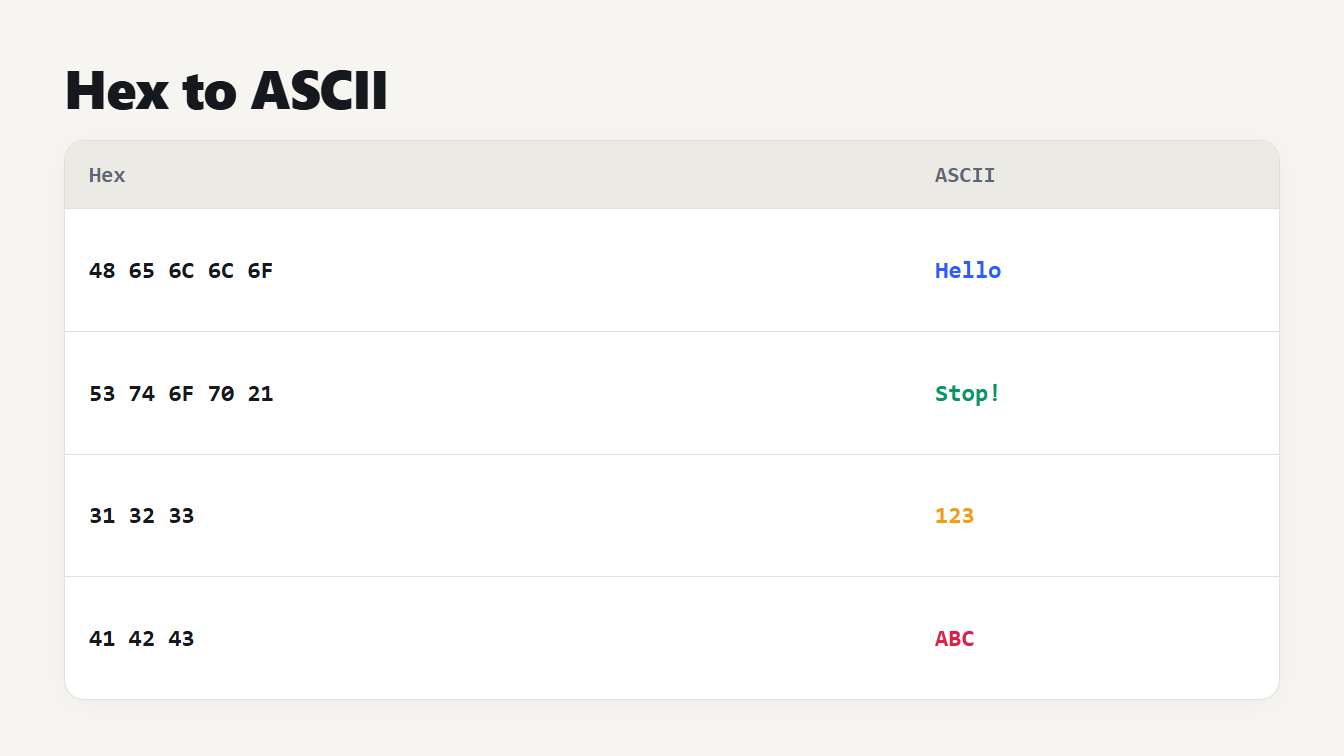
A table of four hex strings and their ASCII text. 48 65 6C 6C 6F is Hello. 53 74 6F 70 21 is Stop!. 31 32 33 is 123. 41 42 43 is ABC.
Hex to ASCII means reading hexadecimal bytes as text. You split the hex into pairs of digits, turn each pair into a number from 0 to 127, and look that number up in the ASCII table: 48 is H, 65 is e, 6C is l and 6F is o, so 48 65 6C 6C 6F is Hello. That is all it takes for plain English text, and this guide shows it by hand, then covers the control codes, the line endings, and what to do when the hex has bytes that are not ASCII at all.
Hex to ASCII in three steps
- Split the hex into pairs of digits. Each pair is one byte.
- Turn each pair into a decimal number: the first digit times 16, plus the second digit.
- Look the number up in the ASCII table.
| Hex | Decimal | Character |
|---|---|---|
| 48 | 72 | H |
| 65 | 101 | e |
| 6C | 108 | l |
| 6C | 108 | l |
| 6F | 111 | o |
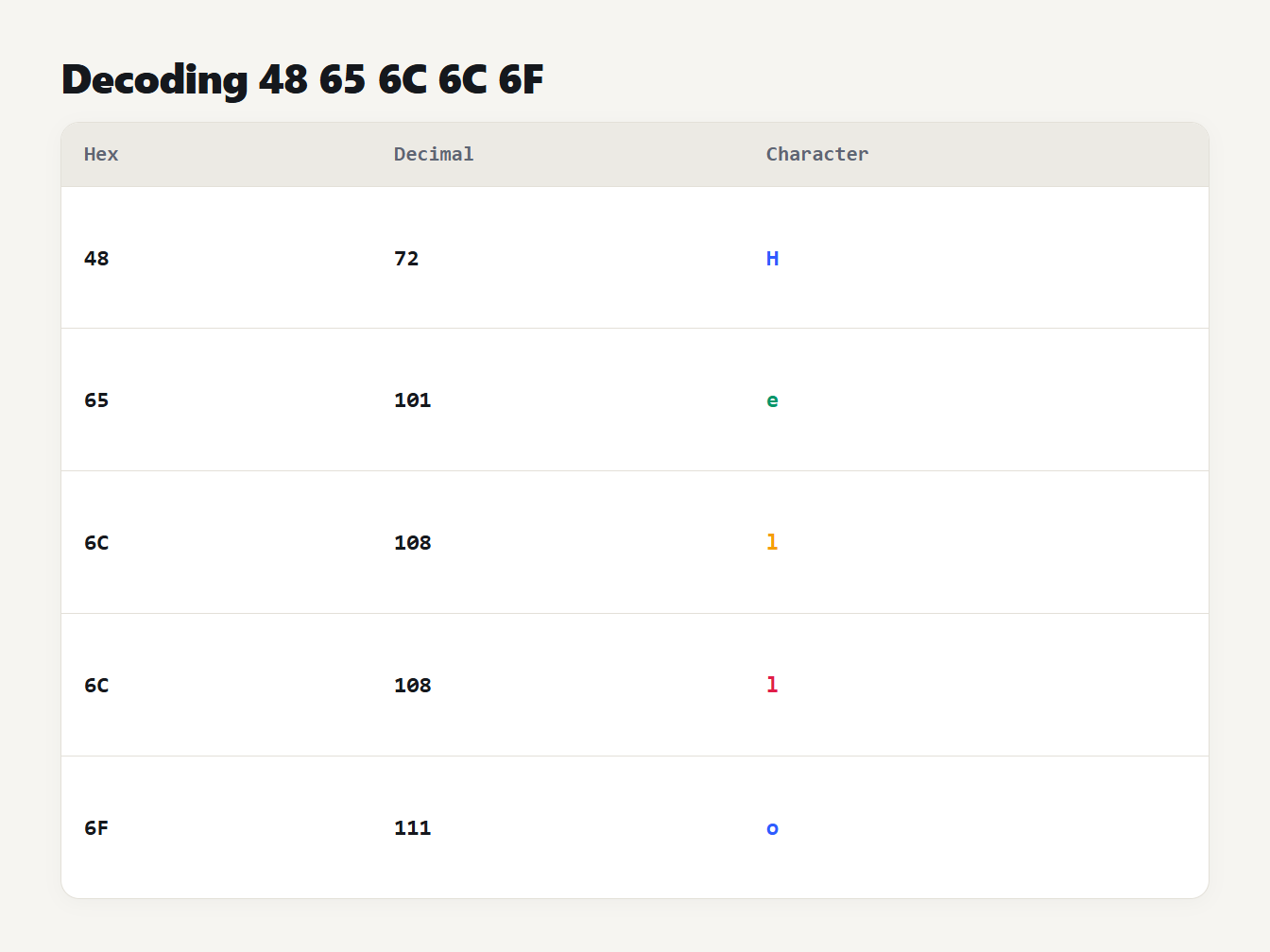
A table of five bytes. 48 is decimal 72 and the letter H. 65 is 101 and e. 6C is 108 and l. A second 6C is 108 and l. 6F is 111 and o. Together they spell Hello.
The arithmetic for 48 is 4 x 16 + 8 = 72. For 6C it is 6 x 16 + 12 = 108, because C is 12 in hex. You can skip the decimal step if you read the ASCII table by hex, with the first digit as the row and the second as the column. A tool such as the Number Base Converter helps when the arithmetic is long.
The ASCII table in hex
ASCII has 128 codes, numbered 0 to 127. The Wikipedia article on ASCII counts 95 printable characters and 33 control characters, and gives their hex ranges. The standard goes back to the 1960s. RFC 20, written in 1969, describes it as the standard 7-bit character code carried in an 8-bit byte whose top bit is always 0.
| Characters | Hex range |
|---|---|
| Control codes | 00 to 1F |
| Space | 20 |
| Digits 0 to 9 | 30 to 39 |
| Capitals A to Z | 41 to 5A |
| Lowercase a to z | 61 to 7A |
| DEL | 7F |
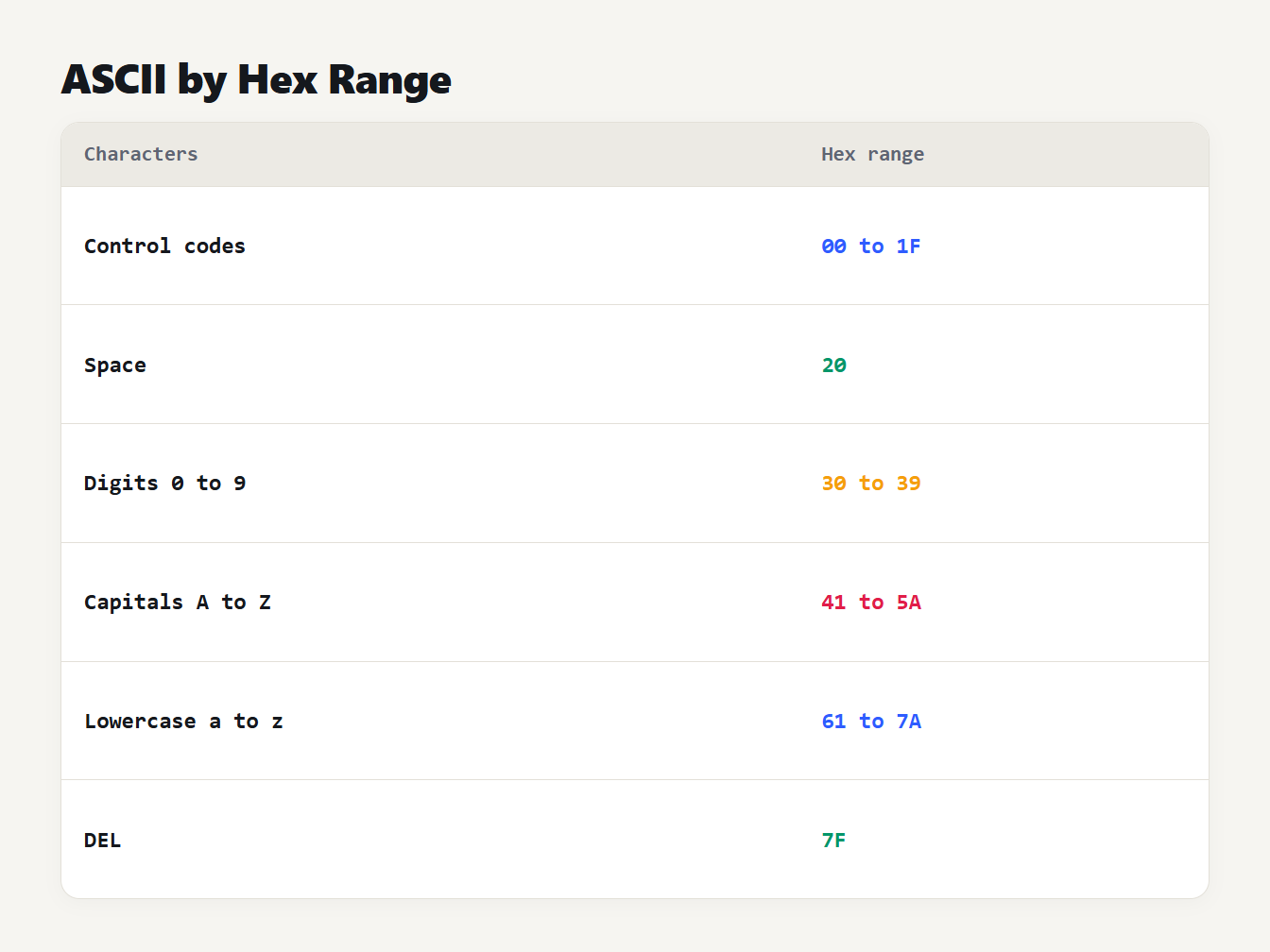
A table of ASCII hex ranges. Control codes are 00 to 1F. The space is 20. The digits 0 to 9 are 30 to 39. Capital letters A to Z are 41 to 5A. Lowercase letters a to z are 61 to 7A. DEL is 7F.
Two patterns save time. A digit is 30 plus its value, so 37 is the digit 7. A lowercase letter is its capital plus 20 in hex, so A is 41 and a is 61. Wikipedia explains that the lowercase letters differ from the capitals by a single bit, and in the table that bit is the one worth 20 hex. That is why a program can change case with one cheap operation.
Control codes you will meet in hex
The first 32 codes are not characters you can see. They are instructions from the days of teleprinters, and a handful still matter.
| Hex | Name | Meaning |
|---|---|---|
| 00 | NUL | Null |
| 07 | BEL | Bell |
| 08 | BS | Backspace |
| 09 | HT | Horizontal tab |
| 0A | LF | Line feed |
| 0D | CR | Carriage return |
| 1B | ESC | Escape |
| 7F | DEL | Delete |
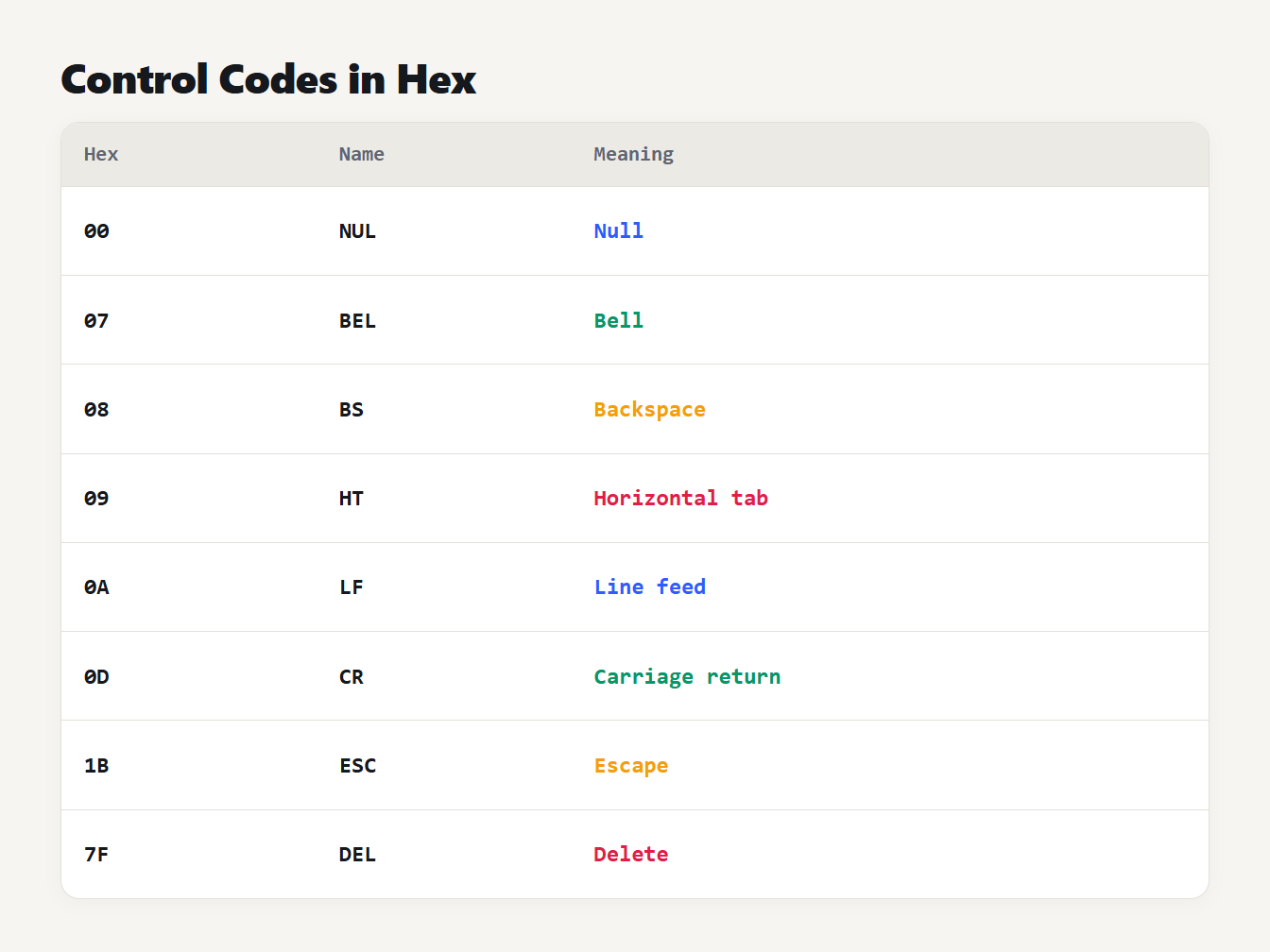
A table of eight control codes. 00 is NUL, null. 07 is BEL, bell. 08 is BS, backspace. 09 is HT, tab. 0A is LF, line feed. 0D is CR, carriage return. 1B is ESC, escape. 7F is DEL, delete.
The two that appear in almost every real file are 0A and 0D, the line endings. Wikipedia's article on newlines lists the conventions: Unix, Linux and macOS end a line with 0A alone, Windows and MS-DOS use 0D 0A, and classic Mac OS used 0D. It ties the two-code version to teleprinters, where returning the carriage and feeding the paper were separate actions. So if decoded text looks like one long line, check for 0A or 0D, since many viewers draw them as nothing.
Worked examples
| Hex | Result |
|---|---|
| 53 74 6F 70 21 | Stop! |
| 31 32 33 | 123, three characters |
| 7B 22 6F 6B 22 3A 74 72 75 65 7D | {"ok":true} |
| 48 69 0D 0A 42 79 65 | Hi and Bye on two lines |
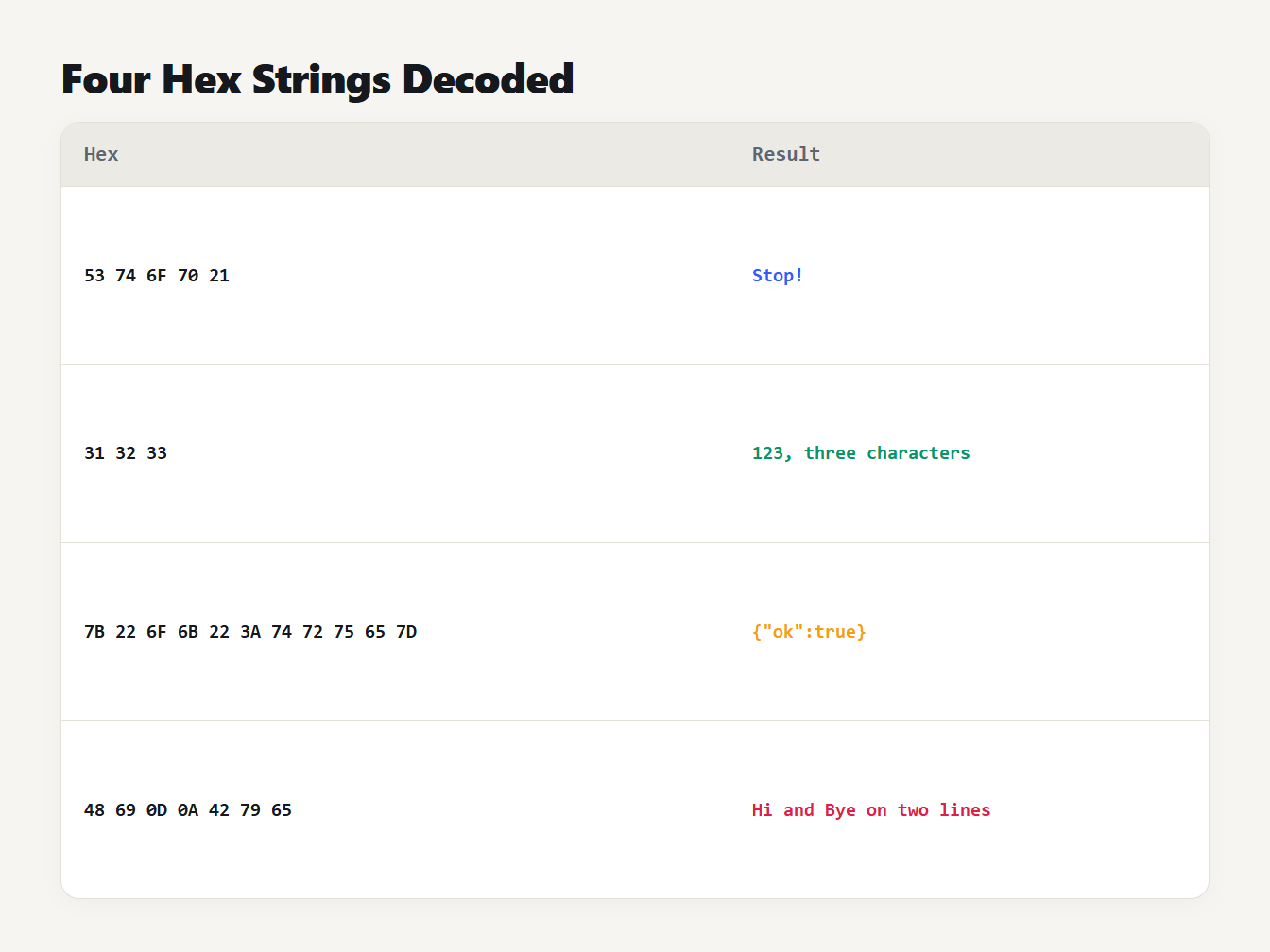
A table of four hex strings and their results. 53 74 6F 70 21 is Stop!. 31 32 33 is the three characters 123. 7B 22 6F 6B 22 3A 74 72 75 65 7D is the JSON text ok colon true in braces. 48 69 0D 0A 42 79 65 is Hi and Bye on two lines.
The second row trips people up. 31 32 33 is the text 123, three digit characters, not the number 0x123. A digit character is a code from 30 to 39, and the hex of a number is a different thing. You can check any of these in the Hex to ASCII Converter, which also lists each byte with its decimal and binary value and the name of every control code.
Bytes above 7F are not ASCII
ASCII stops at 7F. A byte from 80 to FF does not belong to it, and that is where most confusing results come from. The Wikipedia article says the first 128 Unicode code points are the same as ASCII, and UTF-8 keeps them as single bytes, so plain English text looks the same in both. Every other character takes two to four bytes in UTF-8.
So C3 A9 is one character, the letter e with an acute accent, if the data is UTF-8. Read as ASCII it is two bytes that do not exist. Read as Latin-1 it shows as two unrelated characters, a capital A with a tilde and a copyright sign. In the Hex to ASCII Converter you choose a dot, the Latin-1 character or an error for these bytes. To decode them as real UTF-8, use the Text to Hex Converter, and see the guide to converting text to hex for how the encodings differ.
Hex that is not text at all decodes to noise. A hash, a color code or a UUID is a number written in hex, not a message. The first four bytes of the SHA-256 hash of hello, 2C F2 4D BA, decode to a comma, a byte above 7F, the letter M and another byte above 7F.
UTF-16 text has its own tell. The word Hi in UTF-16 little endian is 48 00 69 00, and an ASCII decoder shows the zero bytes as NUL codes between the letters.
Hex to ASCII in code and on the command line
In JavaScript on Node.js, Buffer.from('48656c6c6f', 'hex').toString('ascii') returns Hello. In a browser without Buffer, String.fromCharCode(...'48656c6c6f'.match(/../g).map(h => parseInt(h, 16))) does the same. In Python, bytes.fromhex('48656c6c6f').decode('ascii') gives Hello too, and Linux has xxd -r -p.
The three behave differently on bad data, and I tested each. Python raises an error for the hex 486, because there is an odd number of digits, and for c3a9, because the byte 0xC3 is not in range for ASCII. Node's ascii decoder never fails: it clears the top bit of each byte, so c3a9 becomes C), which is wrong without any warning. Node also drops the last digit of an odd-length string, so 486 becomes H. Use utf8 or latin1 in Node when the data may contain bytes above 7F. The tool on this site stops with the position of the problem instead of guessing.
Common mistakes
Splitting the hex in the wrong place is the first. Hex is read from the left in pairs, so 4865 6C6C 6F is fine but 486 56C 6C6F is not. Reading hex digits one at a time is the second, which turns 48 into 4 and 8. Treating A to F as letters in the output is the third: they are digits 10 to 15.
Ignoring the encoding is the fourth. If the text has accents, symbols or emoji, it is not ASCII, and ASCII to hex will refuse it for the same reason. Forgetting the prefix is the fifth: 0x48, \x48 and %48 are all one byte, and the 0x, backslash or percent sign is only the marker.
Frequently asked questions
How do you convert hex to ASCII?
Split the hex into pairs of digits, turn each pair into a decimal number, and look that number up in the ASCII table. 48 is 72, which is H, and 65 is 101, which is e. So 48 65 6C 6C 6F spells Hello. A tool does the same thing as you type.
What is 41 in hex as ASCII?
41 in hex is 65 in decimal, which is the capital letter A. The capitals run from 41 to 5A, and the lowercase letters sit exactly 20 higher, from 61 to 7A, so 61 is a.
Why does my hex show dots or strange letters?
ASCII only covers 00 to 7F. A byte from 80 to FF is not ASCII, and text such as an accented letter is stored as two or three of them in UTF-8. C3 A9 is the letter e with an acute accent in UTF-8, but it reads as two odd characters in Latin-1.
What do 0A and 0D mean?
0A is the line feed and 0D is the carriage return. Linux and macOS end a line with 0A, and Windows ends it with 0D 0A. If you see them in decoded text, they are line breaks, not letters.
Is ASCII the same as UTF-8?
For the first 128 characters, yes. UTF-8 writes them as the same single bytes, so plain English text is identical in both. UTF-8 then uses two to four bytes for every other character, which ASCII cannot hold.
Decode your own hex
Paste your hex into the Hex to ASCII Converter to read it as text and see every byte. To go the other way, switch to ASCII to hex, or read the guide to converting binary to decimal for the number side of the same idea.