How to Convert HEX to RGB and HSL: Formulas, Examples and Contrast
Learn how to convert HEX to RGB and HSL by hand, what 3 and 8 digit codes mean, why whole-number HSL loses color, and how to check contrast. Tested on Chromium.
By TheTextKit TeamPublished
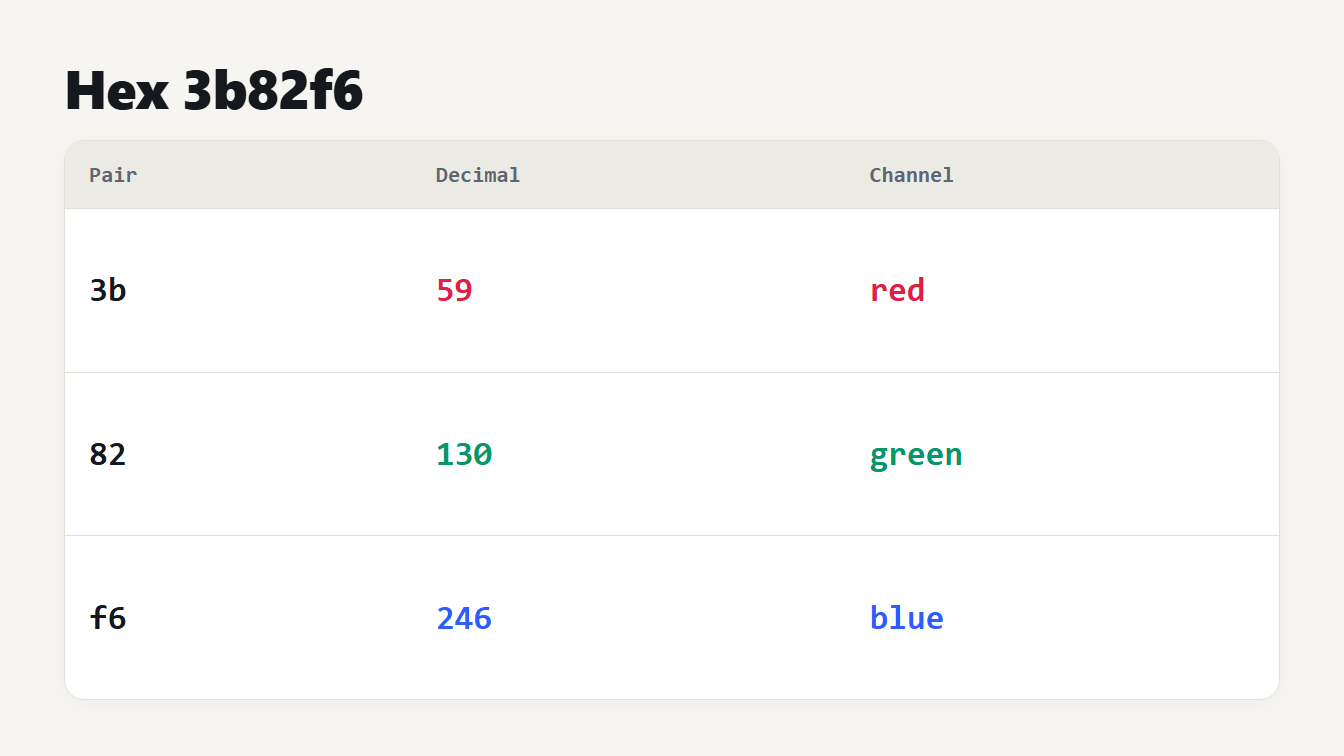
A table showing how the hex code 3b82f6 is read in pairs. The pair 3b is 59, the red value. The pair 82 is 130, the green value. The pair f6 is 246, the blue value.
To convert HEX to RGB, drop the #, split the six characters into three pairs, and turn each pair from base 16 into a number from 0 to 255. The pairs are red, green and blue. So #3b82f6 becomes rgb(59, 130, 246). The same color in HSL is hsl(217.2, 91.2%, 59.8%), and that decimal point turns out to matter. This guide shows the arithmetic, explains 3 digit and 8 digit codes, and then checks the whole thing against a real browser on tens of thousands of colors.
How to convert HEX to RGB
- Open the Color Converter and paste the code, with or without the
#. - Read the RGB line, which is ready to paste into CSS.
- Copy the HEX, RGB or HSL line you need.
To do it by hand, take the code #3b82f6 and work through three steps:
- Split it. The pairs are
3b,82andf6. - Convert each pair. The first digit counts sixteens and the second counts ones. The hex digits
atofmean 10 to 15. So3bis 3 × 16 + 11 = 59,82is 8 × 16 + 2 = 130, andf6is 15 × 16 + 6 = 246. - Write the result. Red 59, green 130 and blue 246 give
rgb(59, 130, 246).
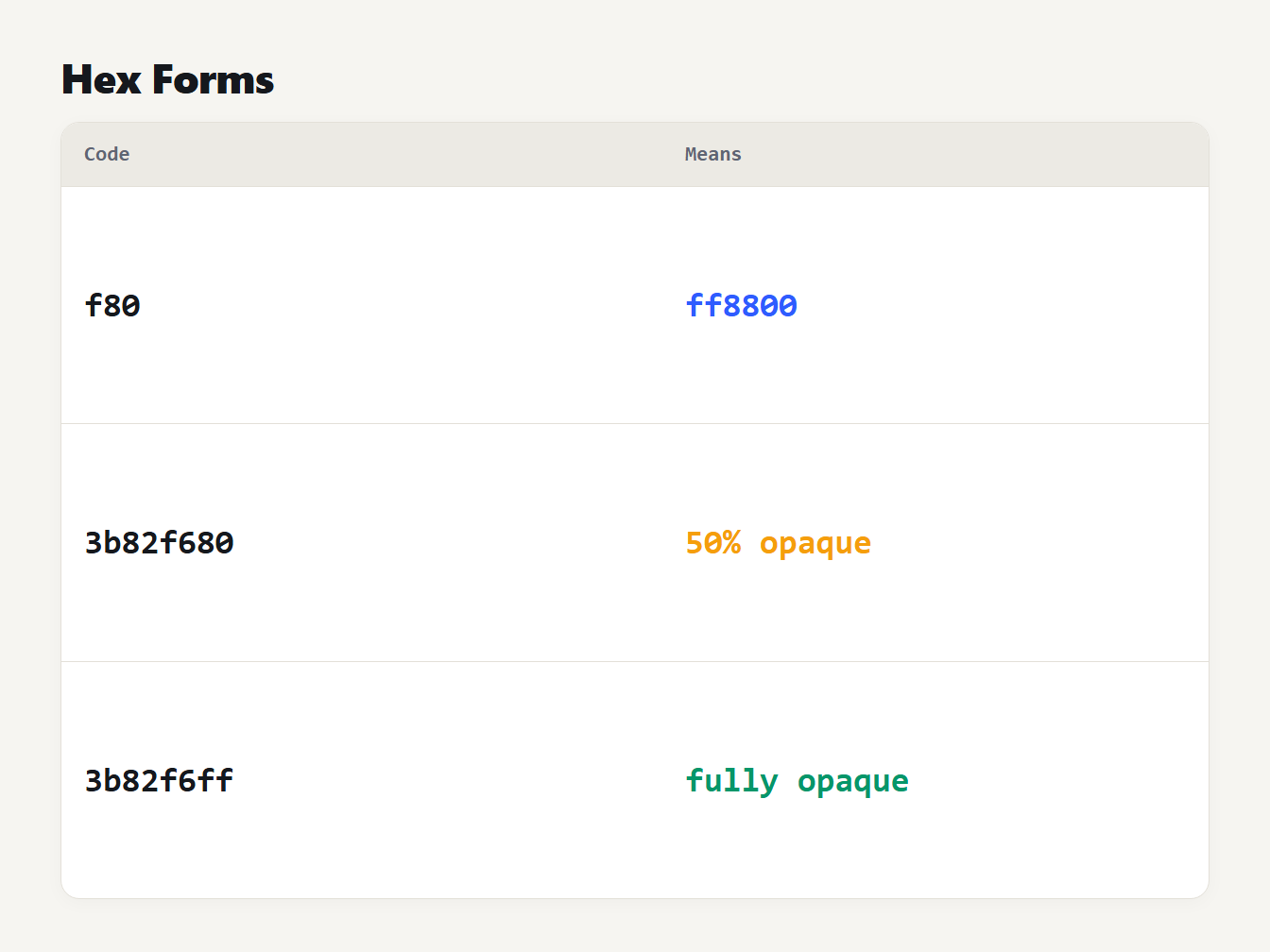
A table of three hex codes and what they mean. The three digit code f80 is the same as ff8800. The eight digit code 3b82f680 is the blue at about 50 percent opacity. The eight digit code 3b82f6ff is fully opaque.
To go the other way, from RGB to HEX, write each number in base 16 with two digits. The tool does both directions, and also reads rgb() and hsl() values and the CSS color names.
Short codes, 8 digit codes and the alpha pair
The MDN reference for hex colors lists four forms: #RGB, #RGBA, #RRGGBB and #RRGGBBAA. Three rules cover all of them:
- A single digit is doubled.
#f80means#ff8800, which isrgb(255, 136, 0). MDN's wording is that a lone digit is duplicated, so1means11. - The last pair is opacity. It runs from
00, fully transparent, toff, fully opaque.#3b82f680is the blue at 128 out of 255, which is 50.2 percent, writtenrgba(59, 130, 246, 0.5)in CSS. - Case does not matter.
#00ff00and#00FF00are the same.
When you convert an opaque color, the tool writes six digits. When it has transparency, it writes eight and uses rgba() or hsla() for the other forms.
Converting to HSL
Once you convert hex to RGB, the next step is often HSL, which describes a color as a hue, a saturation and a lightness. That is easier to adjust by eye than three channel numbers. The conversion from RGB uses the three channels as fractions of 255. For #3b82f6 they are 0.2314, 0.5098 and 0.9647. Then:
- The largest is blue at 0.9647 and the smallest is red at 0.2314, so the spread is 0.7333.
- Lightness is the average of the largest and smallest: 0.5980, or 59.8 percent.
- Saturation is the spread divided by 1 minus the distance of lightness from the middle: 0.7333 ÷ 0.8039 = 0.9122, or 91.2 percent.
- Hue depends on which channel is largest. For blue it is the red minus the green, divided by the spread, plus 4, times 60: (0.2314 − 0.5098) ÷ 0.7333 + 4 = 3.6203, and 3.6203 × 60 = 217.2 degrees.
So #3b82f6 is hsl(217.2, 91.2%, 59.8%). Many converters round that to hsl(217, 91%, 60%), and that is where the trouble starts.
Why whole-number HSL loses color
Plug hsl(217, 91%, 60%) back into a browser and you do not get #3b82f6. You get #3c83f6, which is rgb(60, 131, 246): red and green are each one step off. Rounding hue, saturation and lightness to whole numbers throws information away, because there are far more RGB colors than whole-number HSL values.
We counted it. There are 16,777,216 colors in 8 bit RGB. For each one, we converted to HSL, rounded, converted back, and compared:
| HSL written with | Colors that come back unchanged |
|---|---|
| One decimal | 16,777,216 of 16,777,216 |
| Whole numbers | 1,775,571 of 16,777,216 |
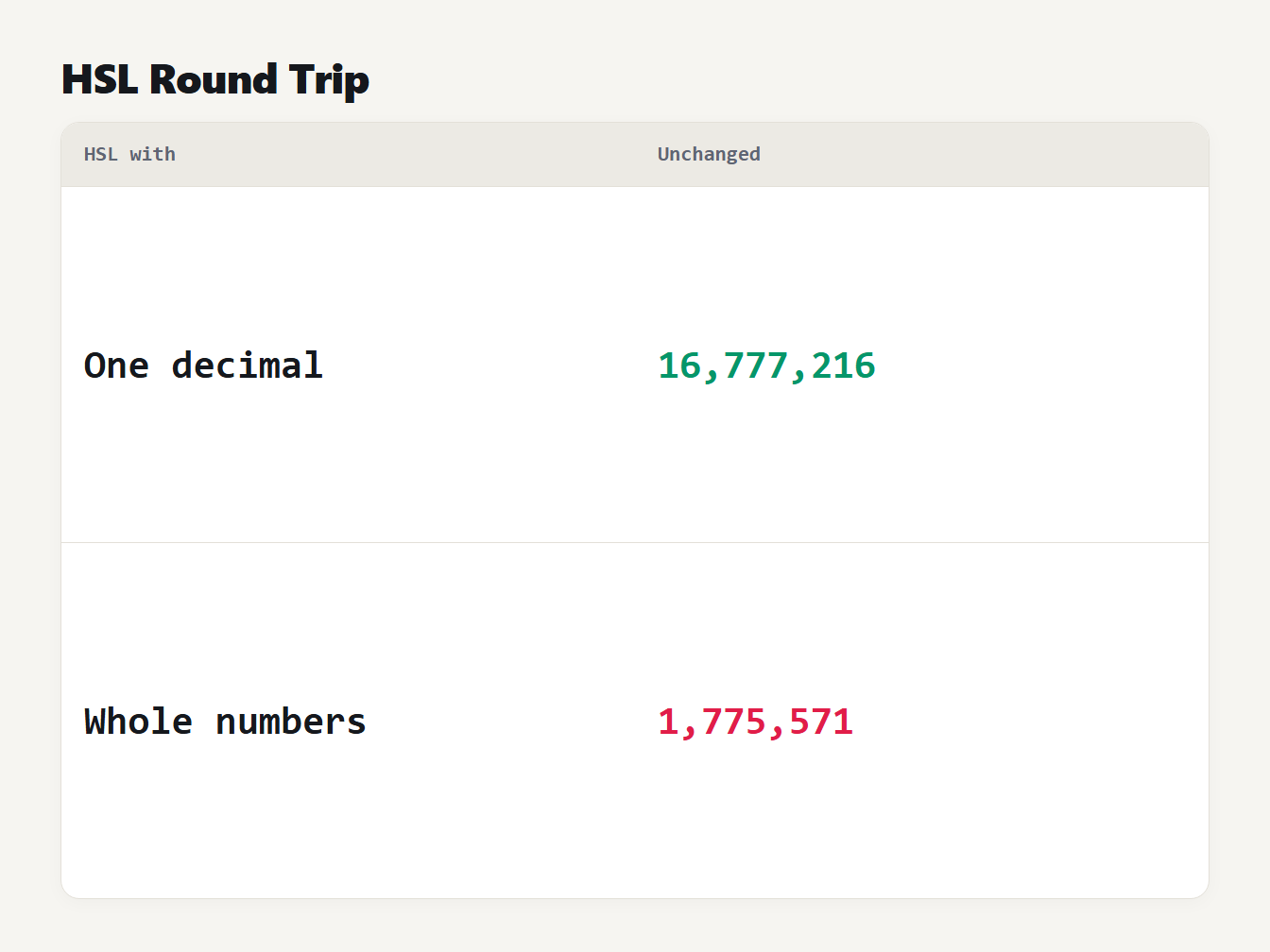
A table of results for all 16,777,216 RGB colors converted to HSL and back. HSL with one decimal returned every color unchanged. HSL with whole numbers returned only 1,775,571 of them.
So whole-number HSL returns the exact color for only about 11 percent of them. The Color Converter therefore shows two HSL lines. The first is the whole-number form most code uses. The second, labeled exact, has one decimal and converts back to the same RGB every time. Use it when a color must survive a round trip, such as a design token that moves between tools.
Checking contrast with the WCAG formula
A color converter is often used to answer a different question: can people read this text? The WCAG definition of contrast ratio is (L1 + 0.05) ÷ (L2 + 0.05), where L1 is the relative luminance of the lighter color and L2 of the darker one. Relative luminance weights the channels, after removing the gamma curve, as 0.2126 for red, 0.7152 for green and 0.0722 for blue. The ratio runs from 1 to 21.
The thresholds are 4.5 to 1 for normal text and 3 to 1 for large text, which is at least 18 point or 14 point bold. WCAG says the values must not be rounded, so a ratio of 4.499 does not meet 4.5. Here are common text colors on a white background, calculated by the tool:
| Text color | Ratio on white | Normal text, AA (4.5) |
|---|---|---|
#1f2937 | 14.67 to 1 | Pass |
#6b7280 | 4.83 to 1 | Pass |
#767676 | 4.54 to 1 | Pass |
#777777 | 4.47 to 1 | Fail |
#9ca3af | 2.53 to 1 | Fail |
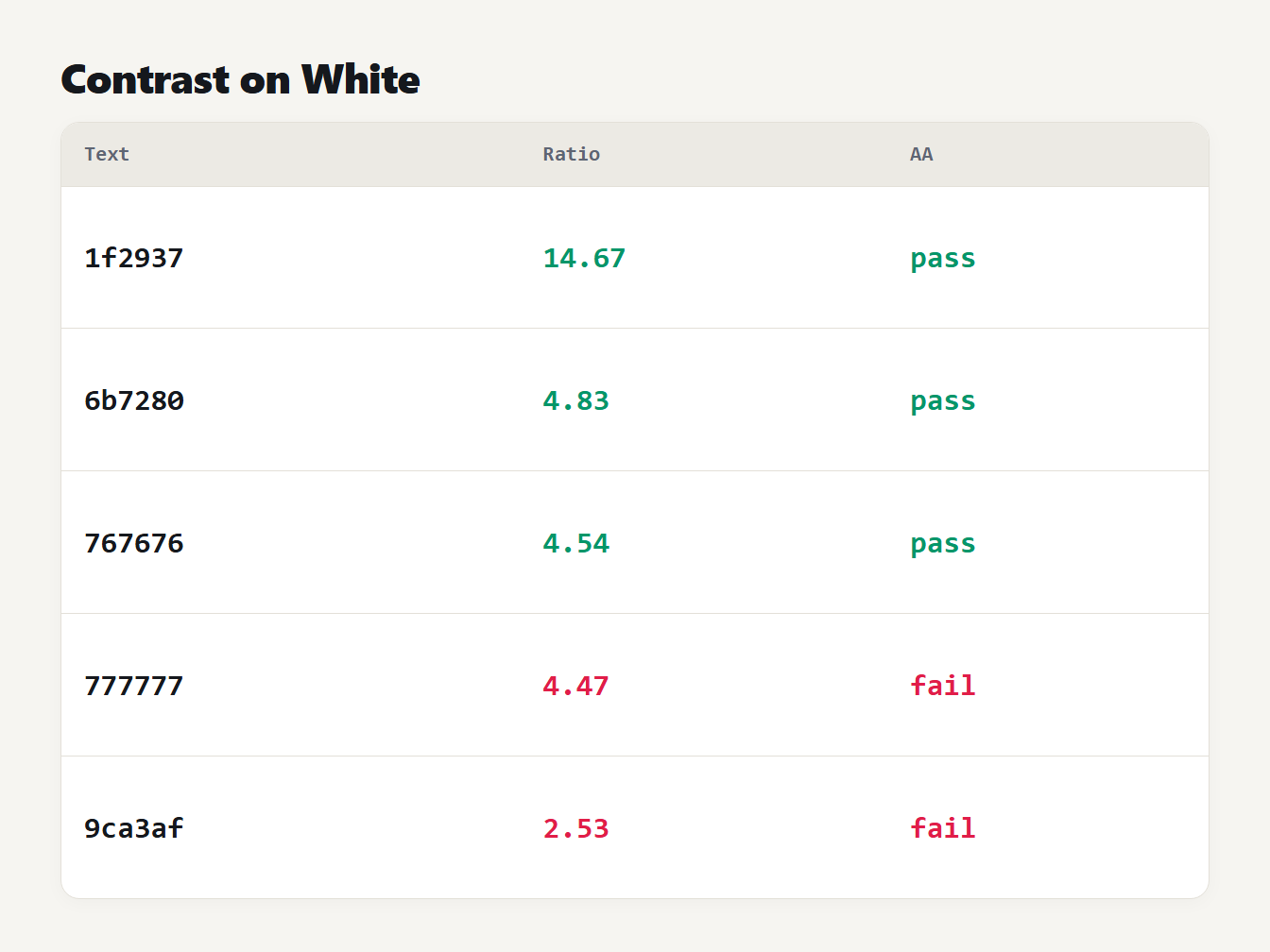
A table of five text colors on a white background with their contrast ratios and whether they pass the 4.5 to 1 level for normal text. 1f2937 is 14.67 and passes. 6b7280 is 4.83 and passes. 767676 is 4.54 and passes. 777777 is 4.47 and fails. 9ca3af is 2.53 and fails.
The pair #767676 and #777777 shows why the exact rule matters. They look the same, yet one passes and the other fails by 0.03. The tool shows ratios cut down rather than rounded up, so 4.47 is never shown as 4.5.
How we tested it
A converter that is slightly wrong is worse than none, so we compared ours with the engine that draws the colors, Chromium. A script made the test colors and the browser was the oracle:
- Reading colors. We gave Chromium and the tool 4,523 color strings. They were hex in all four lengths,
rgb()in the comma and space forms,hsl()with several angle units, names, and invalid input. They agreed on 4,522. The one difference was an angle in radians that landed within a hair of a rounding point. - HSL to RGB. On 20,000 random
hsl()values with decimals, our result matched the browser's on 19,997. The other three differed by one step and all sat within 0.00002 of a rounding midpoint, where the browser rounds up. - Round trip. We wrote 20,000 random colors as one-decimal
hsl()strings and let Chromium read them back. All 20,000 came back as the original RGB.
| Check against Chromium | Result |
|---|---|
| Color strings read the same | 4,522 of 4,523 |
hsl() converted to RGB the same | 19,997 of 20,000 |
| One-decimal HSL read back exactly | 20,000 of 20,000 |
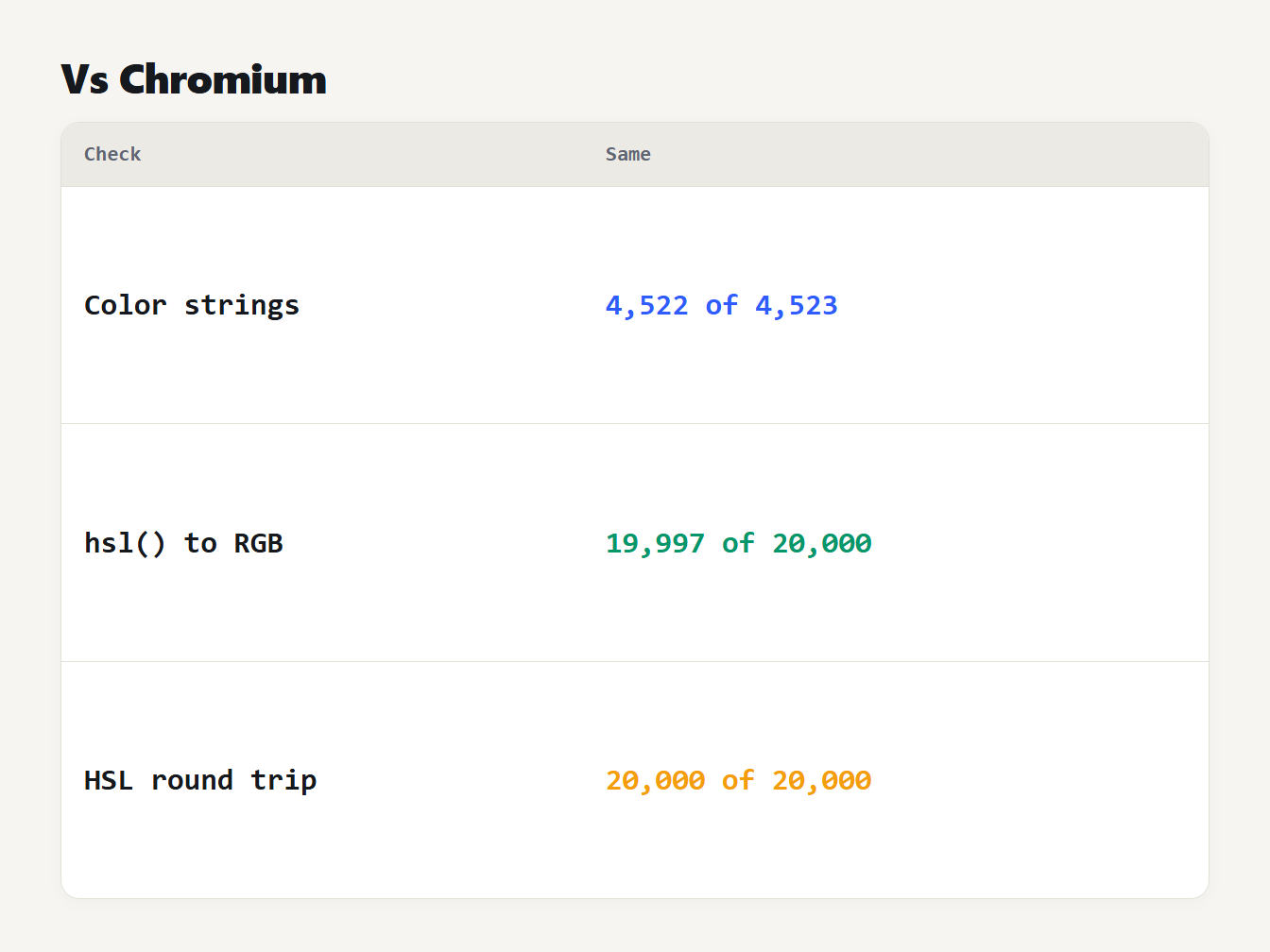
A table of three checks against Chromium. Color strings were read the same in 4,522 of 4,523 cases. hsl values converted to RGB the same in 19,997 of 20,000 cases. One-decimal HSL strings were read back exactly in 20,000 of 20,000 cases.
The limit of the test is that it covers 8 bit colors in the sRGB model. It does not cover wide-gamut formats such as color(display-p3 ...), which the tool does not read.
Frequently asked questions
How do I convert HEX to RGB?
Remove the # sign and split the six characters into three pairs for red, green and blue. Convert each pair from base 16 to a number from 0 to 255. For #3b82f6 the pairs 3b, 82 and f6 are 59, 130 and 246, so the color is rgb(59, 130, 246).
What does an 8 digit hex code mean?
The first six digits are red, green and blue, and the last two are alpha, the opacity. 00 is fully transparent and ff is fully opaque, so #3b82f680 is the same blue at about 50 percent. In CSS it is written rgba(59, 130, 246, 0.5).
Why does hsl() with whole numbers give a slightly different color?
Rounding hue, saturation and lightness to whole numbers loses detail. Only about 11 percent of the 16.7 million RGB colors come back unchanged from whole-number HSL, while HSL with one decimal returns all of them. Keep one decimal when the color must not change.
What contrast ratio does text need?
WCAG level AA asks for at least 4.5 to 1 for normal text and 3 to 1 for large text, which is 18 point or 14 point bold. Level AAA asks for 7 to 1 and 4.5 to 1. The ratio is not rounded, so 4.499 to 1 does not pass 4.5.
Is my data uploaded?
No. The conversion runs in your browser, and the colors you type are not sent anywhere or stored. The tool needs no account and keeps nothing after you close the page.
Convert a color now
Paste a color into the Color Converter to convert hex to RGB or HSL, copy the format you need, and check the contrast of your text on its background. If you also work with sizes, our PX to REM Converter does the same for CSS units. Everything runs in your browser, so nothing is uploaded.