How to Format SQL: Style Rules, Dialects and Safe Formatting
Learn how to format SQL: clause layout, keyword case and why the dialect matters. Tested on 1,434 queries against SQLite bytecode, with no change in meaning.
By TheTextKit TeamPublished
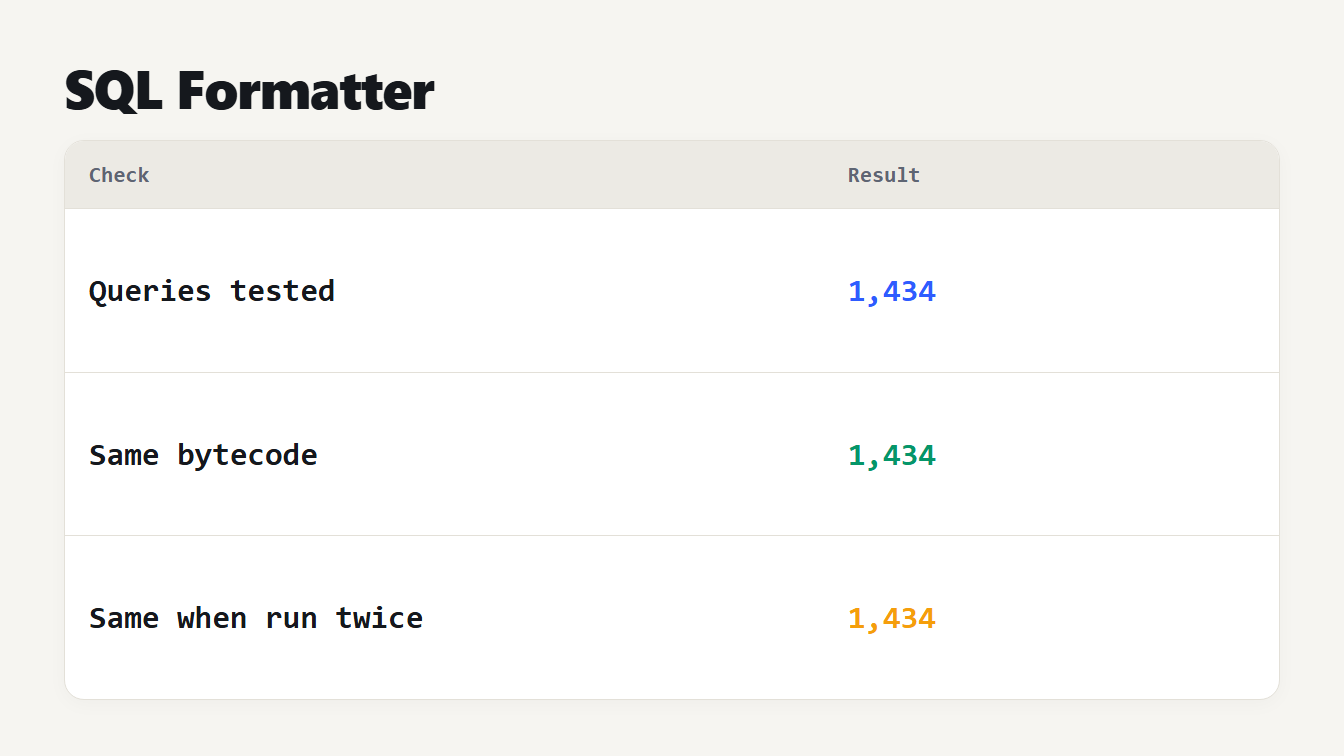
A table of three results for the SQL formatter on 1,434 test queries. All 1,434 compiled to the same SQLite bytecode after formatting. Formatting the result a second time changed nothing in all 1,434.
To format SQL, put each major clause on its own line, indent the columns, joins and conditions under it, and write the keywords in one consistent case. A SQL formatter does this for you in one step. The part that deserves care is trust: formatting must change only spaces and keyword case, never the meaning of the query. This guide shows what good layout looks like, how to pick a case for keywords, and how we tested our SQL formatter by comparing SQLite's own compiled form of 1,434 queries before and after formatting.
How to format SQL
- Open the SQL Formatter.
- Paste one query, or several separated by semicolons.
- Choose your database in the Dialect list, the keyword case and the indent.
- Copy the result, or download it as a
.sqlfile.
If the dialect you chose cannot read the query, the tool tries PostgreSQL, MySQL and SQLite in turn and tells you which one it used. If none can, it shows the error, which is usually an unclosed quote or bracket.
What good SQL layout looks like
When you format SQL by hand, the aim is a layout you can scan in seconds. Here is a query as it often arrives, on one line:
select o.id, c.name, sum(i.qty * i.price) as total from orders o join customers c on c.id = o.customer_id left join items i on i.order_id = o.id where o.created >= '2026-01-01' and c.country in ('US', 'CA') group by o.id, c.name having sum(i.qty * i.price) > 100 order by total desc limit 20;
And here is the same query after the formatter, with the default settings:
SELECT
  o.id,
  c.name,
  sum(i.qty * i.price) AS total
FROM
  orders o
  JOIN customers c ON c.id = o.customer_id
  LEFT JOIN items i ON i.order_id = o.id
WHERE
  o.created >= '2026-01-01'
  AND c.country IN ('US', 'CA')
GROUP BY
  o.id,
  c.name
HAVING
  sum(i.qty * i.price) > 100
ORDER BY
  total DESC
LIMIT
  20;
Every clause starts a line, each column and condition has its own line, and the joins sit together under FROM. You can see at a glance what is selected, where it comes from and how it is filtered. A change to one condition shows up as a one-line difference in a code review, which you can check with the Diff Checker.
Upper case or lower case keywords?
SQL does not care. PostgreSQL's lexical structure documentation says that key words and unquoted identifiers are case-insensitive. So select, SELECT and Select are the same word. The same page notes that quoting an identifier makes it case-sensitive, so "Foo" and foo differ, which is why the formatter never changes the case of quoted names or of strings.
The choice is about readers. The SQL style guide at sqlstyle.guide says to always use uppercase for reserved keywords such as SELECT and WHERE, so that they stand apart from table and column names. Other teams prefer lowercase because it is faster to type. Both are fine. What is not fine is mixing them in one file, so pick one and let the formatter keep it. The tool offers upper case, lower case, or as typed.
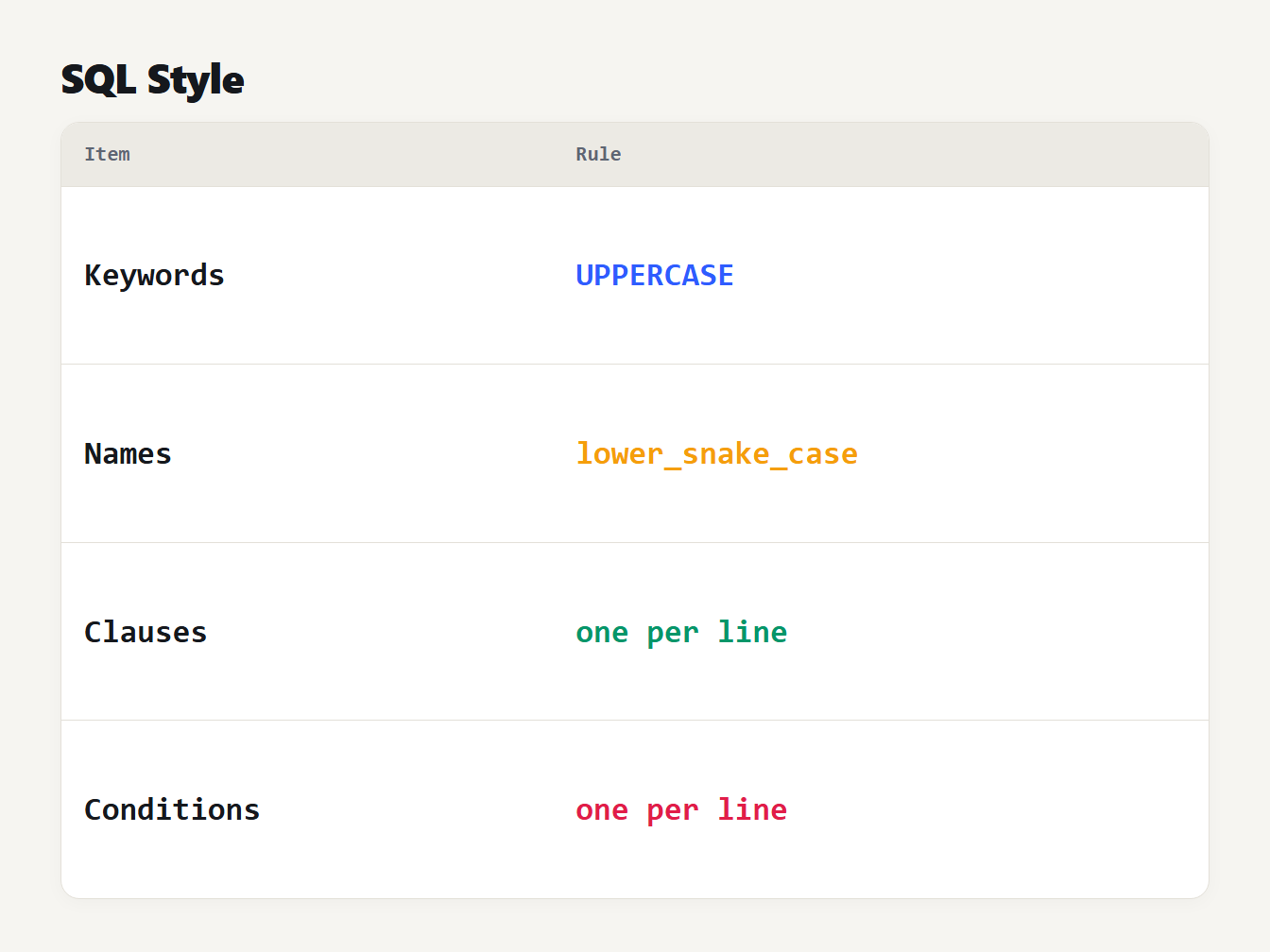
A table of four style choices for SQL with a common rule for each. Keywords in uppercase. Table and column names in lowercase with underscores. Each clause on its own line. Each condition on its own line.
Can formatting change the meaning of a query?
It must not, and that is checkable. SQLite can show the compiled form of any statement. Its EXPLAIN command returns the sequence of virtual machine instructions it would have used to run the statement. Two statements that mean the same thing compile to the same instructions, so if a query and its formatted version give identical instructions, the formatting changed nothing that matters. Strings are part of those instructions, so a changed string would show up too.
SQLite's documentation warns that the output of EXPLAIN is for interactive analysis and may change between releases. We use it only as a test inside one run, comparing two statements, and never as a stored result.
A script generated 1,500 SQLite statements, and the 1,434 that were not CREATE TABLE statements went into the test. They were selects with joins, subqueries, CASE, GROUP BY, HAVING, LIMIT and common table expressions, plus inserts, updates and deletes. Their strings held awkward text: doubled quotes, -- and /* */ inside strings, semicolons, accents and an emoji, with line comments and block comments in the queries themselves. We left out CREATE TABLE because SQLite stores the text of that statement inside its instructions, so any change of spaces shows up even though the table is the same.
| Check | Result |
|---|---|
| Queries tested | 1,434 |
| Same SQLite instructions after formatting, with the tool's defaults | 1,434 of 1,434 |
| Same instructions with lower case, 4 spaces, and with tabs | 1,434 of 1,434 each |
| Formatting the result again gave the same text | 1,434 of 1,434 |
Comments were also kept: for each query we compared the comments before and after, ignoring only the extra indent the formatter adds inside a block comment, and they matched.
Why the dialect matters
The tool is built on the open source sql-formatter library, which reads each database's own syntax. We ran the same 1,434 queries through every dialect setting the tool offers and counted what happened. These queries are written for SQLite, so the result shows how a setting treats syntax from another database, not how it treats its own.
| Dialect setting | Result on the 1,434 SQLite queries |
|---|---|
| PostgreSQL, MySQL, MariaDB, SQLite, Oracle, Snowflake, Redshift, Trino, Db2 | All 1,434 unchanged |
| Standard SQL | 183 rejected, the other 1,251 unchanged |
| SQL Server (T-SQL) | 184 changed |
| Spark SQL | 178 changed |
| BigQuery | 183 rejected, 150 of the rest changed |
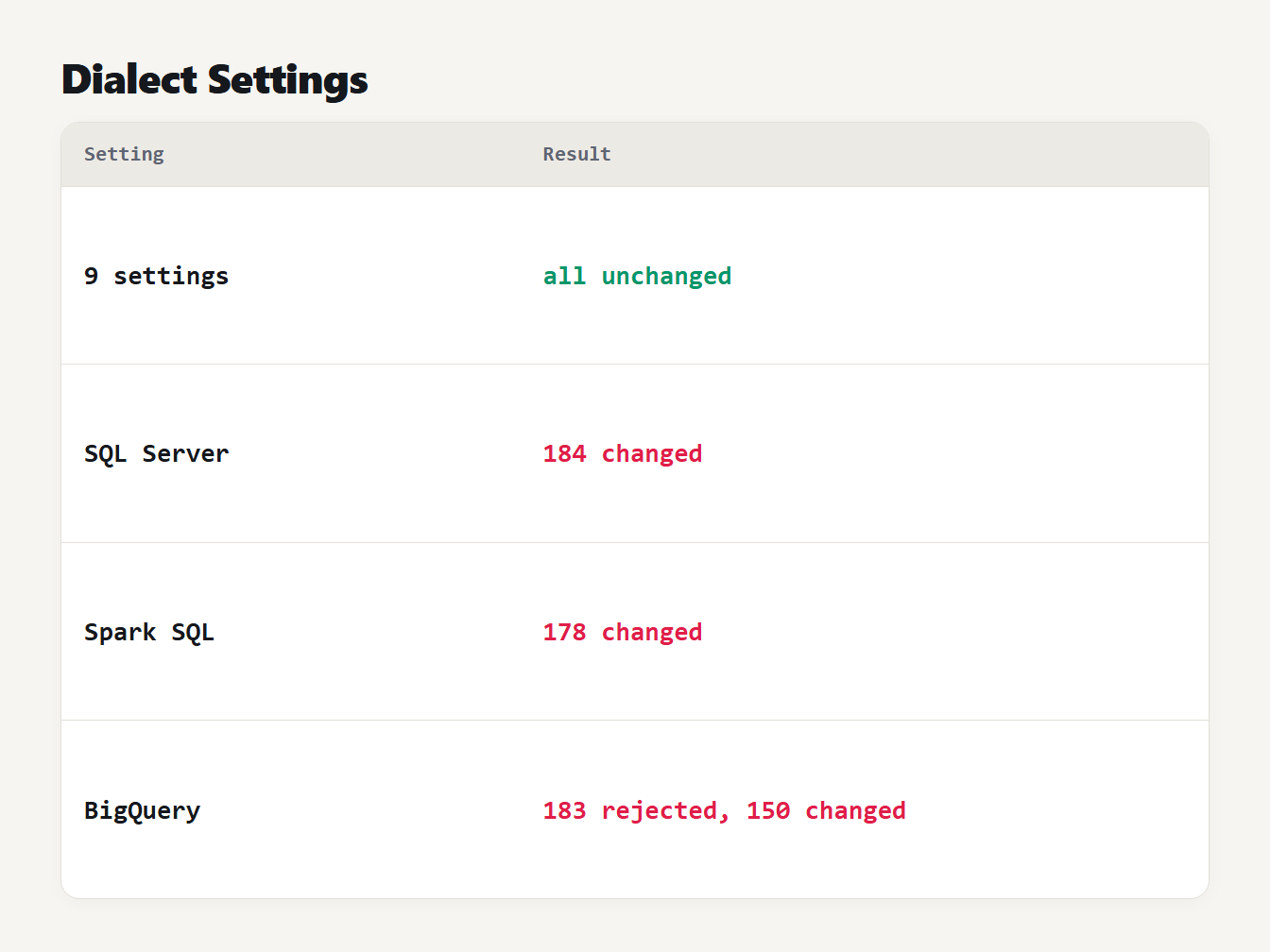
A table of what four groups of dialect settings did to 1,434 SQLite queries. Nine settings, including PostgreSQL and MySQL, left all unchanged. SQL Server changed 184. Spark SQL changed 178. BigQuery rejected 183 and changed 150.
The changes had two exact causes.
All 184 queries changed by the T-SQL setting use the || operator, which SQLite and PostgreSQL use to join text, and which the T-SQL setting does not treat as one operator. All 178 queries changed by the Spark setting, and all 150 by the BigQuery setting, contain a string with a quote written as two quotes, as in 'it''s'. PostgreSQL's documentation says that is how a quote is written inside a string. GoogleSQL, the language of BigQuery, escapes a quote with a backslash instead, as in 'it\'s', according to its lexical rules. So a formatter following those rules does not read 'it''s' as one string.
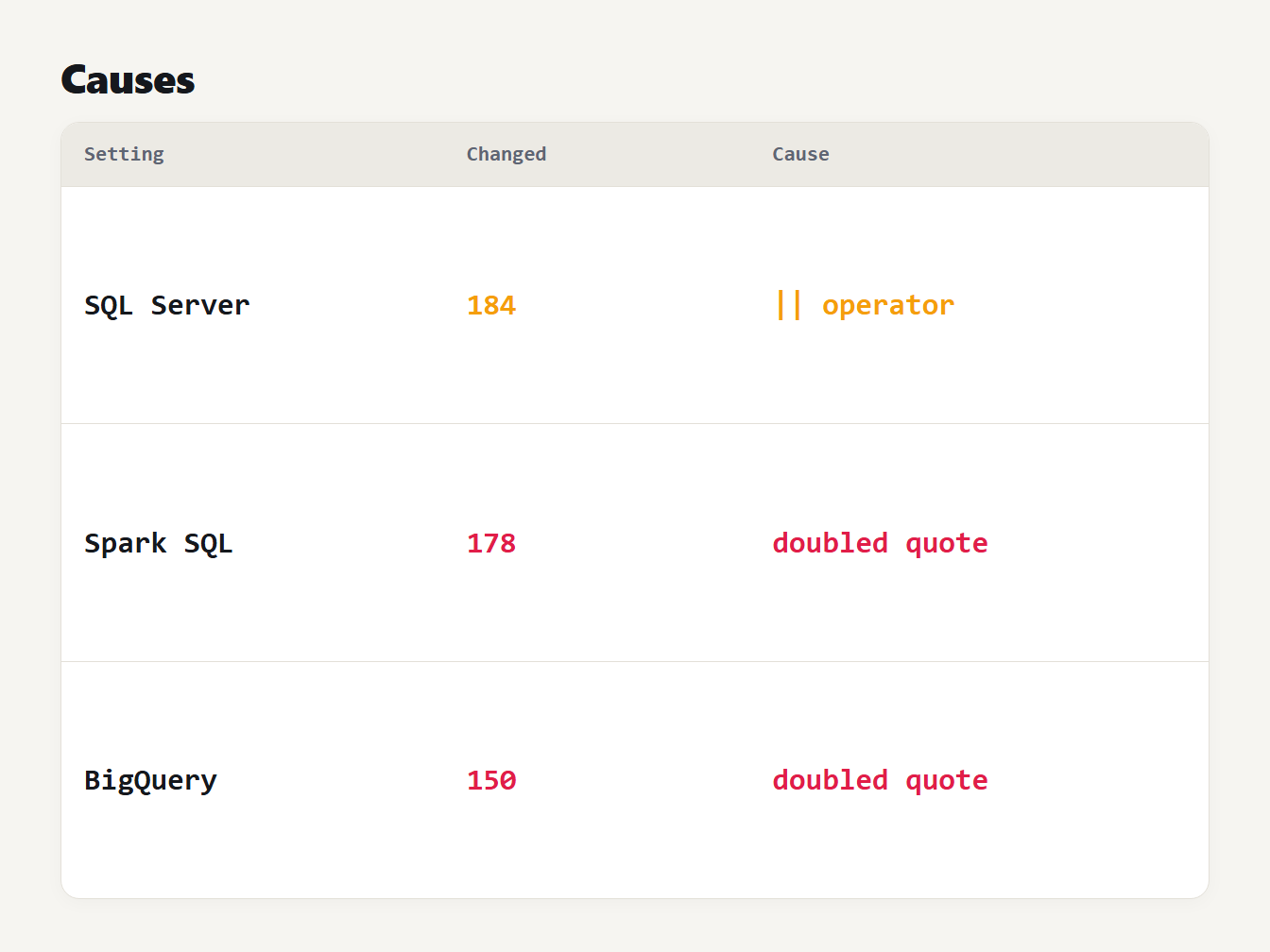
A table of the causes of changed queries in three dialect settings. All 184 queries changed by SQL Server contain the double pipe operator. All 178 queries changed by Spark SQL contain a quote written as two quotes. All 150 queries changed by BigQuery contain a quote written as two quotes.
None of this means those settings are wrong. They are right for queries written for those databases. It means you should choose the dialect that matches your SQL, because a formatter that follows another database's rules can silently split a symbol.
What the tool does when the dialect is wrong
People often paste SQL without knowing the setting. So the tool does not fail on the first parse error. If your dialect cannot read the query, it tries PostgreSQL, then MySQL, then SQLite, uses the first that can, and tells you which one it used, so you can switch to the right one. We tested the defaults on the same queries.
| With the default settings | Queries |
|---|---|
| Formatted with the chosen dialect | 1,251 |
| Formatted through the PostgreSQL fallback | 183 |
| Not formatted | 0 |
| Same SQLite instructions after formatting | 1,434 of 1,434 |
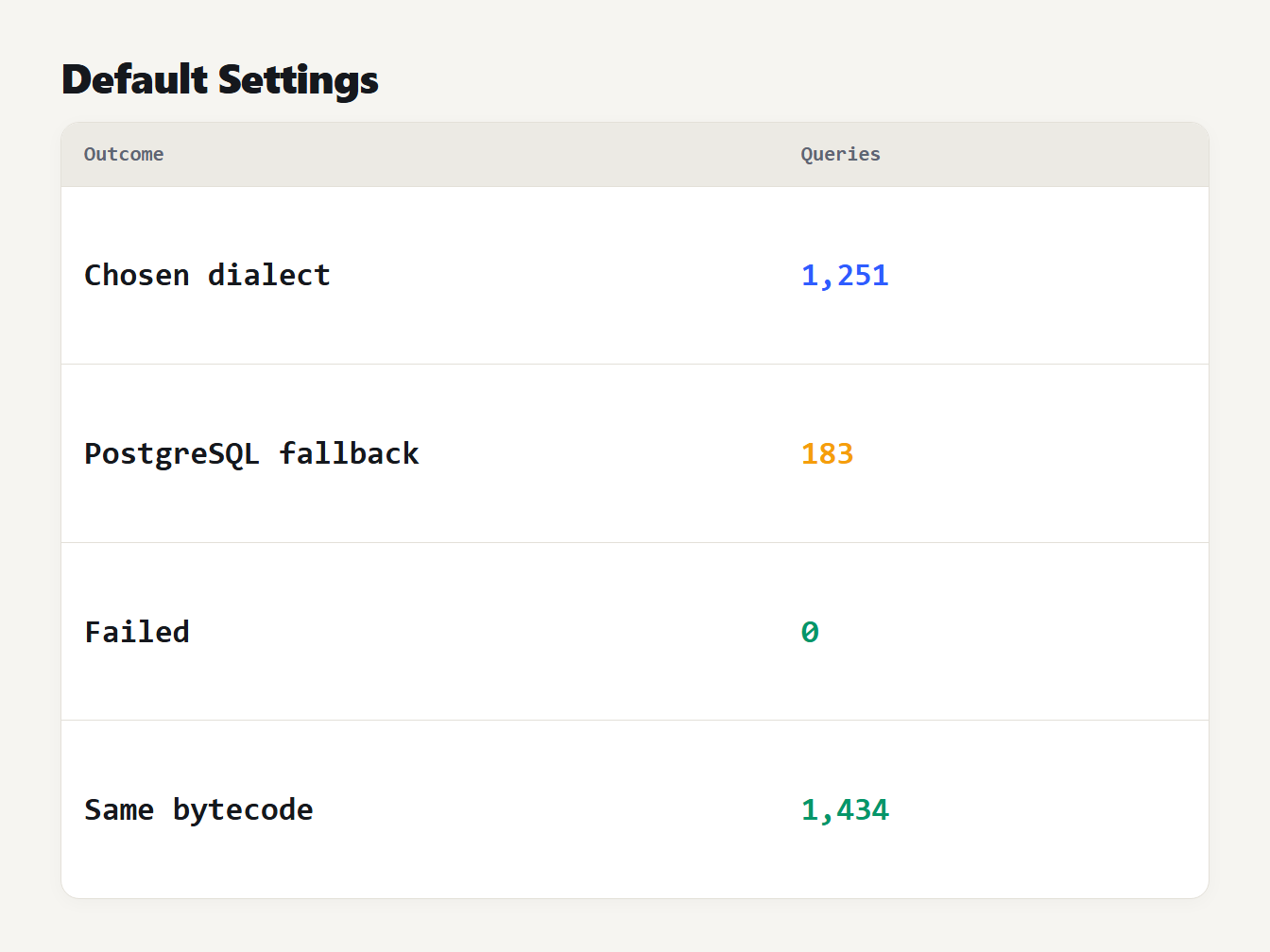
A table of what the default settings did to 1,434 queries. 1,251 were formatted with the chosen dialect. 183 were formatted through the PostgreSQL fallback. None failed. All 1,434 kept the same SQLite instructions.
The fallback is a convenience, not a guarantee, because a fallback chooses a dialect that can read the query, not one that understands it as its author meant. If the note appears, pick your database from the list.
Limits of the test
The test was run on SQLite, because it runs inside a test script with no server, so it shows nothing about how a query behaves on another database. It also uses generated queries, which are less odd than real ones, and no query used features such as stored procedures or procedural blocks. And the formatter changes layout, not logic, so it will not fix a slow or wrong query.
Frequently asked questions
How do I format a SQL query?
Paste the query into a SQL formatter, choose your database, and copy the result. The tool puts each clause on its own line, indents columns and conditions, and sets the case of the keywords. Only spaces, line breaks and keyword case change.
Should SQL keywords be upper case or lower case?
Either works, because SQL ignores the case of keywords. PostgreSQL's documentation says key words and unquoted identifiers are case-insensitive. Upper case is the long-standing convention that makes keywords stand out, while some teams prefer lower case. Choose one and keep it.
Does formatting change what a query does?
It should not. In our test the compiled form of 1,434 queries was identical after formatting. The exception is a formatter set to the wrong dialect, which can split a symbol it does not know. Choose the dialect of your database.
Why does the dialect matter?
Databases differ in operators, quoting and escapes. Standard SQL and PostgreSQL write a quote inside a string as two quotes, while BigQuery uses a backslash. A formatter that follows the wrong rules can break a string in two or read an operator as two symbols.
Is my SQL uploaded?
No. The formatting runs in your browser, and your queries are not sent anywhere or stored. The tool needs no account and keeps nothing after you close the page.
Format your SQL now
Paste your query into the SQL Formatter to format SQL online, pick your database, and copy the clean version. For JSON, use the JSON Formatter. Everything runs in your browser, so your queries are never uploaded.