JSON vs YAML: Differences, Examples and When to Use Each
JSON vs YAML explained with the same config in both formats, a size and speed test, the yes and no trap, and free converters to switch between them.
By TheTextKit TeamPublished
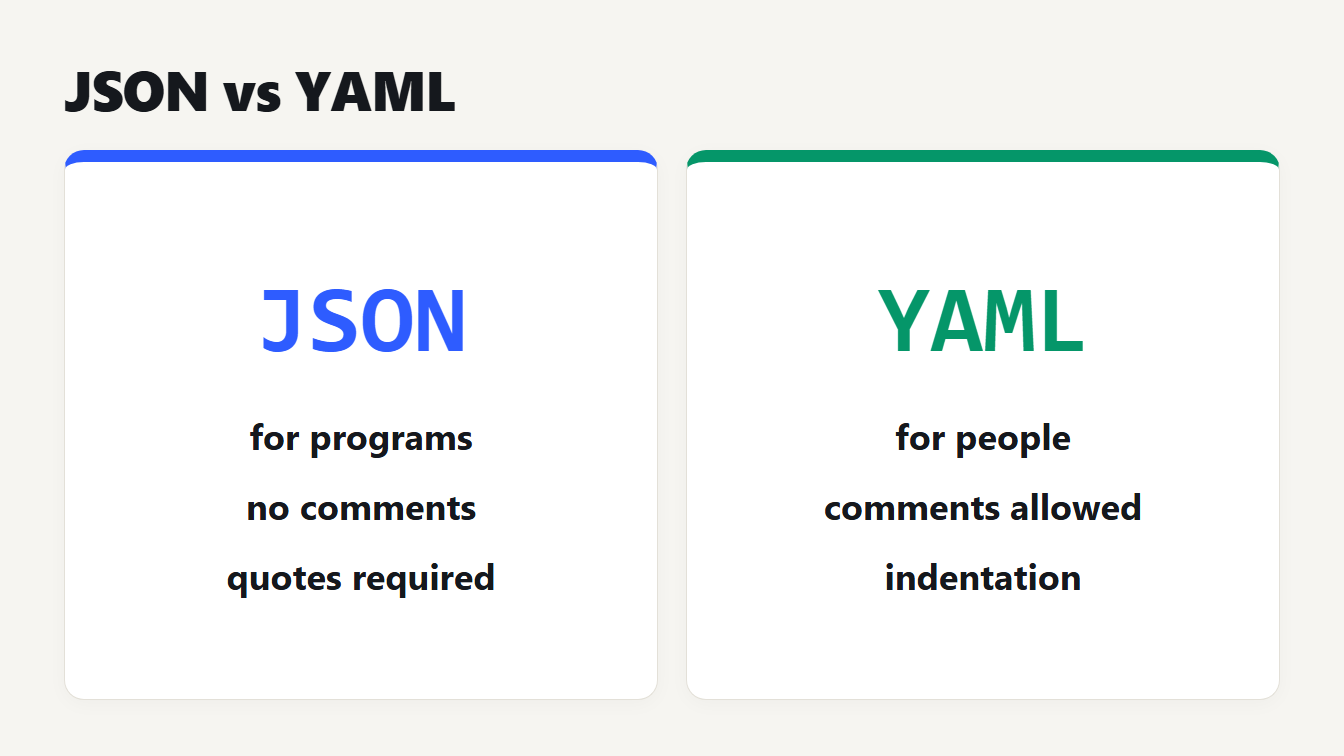
Two cards compare JSON and YAML. JSON is for data that programs exchange, has no comments and needs quotes. YAML is for config files people edit, allows comments and uses indentation.
JSON vs YAML comes down to who reads the file. Use JSON for data that programs exchange, such as API requests and responses. Use YAML for configuration that people edit by hand, because it allows comments and needs fewer quotes and brackets. Both hold the same kinds of data: objects, lists, strings, numbers, true or false, and null. This guide shows one file in both formats, a size and speed test, the yes and no trap that catches many teams, and what you lose when you convert YAML to JSON.
JSON vs YAML at a glance
JSON is strict and small: every key and string is quoted, braces and brackets mark the structure, and the grammar has no comment syntax. YAML uses indentation instead of braces, makes most quotes optional and lets you write comments. It also adds anchors, aliases and several documents in one file.
| JSON | YAML | |
|---|---|---|
| Comments | None in the grammar | Yes, after a # sign |
| Keys and strings | Always double-quoted | Usually plain |
| Structure | Braces, brackets and commas | Indentation and dashes |
| Values per file | One | Several documents, split by --- |
| Repeated blocks | Copy them | Anchors and aliases |
| Duplicate keys | "Should be unique", JavaScript keeps the last | Must be unique, parsers differ on enforcing it |
| Read in a browser | Built in with JSON.parse | Needs a library |
| Tabs | Allowed as spacing between tokens | Not allowed for indentation |
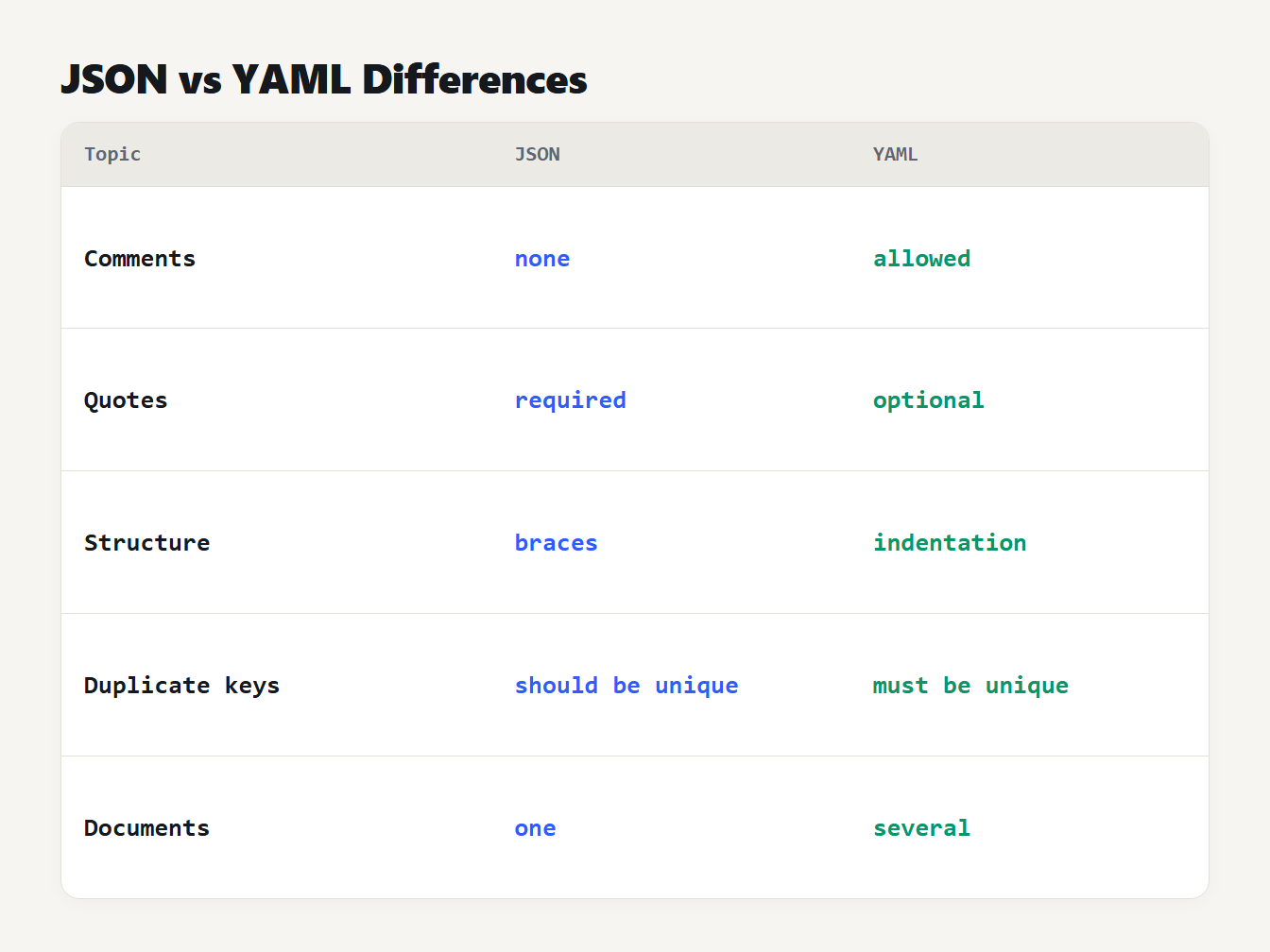
Five rows compare JSON and YAML. Comments: none against allowed. Quotes: required against optional. Structure: braces against indentation. Duplicate keys: should be unique against must be unique. Documents: one against several.
RFC 8259 defines JSON and lists its value types: object, array, number, string, true, false and null. The YAML 1.2.2 specification defines YAML, including comments in section 6.6 and the ban on tabs for indentation in section 6.1.
The same data in JSON and YAML
Here is a small service config in JSON:
{
  "name": "web",
  "replicas": 3,
  "image": "nginx:1.27",
  "ports": [
    80,
    443
  ],
  "env": {
    "LOG_LEVEL": "info",
    "DEBUG": false
  },
  "healthcheck": null
}
And the same data in YAML:
name: web
replicas: 3
image: nginx:1.27
ports:
  - 80
  - 443
env:
  LOG_LEVEL: info
  DEBUG: false
healthcheck: null
The JSON is 178 characters over 14 lines. The YAML is 117 characters over 10 lines, about 34 percent shorter. Minified JSON, with all the spacing removed, is 125 characters on one line, so YAML is only slightly smaller than that.
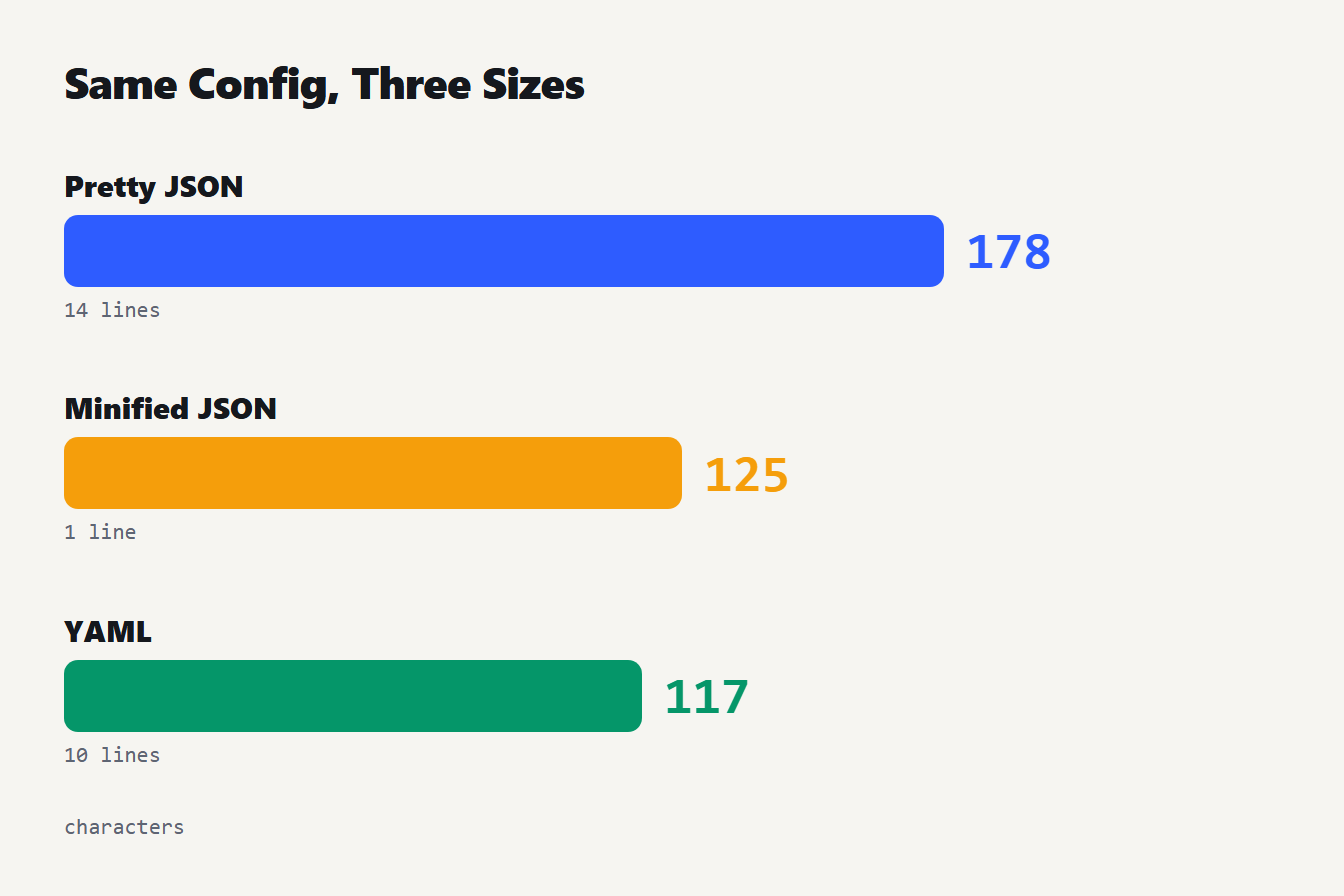
Three bars compare the same config. Pretty-printed JSON is 178 characters over 14 lines. Minified JSON is 125 characters on 1 line. YAML is 117 characters over 10 lines.
The gap depends on the data. In a second test we made a list of 100 small records, each with an id, a name, a flag and two tags. Pretty JSON took 10,620 characters, minified JSON 5,719 and YAML 6,318. So YAML was 40.5 percent shorter than pretty JSON and 10.5 percent longer than minified JSON. If bytes matter on the wire, minify the JSON. If people read the file, YAML takes less space on screen, and that's the trade in the JSON vs YAML size question.
Is JSON valid YAML?
Yes, if the parser follows YAML 1.2. That revision aimed to make YAML a strict superset of JSON, which means a JSON file is also a YAML file. We tested it. We generated 5,000 values with nested objects, lists, quotes, line breaks, emoji and awkward strings such as yes and 0x1F. We wrote each as minified and pretty JSON, which gave 10,000 files, and read them as YAML with two independent parsers. Every result matched JSON.parse.
That has a practical use. If a tool wants YAML, you can paste JSON into it. Converting JSON to YAML doesn't lose anything either. We converted 4,293 generated documents at two indent widths, 8,586 conversions in all, and read each result back with the yaml library. Every one came back identical to the original.
The reverse doesn't hold. A YAML file can use comments, anchors and several documents, and JSON has no place for them.
The yes, no, on and off problem in YAML
YAML 1.1 was a working draft from 2005. Its boolean type accepts many words as true or false. True words are y, yes, on and true. False words are n, no, off and false. Each can be lowercase, capitalized or uppercase. YAML 1.2 narrowed the rule. In its core schema only true, True, TRUE, false, False and FALSE are booleans, and null is null, Null, NULL or ~.
Many tools still follow the older rules, and you can't tell which from the file alone. We read the same words with PyYAML 6.0.3 and with the yaml library, which follows YAML 1.2:
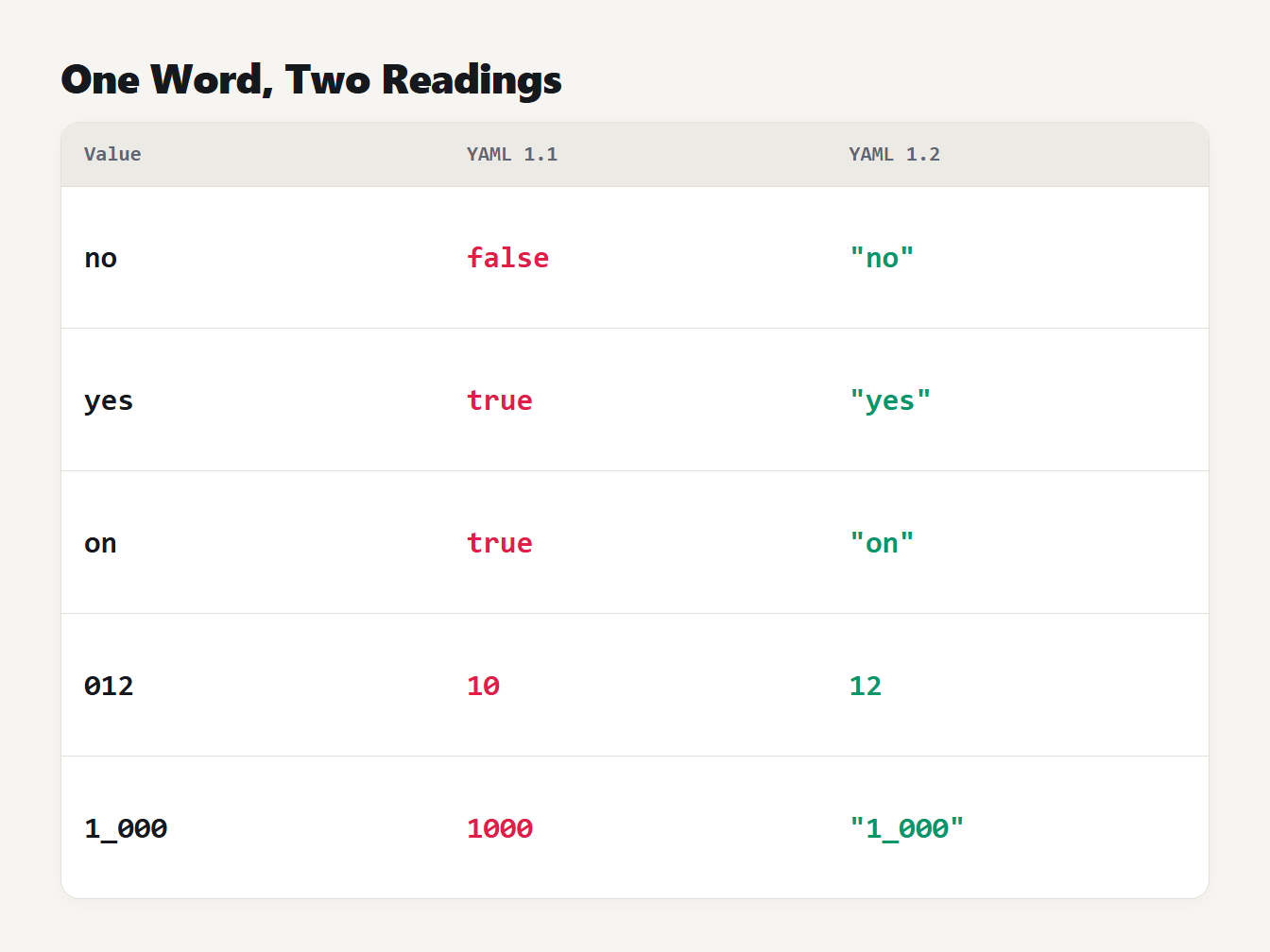
A table of five values and how each YAML version reads them. no is false in YAML 1.1 and the text no in YAML 1.2. yes is true and the text yes. on is true and the text on. 012 is 10 and 12. 1_000 is 1000 and the text 1_000.
This is the famous "Norway problem". A list of country codes that contains NO can come back with a false where Norway should be. PyYAML left y and n as text even though the 1.1 draft lists them, so even the old rules are applied differently from tool to tool. The fix is to put quotes around any string that looks like a boolean, number or null: country: "no".
Leading zeros cause a similar surprise. 012 is the number 10 in PyYAML, because YAML 1.1 reads it as octal, and the number 12 in YAML 1.2. Quote values such as zip codes and version-like codes, or they may change type. Our JSON to YAML converter quotes these strings for you, so any parser reads them as text.
What you lose when you convert YAML to JSON
JSON has no comments, anchors or dates, so some YAML features do not survive the trip. Take this file:
# service settings
defaults: &defaults
  retries: 3
  timeout: 30
api:
  <<: *defaults
  url: https://example.com
worker:
  <<: *defaults
  queue: jobs
motd: |
  Hello
  world
released: 2026-10-09
Converted to JSON with the YAML to JSON converter, it grows from 197 to 277 characters and from 14 to 18 lines. The comment is gone. The defaults block is copied into both api and worker. The block string becomes "Hello\nworld\n", and the date becomes the text "2026-10-09". Convert that JSON back to YAML and you get the copied values, not the anchors.
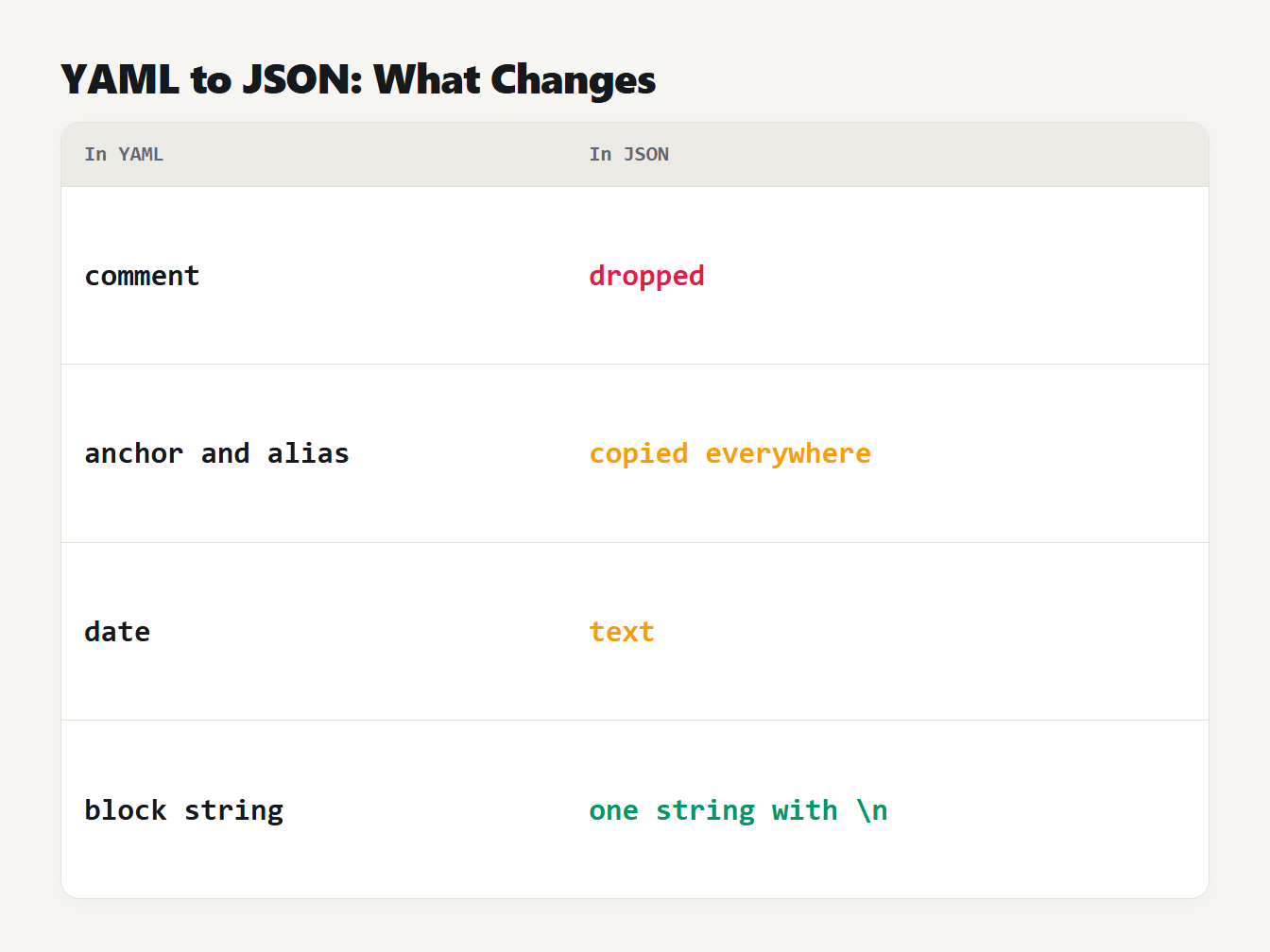
A table of four YAML features and what JSON gets. Comments are dropped. Anchors and aliases are copied into every place they were used. Dates become text. Block strings become one string with newline escapes.
Key order is kept, so defaults, api, worker, motd and released come out in the order you wrote them. A file with several documents separated by --- has no JSON equivalent, so the converter shows the documents as one JSON array and says how many it found.
Speed and safety
JSON.parse is built into every browser and into Node. YAML always needs a library. We measured the difference on 5,000 records, which came to 533 KB as JSON and 583 KB as YAML. Averaged over 20 runs, JSON.parse took 8.6 milliseconds and the js-yaml library took 74 milliseconds, about 9 times longer. That was on one Windows PC with Node 24, so treat the ratio as a rough guide. For a config file read once at startup, nobody will notice. For a service parsing thousands of payloads a second, it matters.
Safety differs too. The PyYAML documentation warns that yaml.load is as powerful as pickle.load and may call any Python function, so it should not read untrusted input. Use safe_load instead. JSON.parse only builds plain data, so it cannot run code.
When to use JSON and when to use YAML
The JSON vs YAML choice is mostly settled by your tool, so pick the format it expects first. After that, think about who edits the file.
- Use JSON for API requests and responses, for data files that programs write and read, and for anything parsed in a browser. Its strictness is a feature: there's one way to write a value.
- Use YAML for files people edit and review, where a comment explaining a setting is worth more than a few saved characters. GitHub Actions workflow files must be YAML. Kubernetes manifests are YAML by convention, though JSON also works, because
kubectlconverts them to JSON before sending them to the API. - Either works for OpenAPI documents. The OpenAPI 3.1 specification says a document may be written in JSON or YAML, and recommends YAML 1.2 with a few extra limits.
- A middle path is JSON with comments. Visual Studio Code uses it for
settings.json, and its own documentation calls the mode JSON with Comments. It is not standard JSON, so a normal parser will reject it.
If you keep a config in both forms, use the Diff Checker to compare versions after you convert, and the JSON Formatter to validate the JSON before you convert it.
Mistakes to avoid with JSON and YAML
- Indenting YAML with tabs. The spec forbids it. Our converter reports
tab characters must not be used in indentation (line 2, column 1). - Leaving yes, no, on or off unquoted. A parser that follows YAML 1.1 turns them into booleans. Quote them.
- Adding comments or trailing commas to strict JSON. A standard parser rejects both.
- Repeating a key.
JSON.parsequietly keeps the last value, so{"a":1,"a":2}becomes{"a":2}. PyYAML does the same witha: 1thena: 2. The js-yaml andyamllibraries refuse the file instead, and js-yaml reportsduplicated mapping key (line 2, column 1). The same file can load in one tool and fail in another. - Trusting leading zeros. Quote anything that must stay text, such as
012. - Using an unsafe loader. Always use the safe function for input you did not write.
Frequently asked questions
What is the main difference between JSON and YAML?
JSON is a strict format with braces, brackets and quoted strings, made for programs to exchange data. YAML uses indentation, makes most quotes optional and allows comments, so it suits files people edit by hand. Both store objects, lists, strings, numbers, true or false and null.
Is YAML a superset of JSON?
Yes, since YAML 1.2. A YAML 1.2 parser reads any JSON file. We read 10,000 generated JSON files with two YAML parsers and every result matched JSON.parse. The reverse is false, because YAML has comments, anchors and several documents per file.
Does JSON support comments?
No. The JSON grammar in RFC 8259 has no comment syntax, so a standard parser rejects them. Some editors use a looser format called JSON with Comments for their own settings files. YAML allows comments that start with a # sign.
Is YAML faster than JSON?
No. JSON is built into browsers and Node and parses faster. In our test of 5,000 records, JSON.parse took 8.6 milliseconds and the js-yaml library took 74 milliseconds, about 9 times longer. Your numbers will differ, but JSON is the faster format to read.
Can I convert YAML to JSON without losing data?
Not always. The values come across, but comments are dropped, anchors are copied into every place they were used, dates become text and several documents become one array. Converting JSON to YAML loses nothing.
Convert your next file
Open the JSON to YAML converter when an API response needs to become a config. Open the YAML to JSON converter when a tool wants JSON and your source is YAML. Both run in your browser and send nothing anywhere. Whichever way you go, check three things. Quote anything that looks like a boolean or a number. Remember that comments won't come across. Then test the result in the parser you actually use, because that's where the JSON vs YAML differences show up.