How to Calculate a Discount and Stacked Sales Correctly
Learn how to calculate a discount: the sale price, the percent off between two prices, the original price, and why 20% off then 10% off is not 30%.
By TheTextKit TeamPublished
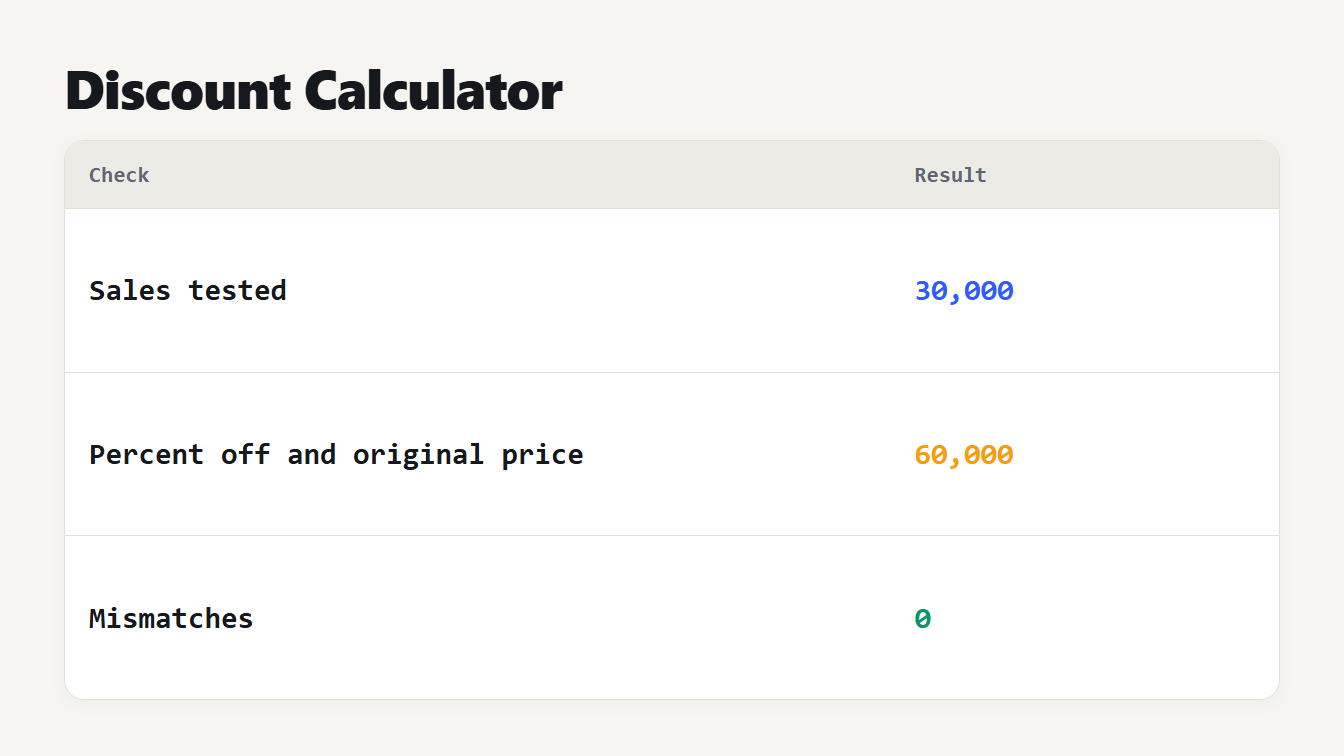
A table of three results for the discount calculator. 30,000 random sales, with up to three discounts and tax, were compared with the Decimal type of Python. 60,000 percent off and original price checks were also compared. There were 0 mismatches.
To calculate a discount, multiply the price by one minus the discount written as a decimal. Take 25% off 80: multiply 80 by 0.75 and the sale price is 60, so you save 20. The same idea runs backwards to find a percent off or an original price, and it explains why two discounts in a row never add up the way the signs suggest. This guide covers the formulas, the most common mistakes, rounding to the cent, and how we checked our discount calculator against exact arithmetic.
How to calculate a discount
- Turn the percent into a decimal. 25% is 0.25.
- Subtract it from 1. That is 0.75, the share of the price you still pay.
- Multiply the original price by it. 80 times 0.75 is 60.
- For the saving, subtract: 80 minus 60 is 20. Or multiply the price by the discount directly: 80 times 0.25.
| Discount | You pay | Multiply the price by |
|---|---|---|
| 10% | 90% | 0.90 |
| 20% | 80% | 0.80 |
| 25% | 75% | 0.75 |
| 50% | 50% | 0.50 |
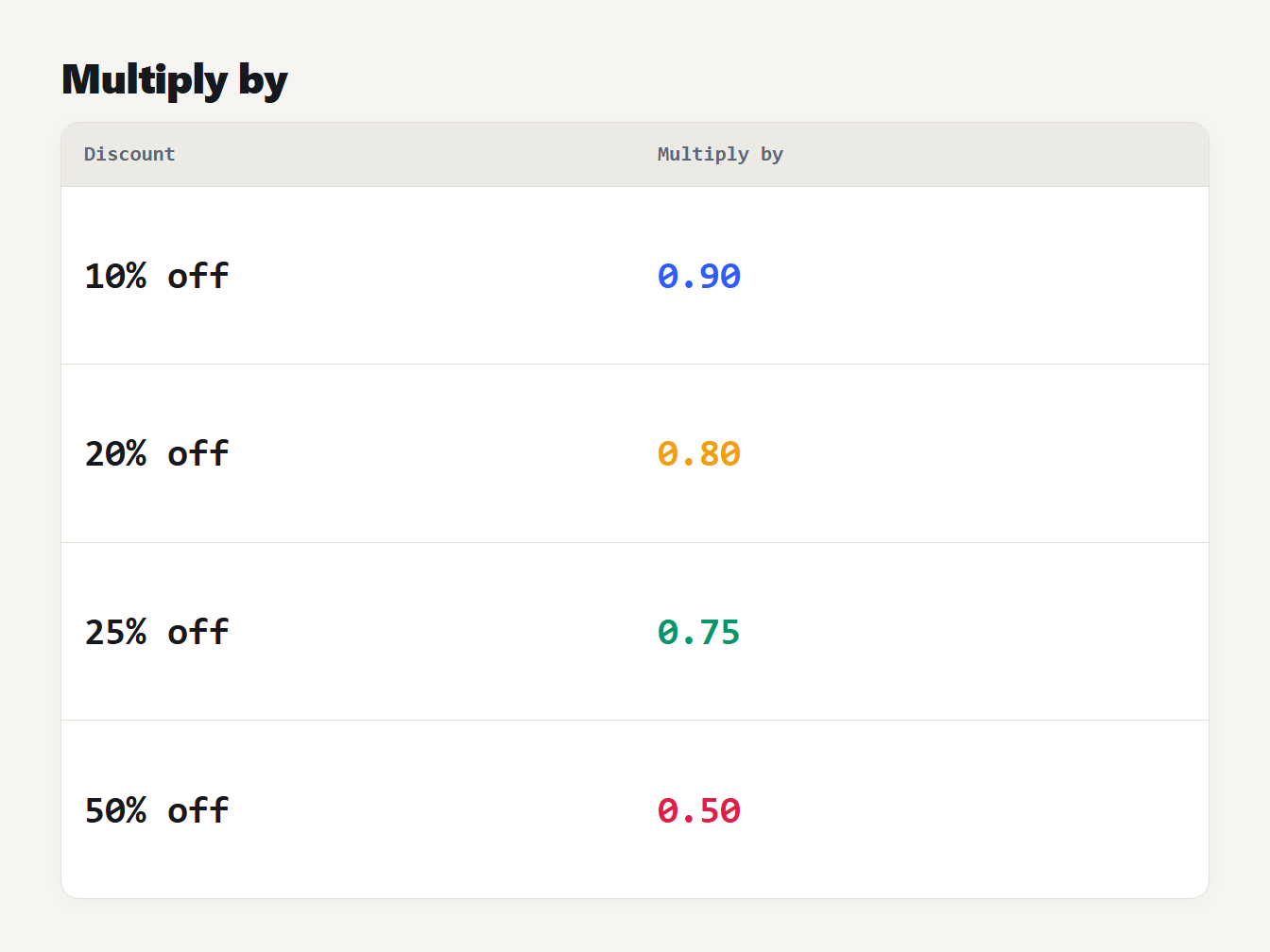
A table of four discounts and the number to multiply the price by. 10% off is 0.90. 20% off is 0.80. 25% off is 0.75. 50% off is 0.50.
The Discount Calculator lets you calculate a discount for any price, with extra discounts and sales tax. You can also enter the price with a dollar sign or with commas, such as $1,299.99.
How to find the percent off between two prices
To calculate a discount as a percent when you know the old price and the new one, divide the difference by the old price. For 80 reduced to 60, that is (80 minus 60) divided by 80, which is 0.25, or 25% off.
Always divide by the old price. The Wikipedia article on percentages says a percentage change is usually read as relative to the initial value. That is why the same 20 difference gives two different percentages. From 80 down to 60 is 25% off, but from 60 back up to 80 is a 33.33% increase, because now the base is 60.
How to find the original price
Suppose a jacket costs 59.99 after 25% off, and you want to know what it cost before. The mistake almost everyone makes first is to add 25% back: 59.99 times 1.25 is 74.99. That is wrong, because the 25% came off the original price and not off the sale price.
Divide instead. The sale price is the original times 0.75, so the original is the sale price divided by 0.75. Here, 59.99 divided by 0.75 is 79.99 to the nearest cent.
| Step | Result |
|---|---|
| Sale price | 59.99 |
| Wrong: times 1.25 | 74.99 |
| Right: divide by 0.75 | 79.99 |
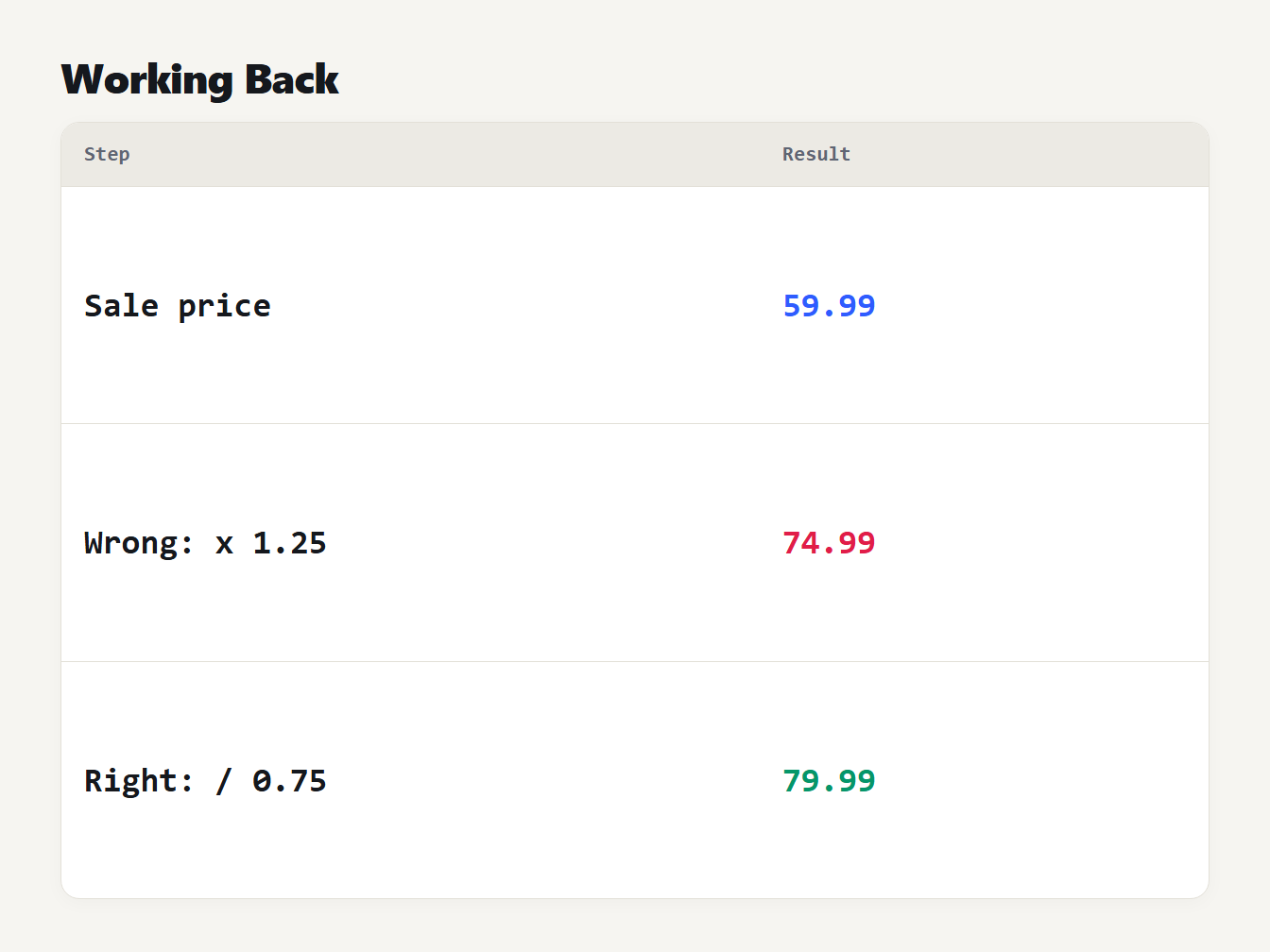
A table showing how to work back from a sale price of 59.99 after 25% off. Multiplying by 1.25 gives 74.99, which is wrong. Dividing by 0.75 gives 79.99, which is right.
The calculator checks itself here. It applies the discount to its answer and shows the result, 59.99, so you can see the answer is right. When prices are rounded to cents the check can be a cent away, and the tool says so.
Stacked discounts do not add up
A sale that says 20% off, plus an extra 10% off, is not 30% off. The second discount comes off the price that is already reduced. The Wikipedia article on percentages says sequential percentage changes do not add up in the usual way: a 10% increase followed by a 10% decrease on 200 leaves 198, not 200.
To calculate a discount that is stacked, multiply the factors. 20% off is 0.80 and 10% off is 0.90, and 0.80 times 0.90 is 0.72, so you pay 72% and save 28%. On a price of 100, the first discount leaves 80 and the second takes off 8.
| Offer | You really save |
|---|---|
| 10% then 10% | 19% |
| 20% then 10% | 28% |
| 25% then 25% | 43.75% |
| 50% then 50% | 75% |
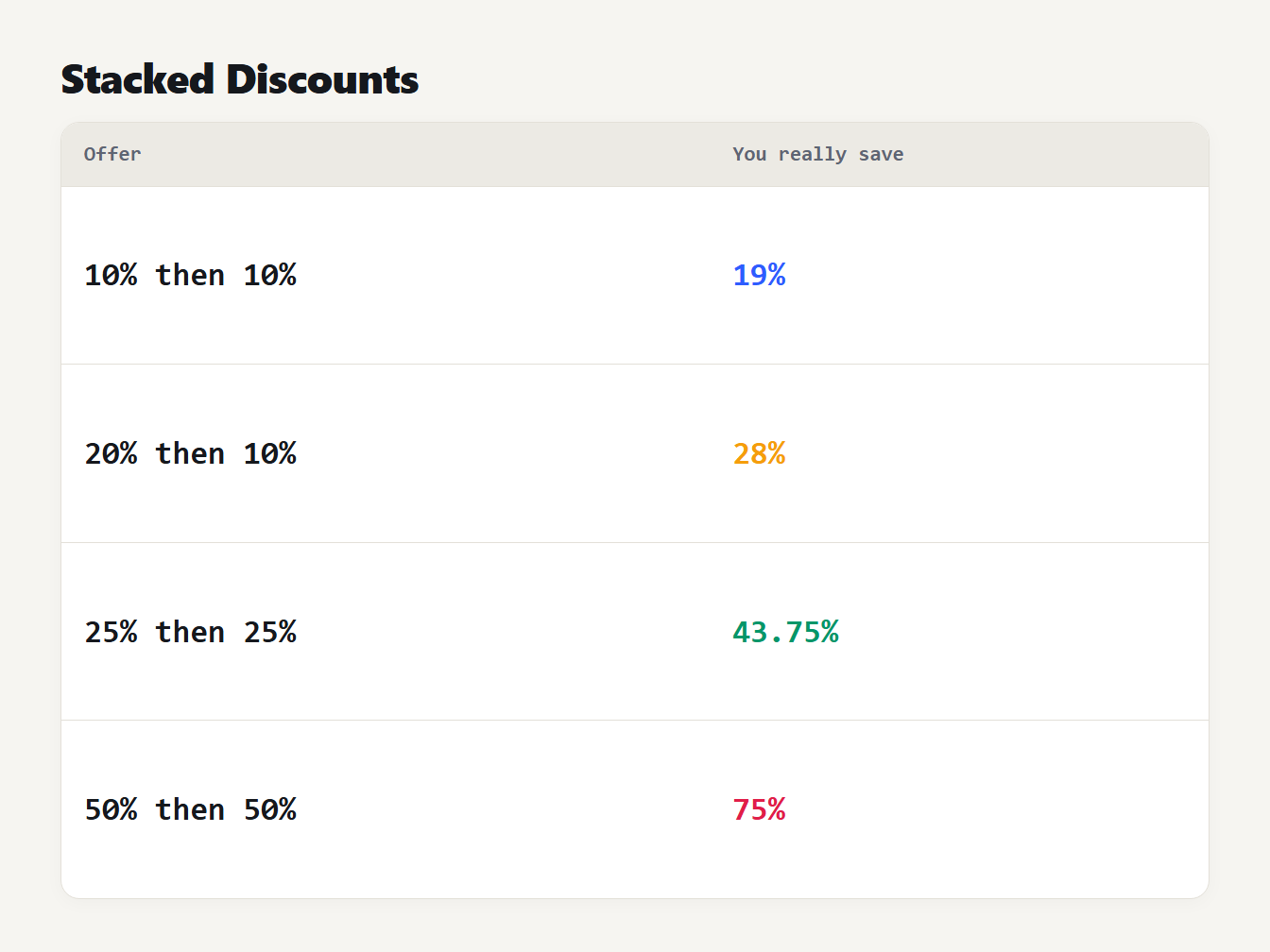
A table of four pairs of stacked discounts and the real saving. 10% then 10% saves 19%. 20% then 10% saves 28%. 25% then 25% saves 43.75%. 50% then 50% saves 75%.
With exact numbers the order of the two discounts does not matter, because multiplication does not care about order. But shops round to the cent after each step, and then it can. We tried 20% then 10% against 10% then 20% on every price from 0.01 to 999.99. In about 32% of prices the final cent was different, and that held in every price band. So if the last cent matters, apply the discounts in the order the shop does.
Adding sales tax
Sales tax is normally worked out on the discounted price. Take 1,299.99 with 20% off, then 10% off, then 8.25% tax.
- 20% off leaves 1,039.99, because 1,299.99 times 0.8 is 1,039.992.
- 10% off leaves 935.99, because 1,039.99 times 0.9 is 935.991.
- Tax is 8.25% of 935.99, which is 77.2192, so 77.22.
- The total is 935.99 plus 77.22, which is 1,013.21.
Rules differ by place and by kind of coupon, so the receipt has the final word.
Rounding, and why floating point goes wrong
Money is rounded to the cent, and the usual rule is that halves round up. The Wikipedia article on rounding says rounding to the smallest currency unit, such as euro cents, is often done by commercial rounding, where a half goes away from zero. So 0.035 becomes 0.04.
Computers make this harder than it looks. Most programming languages store 0.1 as a binary fraction that is slightly off, so 0.1 plus 0.2 is 0.30000000000000004 in JavaScript. That tiny error matters exactly at the halves. We tried every price from 0.01 to 1,000.00 with every discount from 1% to 99%, 9,900,000 sales, and compared three common ways of writing the calculation in code with exact arithmetic.
| Method | Sales that came out a cent wrong |
|---|---|
| Multiply by one minus the discount, then round | 43,816 |
| Round with toFixed, then parse | 122,151 |
| Multiply first, then divide by 100 | 7,432 |
| Exact decimal arithmetic | 0 |
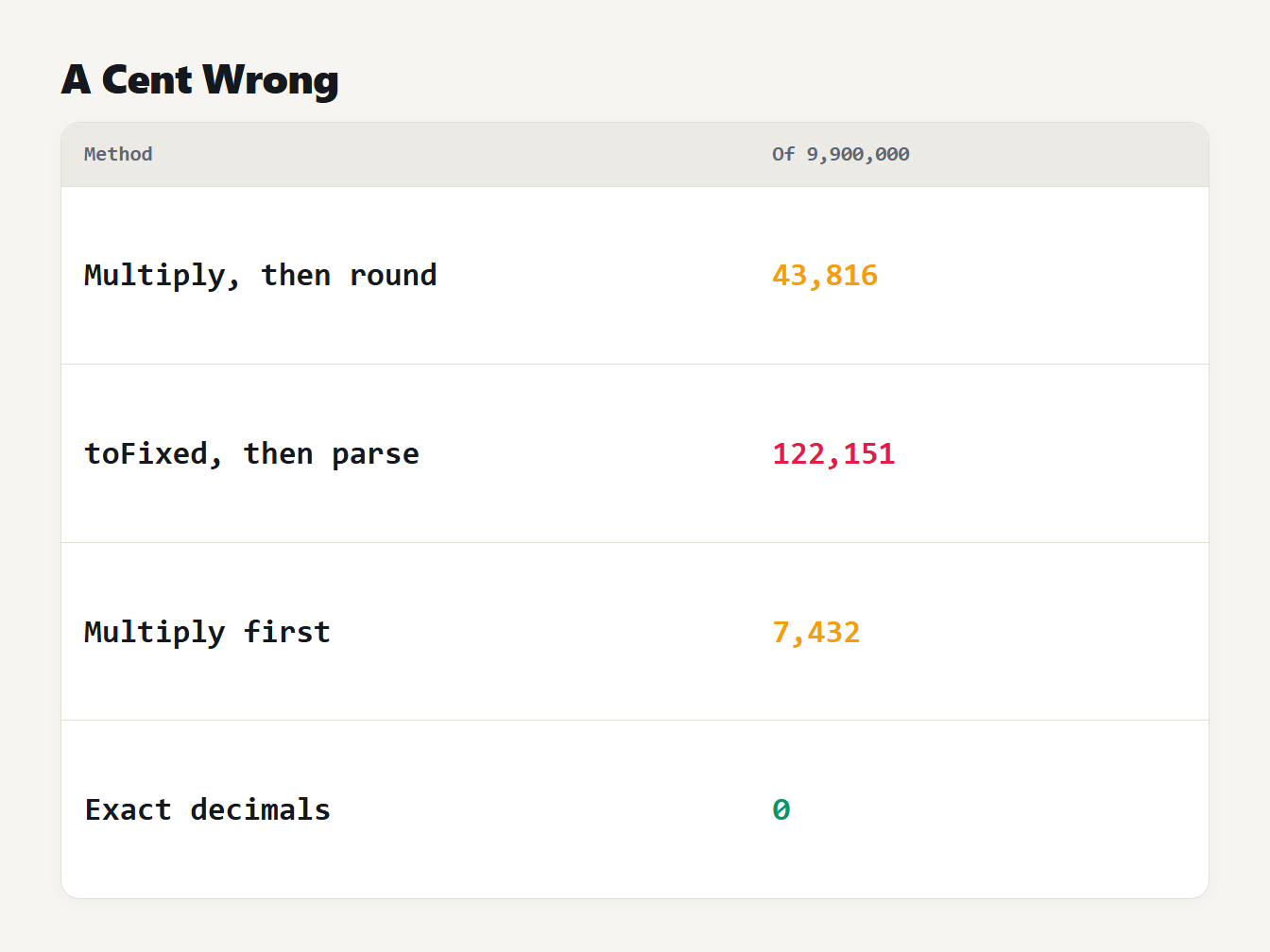
A table of how many of 9,900,000 sales came out a cent wrong with each method. Multiplying by one minus the discount and rounding gave 43,816. Rounding with toFixed gave 122,151. Multiplying first gave 7,432. Exact decimal arithmetic gave 0.
One example: 30% off 0.05 is exactly 0.035, which rounds up to 0.04. The first method gives 0.03, because its 0.035 is stored a hair below 0.035. For that reason the calculator uses exact decimal arithmetic, with whole numbers and fractions, and never a floating point number.
How we tested the calculator
A script generated 30,000 random sales. Each had a price from a cent to 10 digits, with up to six decimals, up to three discounts with up to six decimals each, and sometimes a tax rate. For each, Python's Decimal type, rounding half up to the cent at every step, gave the price after each discount, the saving, the combined percent, the tax and the total. The same script made 30,000 percent off questions between two prices and 30,000 original price questions with one or two discounts, including the check.
| Check | Cases | Mismatches |
|---|---|---|
| Sales with up to three discounts and tax | 30,000 | 0 |
| Percent off between two prices | 30,000 | 0 |
| Original price from a sale price | 30,000 | 0 |
There were no mismatches in any of the 90,000 comparisons.
Limits
The calculator rounds at every step the way a receipt shows, so it follows the order you enter the discounts. Some shops round once at the end, or round per item and not per invoice. A coupon can also apply before or after another one. So the total on your bill can differ by a cent. It works with one price at a time. And it does not know local tax rules.
Frequently asked questions
How do I calculate a price after a discount?
Multiply the price by one minus the discount as a decimal. For 25% off 80, multiply 80 by 0.75 to get 60. The saving is the difference, 20. To do it in one step, multiply by 100 minus the percent, then divide by 100.
Is 20% off then 10% off the same as 30% off?
No. The second discount applies to the reduced price, so you pay 90% of 80% of the original, which is 72%. That is 28% off. Stacked discounts multiply their factors instead of adding their percentages.
How do I find the original price from the sale price?
Divide the sale price by one minus the discount. If an item costs 59.99 after 25% off, the original price was 59.99 divided by 0.75, which is 79.99. Multiplying by 1.25 gives 74.99, which is wrong, because 25% of the sale price is not the same amount as 25% of the original.
How do I calculate the percent off between two prices?
Subtract the sale price from the original, divide by the original price and multiply by 100. For 80 reduced to 60, that is 20 divided by 80, which is 25% off. The reverse change, from 60 up to 80, is a 33.33% increase.
Is sales tax added before or after the discount?
It is usually worked out on the price after the discount, but rules differ by place and by kind of coupon. The calculator adds the tax to the discounted price. Check your receipt if the exact total matters.
Work out your discount now
Enter a price and a percent off in the Discount Calculator to calculate a discount, add a second one and see the total with tax. For other percentages, use the Percentage Calculator, and to split a bill, the Tip Calculator. Everything runs in your browser, so nothing you enter is uploaded.