How to Reverse Text Without Breaking Emoji, Flags and Accents
How to reverse text by letters, words or lines, and why reversing by character breaks flags, skin-tone emoji and accents. Tested on 245 flags and 4,000 texts.
By TheTextKit TeamPublished
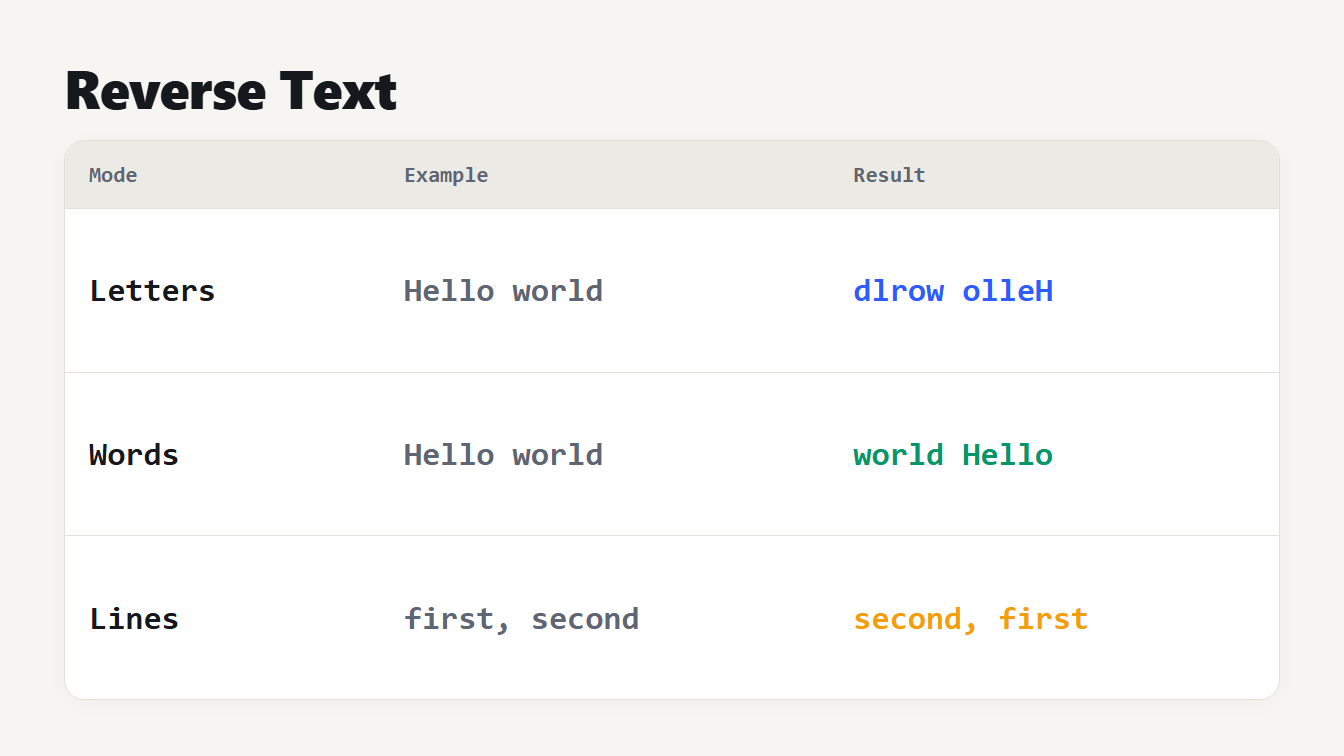
A table of three reversal modes with an example result for each. Reversing letters turns Hello world into dlrow olleH. Reversing words turns it into world Hello. Reversing lines swaps the order of two lines.
To reverse text, paste it into a text reverser and choose how to flip it: by letters, by words or by lines. Reversing letters mirrors the whole text, so Hello world becomes dlrow olleH. Reversing words gives world Hello, and reversing lines swaps the order of the lines. Reversing letters is the one that goes wrong. Most code does it one code point at a time, and it's that which tears apart flags, emoji with skin tones, joined emoji and accented letters. This guide explains why, shows the numbers from our own tests, and covers how the reverser works now.
How to reverse text in three modes
Open the Text Reverser, paste your text and pick a mode:
| Mode | What it does | Example |
|---|---|---|
| Reverse letters | Mirrors the whole text, so the last character comes first | Hello world becomes dlrow olleH |
| Reverse words | Reverses the order of the words on each line, with the spaces left in place | Hello world becomes world Hello |
| Reverse lines | Reverses the order of the lines, keeping your line endings | first and second swap places |
Punctuation stays attached to its word, so Hello, world! becomes world! Hello, in word mode. If you want to check for a palindrome, reverse the letters and compare the result with the original.
Why reversing letters breaks emoji
A text in a computer is a list of numbers, and there are three ways to cut it into pieces. The plain split("") in JavaScript cuts at UTF-16 code units, so a character outside the Basic Multilingual Plane becomes two broken halves. Array.from cuts at code points. And the Unicode standard defines a third unit, the grapheme cluster, for what a person sees as one character. Unicode Standard Annex 29 says user-perceived characters correspond to grapheme clusters. Its rules keep a CR LF pair together, keep emoji joined by a zero width joiner together and pair regional indicator letters into flags.
Many things people see as one character are several code points. According to UTS #51, a flag is a sequence of two regional indicator characters. Skin tones are modifiers that must directly follow their emoji. Families are several emoji joined by the invisible joiner U+200D, which makes one family 7 code points and 11 UTF-16 units in JavaScript. And an accented letter can be a base letter plus a combining mark such as U+0301, so it is two code points too.
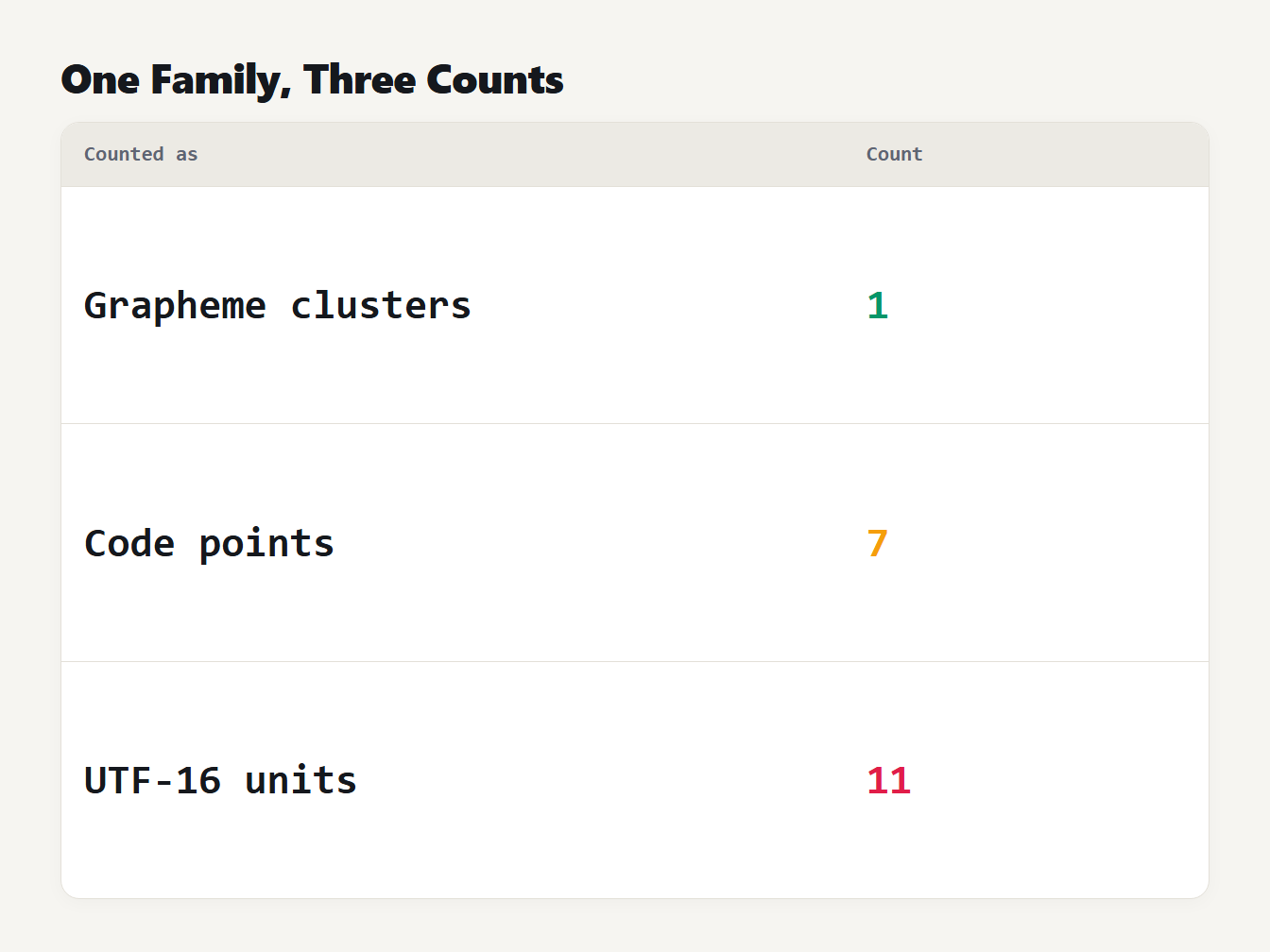
A table counting one family emoji three ways. It is 1 grapheme cluster, 7 code points and 11 UTF-16 code units.
We reversed 305 test items with each method. An item counts as kept intact if reversing a, the item and b gives b, the item and a. The items were the flags for the 245 region codes in the libphonenumber data, 30 emoji with skin tones, 6 joined emoji sequences and 24 letters with a combining accent.
| Items | Count | UTF-16 units | Code points | Grapheme clusters |
|---|---|---|---|---|
| Flags | 245 | 0 | 7 | 245 |
| Skin tones | 30 | 0 | 0 | 30 |
| Joined emoji | 6 | 0 | 0 | 6 |
| Accented letters | 24 | 0 | 0 | 24 |
Reversing by code unit kept none of them intact. Reversing by code point kept 7 flags and nothing else. Reversing by grapheme cluster kept all 305.
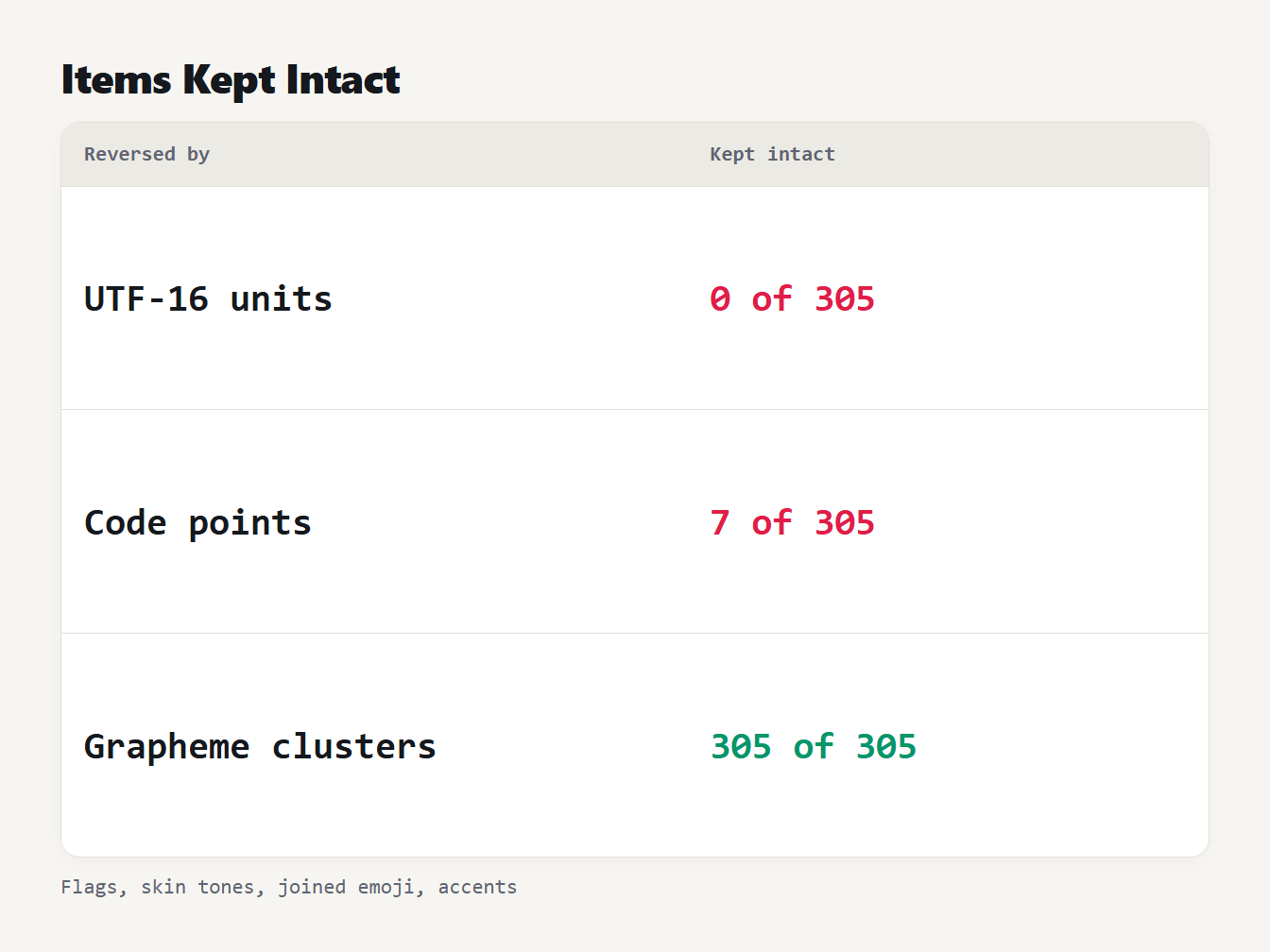
A table of three ways to reverse text and how many of 305 test items stayed intact. UTF-16 code units kept 0. Code points kept 7. Grapheme clusters kept 305.
When a reversed flag is a different flag
The seven flags that survive code point reversal are the ones whose region code reads the same backwards: BB, CC, EE, GG, MM, SS and TT. For many other codes, reversing the two letters gives a real code with a different flag. Of the 245 region codes, 80 turn into another valid flag, in 40 pairs. The flag of Ukraine, UA, becomes Australia, AU. Spain, ES, becomes Sweden, SE. India, IN, becomes Nicaragua, NI, and Bulgaria, BG, becomes the United Kingdom, GB. For the other 158 codes the reversed pair is not a flag, and you see two plain letters or a broken symbol.
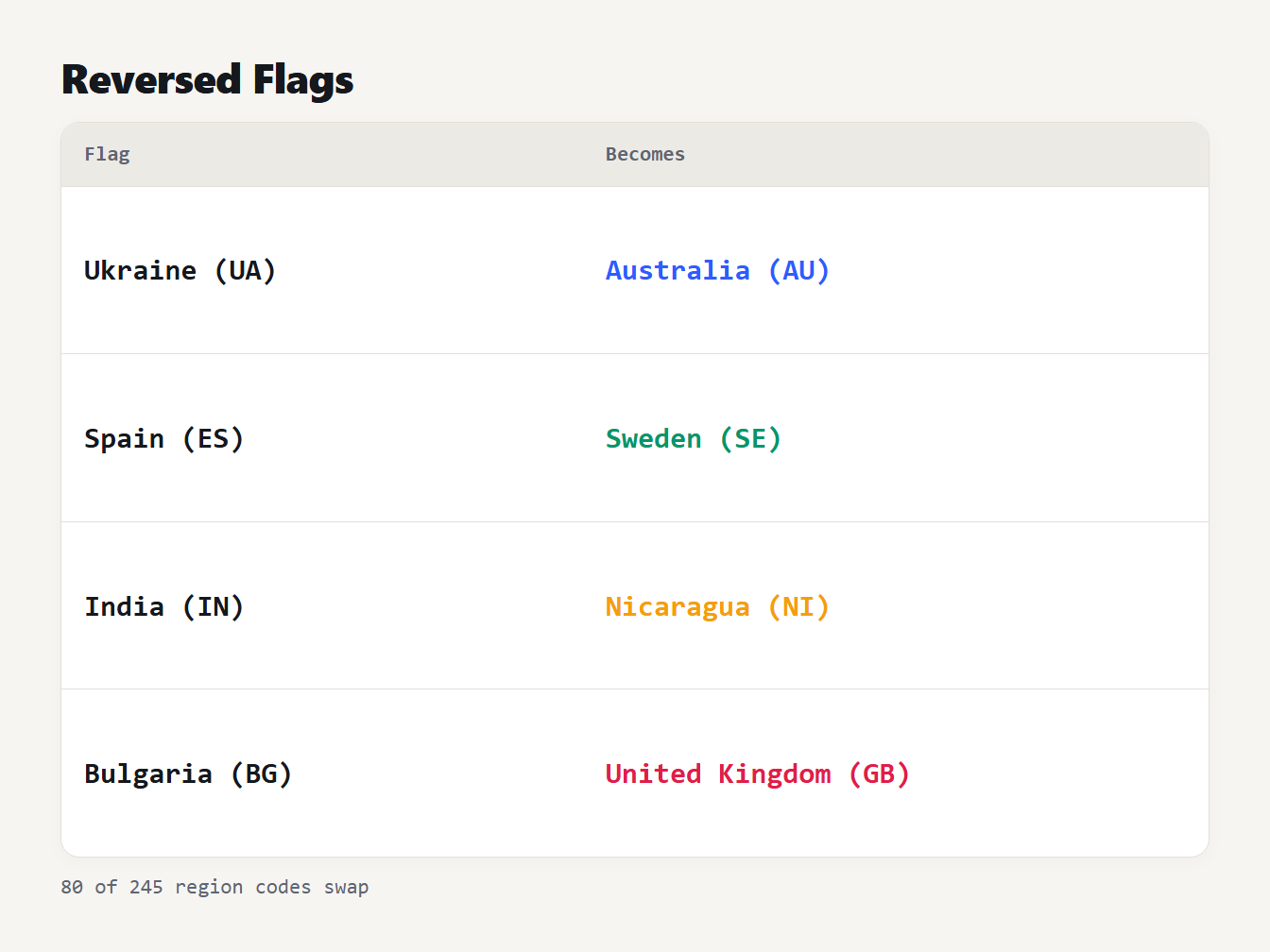
A table of four flags and what each becomes when its two letters are reversed. Ukraine, UA, becomes Australia, AU. Spain, ES, becomes Sweden, SE. India, IN, becomes Nicaragua, NI. Bulgaria, BG, becomes the United Kingdom, GB.
Line endings and spacing
The old reverser had three more problems, found with short inputs:
| Input | Old tool | Now |
|---|---|---|
ab, a Windows line break, cd, in letter mode | dc, then LF and CR in the wrong order, ba | dc, a Windows line break, ba |
| Three lines with Windows line breaks, in line mode | Mixed line endings | Windows line endings kept |
| Two lines and a final line break, in line mode | A blank first line | The final line break stays at the end |
one two and three four, in word mode | four three then two one, so the lines swapped too | two one then four three |
A Windows line break is two characters, CR and LF, and code point reversal turns them into LF then CR. A final line break becomes an empty first line. In word mode the old tool reversed all the words of the text as one list, which also swapped the lines. The new word mode works on one line at a time and keeps the spaces where they were. If you want the old behavior, reverse the letters and then the words of the whole text, or use line mode for the line order.
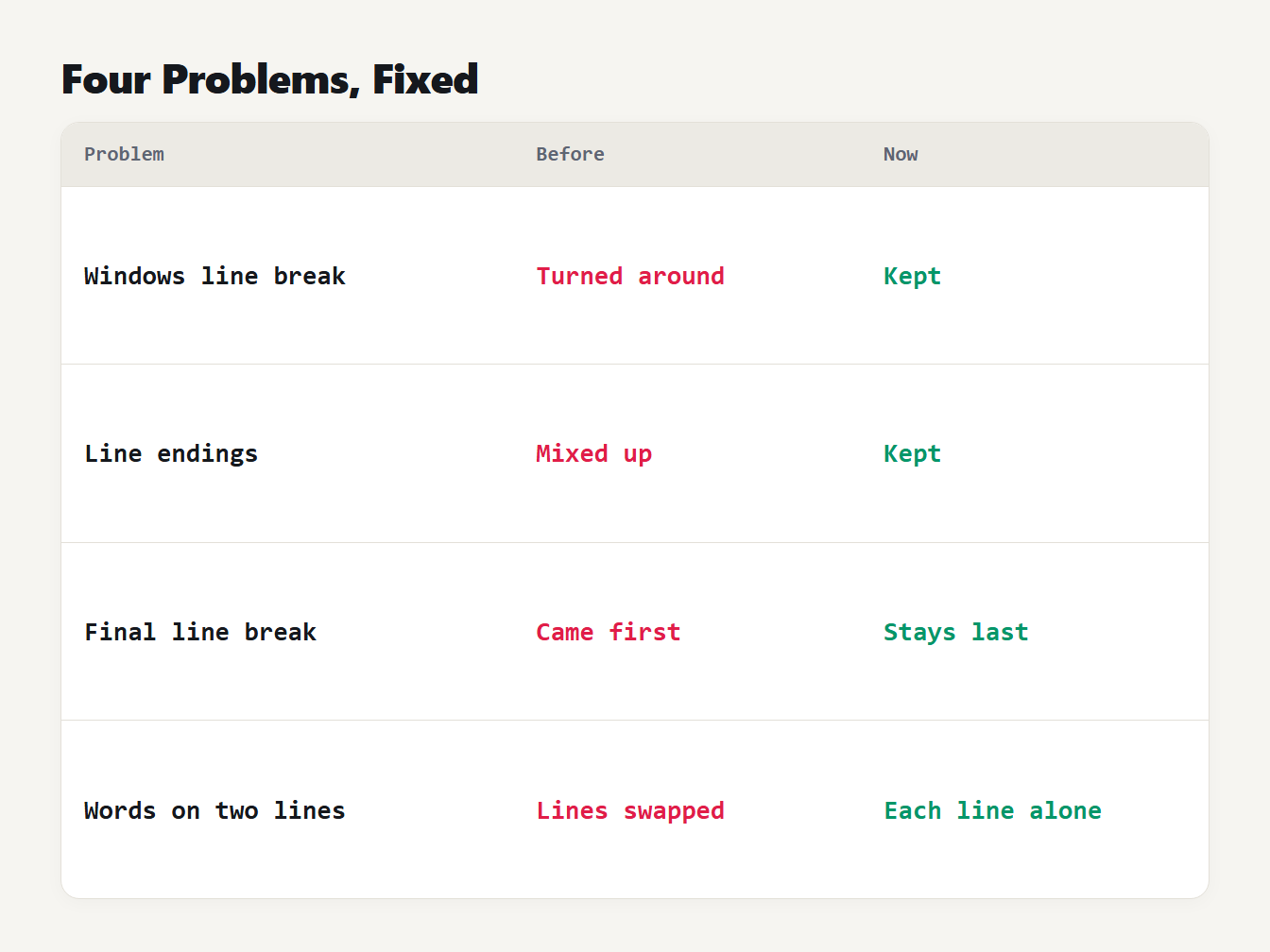
Four problems in the old reverser, fixed. A Windows line break was turned around and is now kept. Line endings were mixed and are now kept. A final line break led the text and now ends it. Words were reversed across lines and now stay on their line.
How to reverse text in code
In JavaScript, Intl.Segmenter returns grapheme clusters. MDN lists it as Baseline 2024, available in the latest browsers since April 2024:
const reverseText = (text) =>
  Array.from(new Intl.Segmenter().segment(text), (part) => part.segment)
    .reverse()
    .join("");
In Python, the standard library has no grapheme splitter, but the regex module understands \X:
import regex

def reverse_text(text):
    return "".join(reversed(regex.findall(r"\X", text)))
We compared the two on 4,000 random texts that mixed letters, accents, skin tones, joined emoji, flags, keycaps, Hangul, Devanagari, line breaks and stray joiners. The reversed text was identical on every one, and so was the number of clusters. Our tool uses the JavaScript version and falls back to code points in a browser without Intl.Segmenter.
Upside-down text is a different trick
People often ask for "upside-down text" when they want to reverse text. That is a separate effect. It reverses the order of the letters and also swaps many of them for look-alikes from other alphabets, so a lowercase a becomes a turned a. Our guide to the fancy text generator explains where those letters come from, and why text built from look-alike characters does not behave like normal text in search or on screen readers.
If you only need the order of items flipped, such as the lines of a log, the code is short. In JavaScript, text.split("\n").reverse().join("\n") does it, and it doesn't care about emoji because it never cuts inside a line. It does assume LF line endings, so for Windows text split on /\r?\n/ and join with the same ending, as the tool does.
What it still gets wrong
Reversing keeps each character whole, but it cannot make the result readable in every script. Text in a right-to-left language such as Arabic or Hebrew is stored in reading order, so reversing it puts the letters in display order and then a bidirectional renderer may flip them again. We did not test those scripts for meaning. Joined letters, such as Arabic, also change shape in context, so a reversed word is not a correct mirror image of the original. Treat the result as fun or as test data, and not as a way to hide text.
Frequently asked questions
How do I reverse text?
Paste it into a text reverser and choose letters, words or lines. Reversing letters mirrors the whole text, reversing words flips the order of the words on each line, and reversing lines flips the order of the lines. A good reverser treats an emoji or an accented letter as one character.
Why does reversed text break emoji?
Because a code-by-code reversal tears apart characters made of several code points. A flag is two letters, a skin tone is a separate modifier, and a family is several emoji joined by invisible characters. Reverse by grapheme cluster, the unit people see as one character, to keep them whole.
Why did reversing a flag give me another flag?
A flag is two regional indicator letters that spell a region code. Reversing the pair spells the code backwards, so Ukraine, UA, becomes Australia, AU. For 80 of the 245 region codes we checked, the reversed code is also a real flag.
How do I reverse a string in JavaScript without breaking emoji?
Split it with Intl.Segmenter, which returns grapheme clusters, then reverse that list and join it. Array.from reverses by code point and the plain split method by UTF-16 unit, and both break flags, skin tones and joined emoji.
Can I use it to check for a palindrome?
Yes. If the text reversed by letters equals the original, it is a palindrome. For a phrase, remove spaces and punctuation and ignore case first, or the check fails on a sentence such as A man a plan a canal Panama.
Reverse your text now
Paste your text into the Text Reverser, pick letters, words or lines and copy the result. It keeps emoji, flags and accented letters whole, preserves your line endings and runs in your browser, so nothing is uploaded. To change the look of the text instead, try the Fancy Text Generator.