How to Remove Extra Spaces From Text, Including Hidden Ones
How to remove extra spaces from text: double spaces, tabs, non-breaking and zero width characters, and why JavaScript and Python disagree about which count.
By TheTextKit TeamPublished
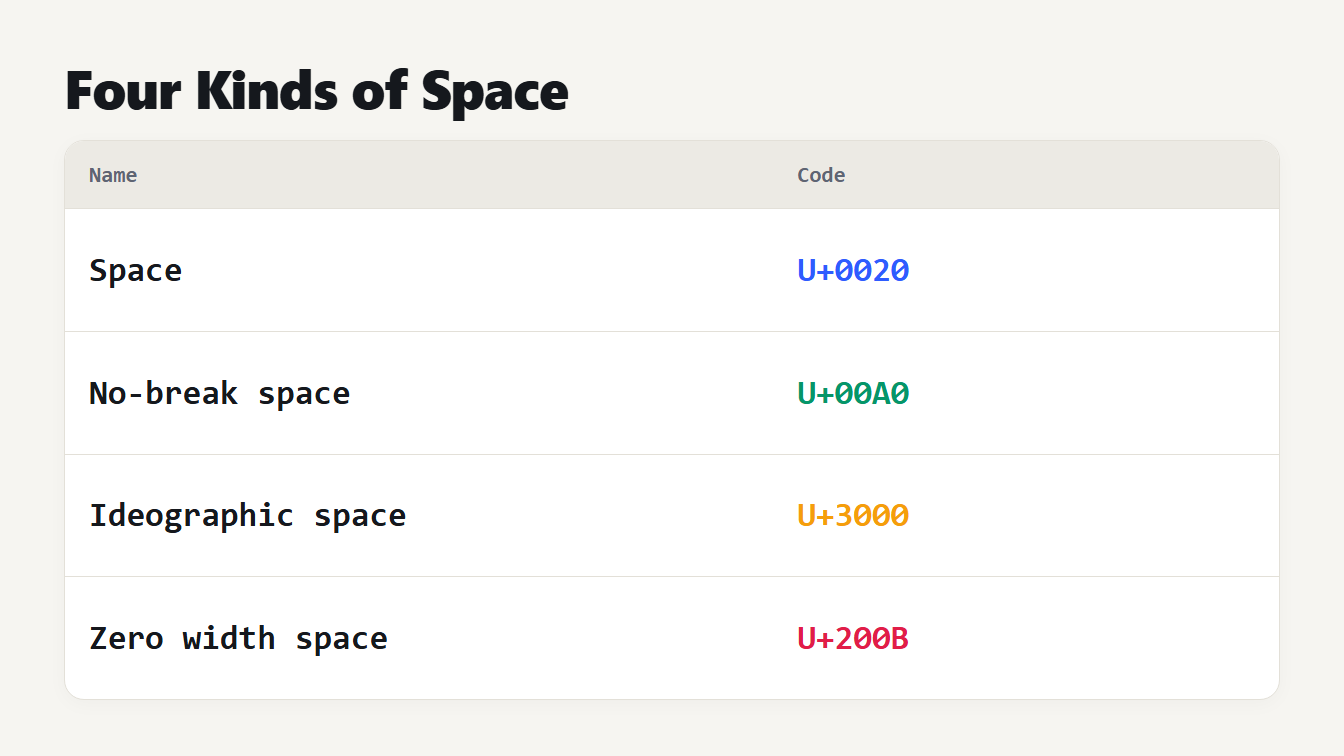
A table of four characters that look like a space and their codes. The ordinary space is U+0020. The no-break space is U+00A0. The ideographic space is U+3000. The zero width space is U+200B.
To remove extra spaces from text, collapse each run of spaces and tabs into one space, trim the start and end of every line and cut long gaps between paragraphs to one blank line. That is simple when the spaces are the ordinary kind. Text copied from web pages, PDFs and Word documents often holds other characters that look the same, and a search for double spaces walks straight past them. This guide shows which characters are hiding in your text, which of them JavaScript and Python count as whitespace, how to clean them with our Whitespace Remover, and the code to do it yourself.
How to remove extra spaces from text in three steps
- Paste the text into the Whitespace Remover. It lists what it found, such as non-breaking spaces and invisible characters, before you copy anything.
- Choose Tidy up spaces and blank lines, and set the options. Tick Keep indentation for code and lists, and choose how many blank lines to keep.
- Copy the cleaned text. To join the lines as well, use Remove Line Breaks, and our guide on removing line breaks from copied text covers that step.
Here is a small example of messy text, pasted from a web page. We wrote the hidden characters in square brackets, because you could not see them otherwise:
Order[NBSP]number:[NBSP][NBSP]4711 [ZWSP] ships  on[TAB]Monday
(three empty lines)
Thanks,[IDEOGRAPHIC SPACE]Ada
It looks like a few double spaces, but the text has 59 characters and contains three non-breaking spaces, one zero width space and an ideographic space as well as the plain gaps. Our tool found 3 double spaces, 1 tab, 3 non-breaking spaces, 1 other special space, 1 invisible character, 2 lines with trailing spaces and 1 run of extra blank lines. It returned Order number: 4711 ships on Monday, a blank line and Thanks, Ada, which is 47 characters.
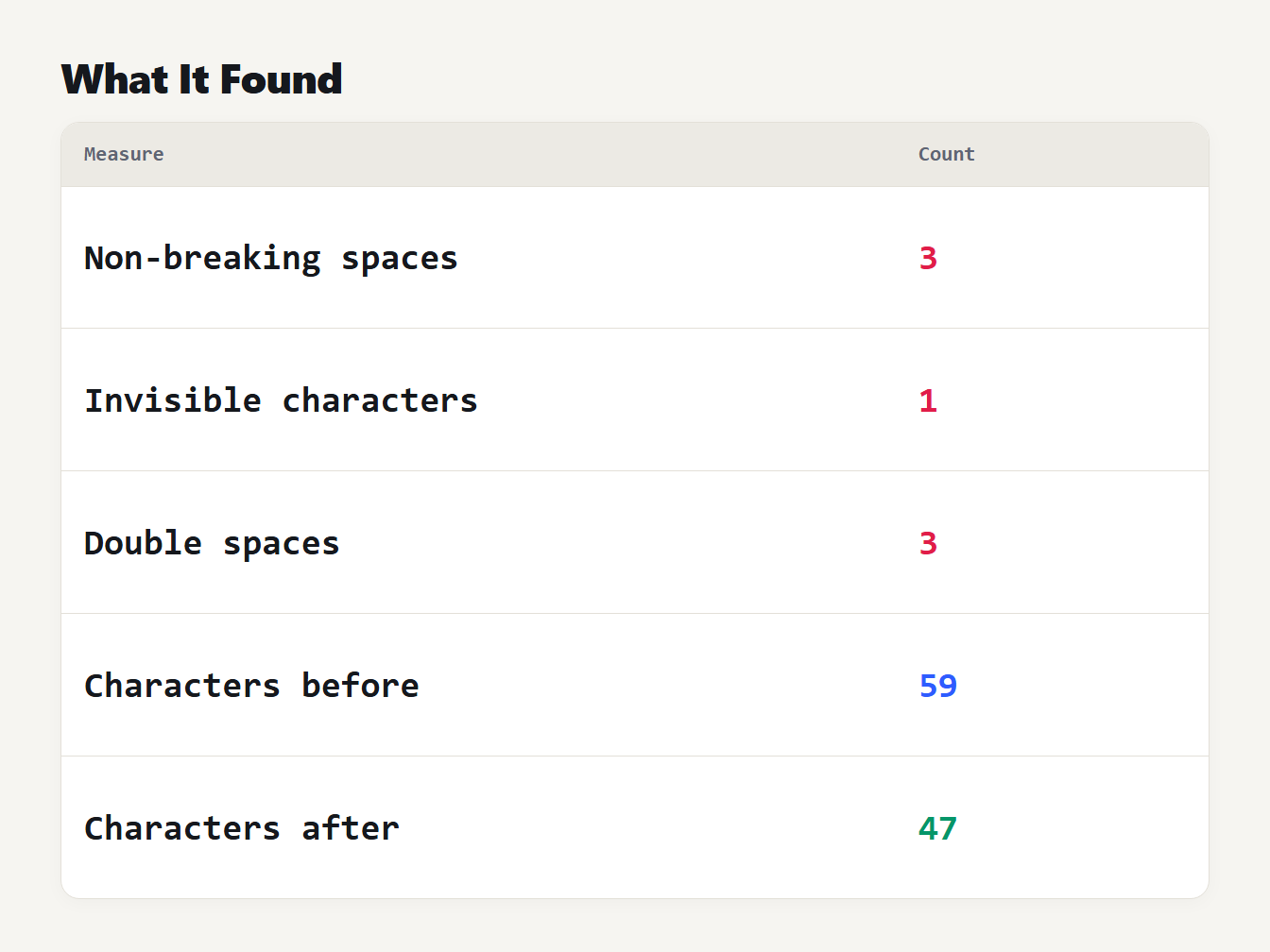
A table of what the Whitespace Remover found in the sample. 3 non-breaking spaces. 1 invisible character. 3 double spaces. The text had 59 characters before and 47 after.
The spaces you cannot see
Several characters look like a space and are not the space bar. The ones that turn up most often are these:
| Character | Code | What it is |
|---|---|---|
| Space | U+0020 | The ordinary space |
| No-break space | U+00A0 | Looks the same, but a line cannot wrap there. HTML writes it as |
| Thin space and en, em spaces | U+2009, U+2002, U+2003 | Narrower or wider gaps used in typesetting |
| Ideographic space | U+3000 | The wide space used in Chinese, Japanese and Korean text |
| Zero width space | U+200B | Invisible and has no width, used to allow a line break |
| Byte order mark | U+FEFF | An invisible marker some files start with |
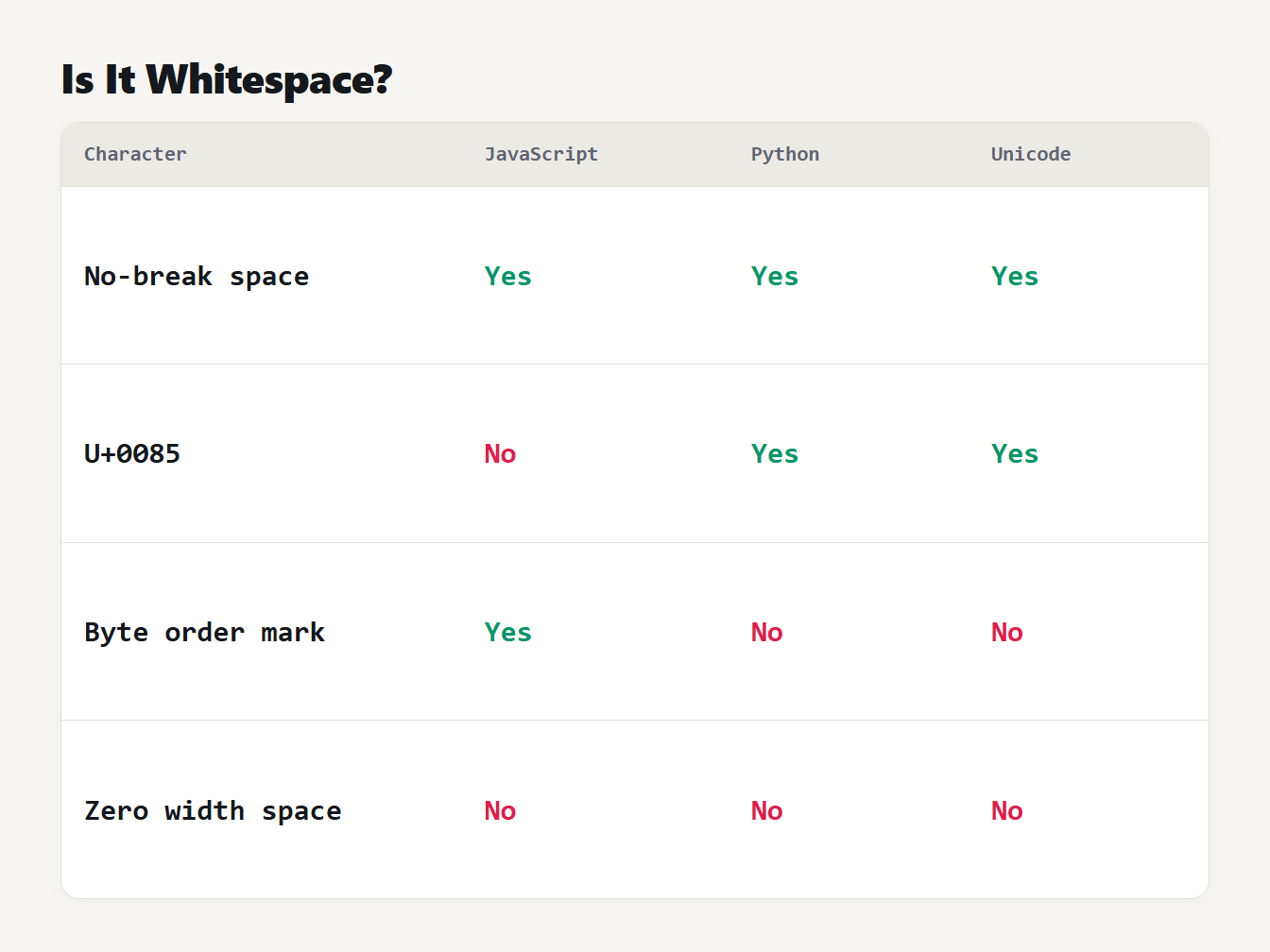
A table of four characters and whether JavaScript, Python and Unicode count each as whitespace. The no-break space counts in all three. U+0085 counts in Unicode and Python but not in JavaScript. The byte order mark counts only in JavaScript. The zero width space counts in none.
The characters differ in how programs treat them. We tested each character in JavaScript and Python and checked the list in the Unicode data. The Unicode character database gives the White_Space property to 25 code points, among them the no-break space, the ideographic space and the spaces from U+2000 to U+200A. It does not give it to U+200B or U+FEFF.
| Character | JavaScript \s | Python isspace() | Unicode White_Space |
|---|---|---|---|
| U+00A0 no-break space | Yes | Yes | Yes |
| U+3000 ideographic space | Yes | Yes | Yes |
| U+0085 next line | No | Yes | Yes |
| U+FEFF byte order mark | Yes | No | No |
| U+200B zero width space | No | No | No |
JavaScript's \s, as the ECMAScript specification defines it, covers the space separators plus tab, line feed, vertical tab, form feed, carriage return, the line and paragraph separators and U+FEFF. Python's str.isspace() is true for characters in the category Zs or with a bidirectional class of WS, B or S, so it includes U+0085 and leaves U+FEFF out. The zero width space is the odd one. No engine counts it, so trim() and split() leave it in your text, and you must remove it by name.
Why a search for double spaces misses them
A find and replace for two spaces only finds two ordinary spaces. Our old whitespace tool worked that way. It collapsed spaces and tabs, trimmed lines and shortened blank lines, but it left every other space alone. On the sample above it returned 50 characters, and the gaps were still there:
| Input | Old tool | Now |
|---|---|---|
| Two non-breaking spaces | Left as they were | One space |
| A zero width space | Left in the text | Removed |
| Two ideographic spaces | Left as they were | One space |
| Windows line breaks | Changed to plain line feeds | Kept |
The fix was to treat all Unicode spaces and line breaks as the same kind of thing. The new version collapses them to one ordinary space, removes the zero width space, the word joiner and the byte order mark, and keeps the line ending of your text. It leaves the zero width joiner and non-joiner, because emoji such as a family and several scripts need them. Our guide to HTML entities explains how the no-break space reaches your text in the first place.
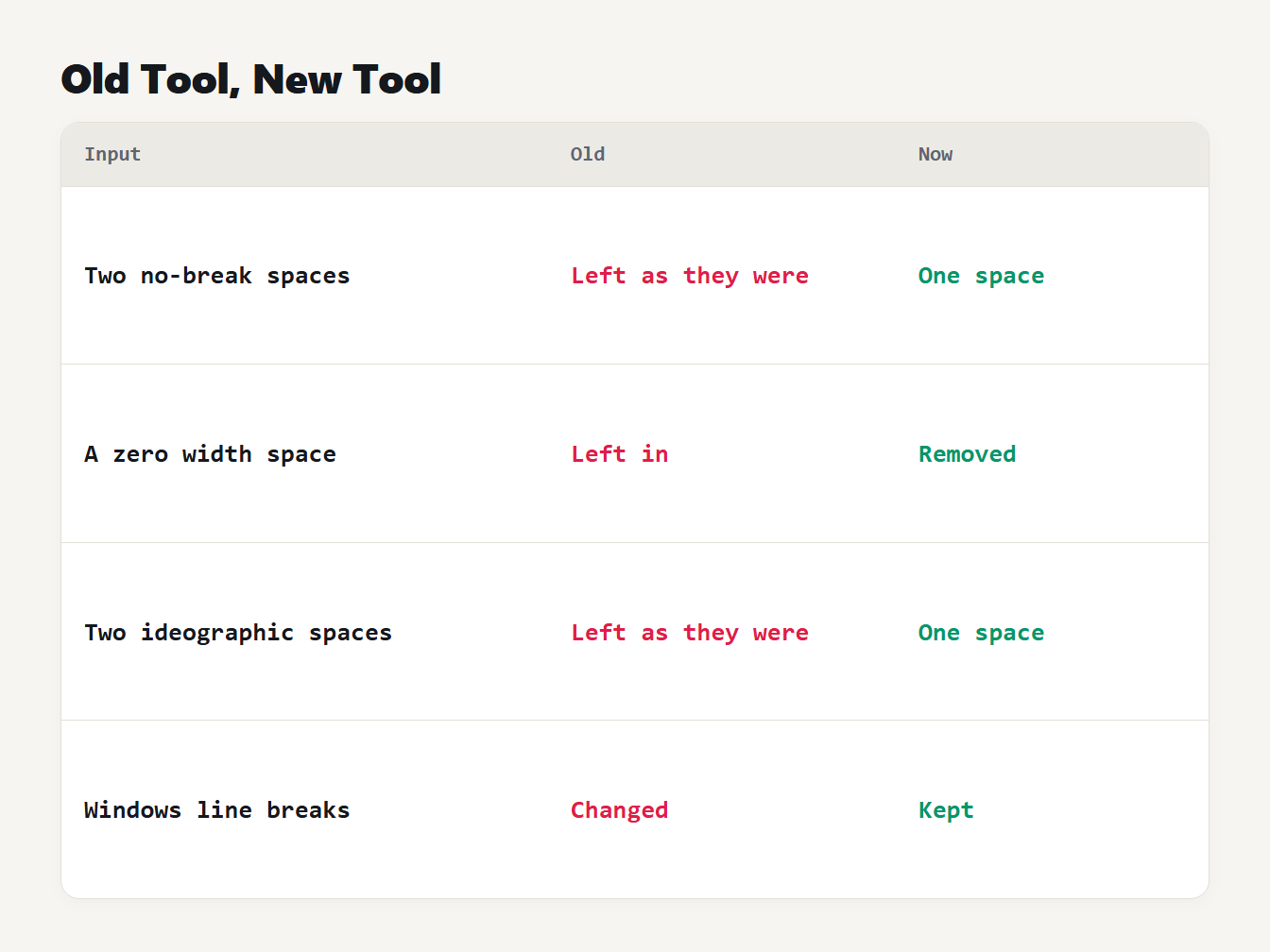
A table of four inputs. Two no-break spaces were left as they were and are now one space. A zero width space was left in and is now removed. Two ideographic spaces were left and are now one space. Windows line breaks were changed to plain line feeds and are now kept.
How to find hidden spaces
You can see what is in a text without cleaning it. The Whitespace Remover prints a Found line under your text. In Python, print(repr(text)) shows a no-break space as \xa0 and a zero width space as \u200b. In JavaScript, this line lists every space-like or invisible character other than the ordinary space:
[...text].filter((c) => /[\p{Zs}\p{Cf}]/u.test(c) && c !== " ")
  .map((c) => "U+" + c.codePointAt(0).toString(16).toUpperCase().padStart(4, "0"));
On the sample above it returns U+00A0 three times, U+200B once and U+3000 once, which are the three no-break spaces, the zero width space and the ideographic space. The class Cf also covers joiners and direction marks, so read the list before you delete anything.
How to remove extra spaces from text in code
If you prefer a script, these two functions do the same job as the tool's tidy mode for text with plain line feeds. In JavaScript, \p{Zs} matches every Unicode space separator, so the no-break space is covered:
function tidy(text) {
  return text
    .replaceAll(String.fromCodePoint(0x200b), "")   // zero width space
    .replace(/[\t\p{Zs}]+/gu, " ")                   // runs of spaces and tabs
    .replace(/^ | $/gm, "")                          // ends of each line
    .replace(/\n{3,}/g, "\n\n")                      // long gaps between paragraphs
    .trim();
}
In Python, \s already includes Unicode spaces, and [^\S\n] means whitespace that is not a line feed:
import re

def tidy(text):
    text = text.replace("\N{ZERO WIDTH SPACE}", "")
    text = re.sub(r"[^\S\n]+", " ", text)
    text = re.sub(r"(?m)^ | $", "", text)
    text = re.sub(r"\n{3,}", "\n\n", text)
    return text.strip()
We ran both on 5,000 random texts that mixed letters, spaces, tabs, no-break, thin and ideographic spaces, zero width spaces and blank lines. They matched the tool's result on every one. They do not handle form feeds, the byte order mark or odd line breaks such as U+2028. The Python version also turns Windows line breaks into plain line feeds. Use the tool when your text may hold those.
We also checked the tool against a separate Python version of the same rules on 5,000 more random texts, which included those characters. The outputs were identical in every case.
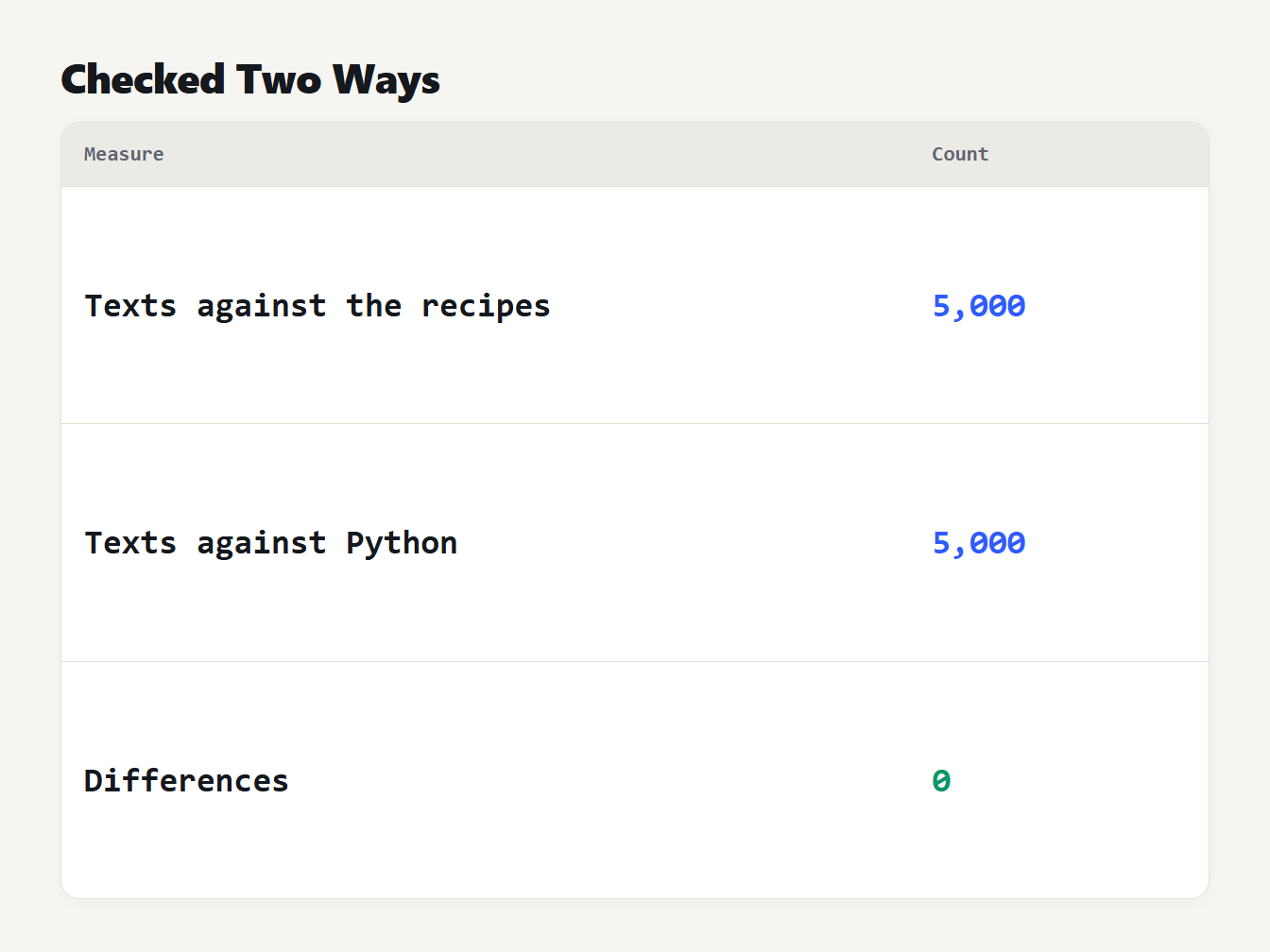
A table with three rows. 5,000 random texts were checked against the code recipes. 5,000 more were checked against a separate Python version. The number of differences was 0.
When you should not remove spaces
Spaces carry meaning in some text. Python and YAML use indentation to show structure. Markdown treats two spaces at the end of a line as a line break, which our Markdown to HTML guide explains. A CSV file can contain a space inside a quoted field that you want to keep, and poetry and plain-text tables use spaces to line things up. For these, use Keep indentation and turn off Collapse repeated spaces, or clean only the part you pasted from elsewhere.
Frequently asked questions
How do I remove extra spaces from text?
Paste the text into a whitespace remover, which turns each run of spaces and tabs into one space, trims every line and limits blank lines. If a search for double spaces finds nothing but the gaps are still there, the text probably holds non-breaking spaces, which only a tool that handles Unicode spaces will catch.
What is a non-breaking space?
A character, U+00A0, that looks like a space but stops a line from wrapping at that point. Web pages and word processors insert many of them. A search or comparison for a normal space does not match it, and in HTML it is written as .
Is a zero width space whitespace?
Not according to Unicode, JavaScript or Python. U+200B is invisible and has no width, but none of them count it as whitespace, so trim and split leave it in the text. You have to remove it by name.
Do JavaScript and Python agree on what whitespace is?
Almost. JavaScript counts the byte order mark U+FEFF as whitespace and Python does not, and Python counts U+0085 where JavaScript's \s does not. Both include the no-break space and the ideographic space.
When should I keep the spaces?
Keep them in code, YAML, poetry, tables made with spaces and Markdown lines that end in two spaces for a line break. Use the keep indentation option to clean the rest of such text without flattening the structure.
Clean your text now
Paste your text into the Whitespace Remover and see what it finds. It handles non-breaking and other Unicode spaces, removes invisible characters, keeps your line endings and runs entirely in your browser, so your text is never uploaded.