How to Extract Phone Numbers From Text Without Catching Dates and IDs
How to extract phone numbers from text: the formats to match, why dates, IP addresses and IDs fool a simple regex, and results tested on 245 countries.
By TheTextKit TeamPublished
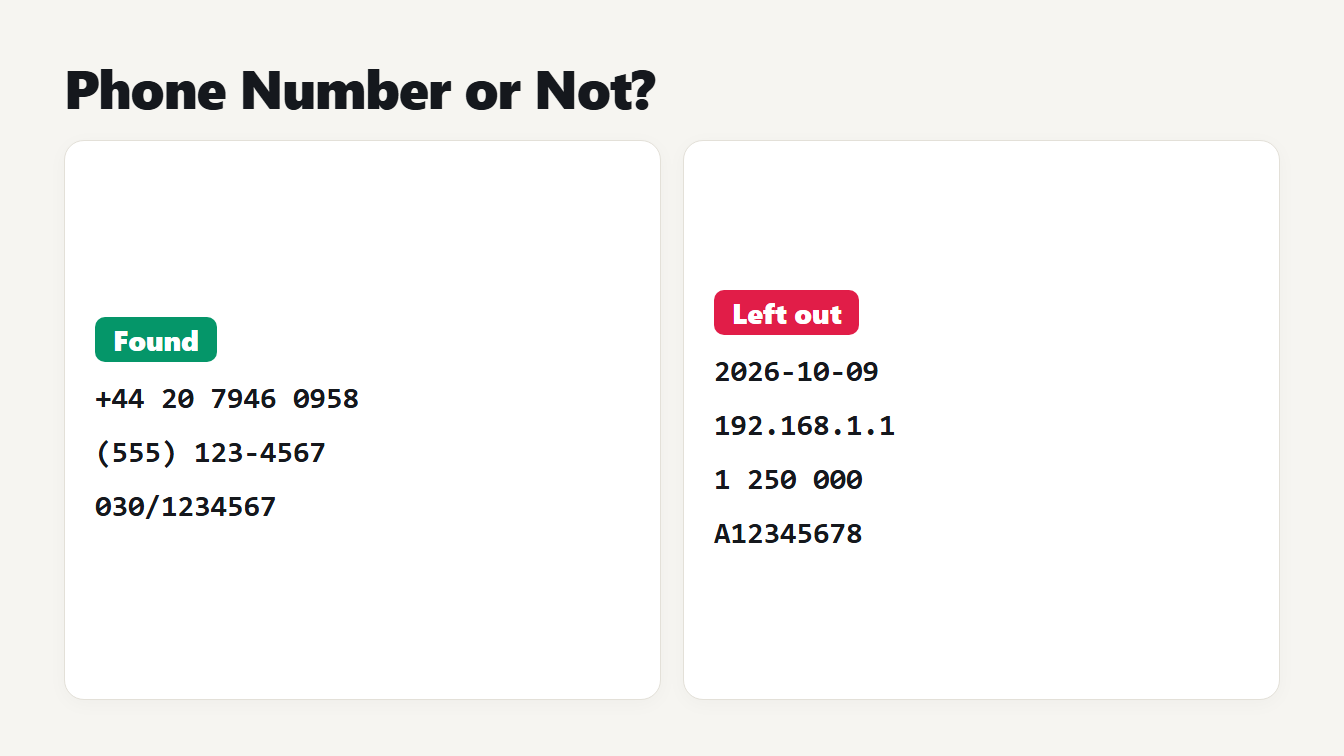
Two cards compare what the extractor finds and what it leaves out. It finds +44 20 7946 0958, (555) 123-4567 and 030/1234567. It leaves out the date 2026-10-09, the IP address 192.168.1.1, the price 1 250 000 and the order code A12345678.
To extract phone numbers from text, look for runs of 7 to 15 digits. They may start with a plus sign, hold an area code in brackets and be grouped with spaces, hyphens or dots. The hard part is not the formats. It is everything else that looks the same: dates, IP addresses, card numbers, prices written with spaces and order codes. Our old extractor used one loose regular expression and returned all of them. This guide lists the formats to match, shows what a simple pattern gets wrong, and reports a test on example numbers from 245 countries with the new Phone Number Extractor.
How to extract phone numbers from text in three steps
- Paste the text into the Phone Number Extractor. It can be an email, a web page or a spreadsheet column.
- Leave Remove duplicates on if the same number appears in different formats. Choose As written or Digits only for the list.
- Copy the result, and check it. The tool matches numbers by their shape and does not know whether a number exists, so a number you must call deserves a second look.
What a phone number looks like in text
The E.164 numbering plan of the ITU is the international standard, and a plan-conforming number has at most fifteen digits, including the country code, according to Wikipedia's summary. Written out, a number starts with a plus sign and a country code and may be spaced. The tel URI standard, RFC 3966, names the hyphen, the dot and brackets as the separators that help readability. It also says implementations must not assume that telephone numbers have a minimum, maximum or fixed length. So the 7 to 15 digit range we use is a practical rule, and not a rule of the standard.
| Format | Example |
|---|---|
| North American | (555) 123-4567 |
| International with spaces | +44 20 7946 0958 |
| E.164, no separators | +14155552671 |
| UK national | 020 7946 0958 |
| Spanish national | 912 345 678 |
| German with a slash | 030/1234567 |
| Russian with a trunk digit | 8 (912) 345-67-89 |
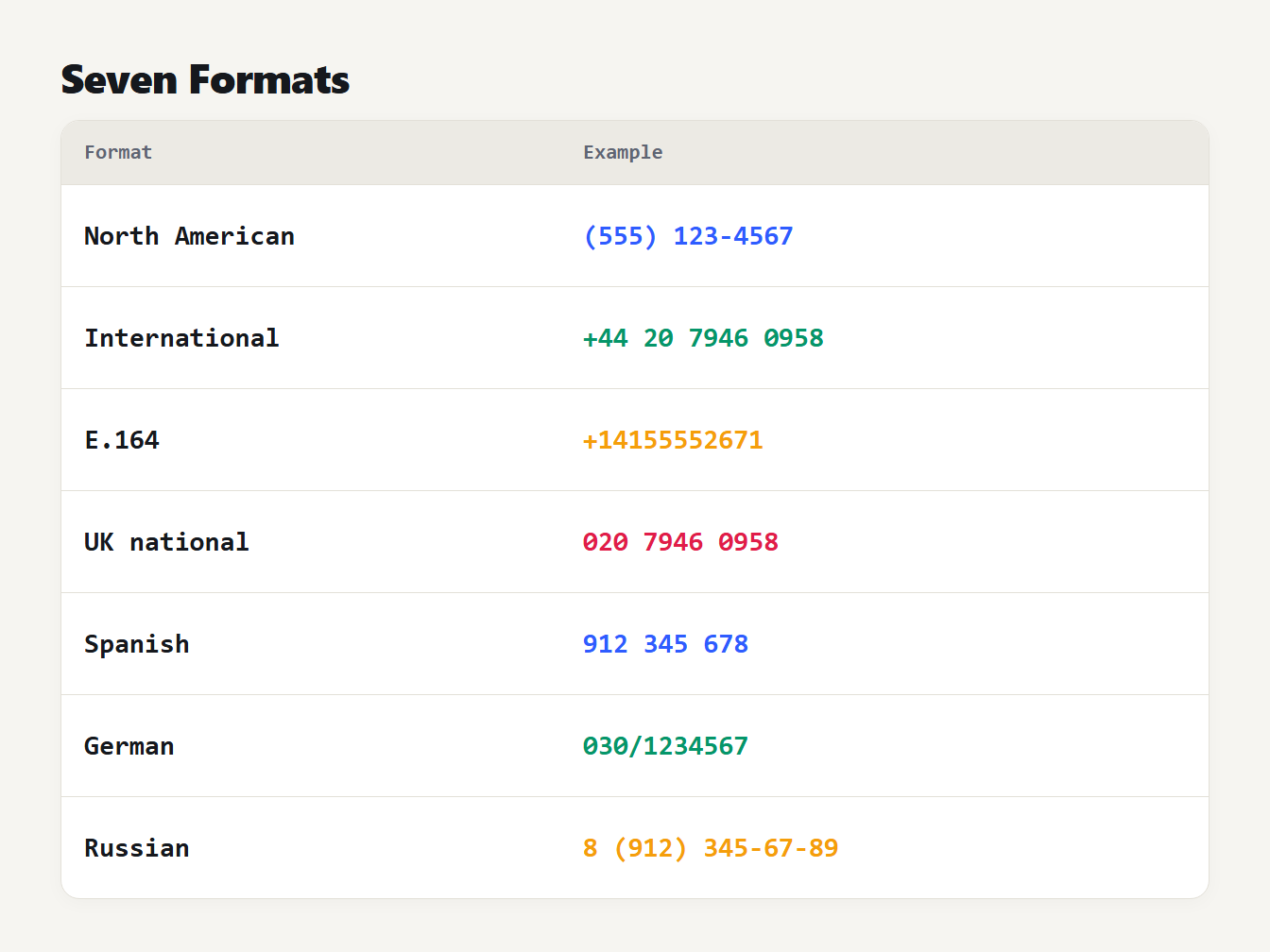
A table of seven phone number formats and an example of each. North American is (555) 123-4567. International is +44 20 7946 0958. E.164 is +14155552671. UK national is 020 7946 0958. Spanish national is 912 345 678. German is 030/1234567. Russian is 8 (912) 345-67-89.
Why a simple regex catches dates and IP addresses
Our old tool used one pattern, a few digits followed by digits, spaces, dots and hyphens. It found every number in the first test, and it found a lot more. On these everyday sentences it returned the wrong thing:
| Text | Old extractor | New extractor |
|---|---|---|
2026-10-09 | Returned as a phone number | Left out |
192.168.100.200 | Returned | Left out |
4111 1111 1111 1111 | Returned | Left out |
1 250 000 euros | Returned | Left out |
A12345678 | Returned 12345678 | Left out |
555-1234 and 5678 Main Street on two lines | One merged result | 555-1234 |
The pattern allowed a space to match a line break, so a number could swallow the digits of the next line. It also cut an order code such as A12345678 into a number, and it joined two numbers written side by side.
The new extractor scans digit runs one at a time. It never crosses a line break, and it rejects a run that is stuck to a letter. It also removes dates, IP addresses, social security numbers, ZIP+4 codes, ISBNs, card numbers, decimals, version strings and prices. A plain run of digits with no plus sign has to be at least 10 digits long, so 1234567 in a sentence about units sold is not returned.
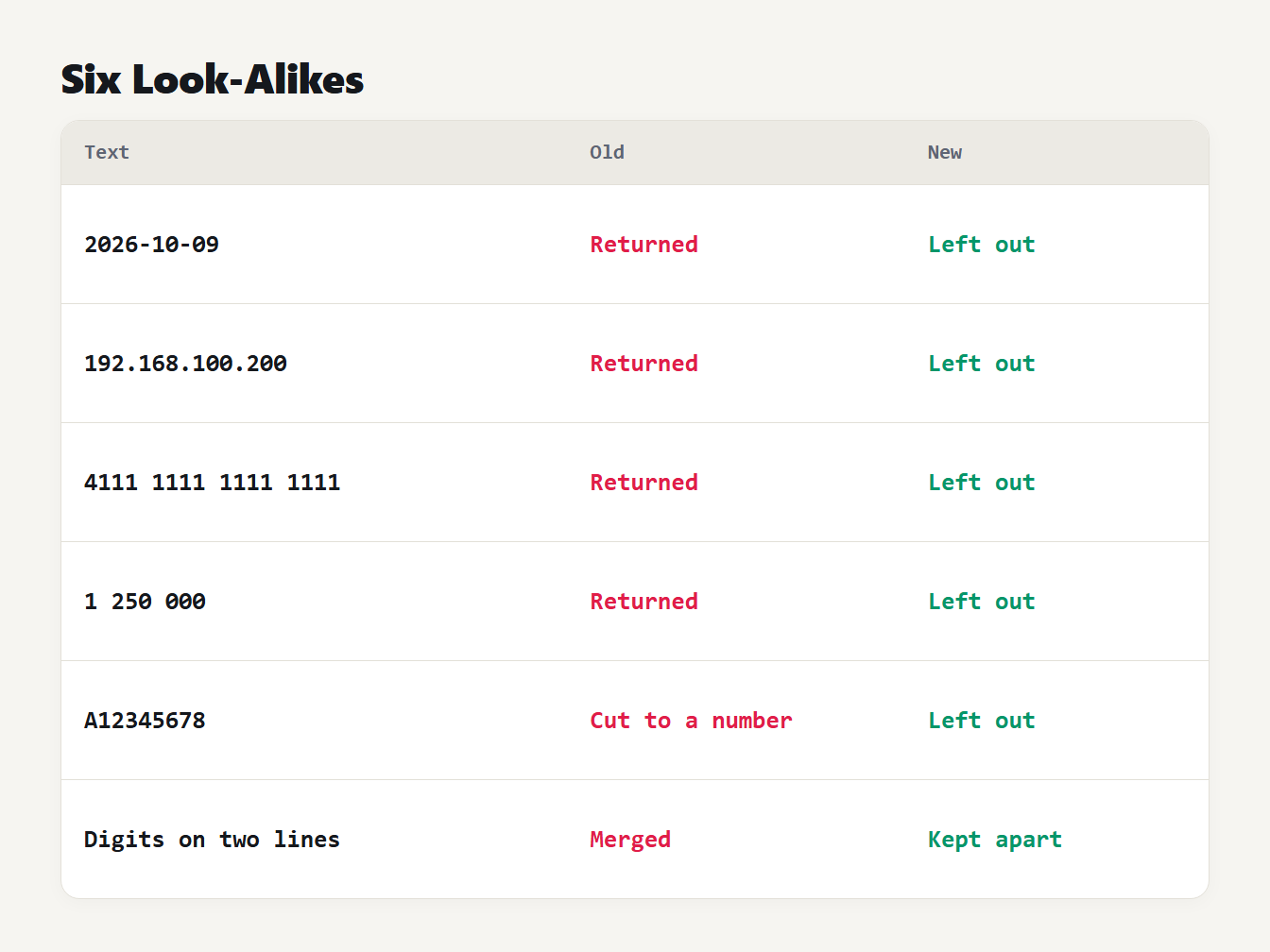
A table of six pieces of text that look like phone numbers. A date, an IP address, a card number and a price were returned by the old extractor and are now left out. An order code was cut into a number and is now left out. Digits on two lines were merged and are now kept apart.
How we tested it
To test how well we extract phone numbers from text, we took the example mobile number of every country and territory in the libphonenumber-js metadata, 245 of them. We wrote each in five formats: the international form, the E.164 form, the international form with dots, the international form with hyphens and the national form. Each went into five short sentences, which gave 1,225 cases per format. Both extractors found every international, E.164, dotted and hyphenated number, 1,225 of 1,225 in each format. For the national form the old pattern found 1,150 and the new one 1,140, which is 93.1 percent.
The difference is deliberate. Of the 245 national examples, 13 have fewer than 7 digits, such as some island numbers, and the new tool skips numbers that short. Three are plain runs of 8 digits with no separator. And the Seychelles number 2 510 123 is written like a price in thousands. Every other national number was found, in all five sentence frames, including numbers written in brackets.
We then made 3,900 sentences with 13 kinds of look-alike: dates, IP addresses, card numbers, social security numbers, ZIP+4 codes, ISBNs, spaced prices, order codes, plain counts, decimals and version numbers. The old extractor returned a phone number for 3,599 of them. The new one returned none, and the library flagged 54. We wrote the new rules with these kinds of text in mind, so treat the zero as a result for known cases and not for all text.
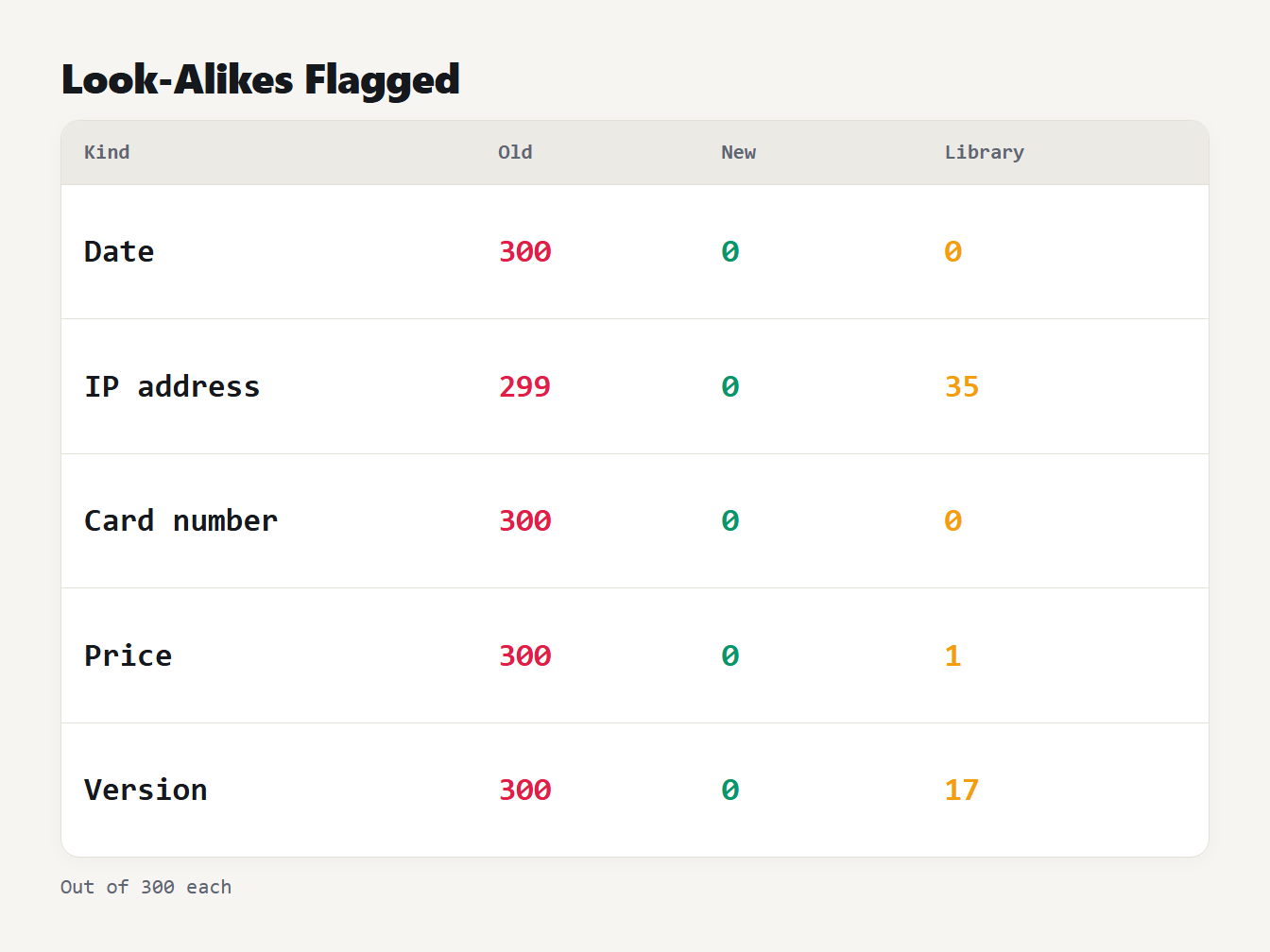
A table of five look-alike kinds and how many of 300 each were returned by the old extractor, the new one and a library. Dates: 300, 0, 0. IP addresses: 299, 0, 35. Cards: 300, 0, 0. Prices: 300, 0, 1. Versions: 300, 0, 17.
How to extract phone numbers from text with a library
A dedicated library, such as the JavaScript libphonenumber-js, checks each candidate against the numbering plan of a country. It reads a national number only for the country you give it, and it skips a number that no plan allows. On our sample sentence Call +44 20 7946 0958 or (555) 123-4567 ..., the library returned the UK number and skipped (555) 123-4567. The 555 code is not an area code in the plan. Our extractor returned both. It also returned some IP addresses and version strings that happened to fit a plan, as the table shows.
import { findPhoneNumbersInText } from "libphonenumber-js";

const text = "Call +44 20 7946 0958 or 020 7946 0958.";
const found = findPhoneNumbersInText(text, "GB");
console.log(found.map((m) => m.number.format("E.164")));
// ["+442079460958", "+442079460958"]
We ran this with the default country set to GB and to US. With GB it read 020 7946 0958 as a UK number, and with US it did not. Use a library when you must validate numbers for a known country. Use an extractor when you need to find every number that is written like one, including test numbers and numbers from many countries, and then check the list.
What it still gets wrong
Some text looks exactly like a phone number. We generated 300 examples of each of four kinds, and the new extractor returned all 300 every time. The kinds were Unix timestamps with 10 digits, 14-digit date and time stamps, plain 11-digit account IDs and amounts written like 12 345 678. Without a plus sign or separators there is nothing to tell them apart. An extension such as ext. 89 is left out, numbers under 7 digits are not found, and a number is never checked against a numbering plan. Treat the output as a list of candidates.
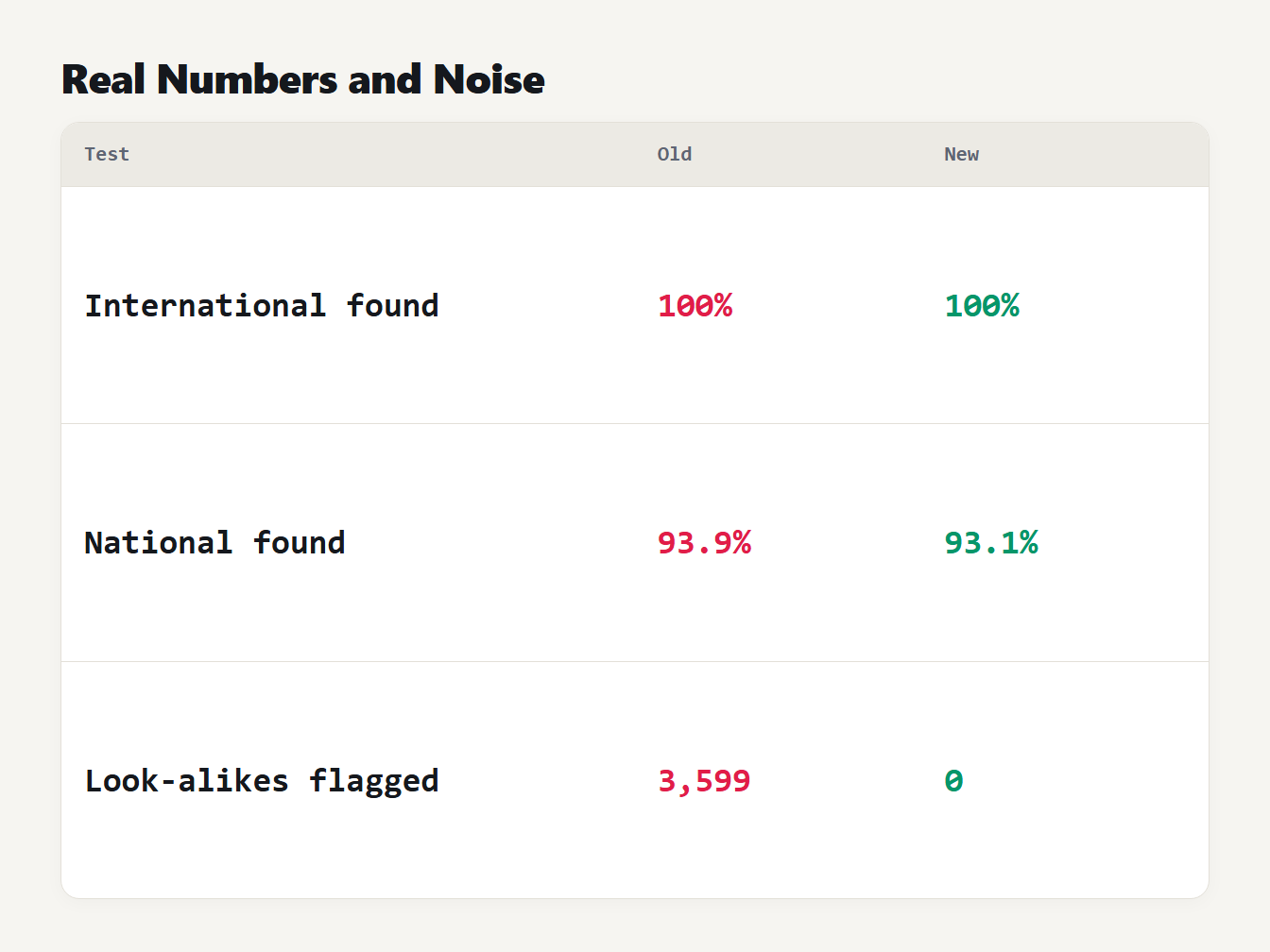
A table of three tests with the old and the new extractor. International formats were found 100 percent of the time by both. National formats were found 93.9 percent by the old and 93.1 percent by the new. Of 3,900 look-alike sentences, the old extractor flagged 3,599 and the new one flagged none.
Frequently asked questions
How do I extract phone numbers from text?
Paste the text into a phone number extractor, which finds runs of 7 to 15 digits that may start with a plus sign and be grouped with spaces, hyphens, dots or brackets. A good one also leaves out dates, IP addresses and IDs that only look like phone numbers. Review the list before you use it.
What regex matches a phone number?
No short regex does it well. A pattern loose enough to match every format also matches dates, IP addresses and card numbers. It is better to find candidates with a pattern and then reject the ones that are dates, IP addresses, IDs or the wrong length.
How many digits can a phone number have?
International numbers in the E.164 plan have at most 15 digits, including the country code. There is no fixed minimum, but most local numbers have at least 7 digits, so 7 to 15 is a practical range for finding numbers in text.
Why does a library find fewer numbers than my extractor?
A library such as libphonenumber checks each number against the numbering plan of a country. A made-up number like (555) 123-4567 is skipped, and a national number is read only for the country you give it. An extractor that matches the shape finds more, including numbers that are not real.
Does it find numbers with an extension?
It finds the number and leaves the extension out, so 555-123-4567 ext. 89 gives 555-123-4567. Extensions are written too many ways to match reliably without checking the number against a plan.
Extract your numbers now
Paste your text into the Phone Number Extractor, choose how to show the list and copy it. It runs entirely in your browser, so your text is never uploaded. To pull email addresses out of the same text, use the Email Extractor, and our guide on how to extract email addresses from text covers that task.