How to Extract Email Addresses from Text: Tool, Regex and Pitfalls
How to extract email addresses from text with a free tool, JavaScript or Python, tested on 20 tricky inputs, plus why a common regex can freeze a page.
By TheTextKit TeamPublished
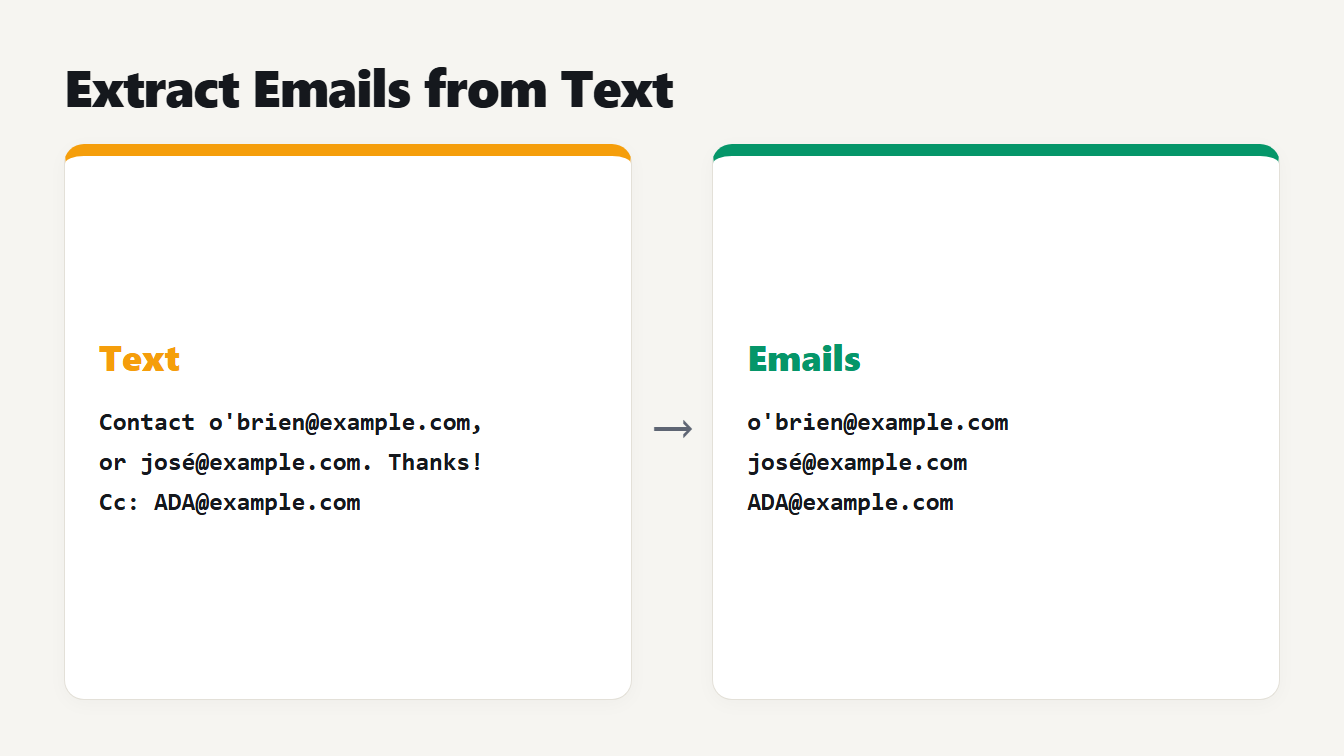
Two cards show the result. The left card holds a few lines of text with addresses inside them. The right card lists the three email addresses found, one per line.
Here is how to extract email addresses from text: paste it into an extractor, let it find every address and remove the repeats, then copy the list. In code you can do the same with a regular expression, as long as you split the text into pieces first. We tested a plain pattern, the classic regex found all over the web and our own extractor on 20 awkward inputs. The classic regex got 15 right and could also freeze a page for seconds on long text. This guide shows what we found and how to avoid it.
How to extract email addresses from text in three steps
- Paste your text. Notes, an exported inbox, a web page, a log file or a spreadsheet column all work.
- Let the tool find the addresses. The Extract Emails tool lists each address once, ignores differences in capital letters and shows how many repeats it removed.
- Copy the list. You get one address per line. To combine lists from several files, paste them together and clean up with the Remove Duplicate Lines tool and the Sort Lines tool.
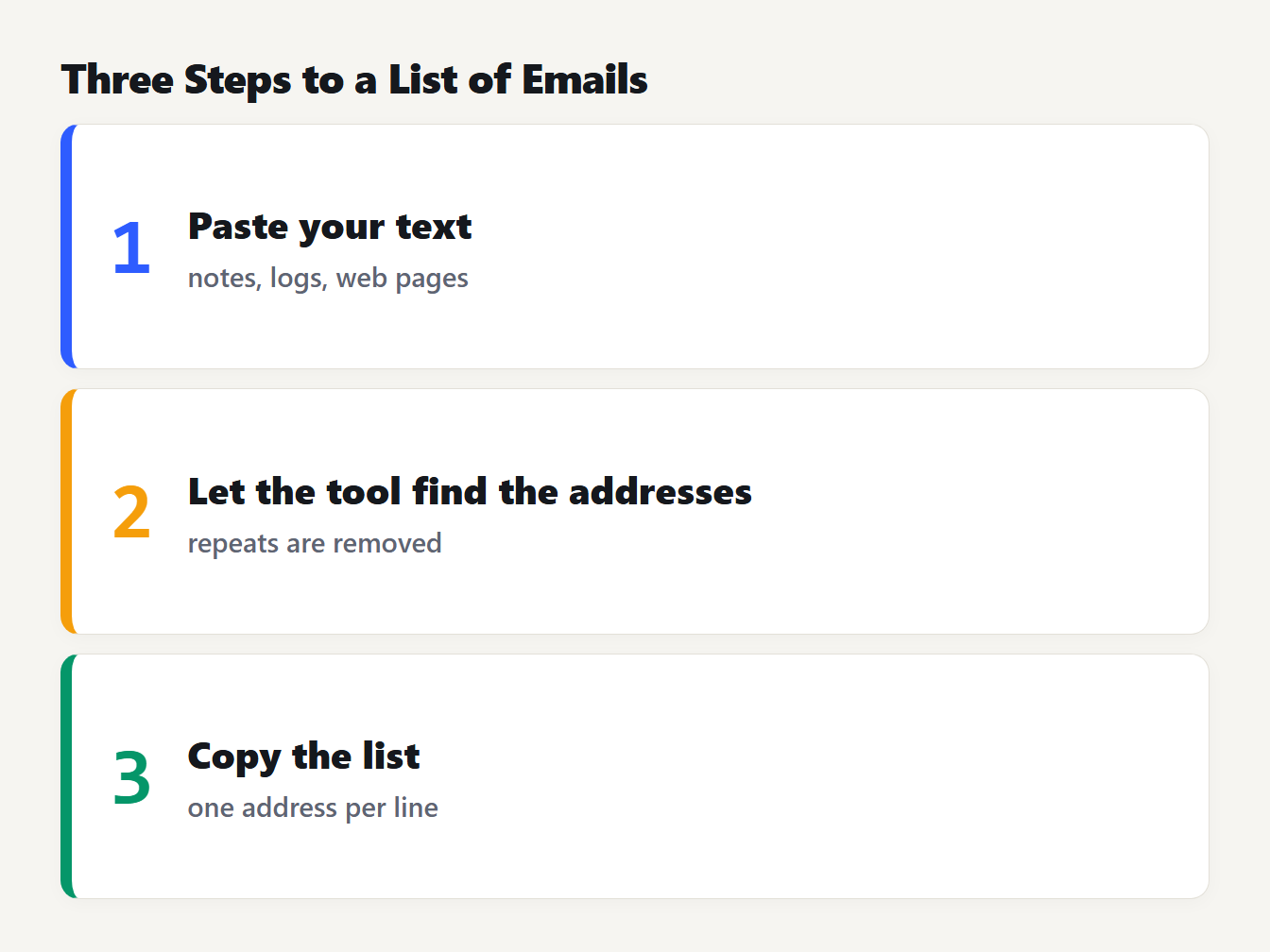
Three numbered cards: 1 paste your text, 2 let the tool find the addresses and remove repeats, 3 copy the list with one address per line.
Everything runs in your browser, so the text isn't uploaded anywhere.
What counts as an email address
The rules are looser than most people expect. RFC 5322 allows letters, digits and these characters in the plain, unquoted part before the @: ! # $ % & ' * + - / = ? ^ _ { | } ~. Dots are allowed between groups of those characters, but not at the start, at the end or twice in a row. That meanso'brien@example.comis a valid address, and so isa/b=c@example.com`.
The size limits come from RFC 5321: 64 octets for the part before the @, 255 for the domain and 256 for the whole path. RFC 5322 is so complex that the HTML Standard gives its own, simpler pattern for input type="email". It calls that pattern a "willful violation of RFC 5322", because the full syntax is too strict before the @, too vague after it and too lax in other ways.
For finding addresses in text, a practical rule beats the full standard. If you allow every character RFC 5322 allows, you start to pull in junk. A link such as ?email=ada@example.com&x=1 contains an = in front of the address, so a pattern that accepts = returns email=ada@example.com. Our extractor allows letters, digits and the characters . _ % + ' - before the @, and it checks that the domain has a dot and a top-level domain of two or more letters.
We tested three methods on 20 tricky inputs
We wrote 20 inputs with a known right answer, then ran three methods on each. The inputs include punctuation around an address, two addresses with no space between them, an apostrophe, an ellipsis, a query string, an accented name and a punycode domain. One has Chinese text next to an address. Several should not match at all, such as ada@localhost and ada@@example.com.
| Method | Right answers out of 20 |
|---|---|
Anything, then @, then anything (\S+@\S+) | 6 |
| The classic regex | 15 |
| The classic regex on words, with an apostrophe (the code below) | 16 |
| Our extractor | 20 |
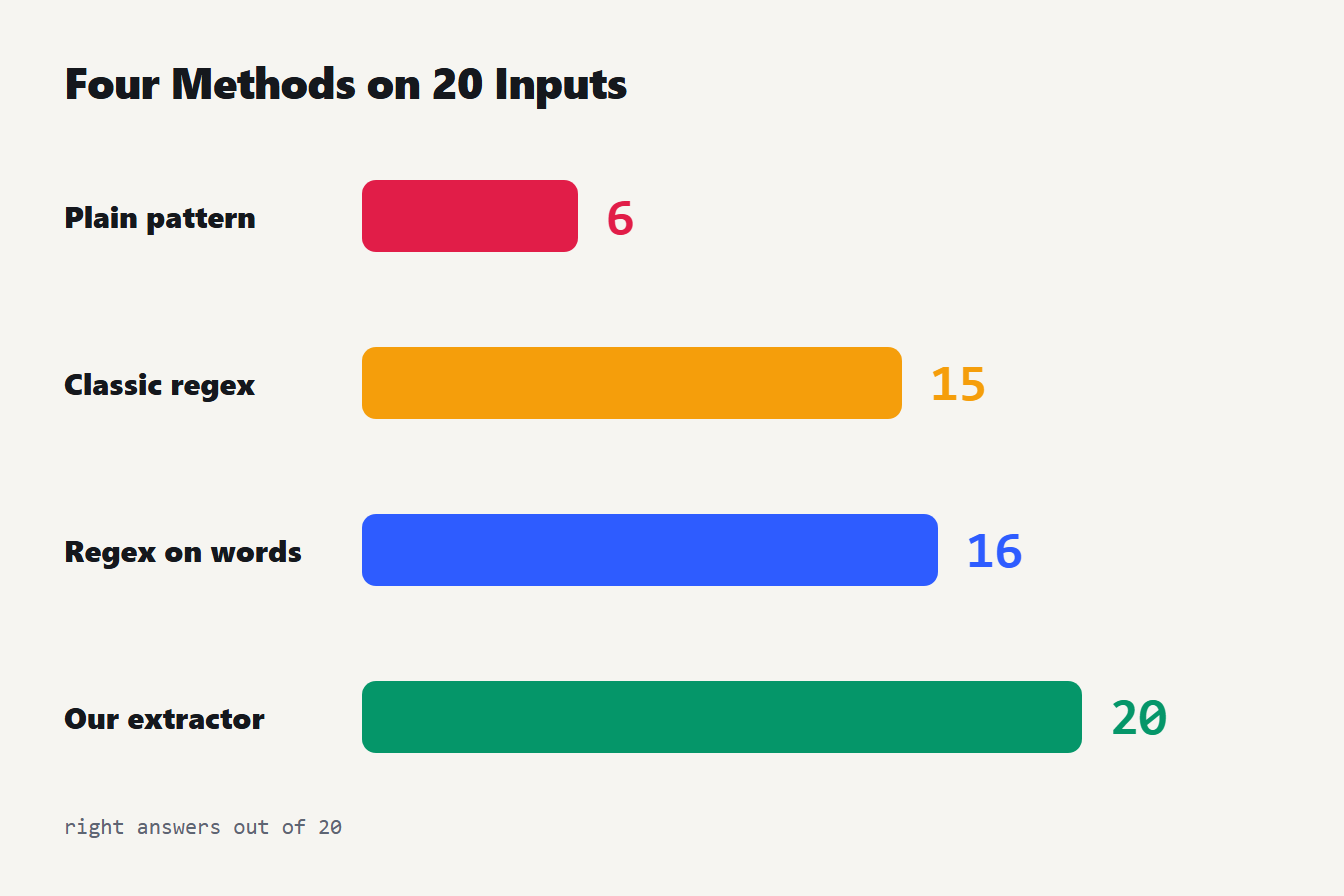
Four bars show how many of 20 tricky inputs each method handled correctly. The plain pattern got 6, the classic regex 15, the regex applied to words 16, and our extractor 20.
A word about that last row. Our extractor passes all 20, but we built the test after finding its flaws, so it includes those cases. Read it as proof that the fixes work, not as proof that it's perfect.
The plain \S+@\S+ fails because it takes everything around the address: the full stop, the brackets, the comma and the Chinese words. The classic pattern, [a-zA-Z0-9._%+\-]+@[a-zA-Z0-9.\-]+\.[a-zA-Z]{2,}, fails on five inputs:
o'brien@example.combecomesbrien@example.com, a different and wrong address.Hi...ada@example.comkeeps theHi....josé@example.comisn't found at all.ada@example.xn--p1aiis cut toada@example.xn.ada@example..com, which is invalid, is returned anyway.
The first and fourth failures are the worst, because the output looks right and isn't.
Why a common email regex can freeze a page
That pattern has a second problem that no test of correctness shows. Start it on a long run of letters with no @ and it tries every starting position, and from each one it reads to the end of the run before it gives up. The time grows with the square of the length. We measured a run of letters in Node:
| Characters | Classic regex | Our extractor |
|---|---|---|
| 50,000 | about 4 seconds | 0.1 ms |
| 100,000 | about 15 seconds | 0.1 ms |
| 200,000 | about 67 seconds | 0.1 ms |
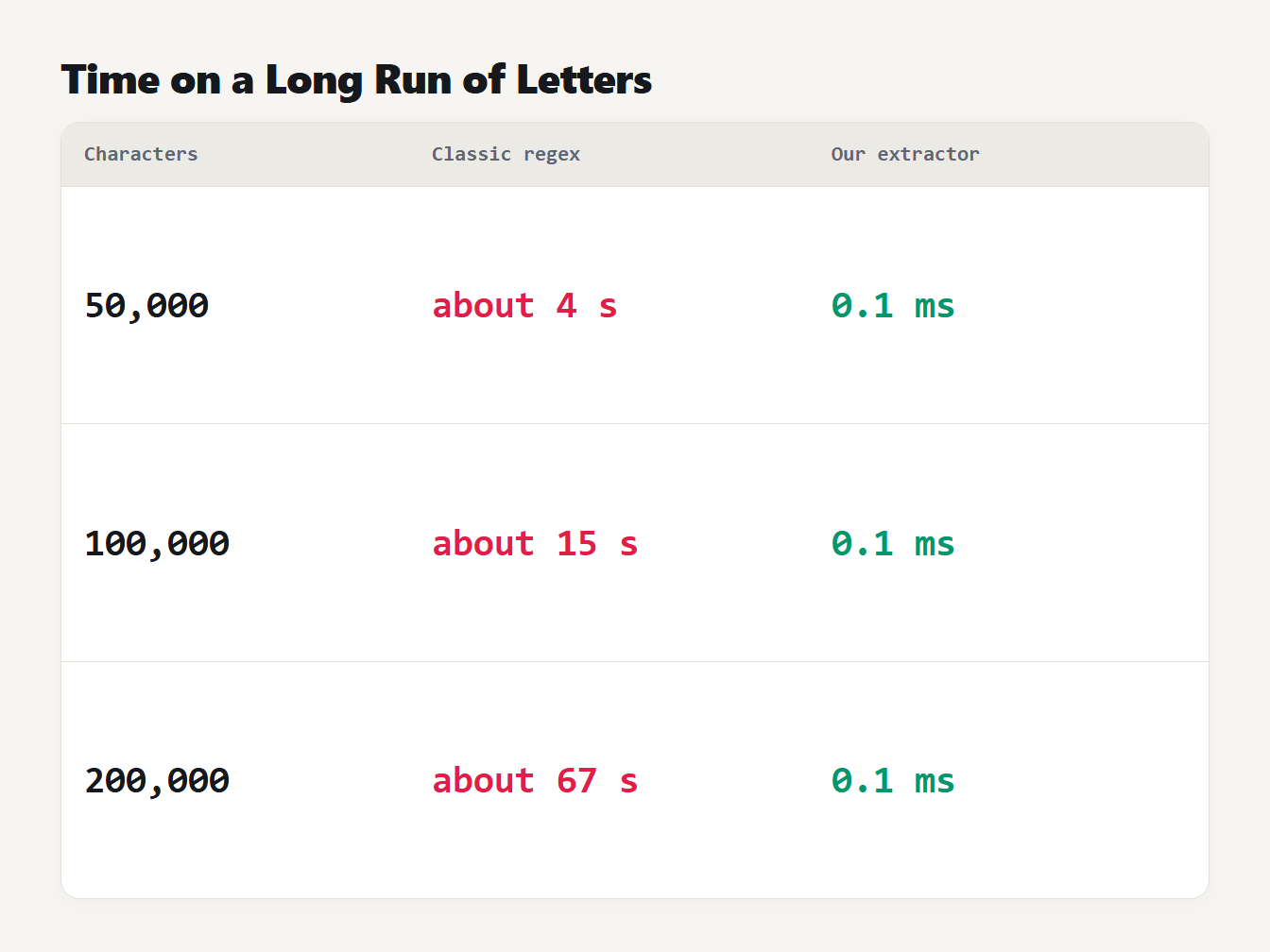
A table of search times on a run of letters with no at sign. At 50,000 characters the classic regex takes about 4 seconds and our extractor 0.1 milliseconds. At 100,000, about 15 seconds. At 200,000, about 67 seconds.
Python's re module has the same problem. On 40,000 letters it took 4.0 seconds. A pasted base64 block, a minified file or a long log line is enough to trigger it, and in a web tool the pattern reruns on every keystroke. Our own tool had exactly this flaw until we found it while writing this guide. It now scans for each @ and reads outward from it, which takes time proportional to the length: 1,000,000 letters took under a millisecond.
How to extract email addresses from text in code
The simplest fix is to split the text into words first, so no single piece is long, and to skip anything too long to be an address. Here it is in JavaScript:
function extractEmails(text) {
  const rx = /[A-Za-z0-9._%+'-]+@[A-Za-z0-9.-]+\.[A-Za-z]{2,}/g
  const found = []
  for (const token of text.split(/[\s,;<>()"]+/)) {
    if (token.length > 300) continue // an address path is at most 256 characters
    found.push(...(token.match(rx) ?? []))
  }
  return [...new Set(found.map((e) => e.toLowerCase()))]
}
And in Python:
import re

rx = re.compile(r"[A-Za-z0-9._%+'-]+@[A-Za-z0-9.-]+\.[A-Za-z]{2,}")

def extract_emails(text):
    found = []
    for token in re.split(r"[\s,;<>()\"]+", text):
        if len(token) <= 300:
            found += rx.findall(token)
    return sorted({e.lower() for e in found})
We ran both on the 20 inputs. Each got 16 right. They keep the apostrophe and handle brackets and commas, and they miss the same four cases: the ellipsis, the accented name, the punycode domain and the double dot. They also stay fast. On 100,000 letters the JavaScript version took 0.1 ms and the Python version 4.9 ms. They lowercase everything, so use the original spelling if case matters to you.
What extractors can't find
An extractor looks for a pattern, so some addresses are out of reach:
![What email extractors miss: ada [at] example [dot] com, ada%40example.com, ada@localhost and non-Latin letters](/_next/image?url=%2Fblog%2Fhow-to-extract-email-addresses-from-text%2Femail-extractor-misses-obfuscated-encoded-localhost.webp&w=3840&q=75 "What extractors miss")
A table of four kinds of address an extractor misses. Written with at and dot in brackets: not an address pattern. URL-encoded with percent 40: decode it first. At localhost: no dot in the domain. Non-Latin letters: not matched.
- Hidden on purpose, as in
ada [at] example [dot] com. There's no @ to find, and turning the words back into symbols is a guess. - URL-encoded, as in
ada%40example.com. Decode the text first with the URL Encoder and Decoder. Our guide to URL encoding explains the codes. - No dot in the domain, such as
ada@localhost. These are valid inside a network and useless for mailing lists, so extractors skip them. - Letters from other scripts. Our extractor reads accented Latin letters, but a name written in Chinese, Cyrillic or Arabic isn't matched.
A match also isn't proof that the mailbox exists. A pattern only checks the shape.
Use extracted addresses responsibly
Finding an address in a document doesn't give you permission to write to it. The people who own those addresses didn't agree to hear from you, and the rules on unsolicited email differ by country. Use extracted lists for something the owners would expect, such as cleaning your own contact list, and check the rules that apply where you and your recipients are. If you also need the links in the same text, the Extract URLs tool finds them.
Frequently asked questions
How do I extract email addresses from text?
Paste the text into an email extractor, which finds every address and removes repeats, then copy the list. In code, run a regular expression over the text, but split it into pieces first so a very long word can't make the regex slow.
What is the best regex to find email addresses?
There is no perfect one. The full standard is too complex, and the HTML Standard calls it a willful violation to simplify it. A practical pattern is letters, digits and . _ % + ' - before the @, then a domain, a dot and a top-level domain of two or more letters.
Why did my email regex freeze the page?
A pattern that starts with a repeated character class, such as [a-z0-9.]+@, is quadratic on a long run of letters with no @. In our test, 50,000 letters took about 4 seconds and 100,000 took about 15. Split the text into words first, or use a loop.
Can I extract emails written as ada [at] example [dot] com?
Not with an address pattern, because the text has no @. You would first need to replace the [at] and [dot] words with @ and a period, and that is a guess about what the writer meant. An address written as ada%40example.com needs URL decoding first.
Is it okay to email everyone I extract?
Not automatically. Finding an address in a document doesn't give you permission to write to it, and laws about unsolicited email differ by country. Use extracted addresses only for a purpose the owners would expect.
Extract your emails now
Paste your text into the Extract Emails tool, check the count, and copy the list. Now that you know how to extract email addresses from text, you also know which cases to double-check by eye: apostrophes, accents and anything written in a hidden form.