Heading Tags (H1 to H6): How to Structure Them and What Google Says
How to use H1 to H6 heading tags: what Google and the W3C actually say about one H1 and skipped levels, plus how to check a page's headings.
By TheTextKit TeamPublished
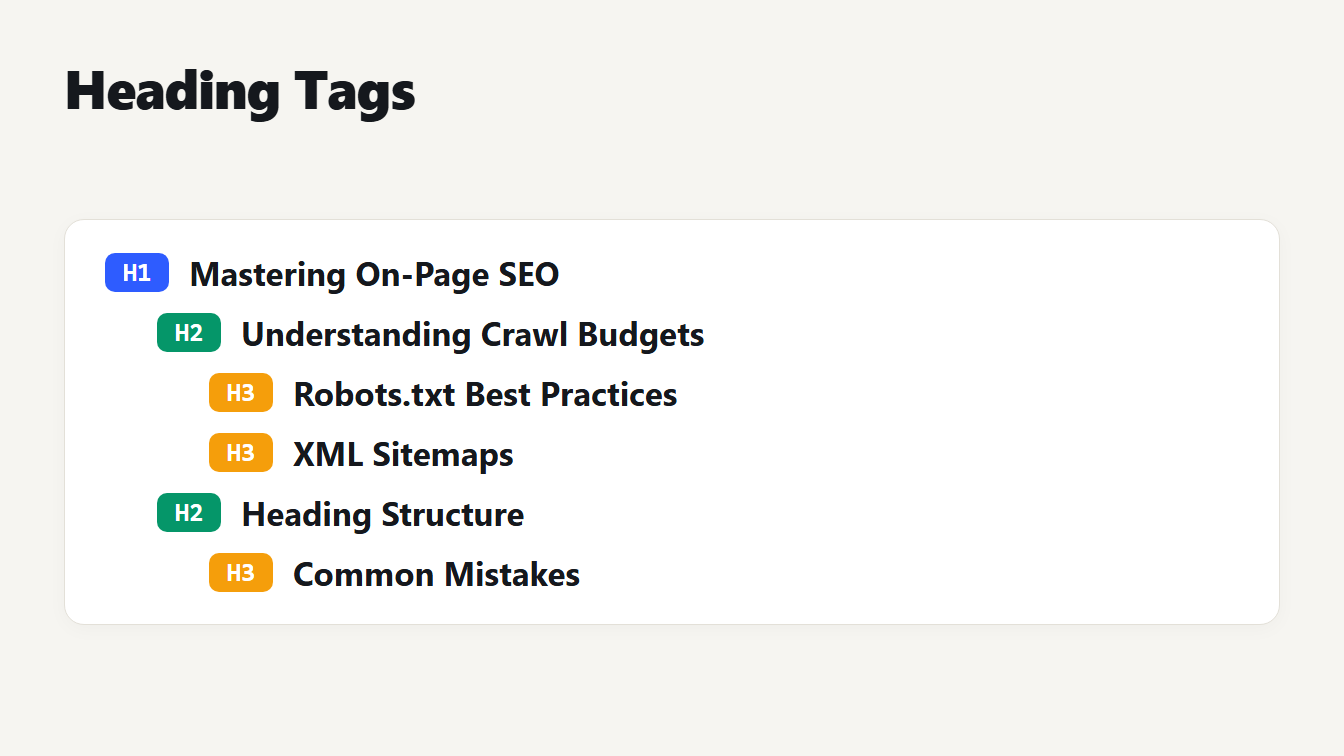
An indented outline of a page. The H1 is at the top, followed by an H2, two H3 headings under it, a second H2 and one more H3. Each line has a colored badge that shows its level.
Heading tags give a page an outline: the H1 names the page and the H2 to H6 tags mark sections and subsections inside it. Search engines read them and so do people who use screen readers, but the advice about them online has hardened into rules that nobody at Google or the W3C actually wrote. This guide goes back to the sources, shows how readers use headings, and explains a bug we found in our own heading checker when we tested it on broken HTML.
What heading tags are
HTML has six levels, from H1 to H6, and the level shows rank. The H1 is the most important, and a lower number is a bigger section. A simple page has one H1, a few H2 sections and some H3 subsections:
<h1>Mastering On-Page SEO</h1>
  <h2>Understanding Crawl Budgets</h2>
    <h3>Robots.txt Best Practices</h3>
    <h3>XML Sitemaps</h3>
  <h2>Heading Structure</h2>
    <h3>Common Mistakes</h3>
Read from top to bottom, the headings form a table of contents. The Heading Tag Analyzer shows this outline for any HTML or Markdown you paste in.
A heading is not the same thing as the title tag. The title tag sits in the browser tab and is the usual first line of a search result, while the H1 appears on the page itself. They are often close in wording but they do not have to match. Our guide to meta description length covers the other piece of text that appears in a search result.
What Google and the W3C say
Two sources are worth reading, and they say different things because they care about different readers.
Google. The SEO Starter Guide says that, for Search, it does not matter if headings are used out of order. It adds that there is no ideal number of headings on a page. It does not mention a limit on H1 headings. Google's John Mueller has also said that several H1 headings are fine, as the Search Engine Land report of his office hours puts it.
The W3C. Its accessibility tutorial on headings says to nest headings by rank, with the H1 as the most important and the H6 as the least. It says that skipping ranks can be confusing and should be avoided where possible, for example an H2 followed directly by an H4, and it allows skipping when you close a subsection.
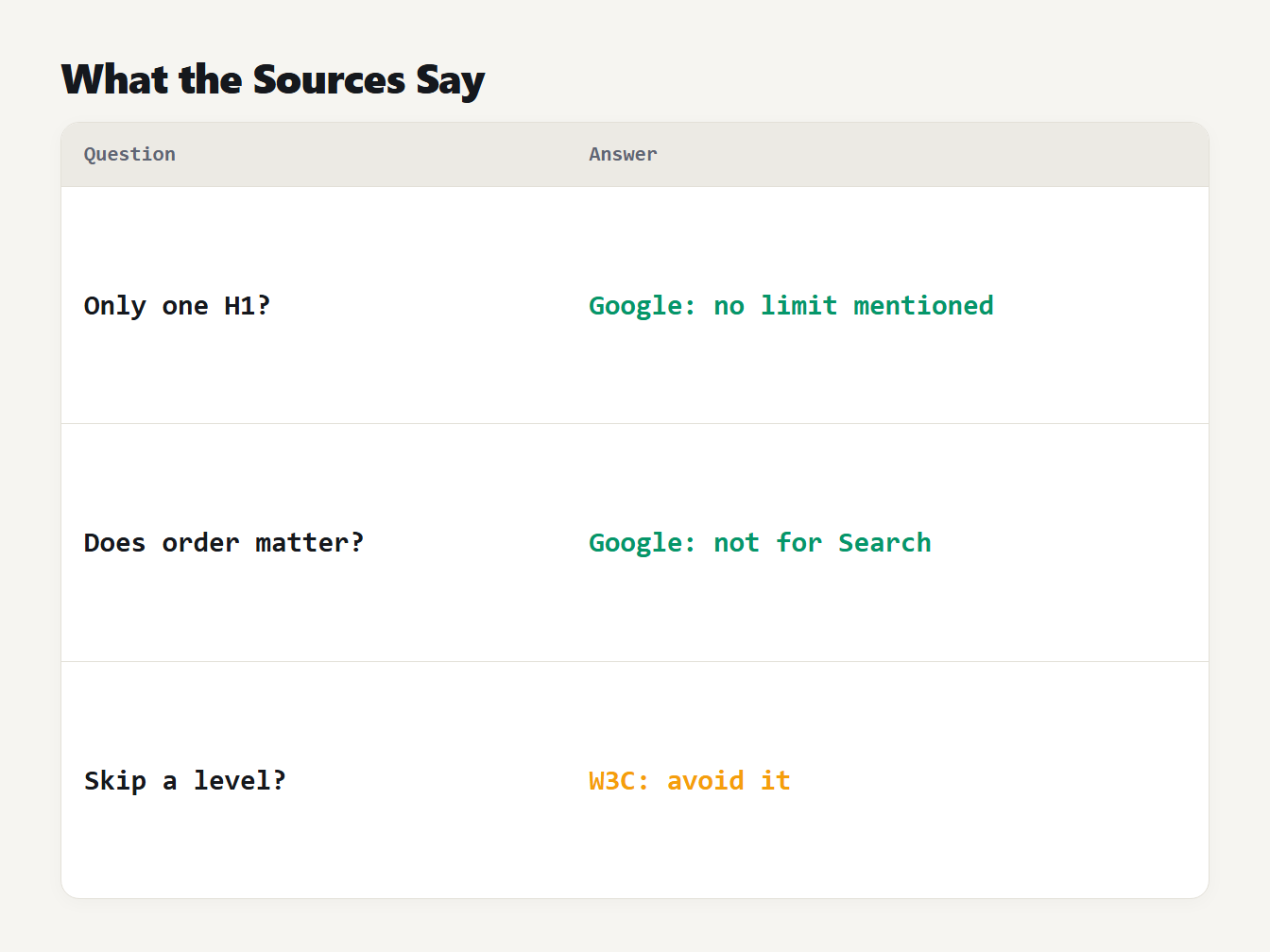
A table of three questions and the source that answers each. Google mentions no limit on H1 headings. Google says heading order does not matter for Search. The W3C advises avoiding skipped heading levels.
The practical reading is simple. Heading order will not change how Google ranks the page, but it does change how people move through it. That is the reason to follow it.
Why readers care about headings
The WebAIM screen reader survey asks how people find information on a long page. In its July and August 2026 results, 67.8% of respondents said they navigate through the headings first. The 2024 survey gave 71.6%, which was 1,082 of 1,512 respondents. No other method came close in 2024: using the Find feature was next at 13.6%.
For these readers the outline is the page. A missing heading hides a section, a heading used only for styling adds a false entry, and a skipped level makes the structure unclear. This is why the outline matters even when Search does not measure it.
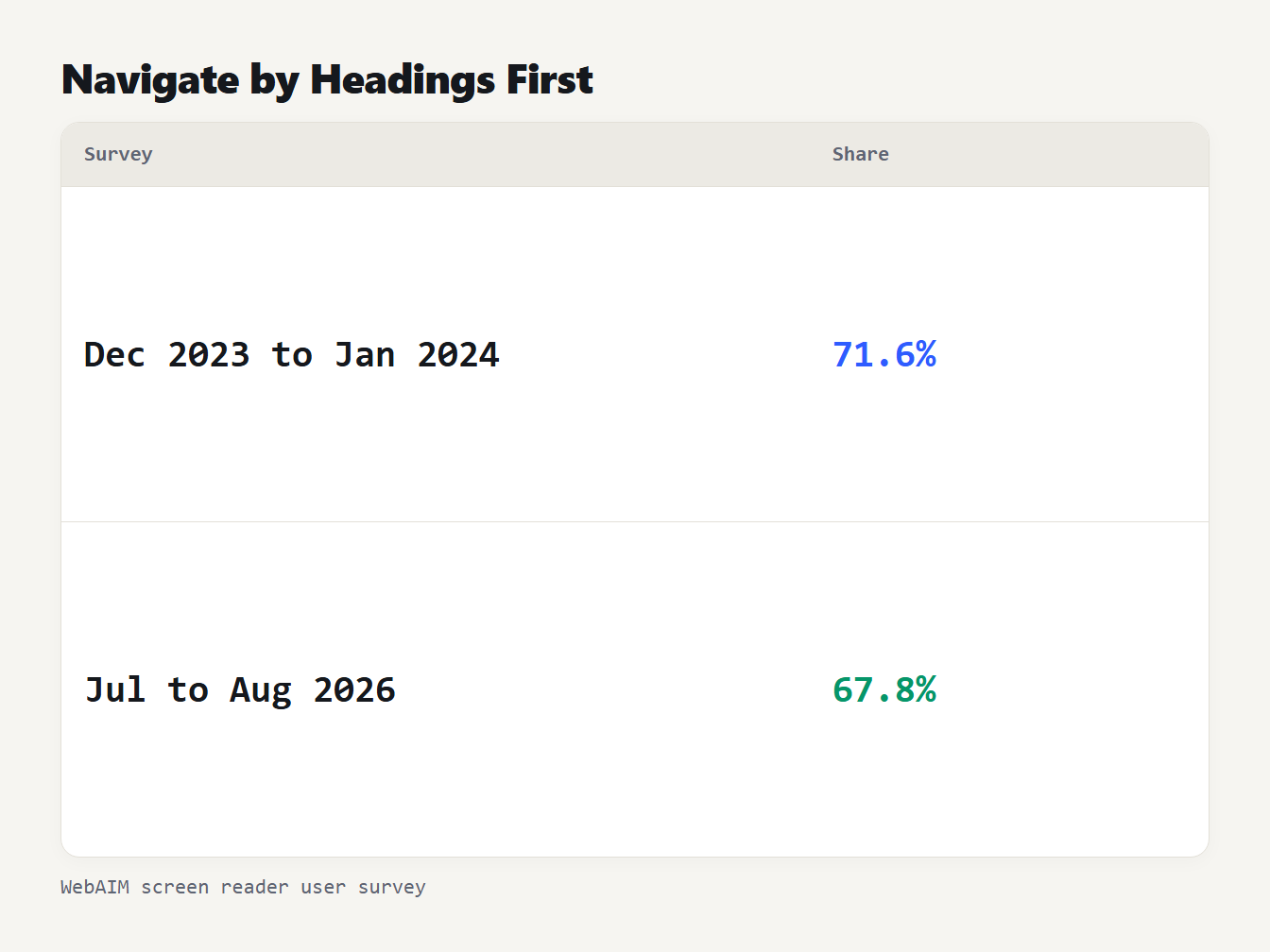
A table of two WebAIM screen reader surveys. In the December 2023 to January 2024 survey, 71.6 percent of respondents navigated through the headings first. In the July to August 2026 survey, 67.8 percent did.
Rules that matter
- Nest by rank. An H3 belongs under an H2, and an H2 under the H1.
- Do not skip levels on the way down. Go from H2 to H3, not from H2 to H4. Going back up, from an H4 to an H2, is fine.
- Give every heading text. An empty heading adds an entry with nothing in it. Check icons and template pieces that print an empty tag.
- Use CSS for looks. Make text bigger with a class, and keep heading tags for structure.
- Write headings that describe the section. A reader who scans only the headings should learn what the page covers.
- Treat one H1 as a convention. It is a sensible default, not a requirement of Search.
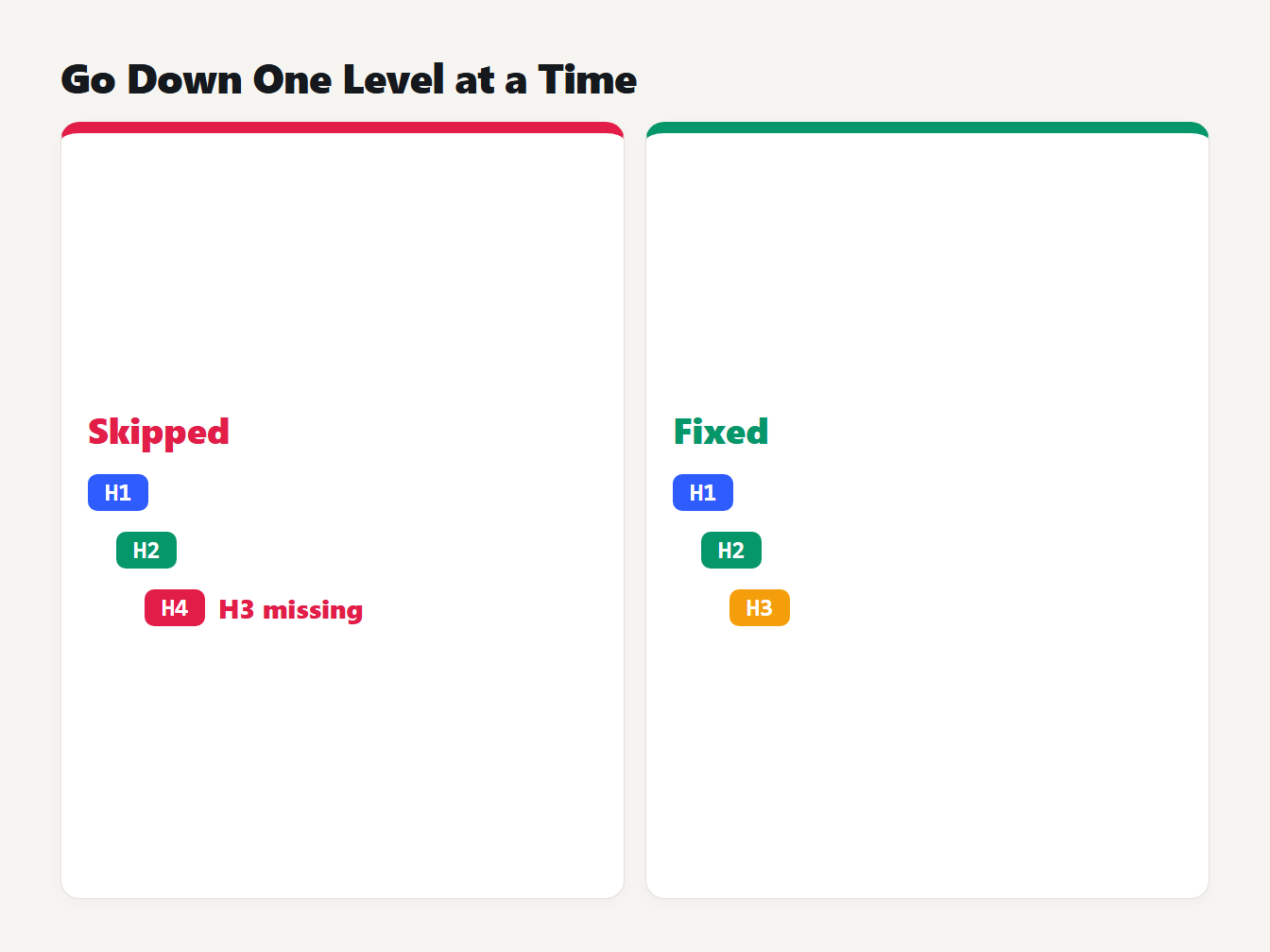
Two outlines side by side. The left one goes from an H1 to an H2 and then to an H4, which skips the H3 level. The right one goes from an H1 to an H2 and then to an H3, which keeps the levels in order.
Why a simple check gets headings wrong
When we tested our own heading checker on broken HTML, it failed in several ways. It used one regular expression to find tags. We ran the old extractor and the new one on ten small cases. We also compared the HTML cases with Chromium's own parser. Here are six of them:
| Input | Old checker | New checker and Chromium |
|---|---|---|
| A heading inside an HTML comment | Counted it, 2 headings | Ignores it, 1 heading |
| A heading inside a script | Counted it, 2 headings | Ignores it, 1 heading |
Tom & Jerry | Showed Tom & Jerry | Shows Tom & Jerry |
An h2 closed by </h3> | Found no heading | Finds the heading |
| A bash comment in a Markdown code block | Counted it as an H1 | Skips code blocks |
A setext heading, Title over ===== | Found no heading | Finds an H1 |
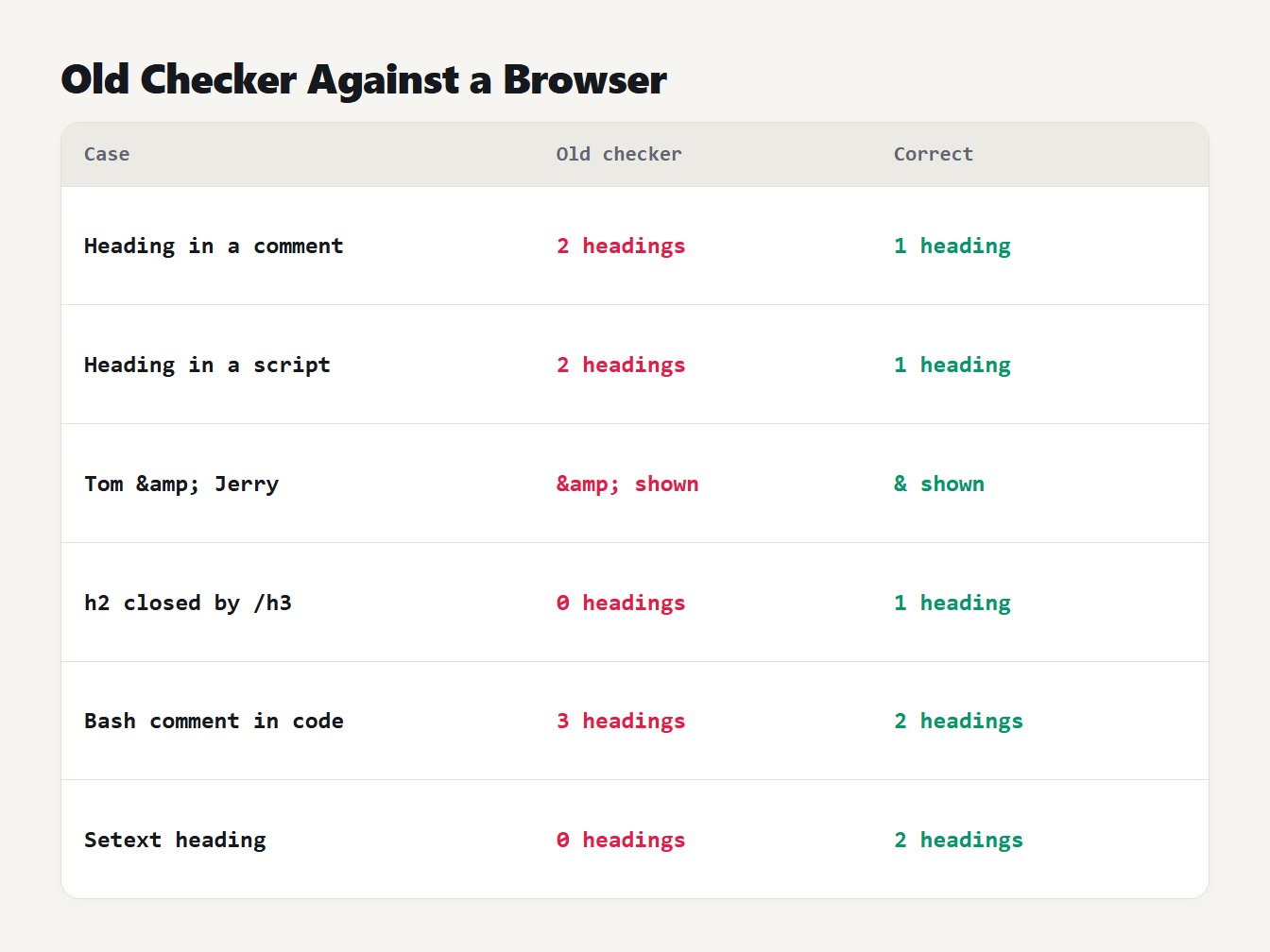
A table of six cases and what the old checker did. A heading in a comment was counted. A heading in a script was counted. An entity was shown as text. A mismatched end tag found no heading. A bash comment in a code block was counted. A setext heading was not found.
The new extractor keeps a stack of open elements, the way a browser does. We checked it against Chromium on 4,000 random broken documents, and it matched on all but 4 of them. On the server HTML of 9 pages of this site, all 340 headings matched the live page. For Markdown we compared it with the CommonMark parser used by remark on all 723 headings in the 47 articles we had at the time, with no differences. One difference is on purpose: the checker uses the alt text of an image inside a heading, because that is the name a screen reader reads.
Writing heading text
A heading should tell a reader what the section answers, in the words they would use. Compare these pairs:
| Weak heading | Better heading |
|---|---|
| Introduction | What a diff checker does |
| More information | Which browsers support the feature |
| Tips | Five ways to find repeated words |
| Step 3 | Press Compare and read the line numbers |
| Our approach | How the tool counts words in other alphabets |
The better versions still make sense in a list of headings on their own, which is how a screen reader user meets them. They also contain the words a visitor typed into a search box, without repeating them for effect.
How to check a page
- Open the Heading Tag Analyzer.
- Paste the HTML, or the Markdown of your article.
- Read the outline and the count at each level.
- Fix empty headings and skipped levels. These are the problems a reader can notice.
- Treat a missing or repeated H1 as a note and decide if it is what you meant.
Most blog systems print the post title as the H1, so the body of an article starts at H2. If you paste only the body, the analyzer notes that no H1 was found. That is expected, and it does not mean the live page lacks one. We ran the analyzer on those same 47 articles. Their 723 headings are 446 H2 and 277 H3, with no skipped level and no empty heading. For the keywords in your headings, our guide to keyword density explains why a count is not a target.
Frequently asked questions
Should a page have only one H1?
It does not have to. Google has said that several H1 headings are not a problem for Search, and its SEO Starter Guide does not mention a limit. Accessibility guidance treats the H1 as the main heading, so most pages use one. Use more only when there is a reason.
Does the order of headings matter for SEO?
Google's SEO Starter Guide says that from the Search perspective it does not matter if headings are out of order, and that there is no ideal number of headings. Order still matters to readers, because people who use screen readers navigate by heading level.
Is it bad to skip a heading level?
It is not a ranking problem, but the W3C advises against it. A heading such as an H4 straight after an H2 can confuse people who move through a page by headings. Skipping levels when you close a subsection is acceptable.
Can I use heading tags to make text bigger?
No. Use CSS for size and style, and keep heading tags for the structure of the page. A heading used only for looks adds a false entry to the outline that screen reader users will find.
How do I check the headings of a page?
Paste the HTML or Markdown into a heading analyzer to see the outline, the count at each level, any empty headings and any skipped levels. A browser extension or the browser's accessibility tree shows the same for a live page.
Check your headings now
Paste your page into the Heading Tag Analyzer and read the outline from top to bottom. If it reads like a clear table of contents, the structure is doing its job.