How to Make a Hyperlink: HTML, Markdown, Word, Docs and Email
How to make a hyperlink in HTML, Markdown, Word, Google Docs and email, with copy-ready code, link text that works and the mistakes that break links.
By TheTextKit TeamPublished
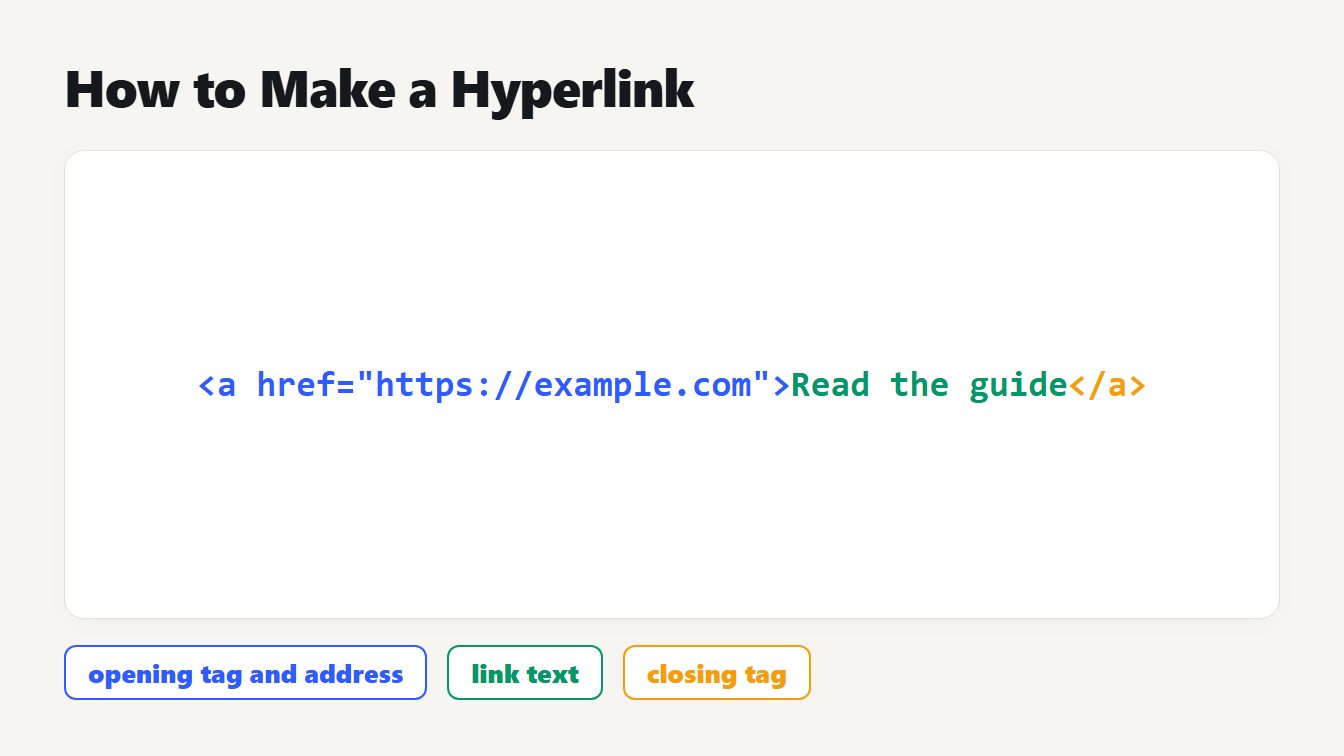
The anchor code with the address https://example.com, the link text Read the guide and the closing tag, with the three parts labeled: opening tag and address, link text, closing tag.
To make a hyperlink in HTML, wrap the link text in an anchor element: <a href="https://example.com">Link text</a>. In Markdown, write the text in square brackets and the address in round brackets. In Word, select the text and choose Insert, then Link. In Google Docs, press Ctrl+K. This guide shows how to make a hyperlink in each of those places, how to build email and new-tab links, and which small mistakes break a link without any warning.
How to make a hyperlink in HTML
An HTML hyperlink is an a element with an href attribute. According to MDN's reference for the anchor element, it can point to a web page, a file, an email address, a spot on the same page, or anything else a URL can address. The three parts are always the same:
| Part | Example | What it does |
|---|---|---|
| Opening tag with address | <a href="https://example.com/pricing"> | Holds the destination |
| Link text | Read the guide | What the reader clicks |
| Closing tag | </a> | Ends the link |
Put together, you get <a href="https://example.com/pricing">Read the guide</a>.
Write the full address with https:// for any other site. A link written as href="example.com" is read as a relative path. We checked it with the browser's own URL parser: on a page at /blog/x, that link resolves to /blog/example.com, not to example.com.
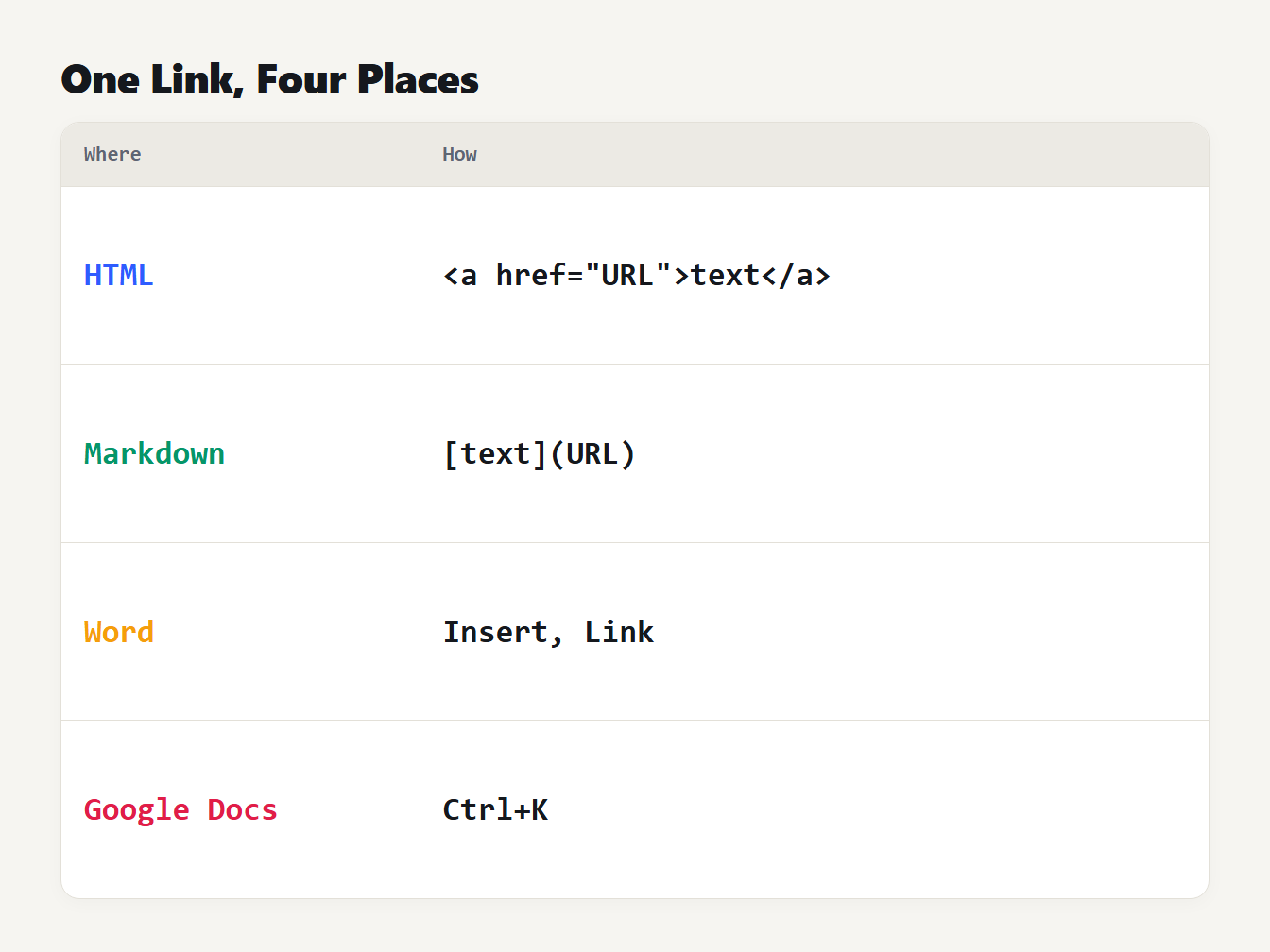
A table with four rows. HTML uses an a tag with an href attribute. Markdown uses square brackets then round brackets. Word uses Insert, then Link. Google Docs uses Ctrl+K.
How to open a link in a new tab
Links open in the current tab by default. Add target="_blank" to open a new one, which MDN says is usually a new tab, though readers can set their browser to use a new window. MDN also notes that target="_blank" now gives the same protection as rel="noopener", so you no longer need to add it for safety.
The better habit is to tell people. MDN advises that links opening a new tab or window should say so, for example "Wikipedia (opens in new tab)". Screen reader users and people with cognitive difficulties can be confused when a new tab appears without warning.
Links to files, phone numbers and email
The href accepts more than web addresses. MDN lists tel: for phone numbers, mailto: for email and sms: for text messages. The download attribute tells the browser to save the file instead of opening it, and you can suggest a file name by giving it a value.
How to make a hyperlink in Markdown
Markdown uses a shorter form. The CommonMark specification defines an inline link as the text in square brackets, then the destination in round brackets, with an optional title in double quotes, single quotes or parentheses. If the destination contains spaces, wrap it in angle brackets.
We ran these through our Markdown to HTML Converter to see the exact output:
| Markdown | HTML result |
|---|---|
[Kit](https://thetextkit.com "Free text tools") | <a href="https://thetextkit.com" title="Free text tools">Kit</a> |
<https://example.org> | <a href="https://example.org">https://example.org</a> |
[docs](https://example.com/a?x=1&y=2) | <a href="https://example.com/a?x=1&y=2">docs</a> |
[page](https://example.com/my_page_name) | <a href="https://example.com/my_page_name">page</a> |
The third row shows the ampersand turned into &, which is correct inside HTML. The fourth shows underscores inside a URL left alone. Going the other way, the HTML to Markdown Converter keeps the address and the title and turns spaces in an address into %20.
How to make a hyperlink in Word, Outlook and Google Docs
In Word and Outlook, select the text or picture you want to link. On the Insert tab choose Link, or right-click and choose Link. In the Insert Hyperlink box, type the address in the Address field and change the Text to display if you want different wording. Typing a web address and pressing Enter or the space bar also creates the link for you. To change it later, right-click it and choose Edit Hyperlink.
For an email link, pick E-mail Address under Link to, enter the address, and type a subject if you want one.
In Google Docs, select the text and choose Insert, then Link, or press Ctrl+K (Cmd+K on a Mac). Enter the address or search for a page, then click Apply. Click Change to edit the link later or Remove to delete it.
How to make an email hyperlink with mailto
An email link is an ordinary link whose address starts with mailto:. RFC 6068 defines it: after the address comes a question mark, then fields such as subject and body, joined by ampersands. Spaces should be written as %20 and line breaks must be written as %0D%0A.
Characters that have a job in a URL need the same care. We encoded the subject "Order #42 & returns" with our URL Encoder and got Order%20%2342%20%26%20returns. The # became %23 and the & became %26. Left raw, the # would cut the address short and the & would start a new field. The finished link reads:
mailto:support@example.com?subject=Order%20%2342%20%26%20returns&body=Hello%2C%0D%0AMy%20order%20is%20late.
In an HTML file, write the ampersand between the two fields as &. Our HTML Entity Encoder does this for a whole snippet: it turned ?q=cats&sort=new into ?q=cats&sort=new.
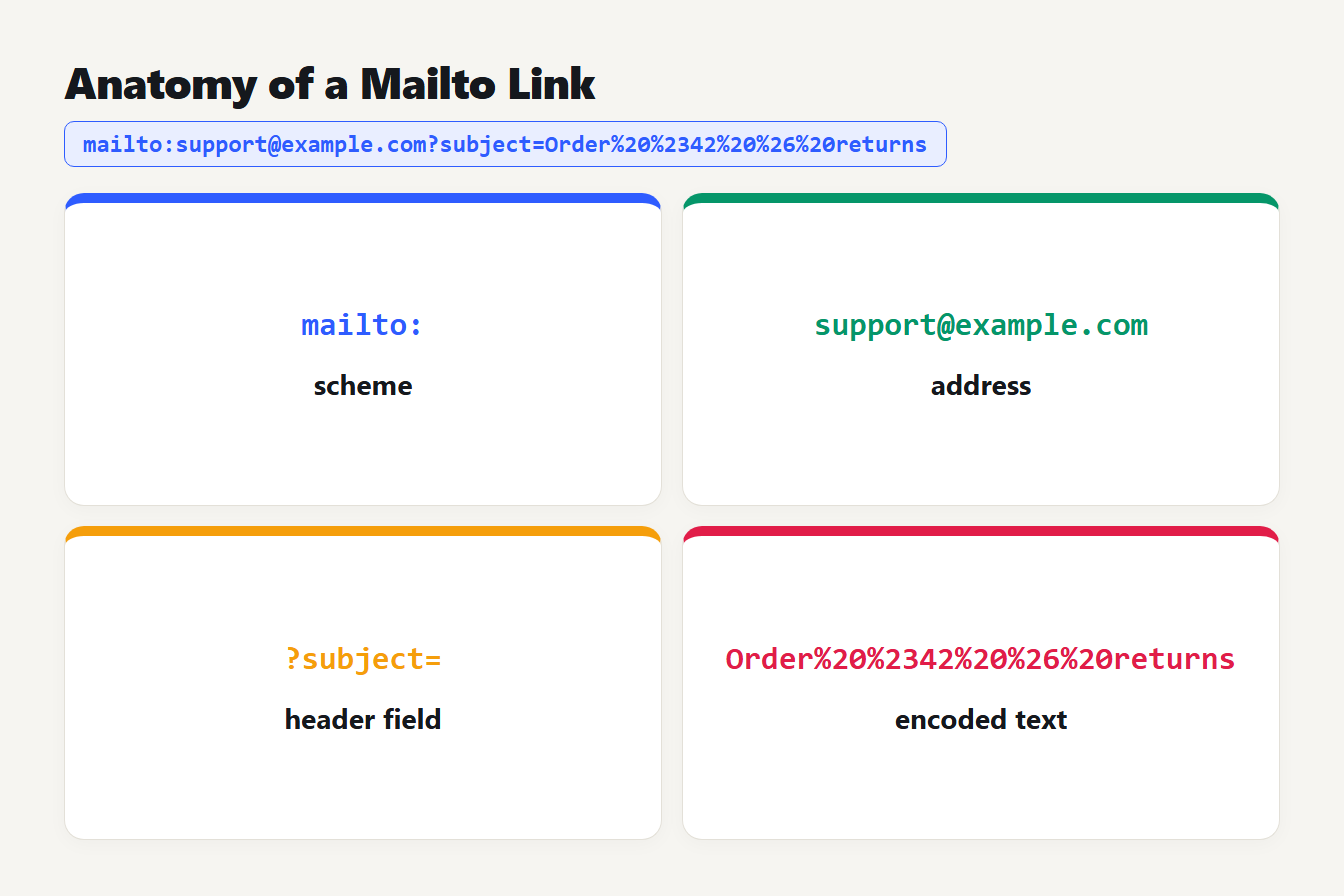
Four cards break down mailto:support@example.com?subject=Order%20%2342%20%26%20returns into the scheme mailto:, the address support@example.com, the header field ?subject= and the encoded text Order%20%2342%20%26%20returns.
Hyperlink generator and hyperlink maker: what they do
A hyperlink generator, also called a hyperlink maker, is a fill-in-the-blanks form. You enter the address and the link text, and it writes the code from the templates above. Our Hyperlink Generator gives you the HTML, Markdown and BBCode at once, builds mailto links with the subject and message encoded, and turns a list of addresses into one link per line. It adds https:// when the address has none, writes spaces as %20, escapes the ampersand in the HTML and warns about link text such as "click here".
Even so, look at the output once. Does the address start with https://? Is any & written as & in HTML? Are spaces encoded? Our URL Parser splits a long address into its parts and decodes each query value, which makes a bad link easier to spot. For campaign links, the UTM Link Builder adds the tracking parameters, and our UTM naming guide explains what to put in them.
Write link text that works
The words inside the link matter as much as the address. MDN says the content of a link should show where it goes, even when read out of context, and warns against linking only "click here" or "here". Google's guide to crawlable links says the same: good anchor text is descriptive, reasonably concise and relevant, and generic text such as "Read more" or "Website" tells people and search engines nothing.
A quick test from Google's page: read only the anchor text and check that it makes sense by itself.
| Weak link text | Better link text |
|---|---|
| Click here | Download the price list (PDF) |
| Read more | Read about UTM naming |
| Website | Open the Example pricing page |
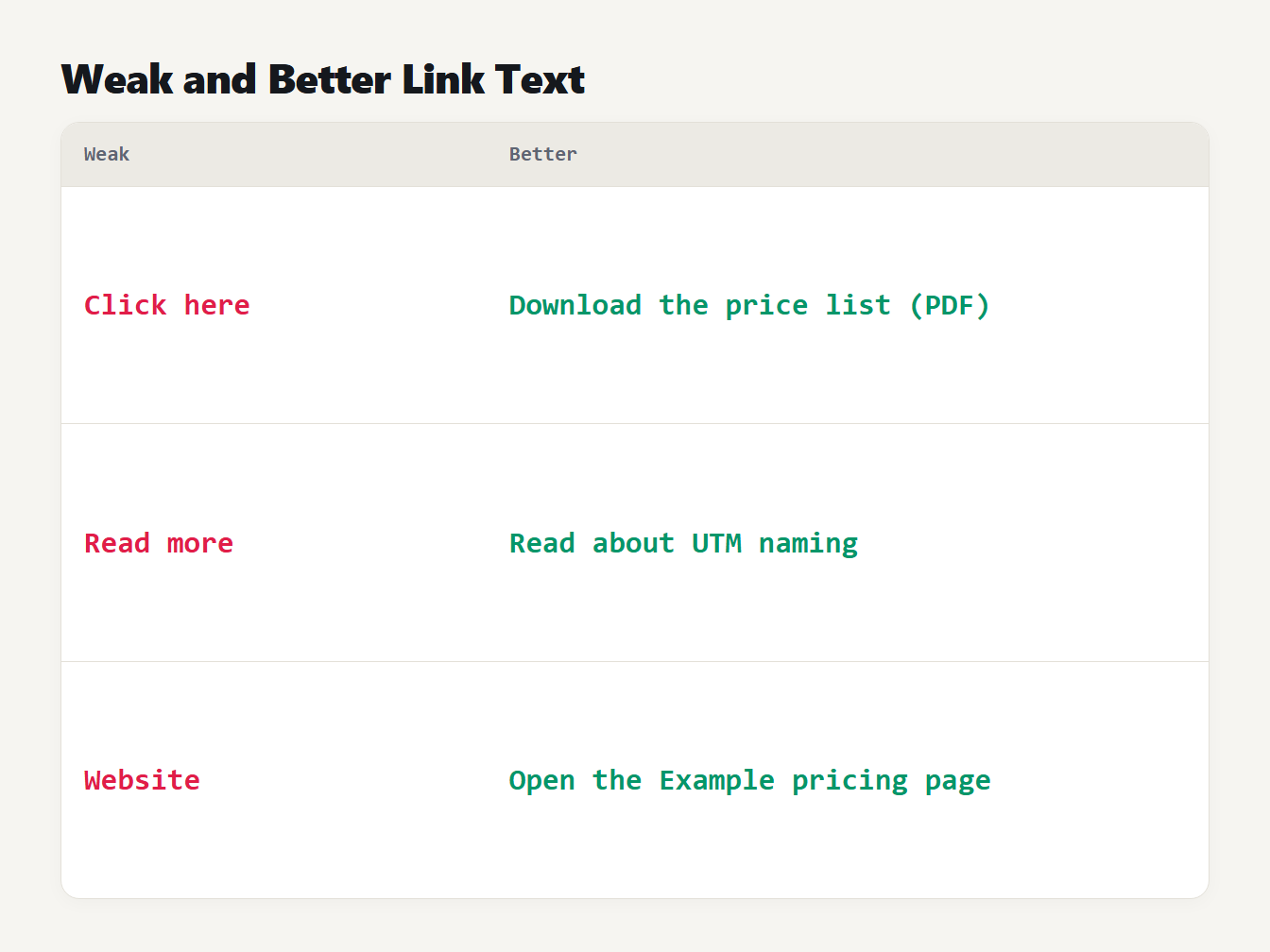
Three rows pair weak link text with a better version: Click here becomes Download the price list (PDF), Read more becomes Read about UTM naming, and Website becomes Open the Example pricing page.
Make links that search engines can follow
Google states that it can only crawl a link that is an a element with an href attribute. The same guide lists a span with an href and an a that relies on an onclick handler as examples it may not follow. Use a real anchor, even if a script adds behavior to it.
Google's page on qualifying outbound links describes three rel values. Use rel="sponsored" for ads and paid placements, rel="ugc" for links in comments and forum posts, and rel="nofollow" when neither fits and you would rather not pass your site's endorsement to the page.
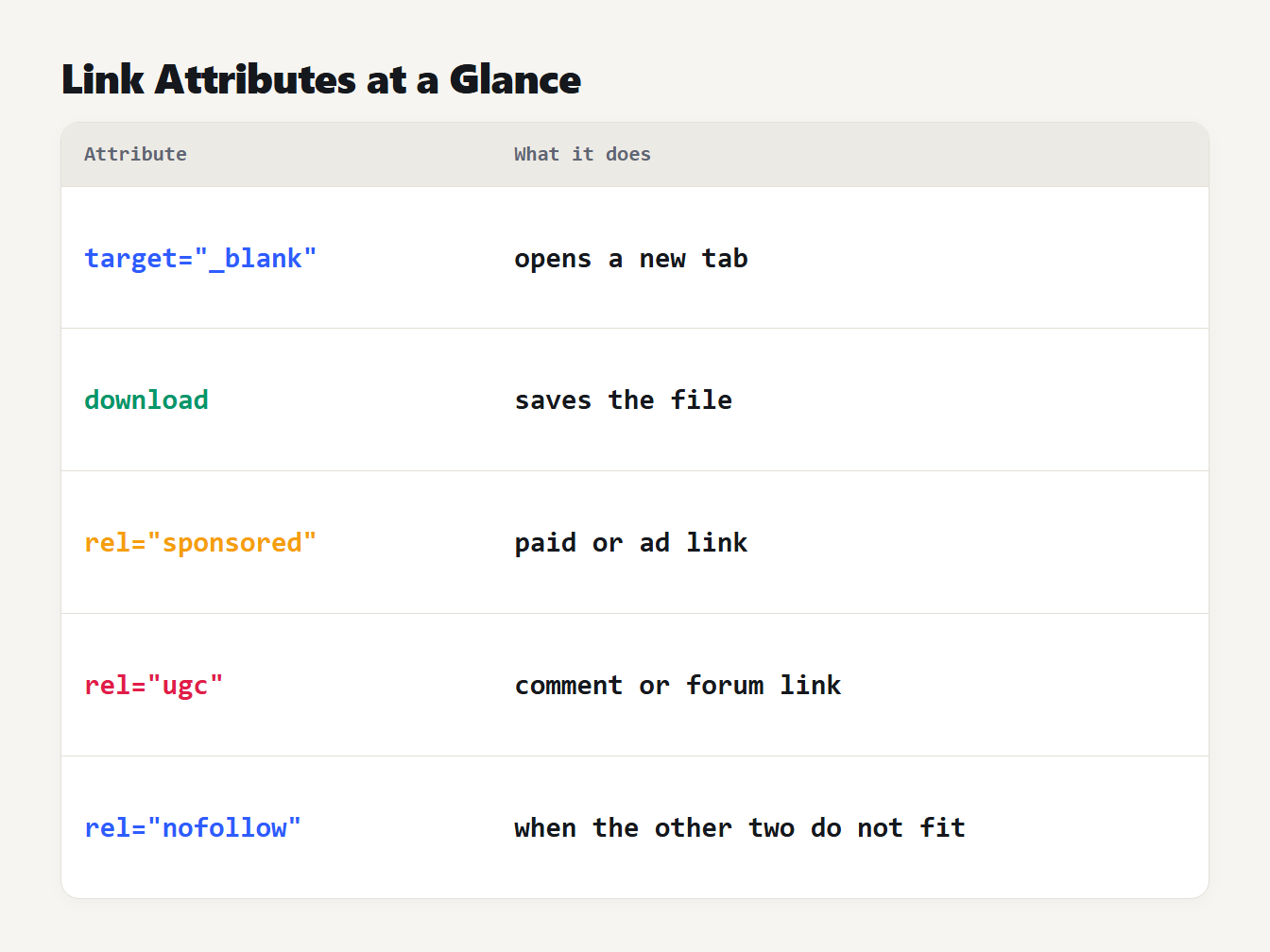
A table of five attributes. target=_blank opens a new tab, download saves the file, rel=sponsored marks a paid or ad link, rel=ugc marks a comment or forum link, and rel=nofollow is the general qualifier when the other two do not fit.
Common mistakes when you make a hyperlink
- Leaving off https://. The link becomes a relative path on your own site and leads to a missing page.
- A raw ampersand in HTML. Write
&between query parameters in the source. - Spaces in the address. Encode them as
%20. Our guide to URL encoding special characters lists the rest. - Link text like "here". It fails the read-it-alone test above.
- A new tab with no warning. Say "(opens in new tab)" in the link text.
- A clickable
span. Search engines may not treat it as a link, and keyboards cannot reach it by default.
Frequently asked questions
How do I make a hyperlink in HTML?
Wrap the link text in an a element and put the address in its href attribute. Include the https:// part. Without it the browser reads the address as a path on your own site, so a link to example.com on a page at /blog/post goes to /blog/example.com.
How do I make a link open in a new tab?
Add target="_blank" to the a element. MDN notes that browsers now treat it as if rel="noopener" were set, so it is safe by default. Say in the link text that it opens a new tab, because some readers will not expect it.
How do I make a hyperlink in Markdown?
Put the link text in square brackets and the address in round brackets straight after it, with no space between them. You can add a title in quotes after the address. An address in angle brackets on its own becomes a link whose text is the address.
What is a hyperlink generator?
A form that takes an address and link text and writes the link code for you, usually as HTML and Markdown. It saves typing, but you should still check that the address starts with https:// and that any ampersand in it is escaped.
How do I make an email hyperlink?
Use mailto: followed by the address in the href. Add a subject and body after a question mark, join the fields with ampersands, and percent-encode spaces as %20 and line breaks as %0D%0A so the message opens ready to send.
Try your next link before you publish it
Now that you know how to make a hyperlink, paste your address into the Hyperlink Generator, copy the format you need and read the result once as a reader would. A link that is clear, complete and reads well alone is the whole job.