UTM Naming Convention: A Simple Rulebook for Clean GA4 Reports
A UTM naming convention keeps GA4 data clean. See the lowercase rule, the utm_medium values GA4 recognizes, a copyable template and a free link builder.
By TheTextKit TeamPublished
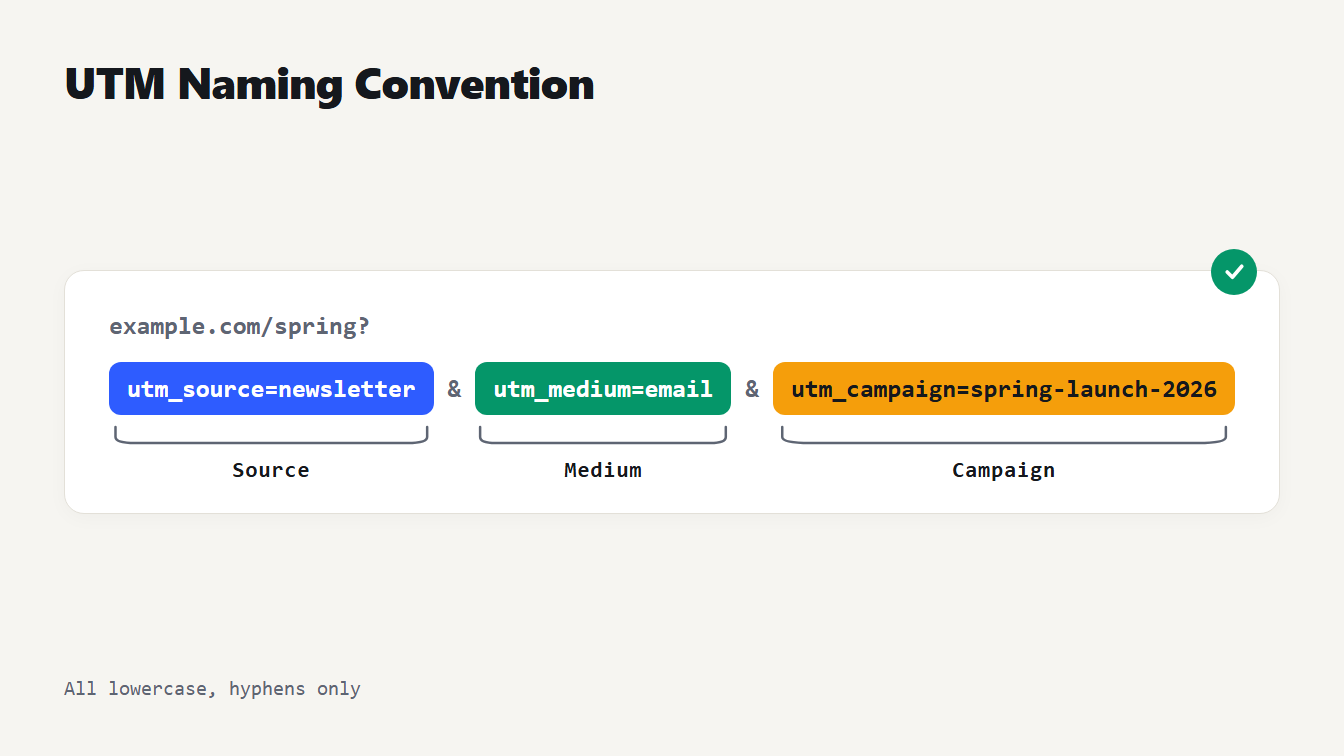
A link ending in utm_source=newsletter, utm_medium=email and utm_campaign=spring-launch-2026, with the three parts labeled Source, Medium and Campaign.
A UTM naming convention is a short, written rule set for what goes into utm_source, utm_medium and utm_campaign, so every link your team tags looks the same. The rules that matter most: write every value in lowercase, use one separator (we use hyphens), pick utm_medium from a short list Google Analytics 4 recognizes, and never tag links inside your own site. Skip them and one campaign can show up as two or three rows in your reports. Below you get the rules, the medium values GA4 puts in each channel, a template to copy and the mistakes behind most broken campaign data.
What a UTM naming convention is, and why GA4 needs one
UTM parameters are the tags at the end of a link that tell Google Analytics where a visit came from. Three do the main work. Google says to always use utm_source (the referrer, such as google, a newsletter or a billboard), utm_medium (the marketing medium, such as cpc, banner or email) and utm_campaign (the product, slogan or promotion). Two more are optional: utm_term for the paid keyword, and utm_content for telling creatives apart. It's all laid out in Google's guide to UTM parameters.
The trouble is that GA4 stores exactly what you type. Google's help page is blunt about it: parameter values are case sensitive, so utm_source=google and utm_source=Google are different values, and so are "Meta" and "meta". One person writes Email, another writes email, and your Source / Medium report now has two rows for one channel.
Channel grouping is more forgiving. Google says its channel definitions aren't case sensitive, so both spellings still land in the Email channel. The split shows up wherever you look at raw values. A convention is the cure: a few decisions, written down once, that everyone follows.
The UTM naming convention in one table
Use this table as the whole rulebook. Everything is lowercase, words are joined with hyphens, and the medium comes from a fixed list instead of being invented link by link.
| Parameter | What goes in it | Rule | Good | Avoid |
|---|---|---|---|---|
| utm_source | The platform or sender | Lowercase name, no ".com" | newsletter, linkedin, google | LinkedIn.com |
| utm_medium | The channel type | Pick from your fixed list | email, cpc, paid-social | newsletter, EDM |
| utm_campaign | The initiative | Name plus year | spring-launch-2026 | Spring Launch 2026! |
| utm_content | Placement or variant | Where on the page, or which creative | hero-button, video-a | Hero Button |
| utm_term | The paid keyword | Paid search links only | text-tools | A keyword on an email link |
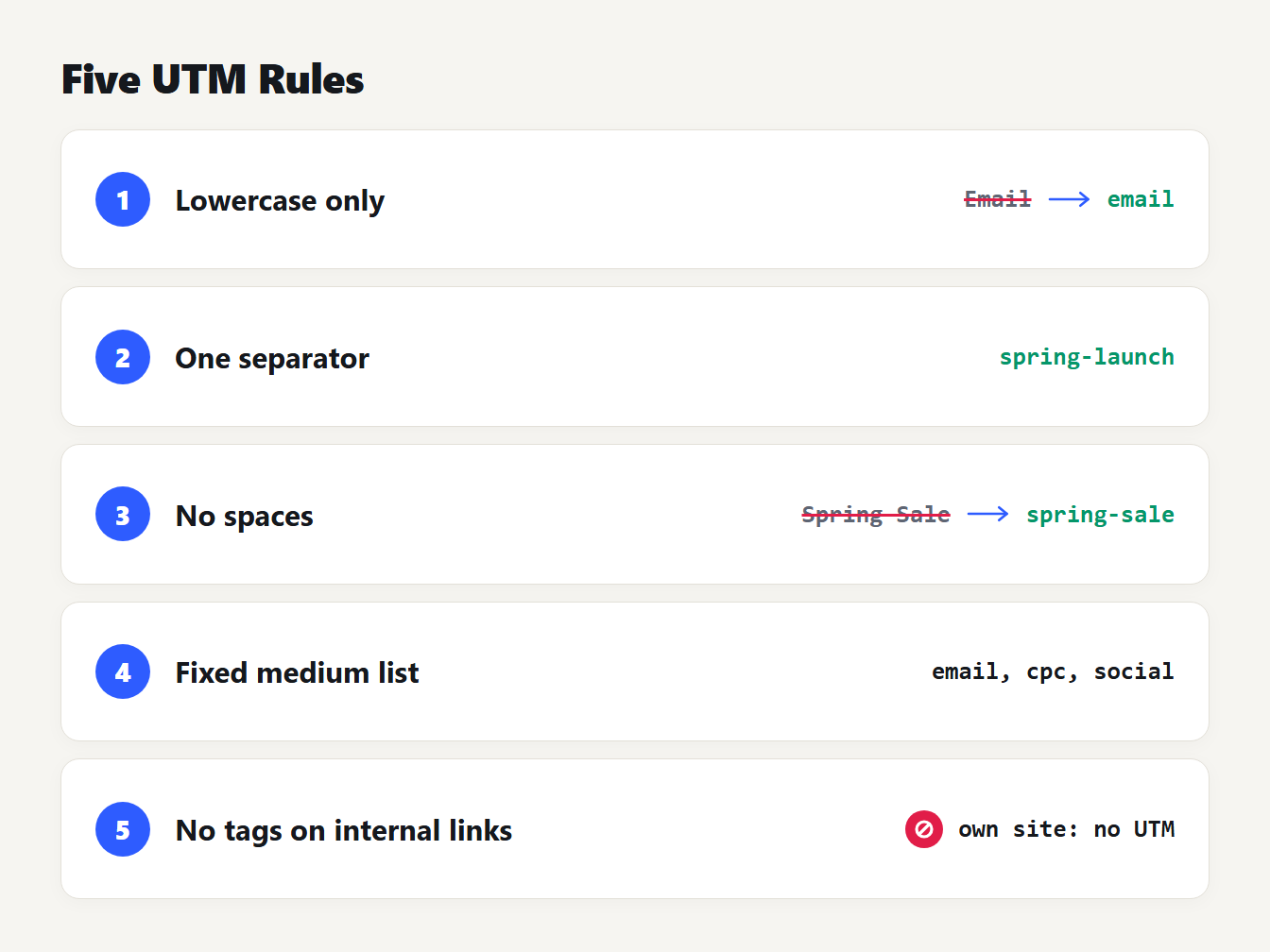
A cheat sheet card listing five rules: lowercase only, one separator (a hyphen), no spaces, utm_medium from a fixed list, and no UTM tags on links inside your own site.
Three of those choices deserve a sentence each.
The separator. Hyphens or underscores both work, and Google's own examples use both. What breaks reports is mixing them: spring_launch and spring-launch are two campaigns. We pick hyphens because an underscore can vanish under a link's underline.
The campaign name. Keep it stable across channels so you can compare email with paid social for the same push, and add the year so next spring doesn't merge into this one. Don't put the date of a single send in it. That belongs in utm_content.
What stays out. Personal data, such as an email address, never goes in a value. Links get shared, logged and stored in reports.
Which UTM medium values does GA4 recognize?
GA4 sorts every visit into a default channel group using rules about the source and the medium. The medium you choose often decides the channel, so it is the one value worth treating as a closed list. These are Google's rules, in plain words, from its default channel group definitions:
| Channel | What GA4 looks for | Medium to use |
|---|---|---|
| email, e-mail, e_mail or e mail as the source or medium | ||
| Paid Search | A search site as the source, and a medium containing cp, or ppc, retargeting, or starting with paid | cpc |
| Paid Social | A social site as the source, and the same paid pattern in the medium | paid-social |
| Organic Social | A social site as the source, or social, social-network, social-media, sm, social network or social media as the medium | social |
| Display | display, banner, expandable, interstitial or cpm as the medium | display |
| Affiliates | affiliate as the medium | affiliate |
| Referral | referral, app or link as the medium | referral |
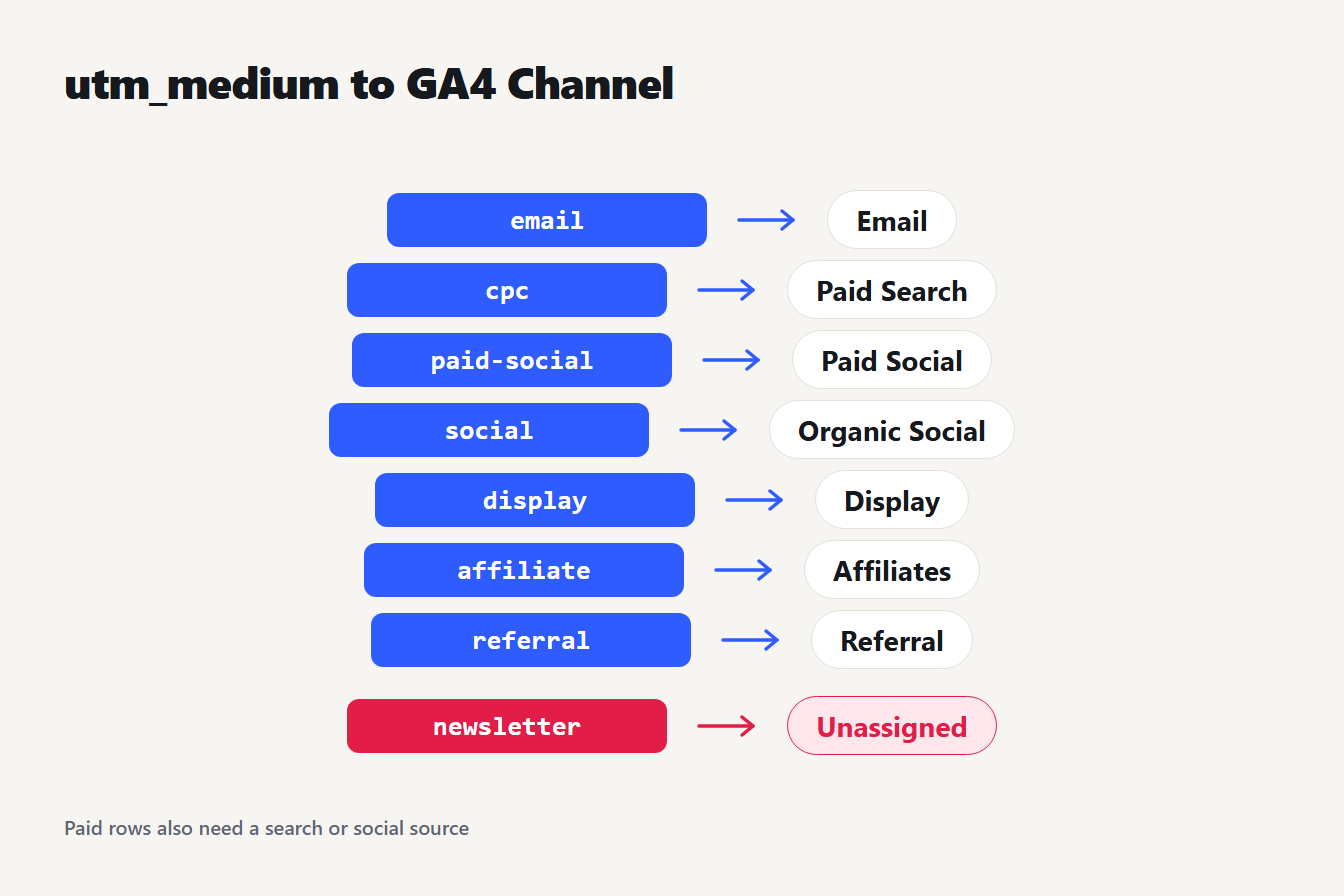
Seven utm_medium values mapped to GA4 channels: email to Email, cpc to Paid Search, paid-social to Paid Social, social to Organic Social, display to Display, affiliate to Affiliates, referral to Referral. A medium of newsletter matches no rule and is Unassigned.
When no rule matches, GA4 files the visit under Unassigned. A medium of newsletter is the classic case: it names a sender, not a channel, so nothing matches. Google also says these definitions can't be edited, which is one more reason to fit your values to them rather than the other way around. The rules can change, so check Google's page before you build a large campaign.
A UTM naming convention you can copy
Here is the whole convention as one block. Paste it into a doc or a spreadsheet header and adjust the source list to the platforms you use.
utm_source    lowercase platform or sender       newsletter, linkedin, google, facebook
utm_medium    one of: email, cpc, paid-social, social, display, affiliate, referral
utm_campaign  initiative-year                    spring-launch-2026
utm_content   placement or variant               hero-button, footer-link, video-a
utm_term      paid search keyword only           text-tools
Now put it to work. Say a store launches a spring promotion at https://example.com/spring. One campaign name, spring-launch-2026, goes on all six links:
| Link | utm_source | utm_medium | utm_content | GA4 channel |
|---|---|---|---|---|
| Newsletter hero button | newsletter | hero-button | ||
| Newsletter footer link | newsletter | footer-link | ||
| LinkedIn post | social | (none) | Organic Social | |
| Facebook ad | paid-social | video-a | Paid Social | |
| Google search ad | cpc | (none) | Paid Search | |
| Guest post link | partner-blog | referral | (none) | Referral |
The search ad also carries utm_term=text-tools. The finished link for the Facebook ad reads:
https://example.com/spring?utm_source=facebook&utm_medium=paid-social&utm_campaign=spring-launch-2026&utm_content=video-a
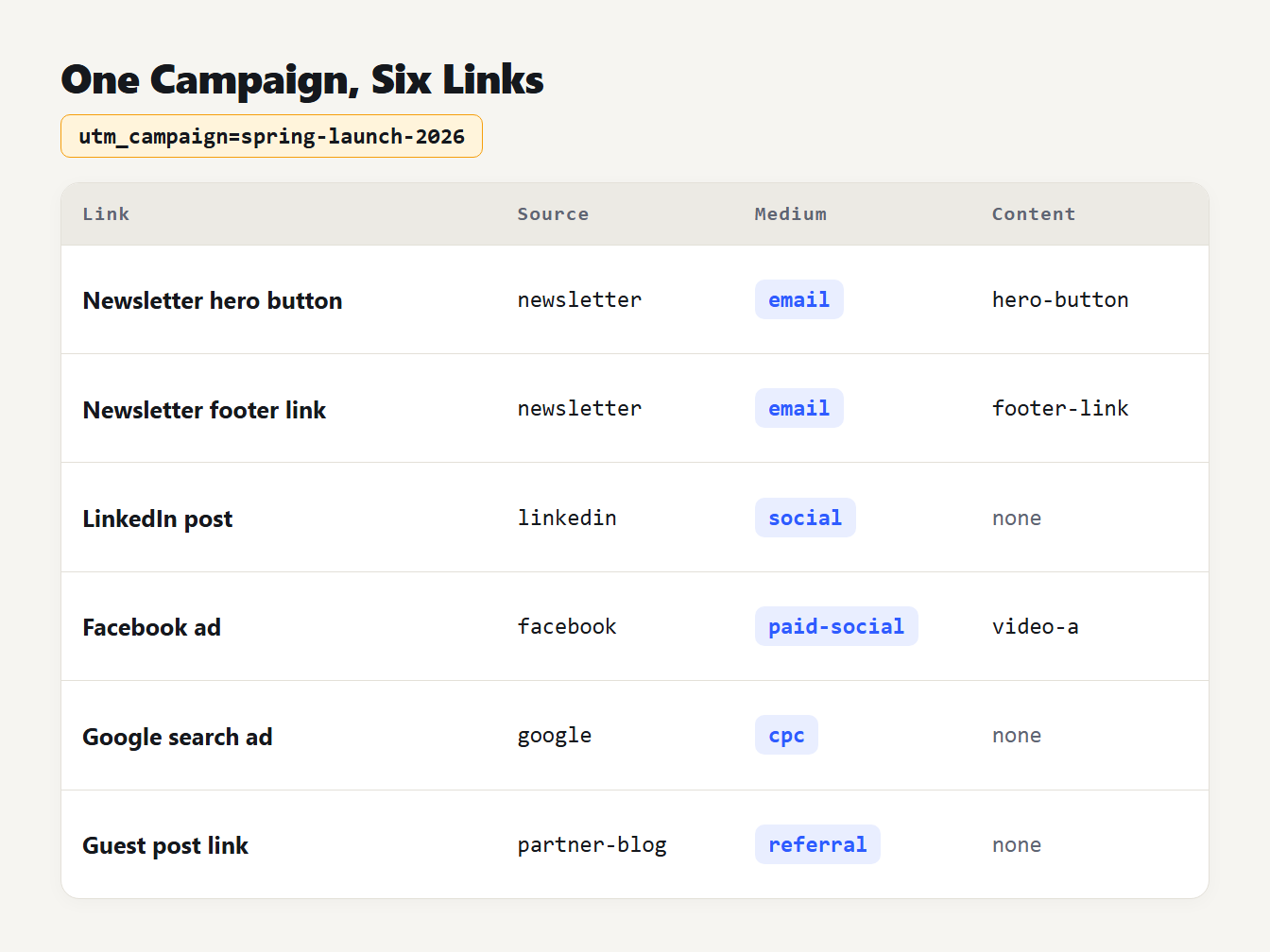
Six links share the campaign spring-launch-2026: newsletter hero button and footer link (email), LinkedIn post (social), Facebook ad (paid-social), Google search ad (cpc) and a guest post (referral).
You can type these by hand, but the UTM Link Builder does the joining for you. It encodes the values, and it adds an ampersand instead of a second question mark when your URL already has a query string. Two things to know. It doesn't change case, so run your values through the Case Converter first. And its quick presets use underscores (paid_social, weekly_digest), which GA4 handles fine; overwrite them with your own values.
Mistakes that split or hide your campaign data
Most broken UTM data comes from the same handful of slips.
| Mistake | What happens | Fix |
|---|---|---|
utm_medium=Email on some links, email on others | Two values in Source / Medium reports | Lowercase everything |
utm_medium=newsletter | No channel rule matches, so Unassigned | Medium email, source newsletter |
Paid ads tagged utm_medium=social | They count as Organic Social | Use paid-social or cpc |
facebook on one link, facebook.com on another | Two sources for one platform | Platform name only |
spring_launch and spring-launch | Two campaigns | One separator |
Spring Sale 2026! in a value | Spaces become %20 and the name is hard to read | Hyphenate it |
Reusing spring-launch every year | Years run together | Add the year |
The paid social row is the sneaky one. Under Google's rules, a social source with a medium of social is Organic Social, so ad spend quietly shows up as free traffic. And for the spaces problem, the URL Slug Generator turns "Spring Launch 2026!" into spring-launch-2026 in one step.
Should you tag links inside your own site?
No. UTM values describe where a visitor came from, and a tagged link on your own page reports your own site as the source. Analysts have warned about this for years. A 2017 Smashing Magazine article says every click on a tagged internal link results in a new session, which cuts a conversion off from its original source.
Be careful with that claim, though. The article is about Universal Analytics, the version GA4 replaced, and we did not find the behavior spelled out in Google's GA4 help pages on UTM parameters or sessions. Treat it as long-standing advice and test it in your own property if the details matter. Either way, the safe habit is the same: tag links that bring people to your site from outside, and track clicks on your own banners with an event instead.
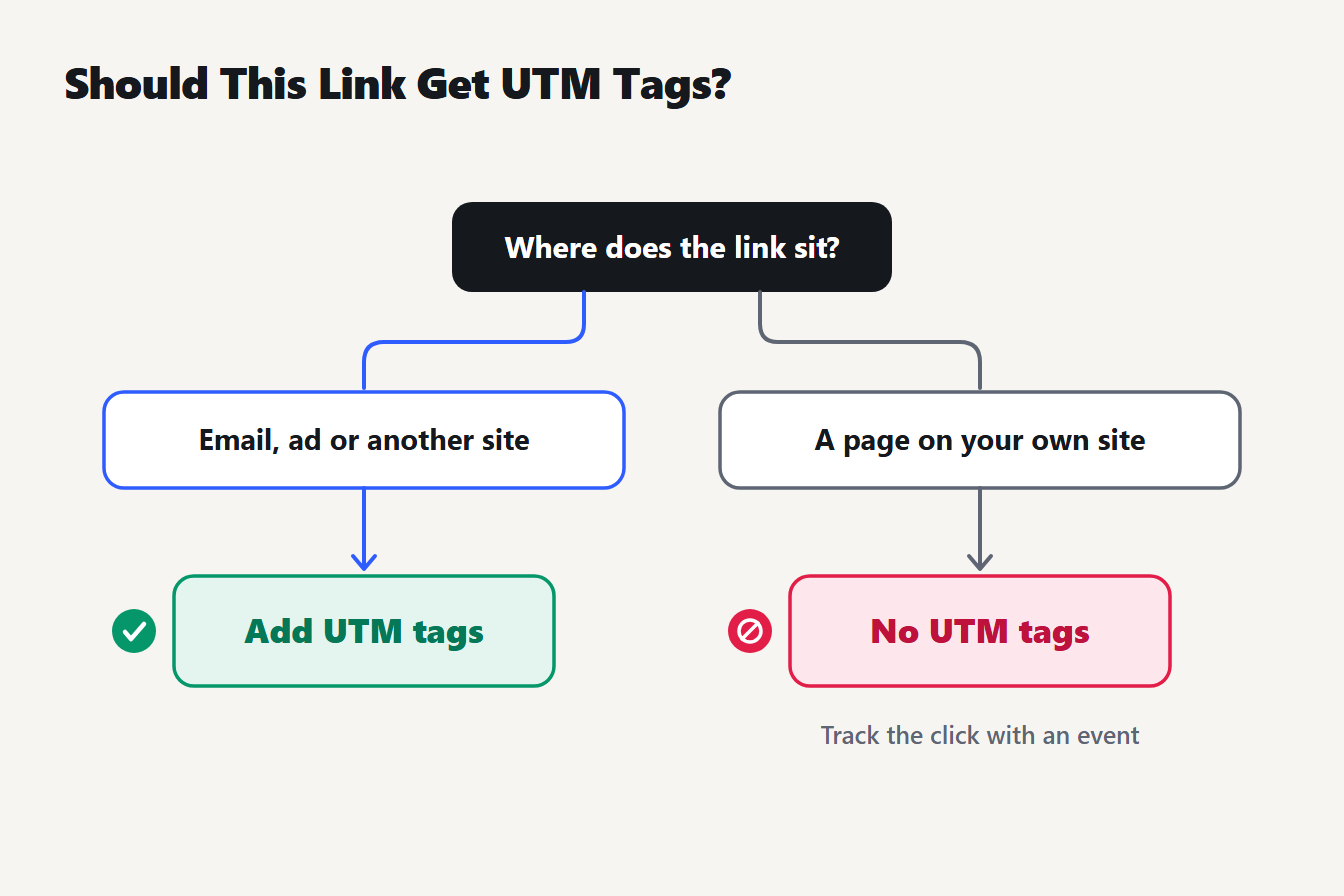
A two-branch chart. A link that brings people from an email, an ad or another site gets UTM tags. A link to a page on your own site gets no UTM tags, and you track the click with an event instead.
Roll it out in five steps
- Write the lists. One page: allowed sources, the medium list from the table above, and the campaign pattern.
- Build links in one place. Use the UTM Link Builder or a shared sheet, so nobody retypes the parameters.
- Clean values before you tag. Lowercase them with the Case Converter and hyphenate names with the slug generator.
- Test one link. Open it, then find that visit in GA4 and check the source, medium and campaign came through as typed.
- Audit now and then. Open the Traffic acquisition report, switch the dimension to Session source / medium and scan for near-duplicates and Unassigned rows.
Old links with bad values can be fixed in bulk. Paste a list of them into Find and Replace, turn on match case and swap utm_medium=Email for utm_medium=email. Everything runs in your browser, so the list never leaves your computer.
Frequently asked questions
Are UTM parameters case sensitive?
Yes. Google's help page says parameter values are case sensitive, so utm_source=google and utm_source=Google are different values, and so are "Meta" and "meta". Write every value in lowercase. Channel grouping is the one place that ignores case, which is why the splits show up in Source / Medium reports.
Should I use hyphens or underscores in UTM values?
Either works in GA4. Google's own examples use both (spring_sale in its parameter table, summer-sale in its example link), and its channel rules accept forms such as e-mail, e_mail and social-network. Pick one separator and never mix them. We use hyphens because they read cleanly in a URL.
What should utm_medium be for a newsletter?
Use email. Put the name of the newsletter in utm_source instead, for example utm_source=weekly-digest. GA4's Email channel looks for email in the source or the medium, and a medium of newsletter matches no rule.
Do I need utm_term and utm_content?
No. Google marks both as optional. Use utm_term for the keyword behind a paid search ad, and utm_content to tell creatives apart or to separate two links to the same page in one email. Leave them off every link where they would add nothing.
Why does my campaign traffic show up as Unassigned?
GA4 uses Unassigned when no channel rule matches the visit. The usual cause is a utm_medium the rules do not know, such as newsletter or EDM. Change the medium to a recognized value like email, cpc or social on new links, and fix the old ones where you can.
Tag your next link the same way
Copy the convention block, fill in the three lists and build your next link with the UTM Link Builder. Check one visit in GA4 before you send the campaign out. A little setup now saves you from untangling three spellings of the same channel later.