301 vs 302 Redirect: Differences, SEO Impact and Which to Use
301 vs 302 redirect explained: how Google treats each, what happens to POST requests, browser caching we measured, and ready-to-paste rules for four platforms.
By TheTextKit TeamPublished
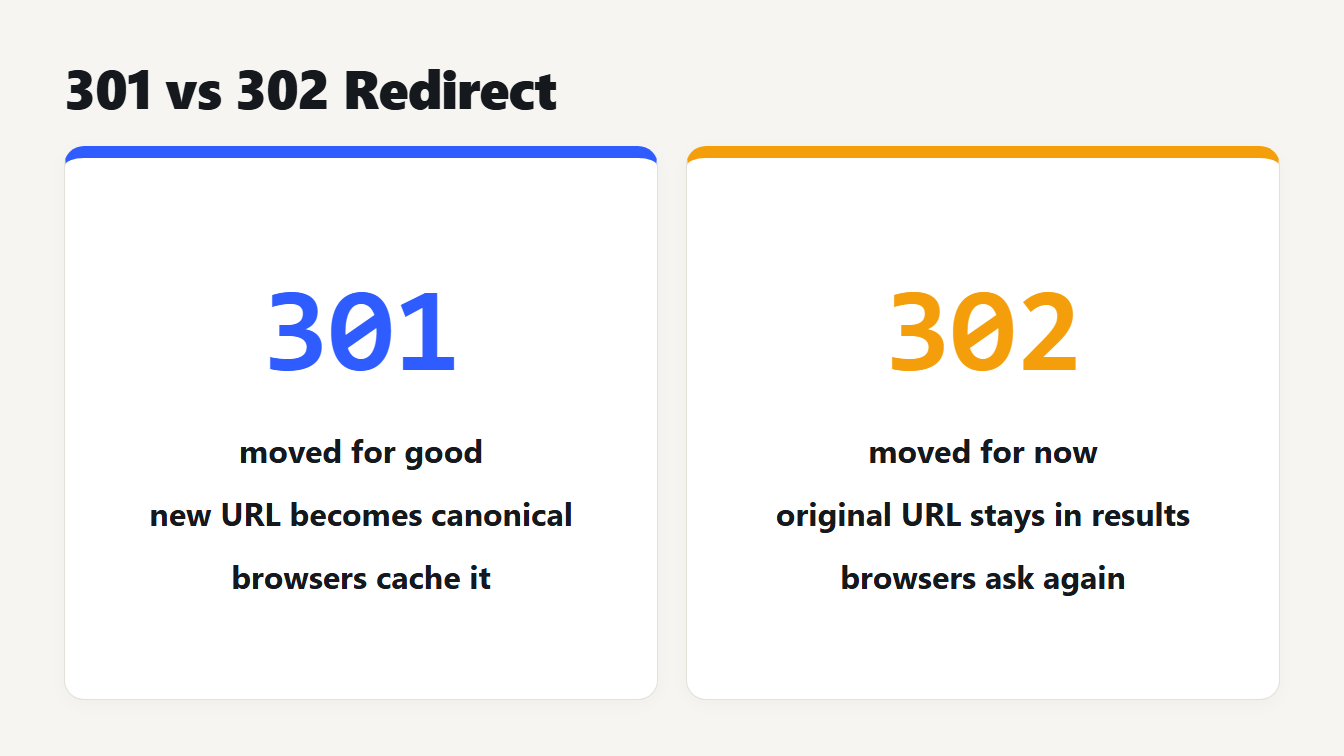
Two cards compare the redirects. A 301 means moved for good, the new URL becomes the canonical one, and browsers cache it. A 302 means moved for now, the original URL stays in results, and browsers ask again each visit.
A 301 redirect means a page has moved permanently. A 302 redirect means it has moved temporarily. In the 301 vs 302 redirect choice, the code you send tells Google which URL to show in search. For a 301 it treats the new URL as the canonical. For a 302 it keeps the original. Use a 301 when the old URL is gone for good, and a 302 for maintenance, tests or seasonal pages.
There is a second difference that gets less attention. A 301 and a 302 can turn a POST request into a GET, and browsers cache a 301. We tested both on a local server, and the results are below along with rules you can paste for four platforms.
301 vs 302 redirect at a glance
| 301 | 302 | |
|---|---|---|
| Meaning | Moved permanently | Found, treated as moved temporarily |
| Google shows | The new URL | The original URL |
| POST request after the redirect | Arrives as GET, body lost | Arrives as GET, body lost |
| Server requests in our 3-visit test | 1 | 3 |
| Typical use | Domain or URL change for good | Maintenance, A/B tests, seasonal pages |
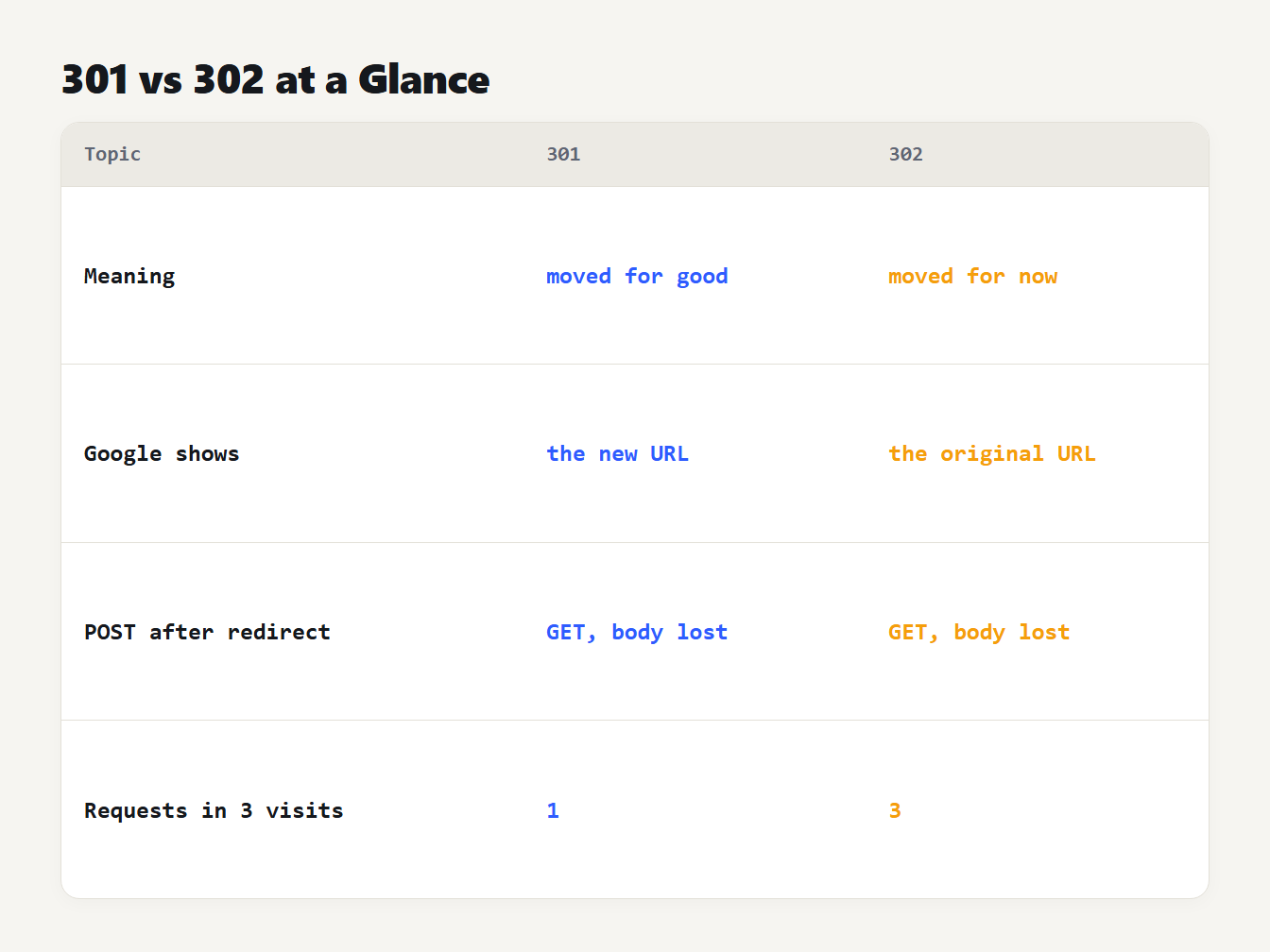
A table comparing a 301 and a 302. Meaning: moved for good against moved for now. Google shows: the new URL against the original URL. POST request: becomes a GET in both. Server requests in three visits: 1 against 3.
The rest of this 301 vs 302 redirect guide explains each row, starting with the one that affects rankings.
How Google treats a 301 and a 302
Google's guide to redirects splits redirects into permanent and temporary. Permanent redirects show the new target in search results. Temporary redirects show the source page. The guide lists HTTP 301 and 308 as permanent, along with a meta refresh of 0 seconds. It lists 302, 303 and 307 as temporary, along with a meta refresh of more than 0 seconds.
For a permanent redirect, Googlebot follows it and the indexing pipeline uses it as a signal that the target should be canonical. For a temporary one, Googlebot follows it but the indexing pipeline doesn't use it as a signal. Google advises JavaScript redirects only when a server-side or meta refresh redirect isn't possible.
So the choice has a direct effect. If you move a page for good and use a 302, you're telling Google to keep the old URL as the one to show. If you run a short test and use a 301, you're telling it the new URL is the permanent one.
What we measured: methods and caching
The 301 and 302 codes have two behaviours that rarely get tested, so we tested them. We ran a small local server that answers /r/301, /r/302, /r/307 and /r/308 with that status and a Location header pointing to a target page. The target page records the method and body it receives.
Request methods. We sent a POST with the body a=1 to each address from Node's fetch, from curl 8.21 and from Chromium 152. All three clients behaved the same way:
| Code | Method that reached the target | Body |
|---|---|---|
| 301 | GET | Lost |
| 302 | GET | Lost |
| 307 | POST | Kept |
| 308 | POST | Kept |
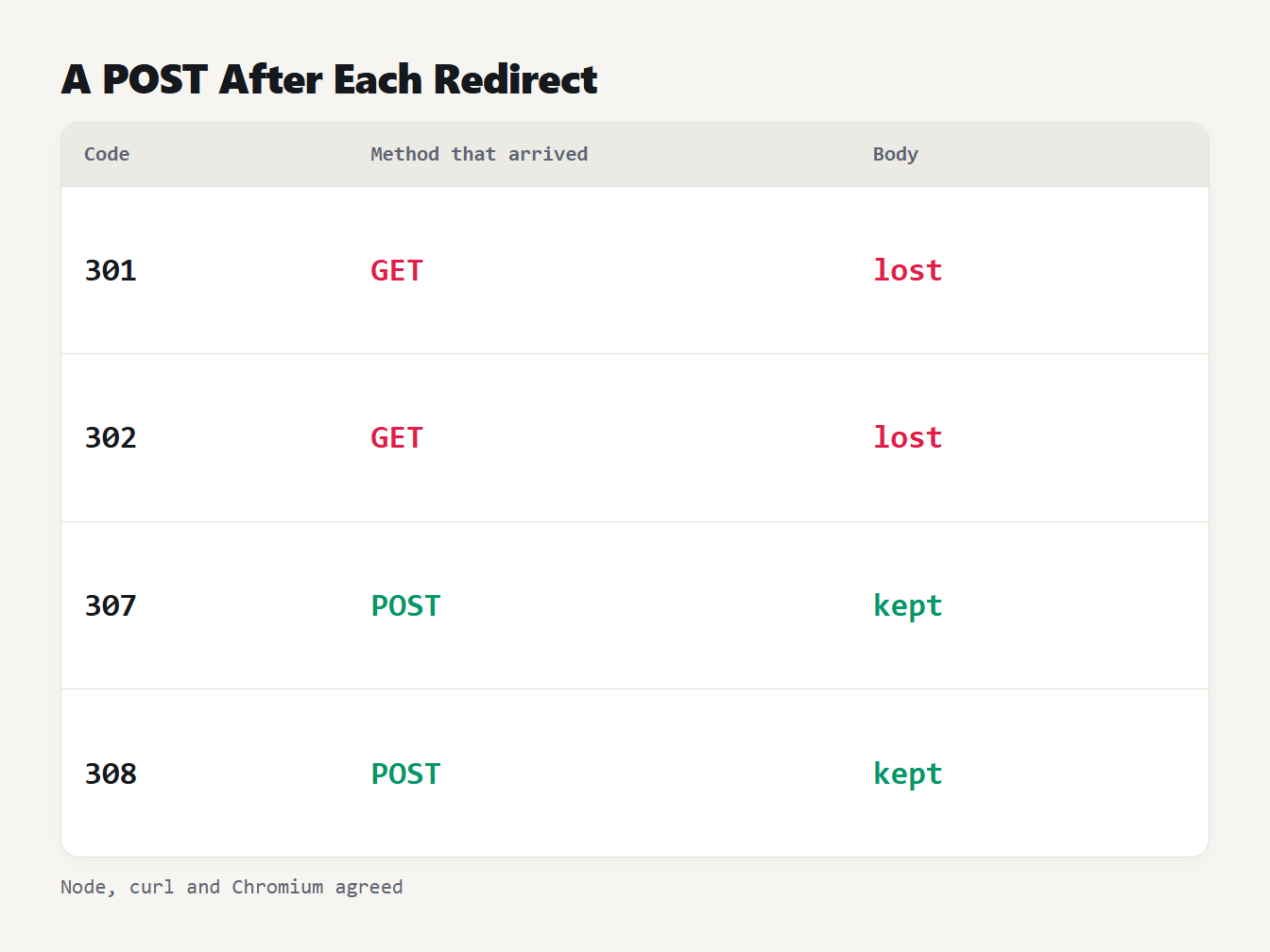
A table of four redirect codes and what reached the target after a POST with a body. 301 and 302 arrived as GET with the body lost. 307 and 308 arrived as POST with the body kept. Node, curl and Chromium agreed.
RFC 9110 explains why. For 301 and 302 the user agent may change a POST to a GET, a leftover of how old browsers behaved. For 307 and 308 it must not. That matters for form posts, webhooks and API calls, and not for links people click, because a click is a GET already.
Caching. We then asked each address three times from Chromium and counted the requests that reached the server. The server sent no cache headers. For 301 it saw 1 request and for 308 it saw 1. For 302 it saw 3 and for 307 it saw 3. The browser had stored the permanent redirects and used them for the next two visits without asking. That is why a wrong 301 is hard to undo: visitors keep following it from their own cache.
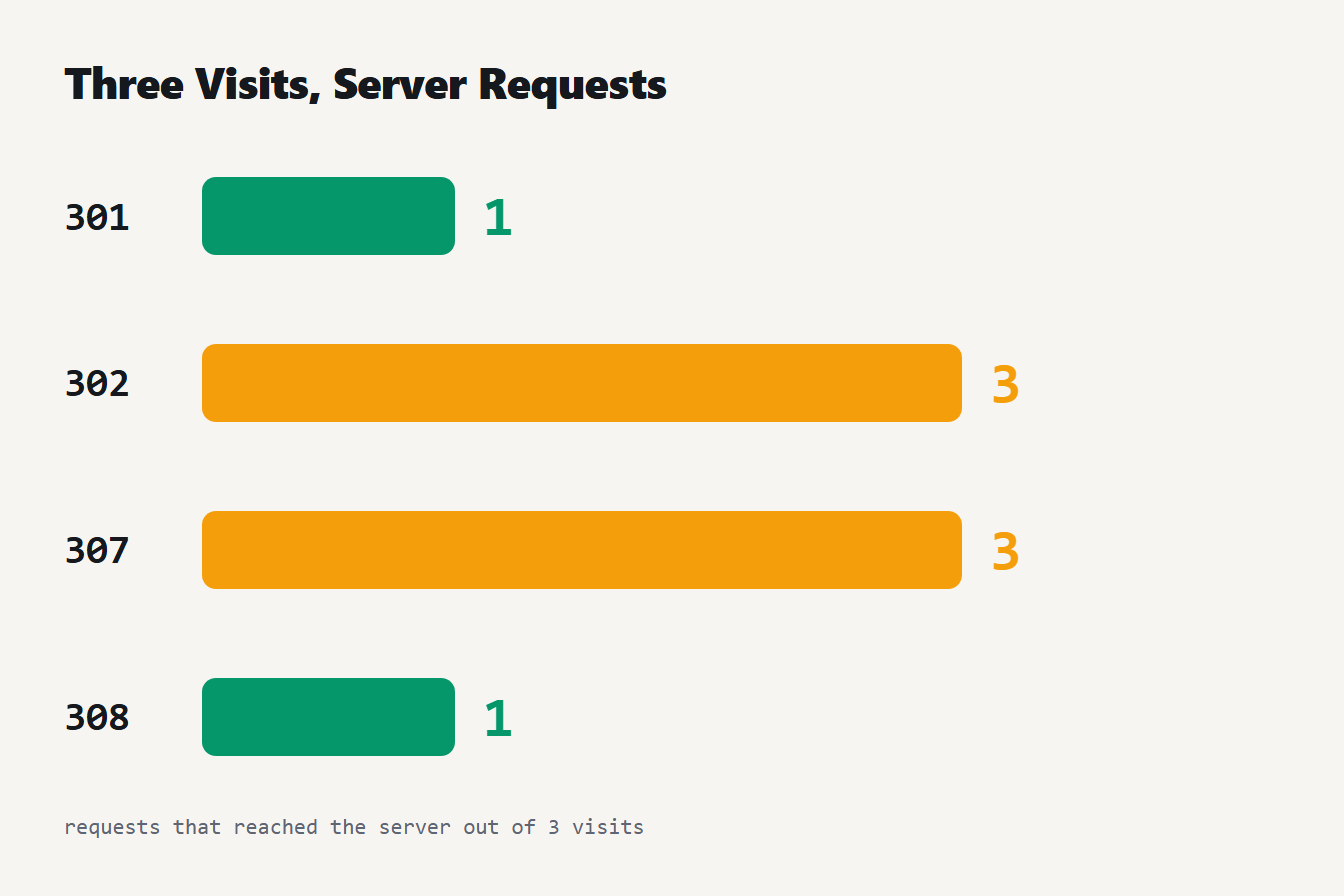
Four bars show how many of three visits reached the server. 301: 1. 302: 3. 307: 3. 308: 1.
307 and 308: the method-preserving versions
A 307 is the temporary redirect that keeps the method, and a 308 is the permanent one. Google files them under temporary and permanent, the same as 302 and 301, so they work for search in the same way. Next.js uses them for that reason. Its redirects documentation says permanent: true sends 308 and permanent: false sends 307, because a 302 or 301 may change a POST to a GET.
This is the catch for Next.js users: permanent: true isn't a 301. If you want an exact 301 you set statusCode: 301 instead. We checked with Next.js's own route validator in this project (version 16.3.6), and it accepted statusCode values of 301, 302, 307 and 308.
Which redirect should you use?
- Moved for good (new URL, new domain, HTTP to HTTPS): use a 301. Use a 308 if the URL receives POST requests.
- Moved for now (maintenance, A/B test, seasonal page, short campaign): use a 302. Use a 307 if the URL receives POST requests.
- Not sure yet: start with a 302. You can switch to a 301 once you're certain, and nobody's browser will have cached the first one.
- A rename of a page slug: that's a permanent move, so redirect the old URL to the new one with a 301. Our URL Slug Generator helps you pick the new slug, and our guide to the parts of a URL shows which part you are changing.
How to set up a 301 or 302 redirect
Once you've settled the 301 vs 302 redirect question, the Redirect Rule Generator writes the rules for each platform. Here is what it produces for /old to /new with a 301:
# Apache .htaccess
Redirect 301 /old /new
# NGINX, inside the server block
location = /old {
  return 301 /new$is_args$args;
}
// Next.js, in next.config.js
async redirects() {
  return [{ source: "/old", destination: "/new", statusCode: 301 }]
}
# Netlify or Cloudflare Pages, in a file named _redirects
/old  /new  301
Apache's Redirect directive belongs to mod_alias and works without mod_rewrite, and it matches only complete path segments. NGINX's return directive takes a URL for the codes 301, 302, 303, 307 and 308, as the NGINX documentation describes. In the NGINX block the $is_args$args part passes the query string on. On Netlify you can write 301! to force the redirect when a file exists at the old path. Cloudflare Pages doesn't list that option, so the generator leaves it out of the line.
Don't leave the code off, because the defaults differ:
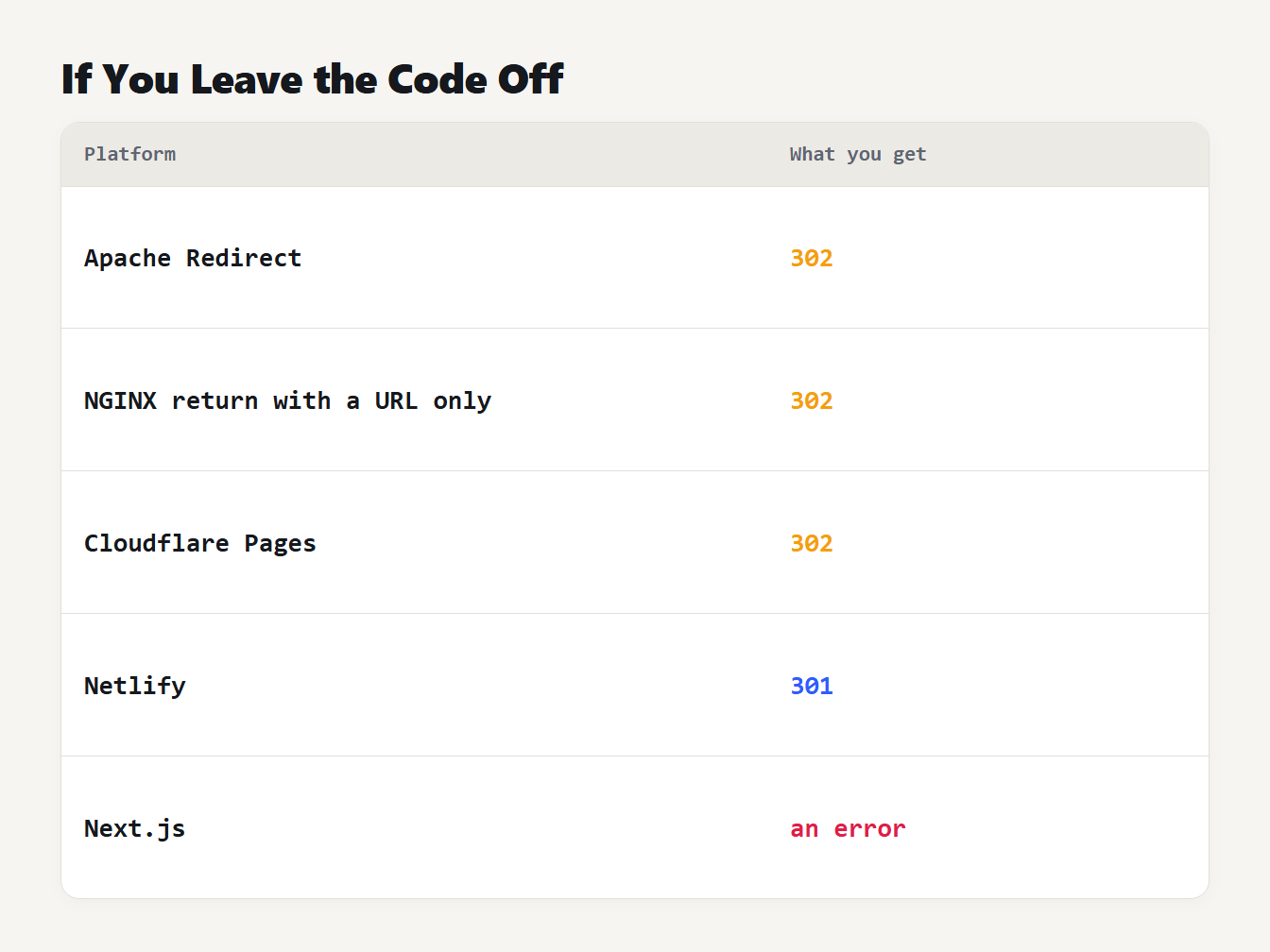
A table of five platforms and what a redirect gets if you leave the code off. Apache Redirect: 302. NGINX return with only a URL: 302. Cloudflare Pages: 302. Netlify: 301. Next.js: an error, because you must set permanent or statusCode.
Apache's documentation says a Redirect with no status is temporary, 302. NGINX says a URL given as the sole parameter of return is a 302. Cloudflare Pages states that 302 is its default. Netlify's default is 301. Next.js refuses the rule: with neither permanent nor statusCode its validator stops with "permanent is not set to true or false".
Redirect mistakes to avoid
- Using a 302 for a permanent move. Google keeps showing the original URL.
- Using a 301 on a trial. Browsers cache it, so undoing it takes time.
- Trusting
permanent: trueto be a 301 in Next.js. It sends 308. - Leaving the code off. The result depends on the platform default.
- Redirecting a POST endpoint with a 301 or 302. The body is lost. Use 308 or 307.
- Never testing. Run
curl -I https://example.com/oldand read the status line and thelocationheader.
Frequently asked questions
What is the difference between a 301 and a 302 redirect?
A 301 says a page has moved permanently and a 302 says it has moved temporarily. Google uses a 301 as a signal that the new URL should be the canonical one, and keeps showing the original URL for a 302. Browsers also cache a 301 but asked the server again for a 302 in our test.
Is a 302 redirect bad for SEO?
Not if the move really is temporary. Google keeps the source page in search results for a temporary redirect, which is what you want for maintenance or a test. It is the wrong choice for a permanent move, because the old URL stays in results instead of the new one.
Should I use 301 or 308 for a permanent redirect?
Either works for pages. Google treats 301 and 308 as permanent in the same way. The difference is that a 308 must keep the request method, so a POST stays a POST. Next.js sends 308 when you set permanent to true.
How do I undo a 301 redirect?
Remove the rule, but expect some delay. Browsers cache a 301 and a 308: in our test Chromium asked the server once for three visits. Visitors who already saw the redirect may keep following it until their cache clears, so use a 302 first when you are unsure.
What status code does a redirect get if I leave it off?
It depends on the platform. Apache's Redirect directive and a bare NGINX return use 302, Cloudflare Pages uses 302, and Netlify uses 301. Next.js refuses a redirect with no permanent or statusCode setting. Always write the code yourself.
Generate your redirect rules
Decide first whether the move is permanent. Then open the Redirect Rule Generator, choose 301, 302, 307 or 308, paste your old and new paths, and copy the rules for your platform. Test one with curl -I before you rely on it.