Parts of a URL: Scheme, Host, Port, Path, Query and Fragment
The parts of a URL explained with one example: scheme, host, port, path, query string and fragment, plus common traps and a free URL parser.
By TheTextKit TeamPublished
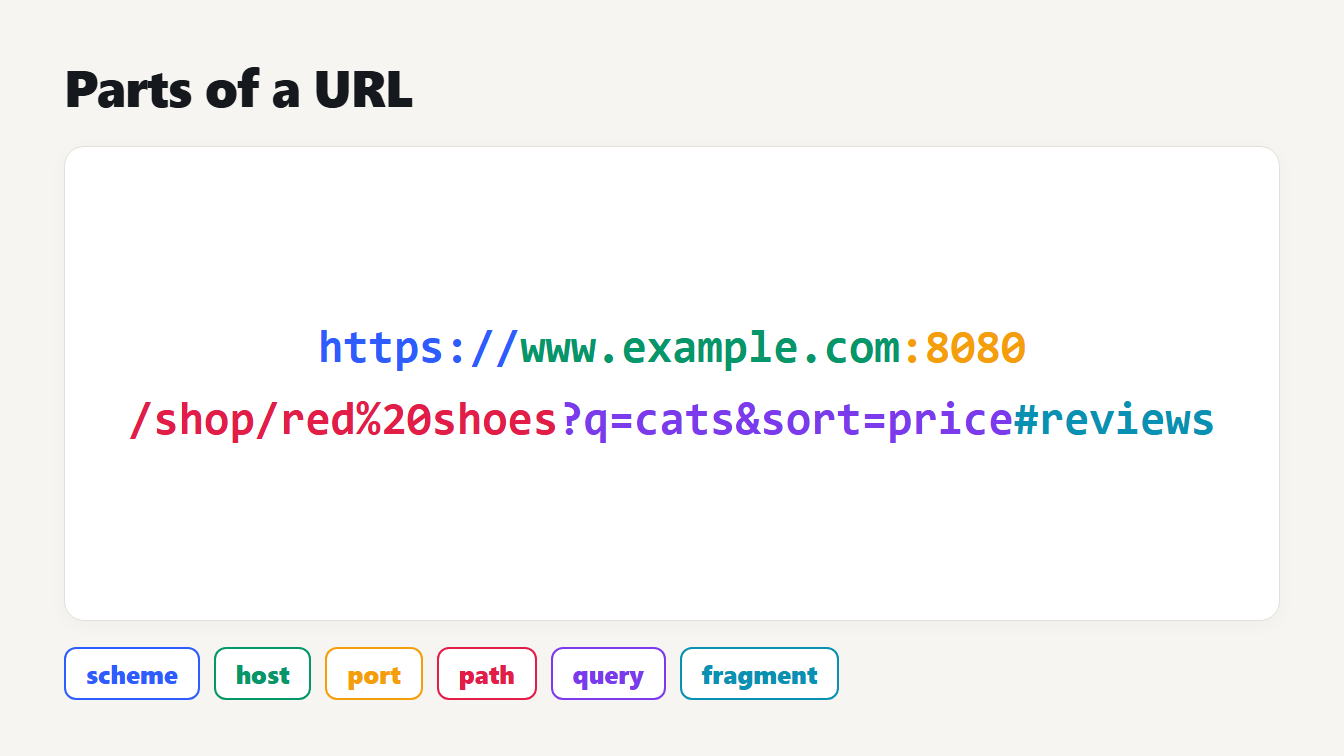
The address https://www.example.com:8080/shop/red%20shoes?q=cats&sort=price#reviews written in six colors, with labels for the scheme, host, port, path, query and fragment.
The parts of a URL are the scheme, the host, an optional port, the path, an optional query string and an optional fragment. Take https://www.example.com:8080/shop/red%20shoes?q=cats&sort=price#reviews. Here https is the scheme, www.example.com is the host, 8080 is the port, /shop/red%20shoes is the path, ?q=cats&sort=price is the query and #reviews is the fragment. This guide walks through the parts of a URL one at a time, what a browser does with each, and the traps that make a link behave in surprising ways.
The parts of a URL at a glance
RFC 3986 defines the general shape: a scheme, then a colon, then the rest, then an optional question mark with a query, then an optional hash with a fragment. The part after the double slash is called the authority, and it has the form [userinfo@]host[:port]. For our example:
| Part | In the example | Its job |
|---|---|---|
| Scheme | https | How to talk to the server |
| Host | www.example.com | Which server |
| Port | 8080 | Which door on that server |
| Path | /shop/red%20shoes | Which resource |
| Query | ?q=cats&sort=price | Extra inputs for the server |
| Fragment | #reviews | A place inside the resource |
We pasted this address into our URL Parser and it split it exactly as the table shows. The path segments were shop and red%20shoes, and the decoded second segment was "red shoes".
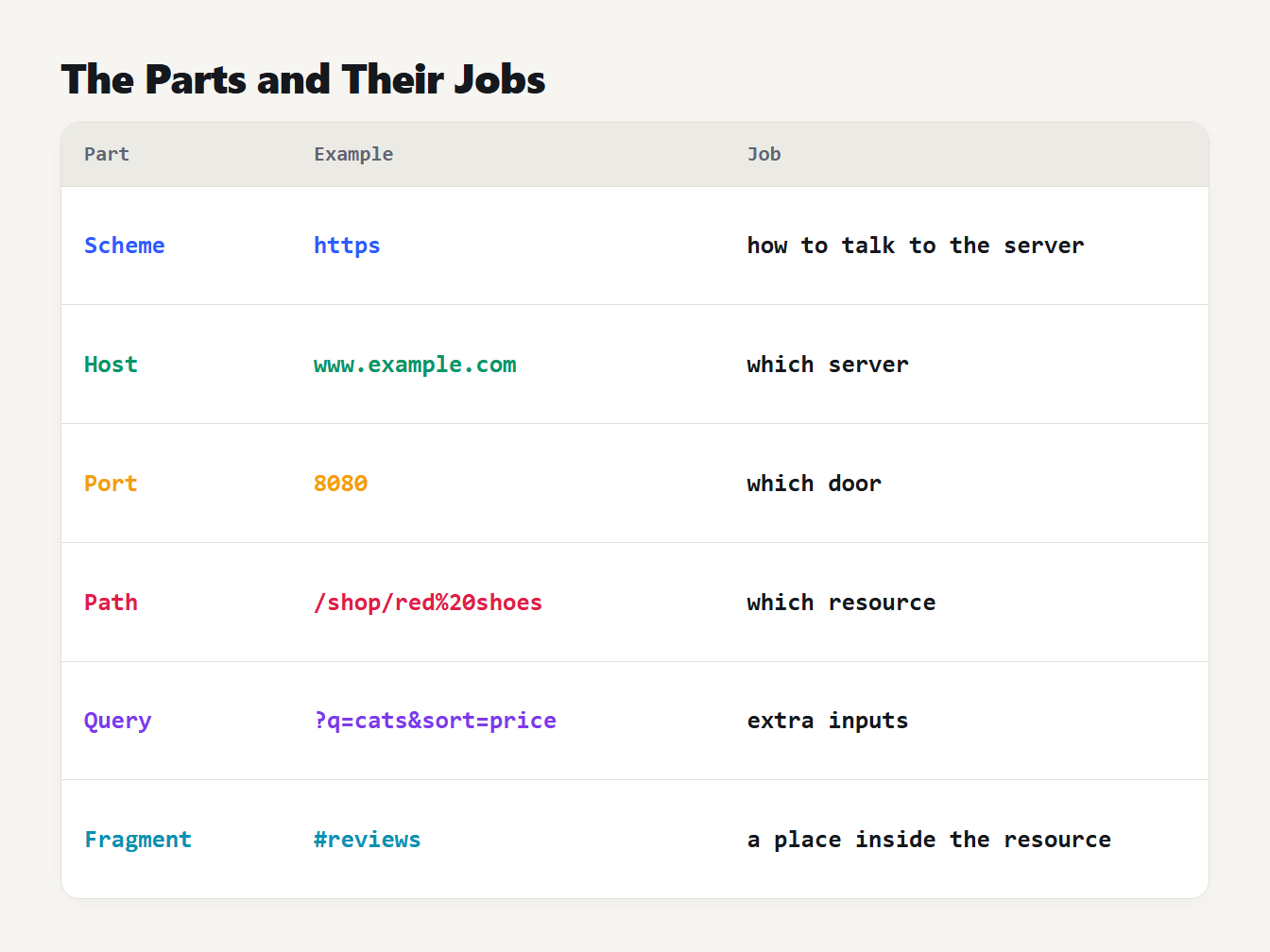
A table of six parts for the example address, each with its value and its job: scheme, host, port, path, query and fragment.
Scheme, host and port: the authority
The scheme, here https, tells the browser which protocol to use. MDN's explainer on URLs adds that for websites it is usually HTTPS or HTTP. The host is the domain name of the server. The port is the technical gate on that server, and MDN notes that it is usually left out when the server uses the standard ports, 80 for HTTP and 443 for HTTPS.
A browser also tidies what you type. We gave a browser's URL parser HTTPS://WWW.Example.COM/Path/File and it returned https://www.example.com/Path/File. The scheme and host were lowercased because they are case-insensitive, and the path kept its capitals because paths can be case-sensitive. We also fed it https://example.com:443/a and the port disappeared, since 443 is the default for HTTPS, while :8443 stayed.
An address can carry a username and password before the host, as in https://ann:secret@example.com/. The URL Parser warns about this, because credentials in a link are visible to anyone who sees it and often end up in logs.
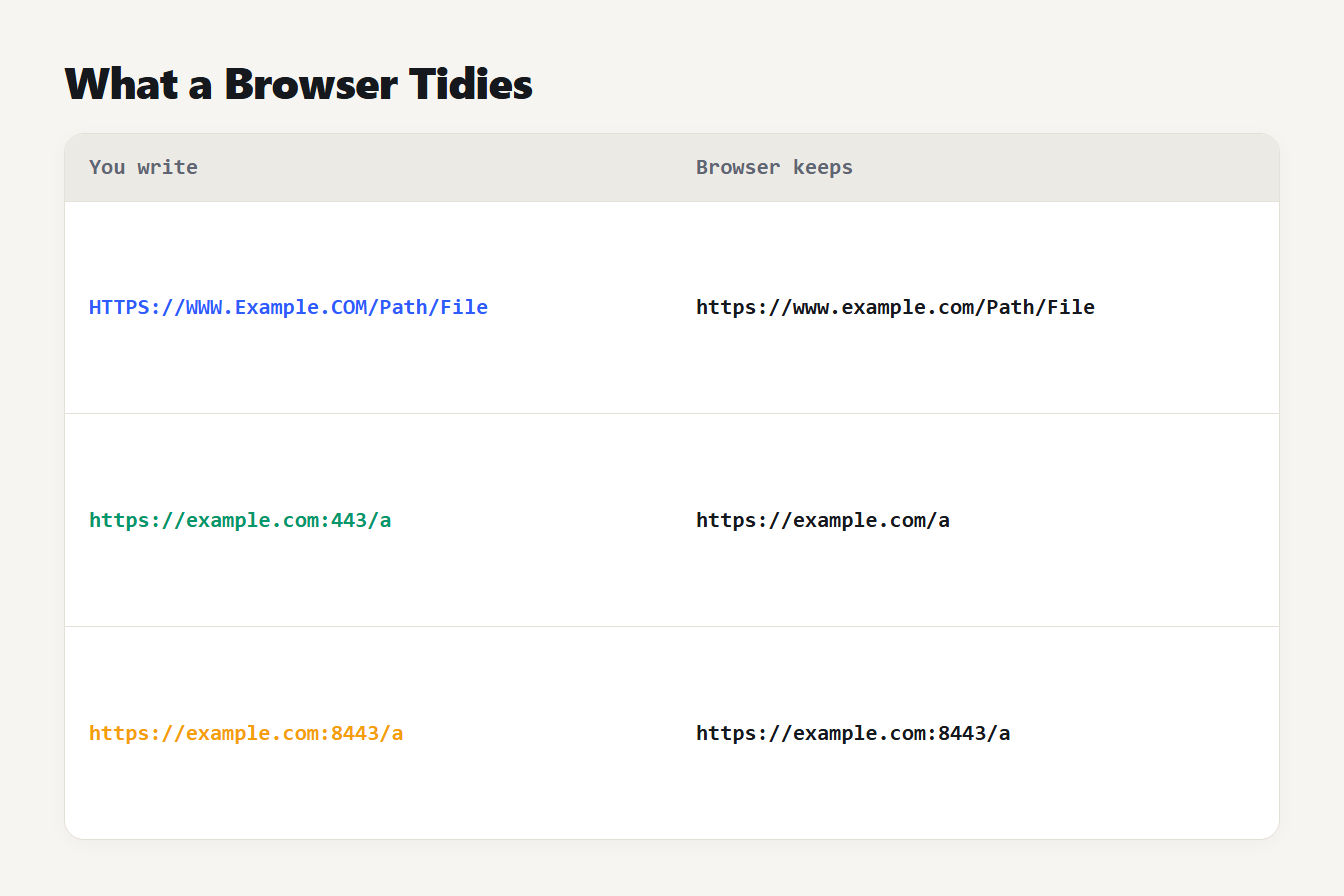
Three rows show what you write and what the browser keeps. HTTPS://WWW.Example.COM/Path/File becomes https://www.example.com/Path/File. https://example.com:443/a becomes https://example.com/a. https://example.com:8443/a stays unchanged.
The path
The path names the resource on the server, such as /shop/red%20shoes. It is split by slashes into segments. Special characters are written as percent codes, so the space in "red shoes" becomes %20, and a parser decodes them for reading. Our guide to URL encoding special characters lists the codes you will meet.
Relative addresses
A link does not have to spell out every part. A relative address leaves out the scheme and host and borrows them from the page it sits on. We resolved five against https://example.com/blog/post/ with a browser's URL parser:
| Written | Becomes |
|---|---|
/shop | https://example.com/shop |
../other | https://example.com/blog/other |
?page=2 | https://example.com/blog/post/?page=2 |
#top | https://example.com/blog/post/#top |
example.com | https://example.com/blog/post/example.com |
The last row is the classic mistake. Without a scheme, example.com is a path, not a host, so the browser appends it to the current address.
The query string
The query starts at the question mark and holds a list of key and value pairs. MDN describes them as pairs separated by the & symbol, so ?q=cats&sort=price has two. The same key can appear more than once, such as ?a=1&a=2, and servers differ in which value they use, which the URL Parser flags.
The trap is the plus sign. In a query, HTML forms and URLSearchParams read + as a space. We tested each spelling in a browser:
| Written | Read as |
|---|---|
a+b | a b |
a%20b | a b |
a%2Bb | a+b |
a%26b | a&b |
So a plus meant literally, for example inside Base64 data, has to be written as %2B, and an ampersand inside a value as %26. Otherwise the value is silently changed. Our URL Encoder writes these for you.
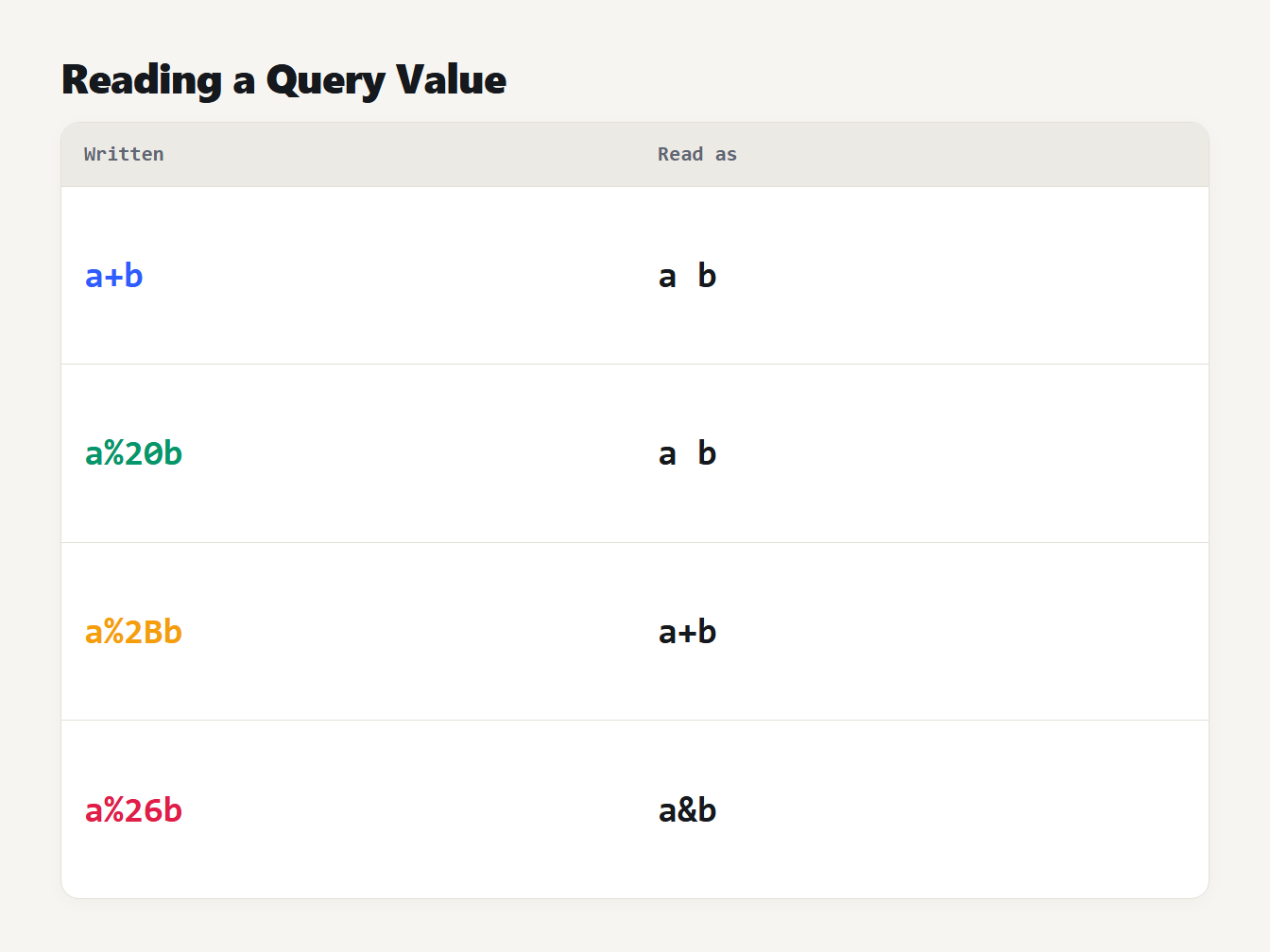
A table of four query values and how a browser reads them. a+b is read as a b, a%20b is read as a b, a%2Bb is read as a+b and a%26b is read as a&b.
The fragment
The fragment starts at the hash sign, as in #reviews. According to MDN, it is never sent to the server with the request. The browser keeps it and uses it to scroll to a place on the page, or for a script to read. RFC 3986 explains the role: it identifies a secondary resource in relation to the main one, and the part before the hash is what is requested. So two links that differ only in the fragment load the same page from the server.
The URL parts as JavaScript properties
The browser's URL object gives you each part by name. Here are the values for our example, as MDN defines the properties:
| Property | Value | What it holds |
|---|---|---|
protocol | https: | The scheme, with the colon |
host | www.example.com:8080 | Domain and port |
hostname | www.example.com | The domain only |
port | 8080 | The port number |
pathname | /shop/red%20shoes | The path |
search | ?q=cats&sort=price | The query, with its question mark |
hash | #reviews | The fragment, with its hash sign |
origin | https://www.example.com:8080 | Scheme, domain and port |
The origin is the one to remember. Two URLs share an origin only when the scheme, domain and port all match, and browsers use that to keep sites apart.
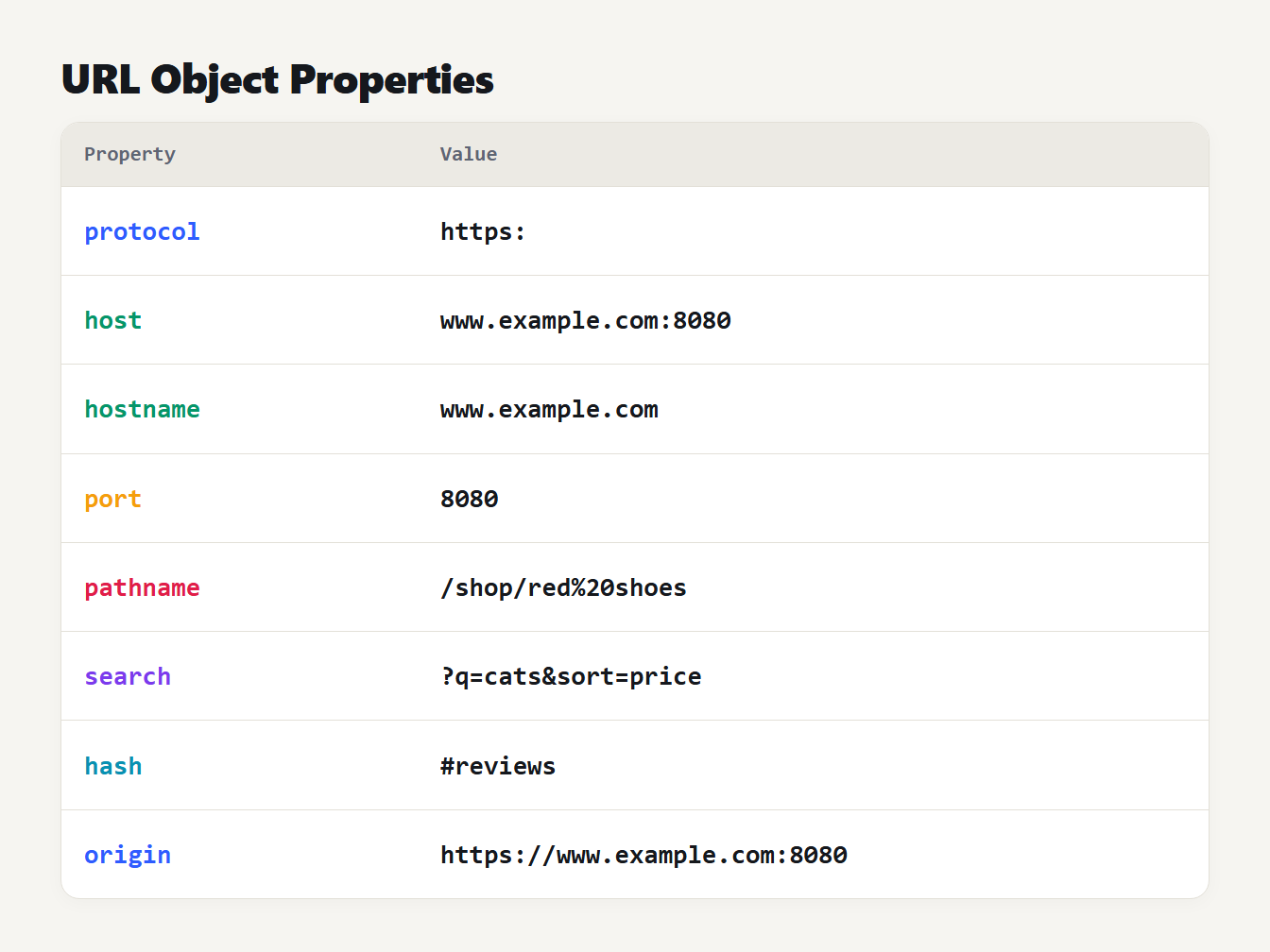
A table of eight JavaScript URL properties with their values for the example address, from protocol, which is https:, to origin, which is https://www.example.com:8080.
Common mistakes the URL parts reveal
Reading a URL part by part also shows where links go wrong. These are the issues our parser warns about:
- No scheme.
example.com/pageis read as a relative path unlesshttps://is added. - http instead of https. The traffic is not encrypted.
- Double encoding.
%2520is a percent sign that was encoded twice, and decoding once leaves%20. - A lone percent sign. It breaks decoding, so write it as
%25. - Spaces. Browsers turn them into
%20, but encode them before you share the link. - Credentials in the address. They appear in logs and history.
Our guide to how to make a hyperlink covers the HTML side of the same problems.
Break down a URL with the URL Parser
The URL Parser and Query Editor uses your browser's own URL parser, so it agrees with how the browser reads the link. Paste an address and it shows the scheme, host, port, path, query parameters and fragment, with every percent code decoded. It lists each warning above. You can then edit the parameters as plain values and copy the rebuilt link, with each value encoded once.
It reads web-style addresses that have a host. A mailto: link has none, so the parser says so and does not guess. For links with tracking parameters, the UTM Link Builder builds them, and our UTM naming guide covers the values.
Frequently asked questions
What are the parts of a URL?
A URL has a scheme such as https, a host such as www.example.com and an optional port. It also has a path, an optional query string that starts with a question mark, and an optional fragment that starts with a hash sign. A username and password can come before the host.
Is the fragment sent to the server?
No. MDN says the part after the hash sign is never sent to the server with the request. Your browser keeps it and uses it to jump to a place on the page or to pass information to scripts.
What is the difference between host and hostname?
The hostname is only the domain, such as www.example.com. The host is the domain plus the port when one is given, such as www.example.com:8080. When the port is the default for the scheme, the two are the same.
What is the origin of a URL?
The origin is the scheme, the domain and the port together. Two URLs share an origin only when all three match, which is the basis of how browsers separate one site from another.
Why does a plus sign in a query string become a space?
In a query string, HTML forms and URLSearchParams read a plus sign as a space. If you mean a literal plus, write it as the code percent 2B.
Read the parts of your next URL
Paste a long link you received, such as one from an email campaign, into the URL Parser and read it part by part. You will see the host, the path and every tracking parameter on its own line. Knowing the parts of a URL turns a long, noisy address into a short list you can read in seconds.