Open Graph Tags: What to Include, Image Sizes and a Template
Open Graph tags explained: the four required tags, og:image sizes for Facebook and LinkedIn, a copy-paste template, and fixes for previews that won't update.
By TheTextKit TeamPublished
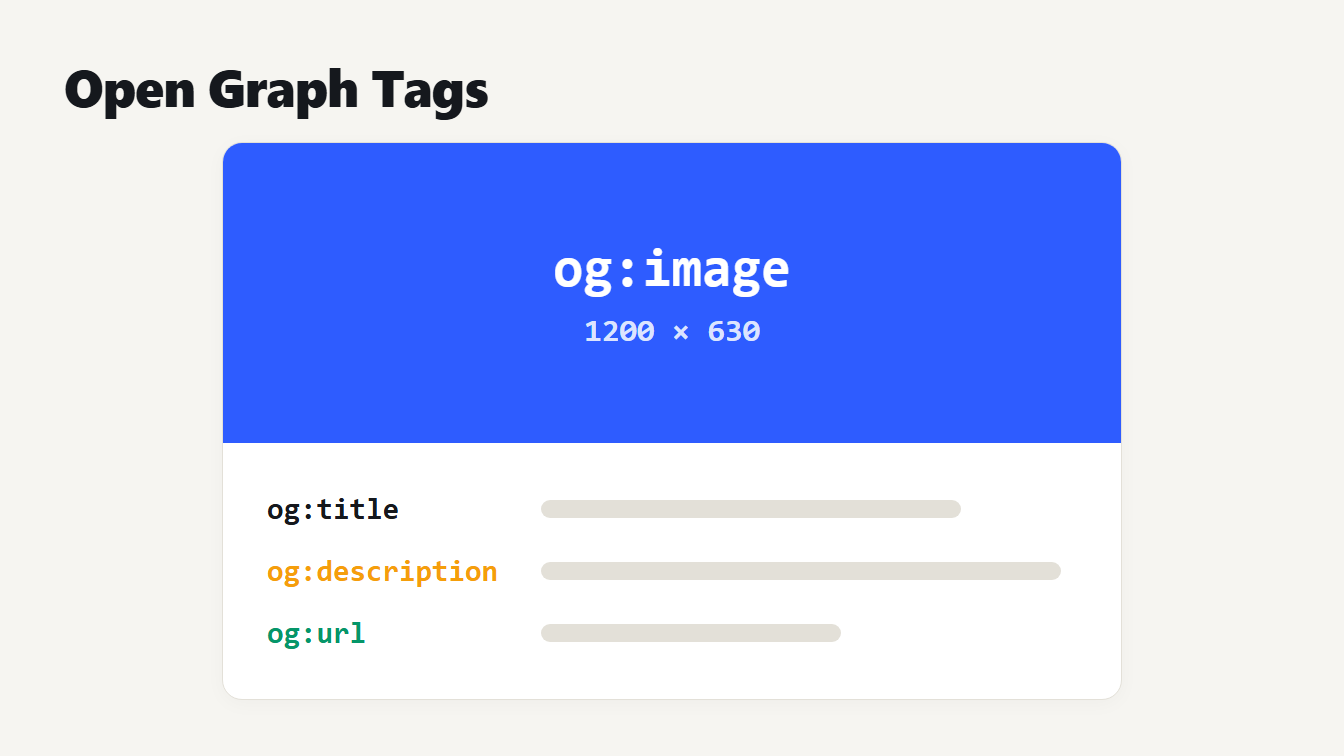
A mock link preview card. The image area is labelled og:image and 1200 by 630. Below it are three lines labelled og:title, og:description and og:url.
Open Graph tags are meta tags in the head of a web page that tell Facebook, LinkedIn and other apps what title, description and image to show when someone shares your link. Four are required: og:title, og:type, og:image and og:url. Add og:description and og:image:alt as well, and use a 1200 by 630 pixel image. Without these tags, each app guesses, and the guess is often a wrong crop or no picture at all. This guide covers every tag worth using, the image sizes the platforms document, a template to copy and the usual reasons a preview won't update.
What Open Graph tags do
The Open Graph protocol is a set of <meta property="og:..."> tags. A page that includes them becomes a rich object that other services can read. Facebook and LinkedIn both read the same tags to build a link preview.
You add the tags once, in the <head> of each page. They don't change how the page looks to visitors. They only change how a shared link looks. If you already write a title and description for search, the Meta Tag Generator covers those, and our guide to meta description length explains how long to make them. Open Graph tags are a separate set that serves social previews.
The four required Open Graph tags
The protocol lists four required properties. It also lists optional ones that are worth setting.
| Tag | Status | What it holds |
|---|---|---|
og:title | Required | The title as it should appear in the preview |
og:type | Required | The kind of object, such as website or article |
og:image | Required | The URL of the preview image |
og:url | Required | The canonical URL of the page |
og:description | Recommended | A short summary of the page |
og:image:alt | Recommended | A description of what is in the image |
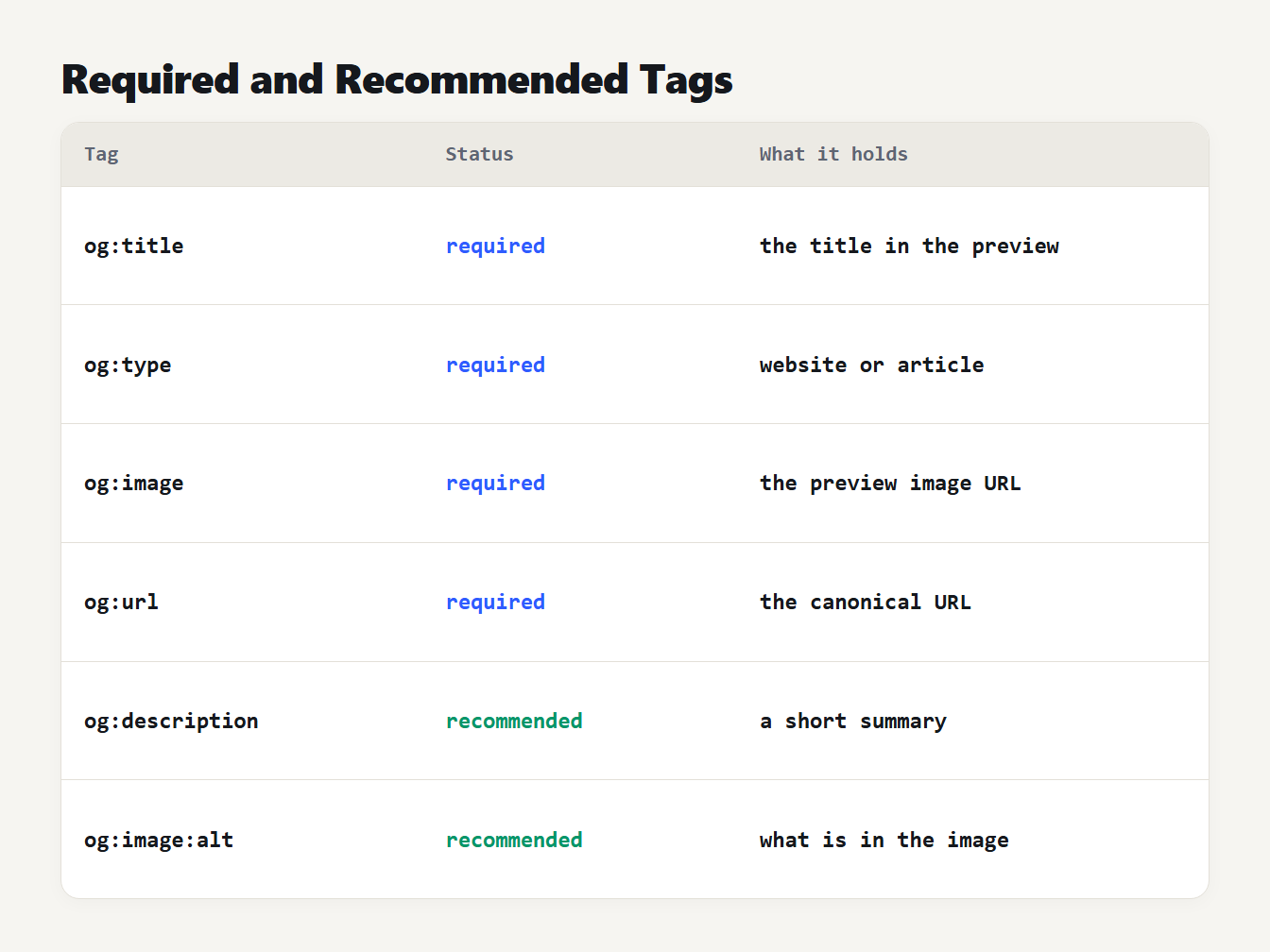
A table of six Open Graph tags. og:title, og:type, og:image and og:url are required. og:description and og:image:alt are recommended. Each row says what the tag holds.
Facebook's sharing guide for webmasters adds advice on what to put in them. Write og:title without branding such as your site name. Keep og:url as the canonical address, without session variables, user-identifying parameters or counters. That last point matters if you tag campaign links: keep the tags out of og:url, and use the UTM Builder only on the links you share, as our UTM naming guide explains.
The sources disagree on description length. The protocol asks for a one to two sentence description. Facebook says the description is usually between 2 and 4 sentences. Previews cut it short anyway, so put the most useful sentence first and stop when you've said it.
The protocol also says that a page with an og:image should have an og:image:alt, a description of what is in the image and not a caption. Write it the way you'd describe the picture to someone who can't see it. The image has two more optional properties, og:image:width and og:image:height. Facebook says they let its crawler render the image on the first share without downloading and processing it first.
Open Graph image size
This is the question most people have. Facebook's image guidelines and LinkedIn's sharing help page give exact numbers:
| Recommended size | At least 1200 by 630 pixels | Minimum 1200 by 627 pixels |
| Ratio | 1.91 to 1 | 1.91 to 1 |
| Smaller images | Large card needs 600 by 315 or more; the absolute minimum is 200 by 200 | Not stated |
| Maximum file size | 8 MB | 5 MB |
Both ratios round to 1.91 to 1. We worked it out: 1200 by 630 is 1.905, and 1200 by 627 is 1.914. So an image of 1200 by 630 pixels, under 5 MB, meets both sets of rules, because 630 is above LinkedIn's 627 minimum. Facebook's page also says to keep the ratio as close to 1.91 to 1 as possible to show the whole image in the feed without cropping.
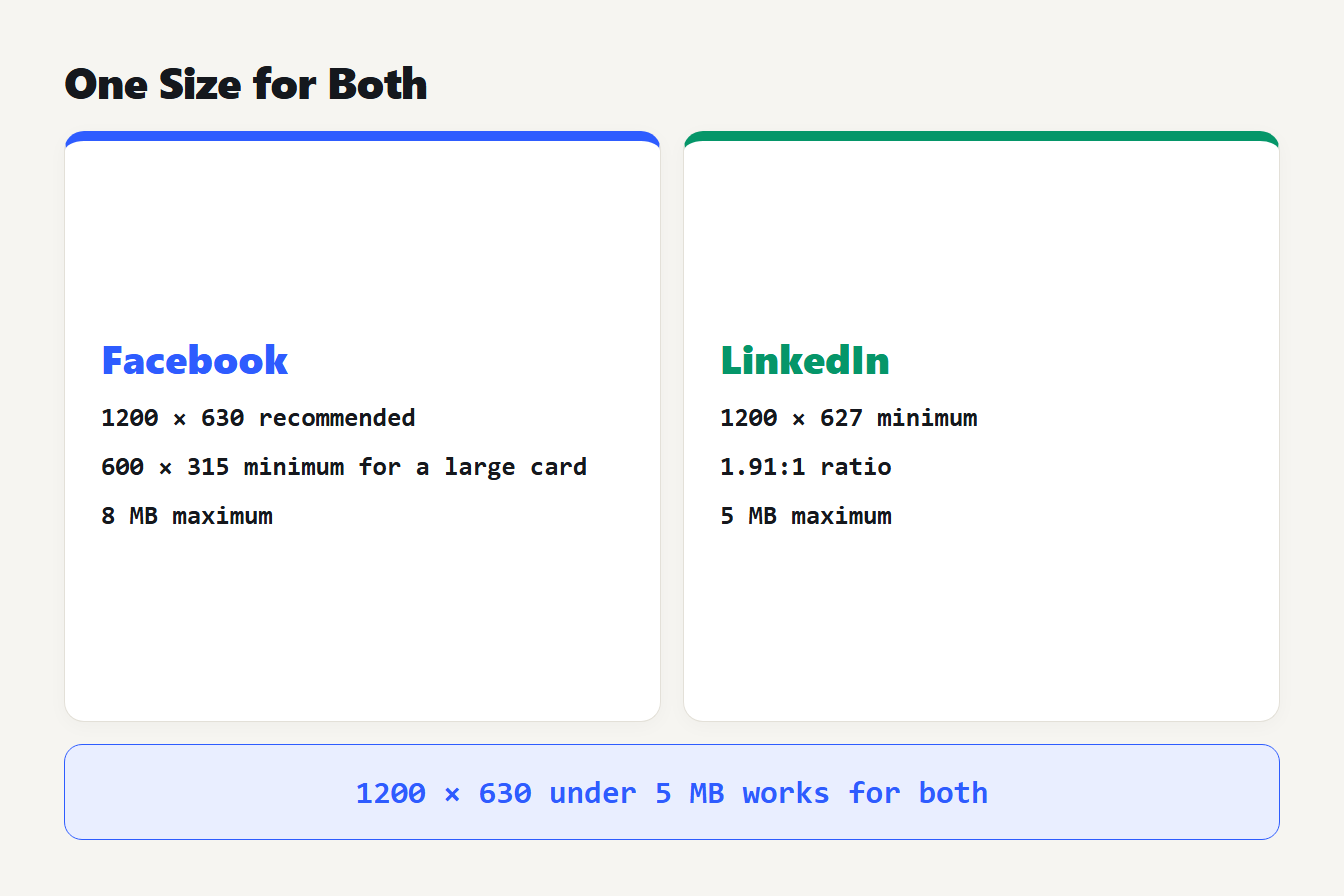
Two cards list the rules. Facebook: 1200 by 630 recommended, 600 by 315 minimum for a large card, 8 MB maximum. LinkedIn: 1200 by 627 minimum, 1.91 to 1 ratio, 5 MB maximum. A line below says 1200 by 630 under 5 MB works for both.
A PNG or JPEG is the safe choice. X has its own image rules for its cards, so check its current Cards documentation if X matters to you.
A copy-paste Open Graph template
Here is a complete set for an article page, written by our Open Graph Generator. Replace the values and paste it into the head of the page:
<meta property="og:type" content="article">
<meta property="og:url" content="https://example.com/blog/open-graph-tags">
<meta property="og:title" content="Open Graph Tags: What to Include">
<meta property="og:description" content="The tags that control how your page looks when it is shared, and the image size that works.">
<meta property="og:image" content="https://example.com/images/og-share.png">
<meta property="og:image:width" content="1200">
<meta property="og:image:height" content="630">
<meta property="og:image:alt" content="Four required Open Graph tags listed on a card">
<meta property="og:site_name" content="Example">
<meta name="twitter:card" content="summary_large_image">
The generator also writes matching twitter:title, twitter:description, twitter:image and twitter:image:alt lines. The twitter:card line is the one that picks the layout on X, so don't leave it out. Use website as the type for a home page and article for a post.
Every value in a tag has to be escaped, because a title is HTML. We tested our own generator with a title containing Q&A: "Tips" <fast> and an image URL ending in ?a=1&b=2. It now writes Q&A: "Tips" <fast> and ?a=1&b=2. Older versions of the generator, and many hand-written pages, leave the ampersand and quotes raw, which can break the tag.
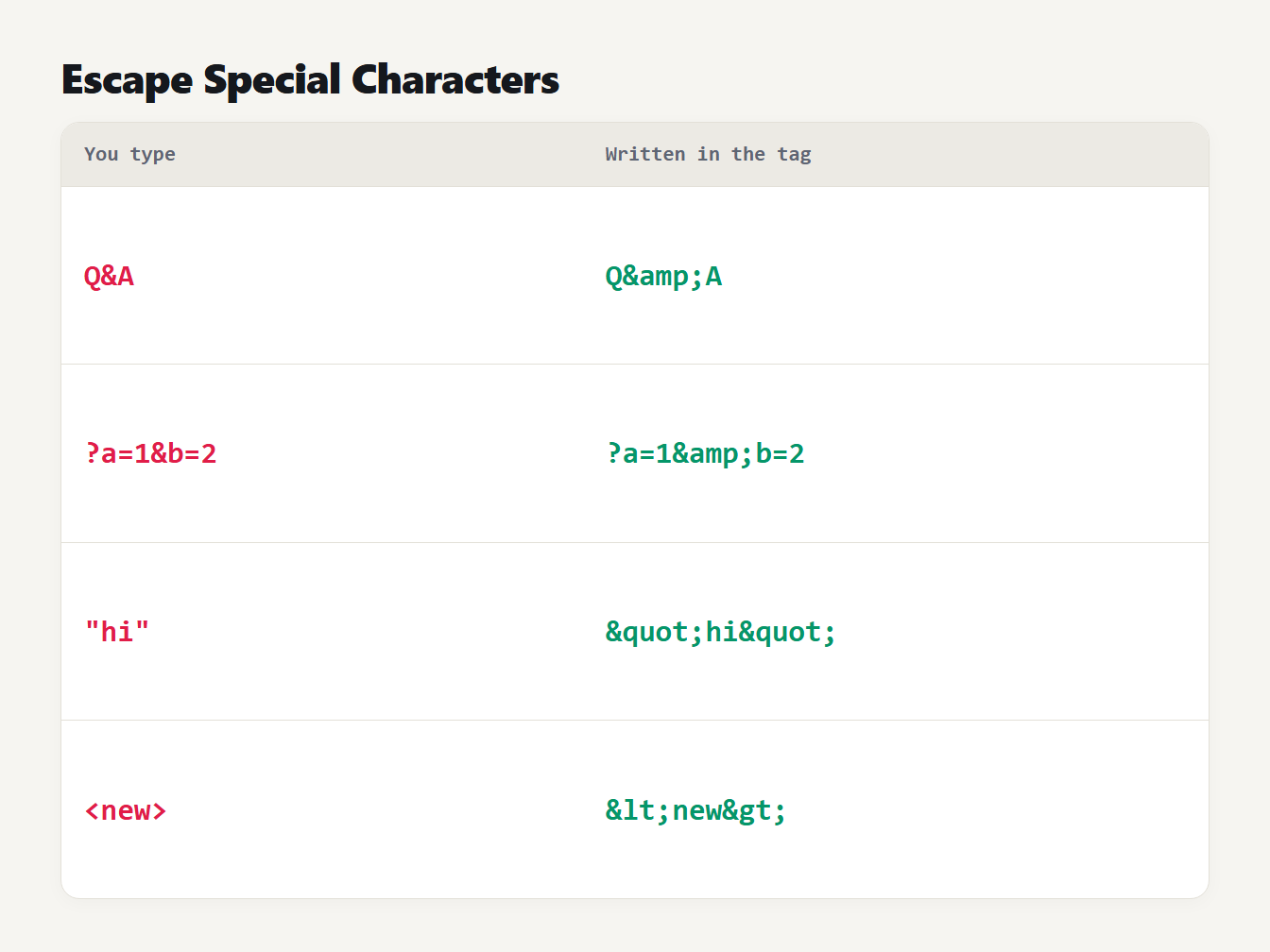
A table of four values and how each is written inside a tag. An ampersand in a title, an ampersand in a URL, double quotes and angle brackets each become an HTML entity.
Why your Open Graph preview won't update
You changed the image or title and the shared link still shows the old one. The usual cause is a cache. Facebook states that images are cached by URL and won't update unless the URL changes. So the fix is to save the new image under a new file name, such as og-share-v2.png, and point og:image at it.
To see what the crawler actually reads, use Facebook's Sharing Debugger. It shows which meta tags the crawler scrapes and any errors or warnings. If your server or firewall blocks visitors with unknown user agents, make sure it lets the Facebook crawler, which identifies itself as facebookexternalhit, read the page. Otherwise it can't see your tags at all.
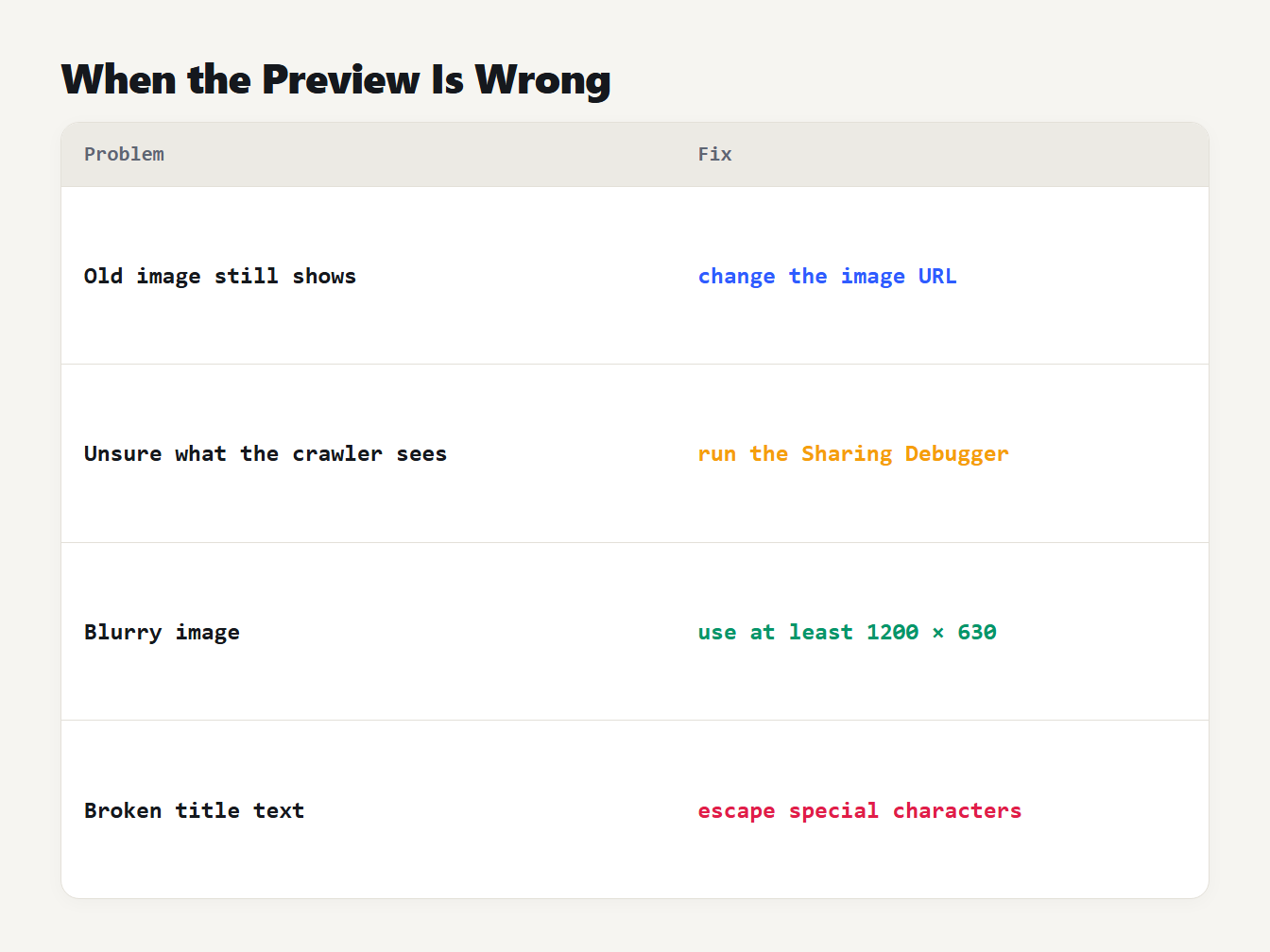
A table of four problems and fixes. An old image still shows: change the image URL. Unsure what the crawler sees: run the Sharing Debugger. A blurry image: use at least 1200 by 630. Broken title text: escape special characters.
Open Graph mistakes to avoid
- Putting the site name in
og:title. Facebook advises leaving branding out. Useog:site_namefor it. - Leaving out
og:image:alt. The protocol says a page with an image should have one. - Using a tiny image. Facebook needs at least 600 by 315 for a large card, and recommends 1200 by 630 for sharp results on high resolution screens.
- Tracking parameters in
og:url. It should be the clean canonical address. - Changing the image but not its URL. The old one stays cached.
- Unescaped characters. An ampersand or quote in a title can break the attribute.
How we handle it on this site
Our own pages carry the full set. The home page and each article write og:image, its width, height and alt text, and articles use og:type article. One thing we watch: our article images are 1344 by 756 pixels, a 16 to 9 shape. In a frame of 1.91 to 1 that's about 52 pixels taller than the frame, so around 7 percent of the height could be cropped. We keep any text inside the central 80 percent of each image, so a crop doesn't cut off words. If you can, make your share image 1200 by 630 and avoid the question.
Frequently asked questions
What are Open Graph tags?
Open Graph tags are meta tags in the head of a page that tell Facebook, LinkedIn and other apps which title, description and image to show when someone shares the link. They start with og:, such as og:title and og:image.
Which Open Graph tags are required?
Four: og:title, og:type, og:image and og:url, according to the Open Graph protocol. It also says a page with an og:image should have an og:image:alt. Adding og:description is strongly advised, because most previews show it.
What size should an og:image be?
Use 1200 by 630 pixels, a 1.91 to 1 ratio, under 5 MB. Facebook recommends at least that size and accepts files up to 8 MB. LinkedIn's minimum is 1200 by 627 and its maximum is 5 MB, so 1200 by 630 meets both.
Why is my old image still showing after I changed it?
Facebook caches images by URL and does not update them unless the URL changes. Give the new image a new file name, then run the page through the Sharing Debugger to see what its crawler reads.
Do I need Twitter or X tags as well?
Add at least twitter:card, because it chooses the card layout on X. Our generator writes the Open Graph set and a matching twitter: set together, so you can paste both into the head of the page.
Build your Open Graph tags
Fill in the Open Graph Generator with your title, description and image, add the alt text and the 1200 by 630 size, and copy the result into your page. Then check how the title and description will look in search with the SERP Preview. With these Open Graph tags in place, a shared link shows the title, summary and picture you chose.