How to Convert CSV to JSON Without Losing Data: Steps and Code
How to convert CSV to JSON: read quoted fields correctly, keep zip codes and IDs intact and handle uneven rows, tested in JavaScript, Python and pandas.
By TheTextKit TeamPublished
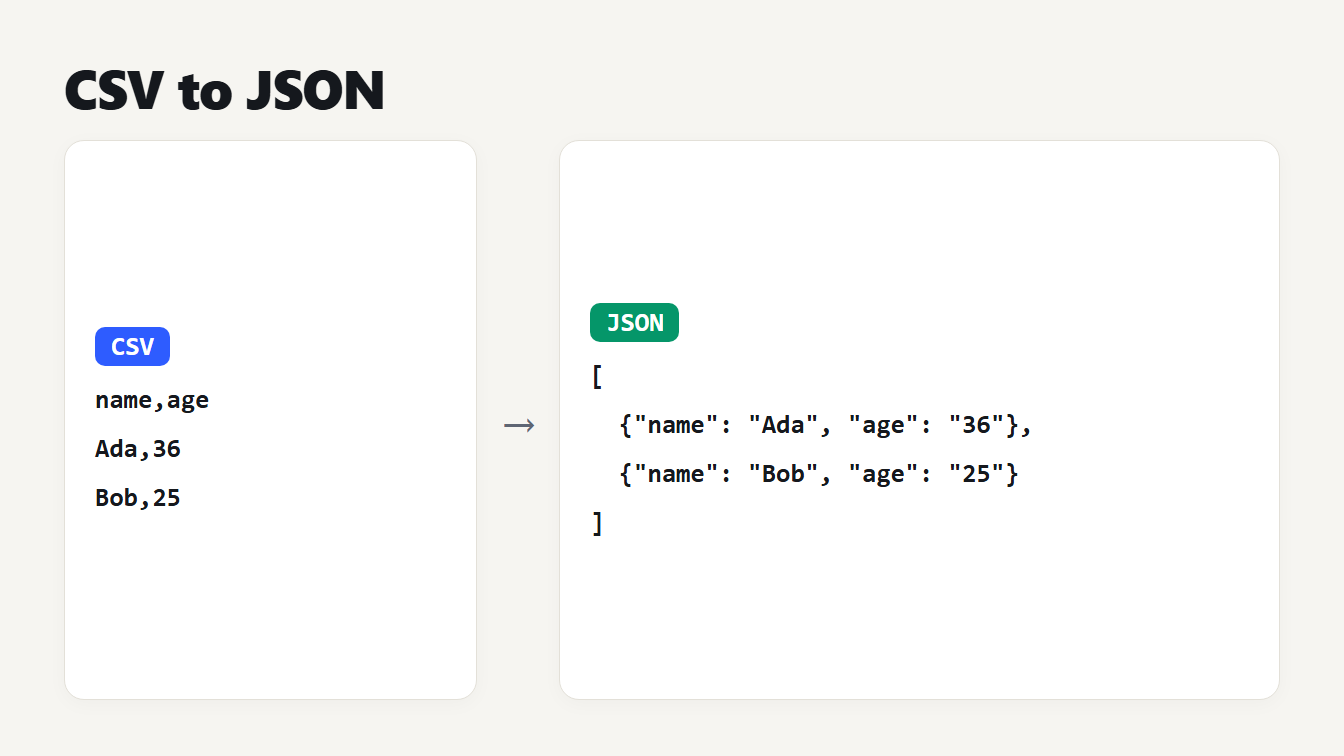
Two cards show a small CSV on the left and the JSON it becomes on the right. The CSV has the header name,age and two rows, Ada,36 and Bob,25. The JSON is an array of two objects with the keys name and age.
Here is how to convert CSV to JSON: read the file with a real CSV parser, use the first row as the keys, and turn every later row into an object. It sounds like a job for splitting each line on commas, and that is where data gets lost, because a quoted field can hold a comma, a double quote or a line break.
After the parsing comes a second question: should 00510 and 1250.50 stay text? This guide walks through both, with the output of four methods on the same file and working code in JavaScript and Python.
How to convert CSV to JSON in three steps
- Check the delimiter and the header. Look at the first lines. Spreadsheets in some regions write semicolons, and some exports have no header row.
- Parse it with a real parser. Use the CSV to JSON converter, a library, or the short function below. Do not split on commas yourself.
- Decide what stays text. A CSV has no types. Keep identifiers, zip codes and anything with a leading zero as text, and convert only what is clearly a number.
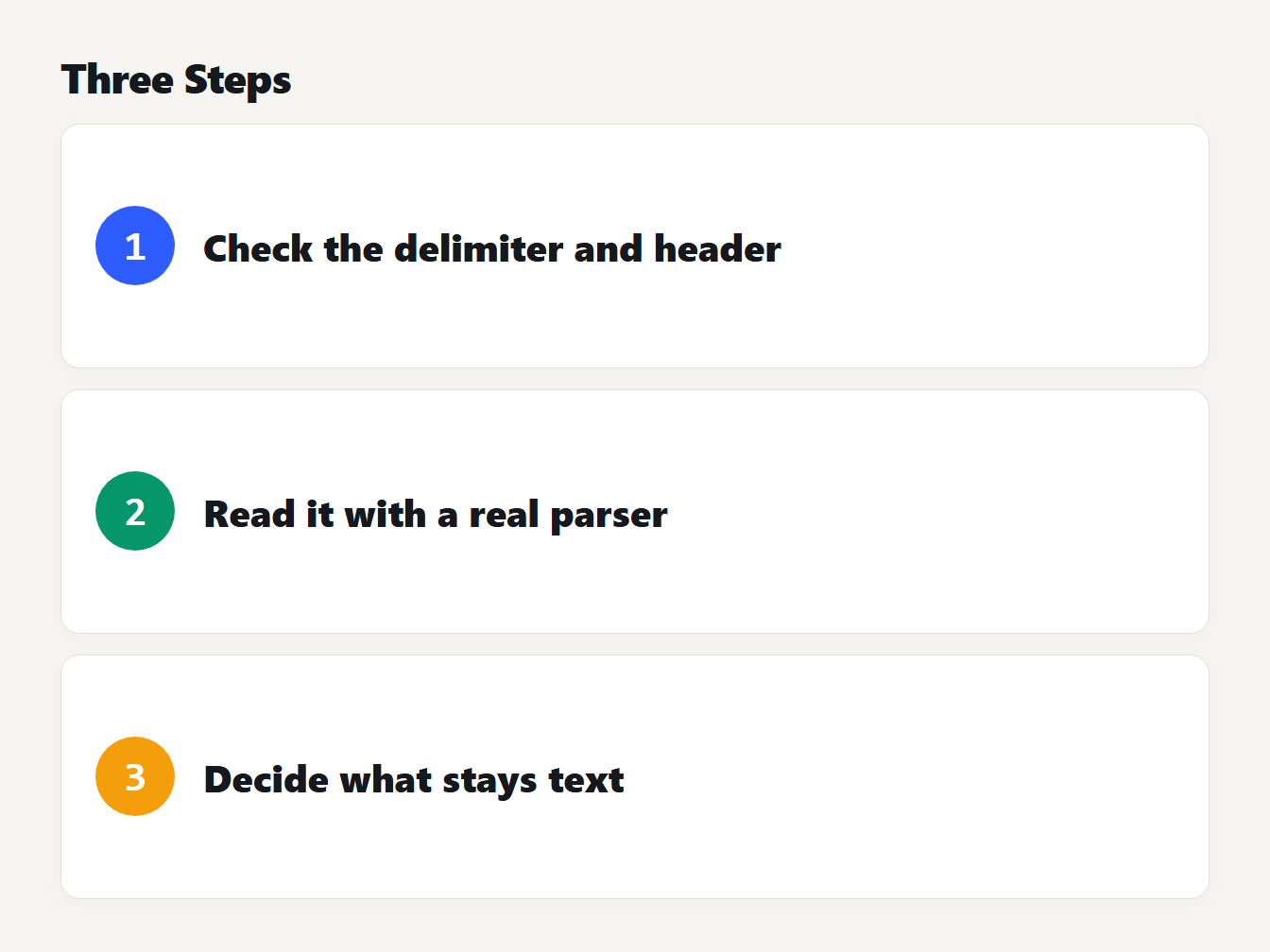
Three numbered cards: 1 check the delimiter and the header row, 2 read the file with a real parser, 3 decide which values stay text.
Example: CSV in, JSON out
Here is a small file with the things that break simple converters. It has a name with a comma, a name with quotes, a cell with a line break, a zip code with a leading zero, a price with a trailing zero and two empty cells.
id,name,zip,balance,note
101,"Lovelace, Ada",00510,1250.50,
102,"Grace ""Amazing"" Hopper",10001,0,"line one
line two"
103,Linus,02134,,dev
The converter returns an array with one object per row:
[
  { "id": "101", "name": "Lovelace, Ada", "zip": "00510", "balance": "1250.50", "note": "" },
  { "id": "102", "name": "Grace \"Amazing\" Hopper", "zip": "10001", "balance": "0", "note": "line one\nline two" },
  { "id": "103", "name": "Linus", "zip": "02134", "balance": "", "note": "dev" }
]
The commas, quotes and line break stayed inside their values, the empty cells are empty strings, and every value kept its exact text. We tidied the layout of the JSON here for reading, and the tool prints one key per line.
Why splitting on commas fails
The file above holds four rows, a header and three records, but a text editor shows five lines, because the last cell of the second record contains a line break. RFC 4180, the 2005 memo that describes CSV, says that fields containing line breaks, double quotes or commas should be enclosed in double quotes. A double quote inside a quoted field is written as two. It is an informational memo, not an Internet standard, and real files break its rules, but those two rules are what every parser relies on.
Splitting that file on line breaks and then on commas gives five rows with 5, 6, 5, 1 and 5 fields. The name "Lovelace and the text Ada" land in two columns, every later value moves one column to the right, and the cell with the line break becomes two broken rows. A parser that follows the quoting rules finds the four rows and five fields each.
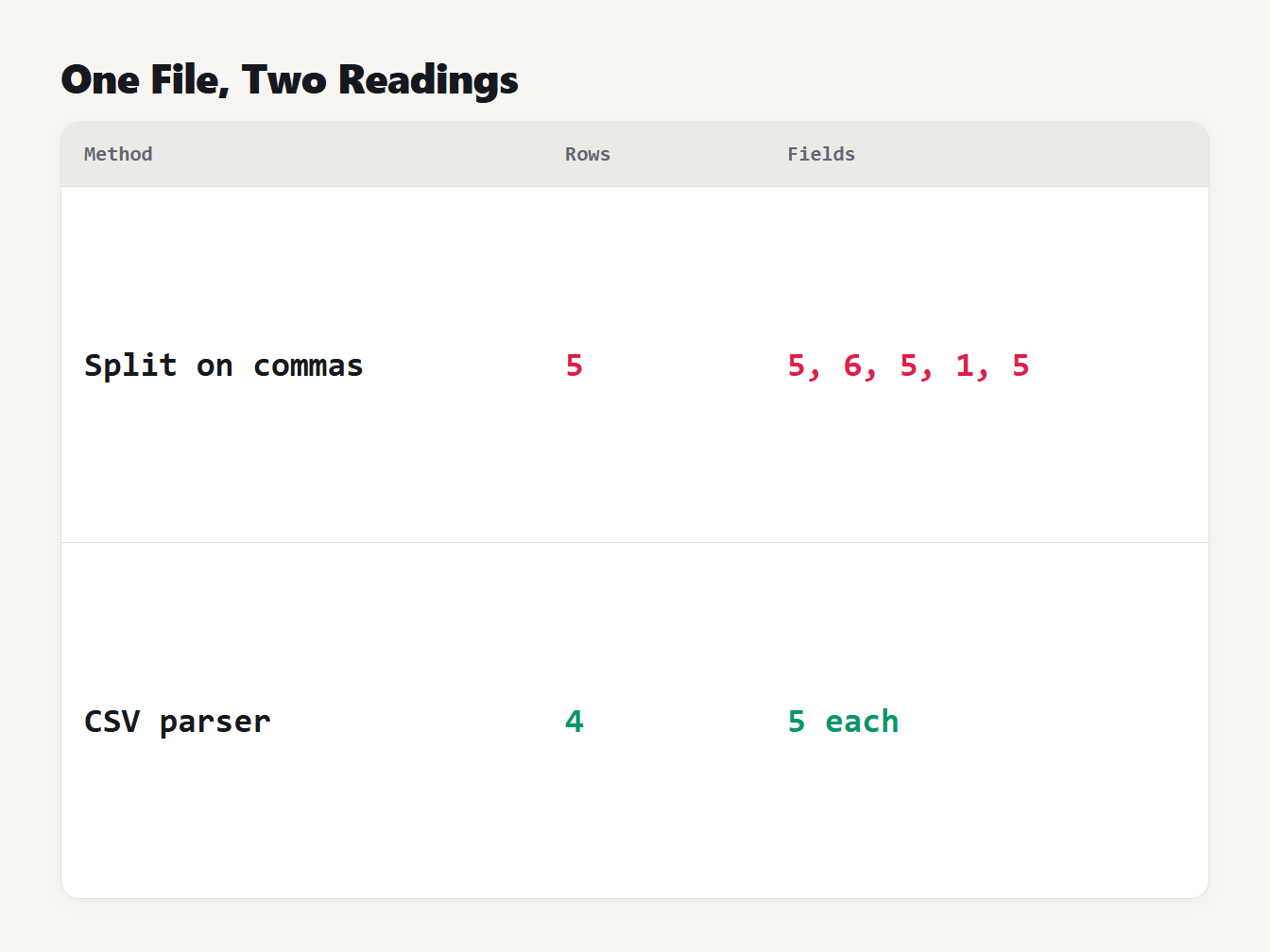
A table with two rows. Splitting on line breaks and commas gives 5 rows with 5, 6, 5, 1 and 5 fields. A CSV parser gives 4 rows with 5 fields each.
Python's csv documentation has a related warning. Open the file with newline='', because otherwise newlines inside quoted fields are not interpreted correctly.
Numbers, zip codes and big IDs: text or JSON types?
JSON has real numbers, and CSV does not, so every converter has to decide. The two specifications push in opposite directions. RFC 8259 says leading zeros are not allowed in a JSON number, so 00510 cannot be written as one. It also says that integers up to 2^53 minus 1 (9,007,199,254,740,991), positive or negative, are the ones implementations agree on exactly. Python's csv module takes the cautious route and returns every cell as a string.
We ran the same file through four methods:
| Method | zip 00510 | balance 1250.50 | Empty note |
|---|---|---|---|
| Our converter, default | "00510" | "1250.50" | "" |
Python csv.DictReader | "00510" | "1250.50" | "" |
pandas read_csv | 510 | 1250.5 | null |
pandas with dtype=str and keep_default_na=False | "00510" | "1250.50" | "" |
Default pandas guessed that the zip column was a number and dropped the zeros. It also turned 1250.50 into 1250.5, wrote 0 as 0.0 and the empty balance as null. Those guesses are fine for analysis and wrong for a zip code. The last row shows the fix: tell pandas to keep everything as text, and it matches the converter.
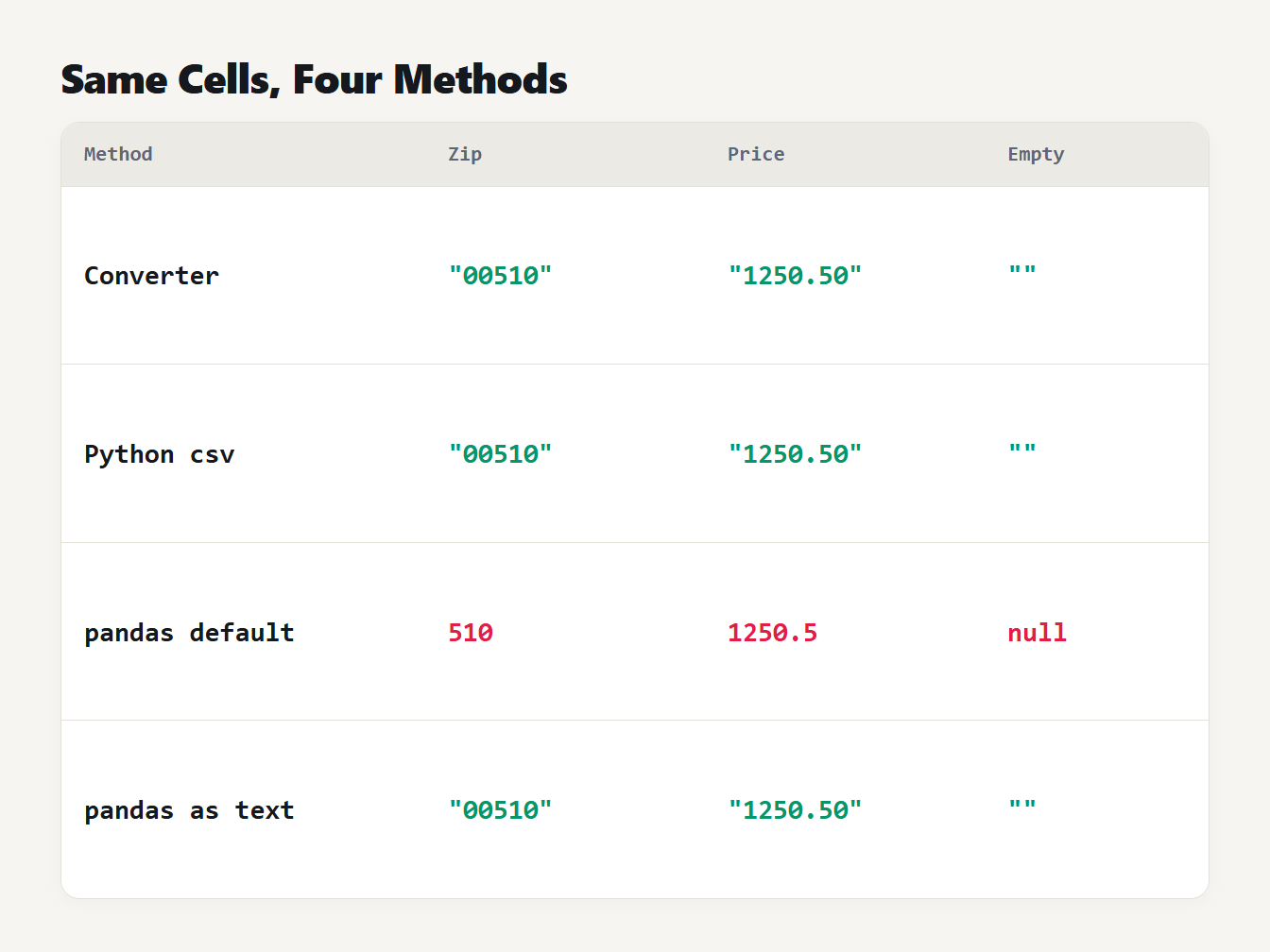
A table of four methods and how each writes three cells. The converter and Python csv keep the text 00510, 1250.50 and an empty string. Default pandas gives the number 510, the number 1250.5 and null. Pandas with text settings keeps the text.
Sometimes you do want numbers. Our converter has an option for that, called detect numbers and booleans. It converts a whole column only when every filled cell in it can be written as a JSON number or as true or false without changing a digit.
In the example, the id column becomes the numbers 101, 102 and 103. The zip column stays text because of 00510, and the balance column stays text because 1250.50 would become 1250.5. A column never mixes types, and an empty cell in a converted column becomes null. We tested the rule on 500 random files, and writing each converted value back as text gave the original cell every time.
Rows with too many or too few cells
RFC 4180 says every line should have the same number of fields, but real files do not. Take this one, where the first row has an extra cell and the second is short:
name,age
Ada,36,extra
Bob
Our converter gives {"name":"Ada","age":"36","column_3":"extra"} and {"name":"Bob","age":""}, so nothing is dropped. Python's DictReader stores the extra cell in a list under the key None, which json.dumps writes as the key "null", and fills the missing age with None. According to the Python documentation, that is controlled by restkey and restval. pandas does something else. The data has one more field than the header, so it treats Ada and Bob as row labels and shifts the values. Its records output is {"name": 36.0, "age": "extra"}, with no names at all.
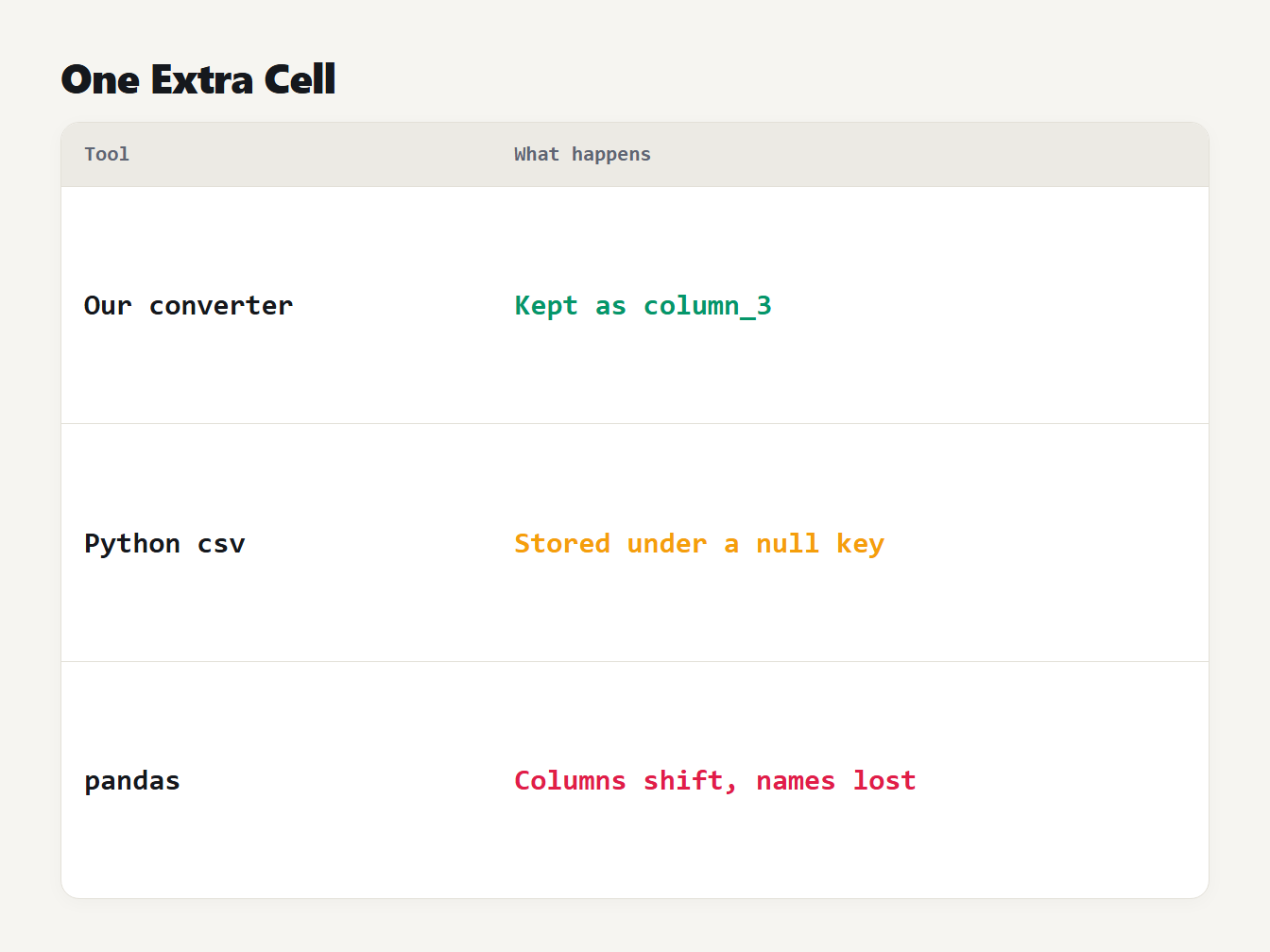
A table of three tools and what each does with a row that has one cell more than the header. Our converter keeps the cell under column_3. Python csv stores it under a null key. Pandas shifts the columns and the names are lost.
None of these is wrong by definition, but only the first two keep the data in a place you can find. If you see an unexpected column_3 or a null key, look for an unquoted comma in the file.
How to convert CSV to JSON in JavaScript
This function needs no library. It reads quoted fields, doubled quotes and line breaks inside quotes, and accepts LF or CRLF line ends:
function parseCsv(text, delimiter = ",") {
  const rows = [];
  let row = [], field = "", quoted = false;
  const endField = () => { row.push(field); field = ""; };
  const endRow = () => { endField(); rows.push(row); row = []; };
  for (let i = 0; i < text.length; i++) {
    const c = text[i];
    if (quoted) {
      if (c === '"' && text[i + 1] === '"') { field += '"'; i++; }
      else if (c === '"') quoted = false;
      else field += c;
    } else if (c === '"' && field === "") quoted = true;
    else if (c === delimiter) endField();
    else if (c === "\n") endRow();
    else if (c !== "\r") field += c;
  }
  if (field !== "" || row.length) endRow();
  return rows;
}

function csvToJson(text) {
  const [headers, ...rows] = parseCsv(text);
  return rows.map((r) => Object.fromEntries(headers.map((h, i) => [h, r[i] ?? ""])));
}
We tested it on 1,500 random tables written by Python's csv.writer, with commas, quotes, line breaks, accents and emoji in the cells, and it returned the original table every time. It does not skip blank lines, remove a byte order mark, understand old-style CR line ends or keep extra cells, which the converter does, so use that for files from unknown sources.
How to convert CSV to JSON in Python
The standard library is enough, and it keeps every value as text:
import csv, json

with open("data.csv", encoding="utf-8-sig", newline="") as f:
    rows = list(csv.DictReader(f))

print(json.dumps(rows, indent=2, ensure_ascii=False))
The utf-8-sig encoding removes a byte order mark if the file has one, which some spreadsheet exports add. If you prefer pandas, switch off its guessing:
import pandas as pd

df = pd.read_csv("data.csv", dtype=str, keep_default_na=False)
df.to_json("out.json", orient="records", indent=2)
Without dtype=str and keep_default_na=False, pandas guesses the types and turns empty cells into null, as the table above shows. We ran both versions with pandas 3.0.6, and they matched our converter on the example file.
Frequently asked questions
How do I convert CSV to JSON?
Read the CSV with a real parser, use the first row as the keys, and turn each later row into an object. Do not split the text on commas, because quoted fields can contain commas, quotes and line breaks. Then decide whether numbers should stay as text.
Why are all my values strings in the JSON?
A CSV has no types, so a converter that is careful returns text. Turning 00510 into a number gives 510 and turning a long ID into a number can round it. Convert only the columns where every value survives, or convert them in your own code after reading.
How do I keep leading zeros when I convert CSV to JSON?
Keep the column as text. JSON numbers cannot have leading zeros, and a program that reads 00510 as a number returns 510. In pandas, read the file with dtype=str. In our converter, leave number detection off or leave the column as it is, because a column with a leading zero stays text anyway.
What happens to rows with too many or too few cells?
It depends on the tool. Python's DictReader keeps extra cells in a list under a key of None and fills missing ones with None. Our converter keeps extra cells under names like column_3 and fills missing ones with an empty string. pandas can shift the columns, so check ragged files first.
Is a CSV with semicolons or tabs still CSV?
In practice yes. RFC 4180 describes commas, but many spreadsheets write semicolons or tabs depending on regional settings. Tell the converter which delimiter the file uses, or the whole row ends up in one field.
Convert your CSV now
Paste your file into the CSV to JSON converter, choose the delimiter, and copy the result. Quoted fields, line breaks and byte order marks are handled, values stay as text unless you ask for numbers, and nothing leaves your browser. To go the other way, read our guide on how to convert JSON to CSV. The JSON Formatter checks and tidies the result.