How to Convert JSON to TypeScript Interfaces
Learn how to convert JSON to TypeScript interfaces: nested objects, optional keys, unions and arrays. Checked with the compiler on 2,000 documents.
By TheTextKit TeamPublished
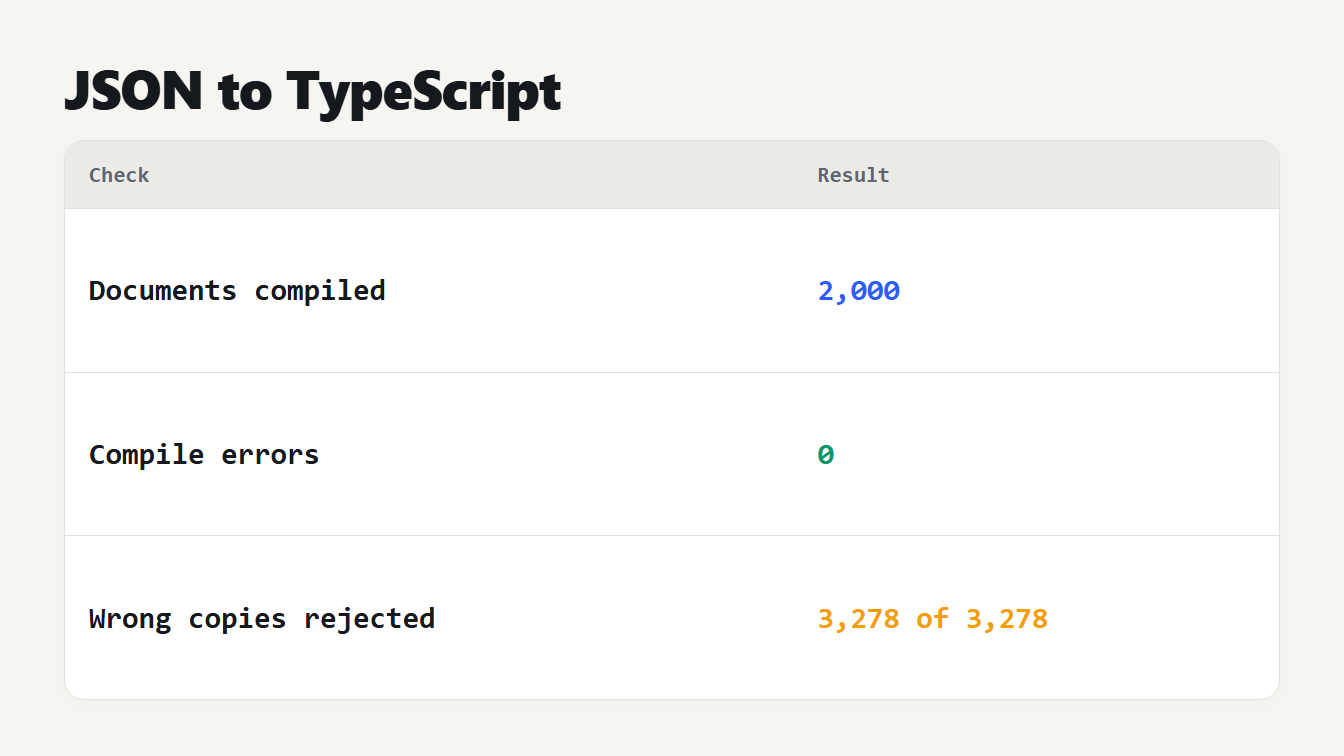
A table of three results for the JSON to TypeScript converter. 2,000 random documents were assigned to their generated types and all compiled. 3,278 deliberately wrong versions were all rejected by the compiler.
To convert JSON to TypeScript, turn every object into an interface with one property per key. Give each property the type of its value, and mark a key optional when some objects in an array lack it. Doing it by hand is slow and easy to get wrong for nested data, so a converter reads a sample and writes the types for you.
This guide shows what the output looks like for a real sample and how the rules work. It also covers when to choose interface or type, and why a type made from a sample is a description and not a guarantee. We also compiled the output of our converter for 2,000 random documents with the TypeScript compiler.
How to convert JSON to TypeScript
Paste a sample of your JSON into the JSON to TypeScript Converter, choose interface or type, and copy the result. Here is a sample with a nested object and an array of orders:
{
  "id": 1042,
  "name": "Ada Lovelace",
  "email": "ada@example.com",
  "active": true,
  "roles": ["admin", "editor"],
  "address": { "city": "London", "zip": null },
  "orders": [
    { "id": "A-1", "total": 19.99, "paid": true },
    { "id": "A-2", "total": 5, "coupon": "SPRING" }
  ]
}
And this is the output with the default settings:
export interface Root {
  id: number;
  name: string;
  email: string;
  active: boolean;
  roles: string[];
  address: Address;
  orders: Order[];
}

export interface Address {
  city: string;
  zip: null;
}

export interface Order {
  id: string;
  total: number;
  paid?: boolean;
  coupon?: string;
}
Three things happened that you would otherwise do by hand. The object under address became its own interface. The items of the orders array were merged into one Order type, and because only the first order has paid and only the second has coupon, both are optional. And zip became null, because the only value we gave it was null.
What each JSON value becomes
| JSON value | TypeScript type |
|---|---|
| Text | string |
| 3.14 | number |
| true | boolean |
| null | null |
| An object | An interface with the same keys |
| An array | The type of its items followed by [] |
| An empty array | unknown[] |
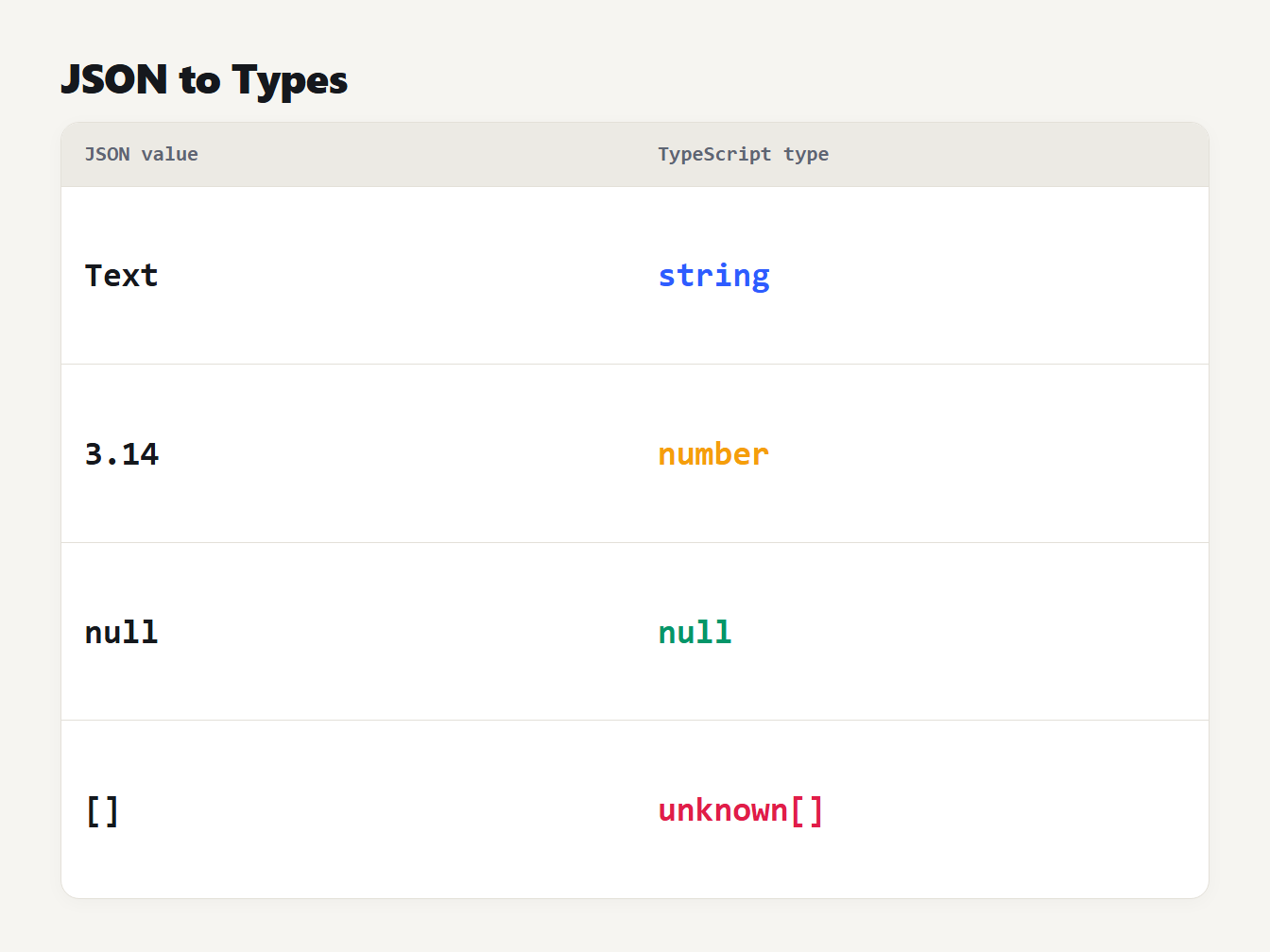
A table of four JSON values and the TypeScript type each becomes. Text becomes string. The number 3.14 becomes number. The value null becomes null. An empty array becomes unknown[].
An empty array is a useful case. The sample says nothing about what the array will hold, so the converter writes unknown[]. According to the TypeScript handbook, any disables all further type checking. unknown is the stricter choice, because the compiler makes you check a value before you use it. That makes unknown[] the safe answer until you know the real type.
Optional keys, null and unions
JSON has no undefined, so a key is either present or missing. A missing key becomes an optional property with a question mark. A key that is null in some items and a real value in others gets | null, while a key that is only ever null becomes null, as zip did above. And a key whose values have different types becomes a union.
| What the sample shows | What you get |
|---|---|
| A key missing from some items | coupon?: string |
| A value that is null in some items | price: string | null |
| Different types across items | id: string | number |
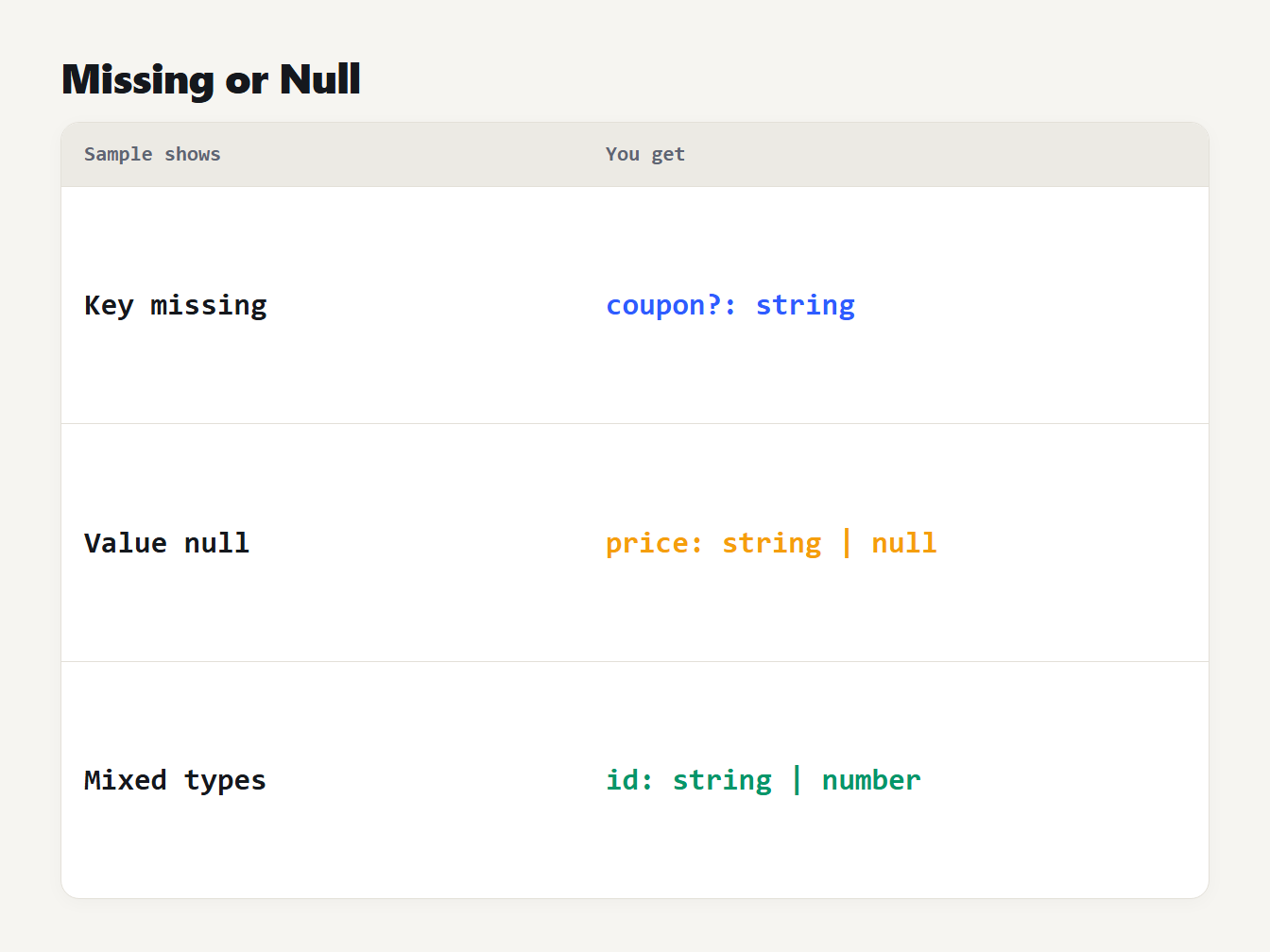
A table of three things a JSON sample can show and the TypeScript type each produces. A key missing from some items becomes coupon?: string. A value that is null in some items becomes price: string | null. Different types across items become id: string | number.
The difference between a missing key and null matters when you read the value. The handbook's page on object types says that when you read an optional property you must check for undefined before using it, as in order.coupon?.toUpperCase(). A value of type string | null needs a null check instead. Mixing them up is a common source of runtime errors, so look at which one your API really sends.
Interface or type?
For plain object shapes the two are close. The TypeScript handbook lists the differences. An interface can be extended with extends and re-opened to add fields, which is called declaration merging. A type alias cannot be re-opened, but it can name unions and other shapes. The handbook's advice is to use interface until you need a feature of type.
| You need | Use |
|---|---|
| A plain object shape | interface |
| A union of types | type |
| To extend or merge it later | interface |
| A root that is an array | type |
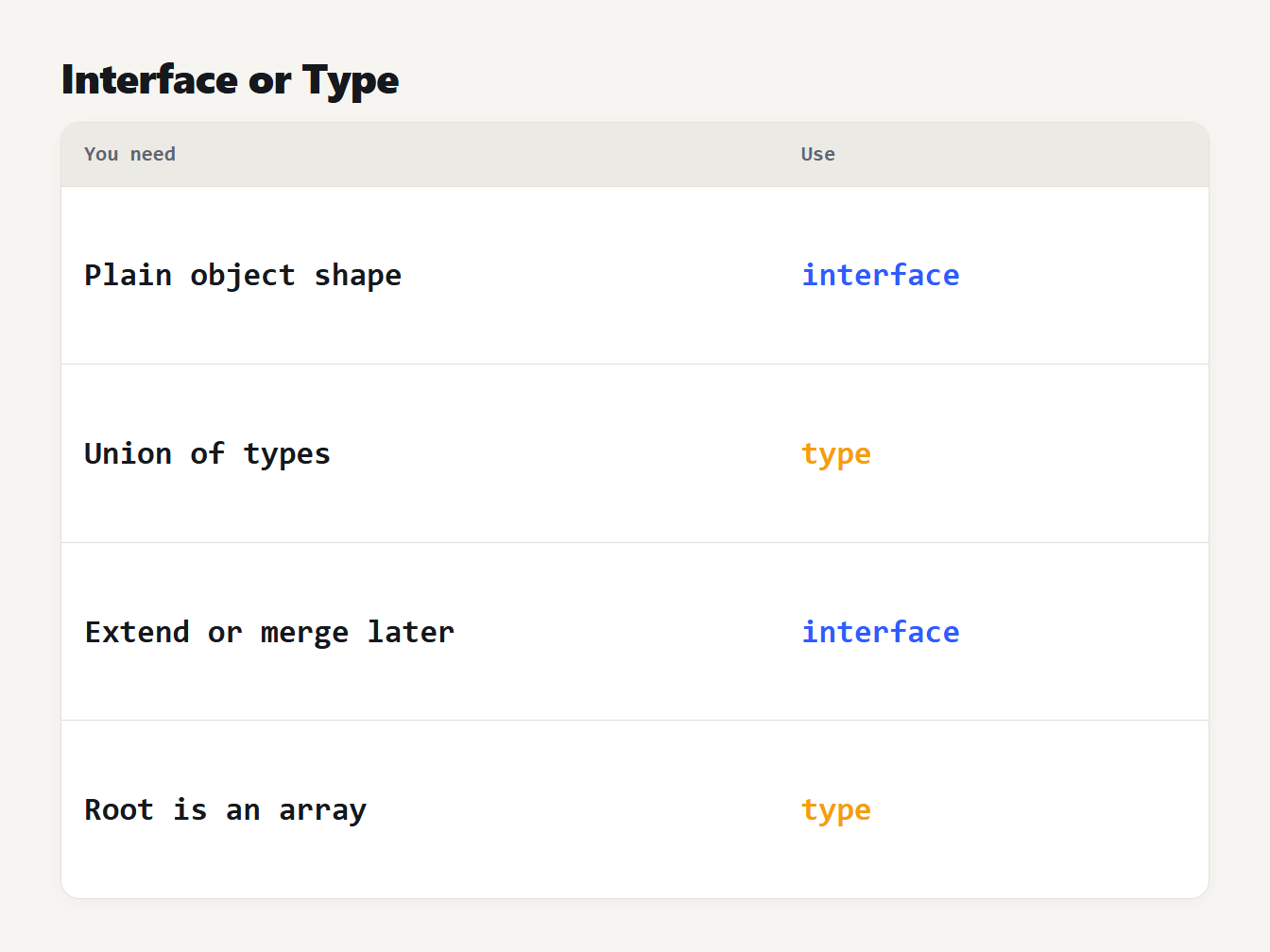
A table of four needs and the declaration to use. A plain object shape takes an interface. A union of types takes a type. Extending or merging later takes an interface. A root that is an array takes a type.
The converter defaults to interface and lets you switch to type. If the root of your JSON is an array or a plain value, the tool always writes a type alias, because an interface cannot be an array. For [{"id": 1}, {"id": 2, "x": true}] it writes export type Root = RootItem[]; followed by an interface for the items.
The readonly option adds readonly to every property and turns arrays into readonly T[]. It only affects type checking, and the handbook warns that it does not make values immutable at runtime.
Why JSON.parse returns any
Once you convert JSON to TypeScript types, the tempting code is const data: Root = JSON.parse(text). It compiles, and it proves nothing. The type declarations that ship with TypeScript 5.9.3 define JSON.parse as returning any, so the compiler accepts any annotation without checking the data.
A safer pattern is to read the result as unknown and check it before you treat it as your type:
const data: unknown = JSON.parse(text)
if (typeof data === "object" && data !== null && "id" in data) {
  // narrowed enough to read data.id safely
}
For anything that crosses a trust boundary, such as an API response, a check at runtime or a schema validation library is what makes the type true. The generated interfaces are the right starting point for the shape you expect. They are not a replacement for that check.
How names and keys are handled
Interface names come from the keys, in PascalCase. A key such as user_profile or user-profile gives UserProfile. The items of an array are named in the singular, so orders gives Order and categories gives Category, and a key like data that has no plural form gives DataItem. Two different objects that would get the same name are numbered: User and User2.
Keys that are not valid property names, such as first-name or 1abc, are written in quotes. Names that would hide a built-in type, such as Date or Record, get a Type suffix, so a key called Date gives DateType.
How we tested the converter
A converter that produces code can be tested by compiling the code. A script generated 2,000 random JSON documents. They had nested objects and arrays, arrays of objects with different keys, mixed arrays, odd keys such as first-name, class and an empty string, names that clash with built-ins, and accents. The script also picked random combinations of the interface, type, export and readonly options. For each one we generated the types, then wrote a file that assigned the original document to the root type, and compiled it with the TypeScript compiler in strict mode.
A passing compile only shows the type is not too narrow. A type of unknown would pass too. So for each document we also made wrong copies. We replaced one value with an object that has a key the type does not know, and we added an extra key to one object, and the compiler had to reject both.
| Test | Count | Result |
|---|---|---|
| Documents compiled against their own types in strict mode | 2,000 | 0 errors |
| Wrong copies with a changed value or an extra key | 3,278 | All rejected |
| Bugs found by the test | 1 | Fixed |
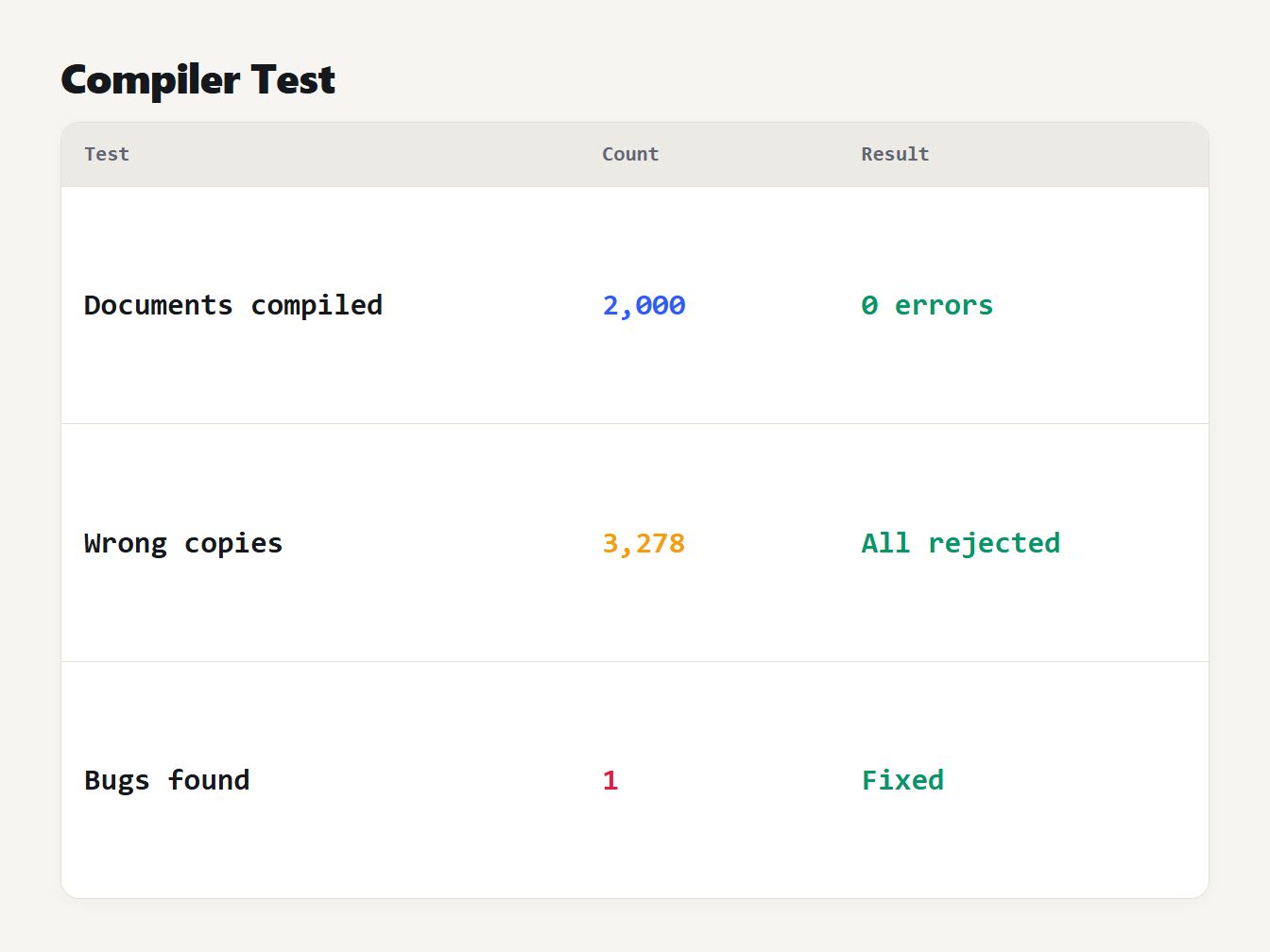
A table of three results from compiling the converter's output. 2,000 documents compiled against their own types in strict mode with 0 errors. 3,278 wrong copies were all rejected. The test found 1 bug, which was fixed.
The test did find one bug. With the readonly option, an array of arrays came out as readonly readonly X[][], which is not valid TypeScript. The fix is to put parentheses around the inner type, readonly (readonly X[])[], and the test now covers it.
Limits
When you convert JSON to TypeScript from a sample, the sample cannot tell the converter everything. It cannot tell that a string holds a date, that a number is always a whole number, or that a field is an enum. It cannot see keys that never appeared. And one thing needs care: JSON numbers are read as JavaScript numbers, so an identifier such as 9007199254740993 cannot be held exactly. If your API sends large ids, ask for them as strings.
Frequently asked questions
How do I convert JSON to a TypeScript interface?
Paste the JSON into a converter and copy the result. Each object becomes an interface with a property for every key, typed after its value. For {"id": 1, "name": "Ann"} you get an interface with id: number and name: string.
Why are some properties optional?
A key that is missing from at least one object in an array gets a question mark. A key that is present in every object stays required. With a single object every key is required, so paste several items to see which keys are optional.
Should I use interface or type?
For plain object shapes either works. The TypeScript handbook suggests using interface until you need a feature of type, such as a union. When the root of the JSON is an array or a plain value, a type alias is needed.
Why is JSON.parse typed as any?
Because the shape of a JSON string is not known until it is read, so TypeScript's own typing returns any, which turns off type checking. Assign the result to unknown and check it before use, or validate it with a schema library.
Does the generated type guarantee the API response?
No. It describes the sample you pasted. A field that was always a number in your sample may be null or a string in other responses. Use a sample with the variations you expect and check the result against the API documentation.
Convert your JSON now
Paste your sample into the JSON to TypeScript Converter to get interfaces or types you can copy or download as a .ts file. To tidy the JSON first, use the JSON Formatter, and to start from YAML, use the YAML to JSON Converter. Everything runs in your browser, so your data is never uploaded.