How to Sort Lines Alphabetically (and Why Tools Disagree)
How to sort lines alphabetically online or in code, and why 10 lands before 9, how case and language change the order, checked against Python.
By TheTextKit TeamPublished
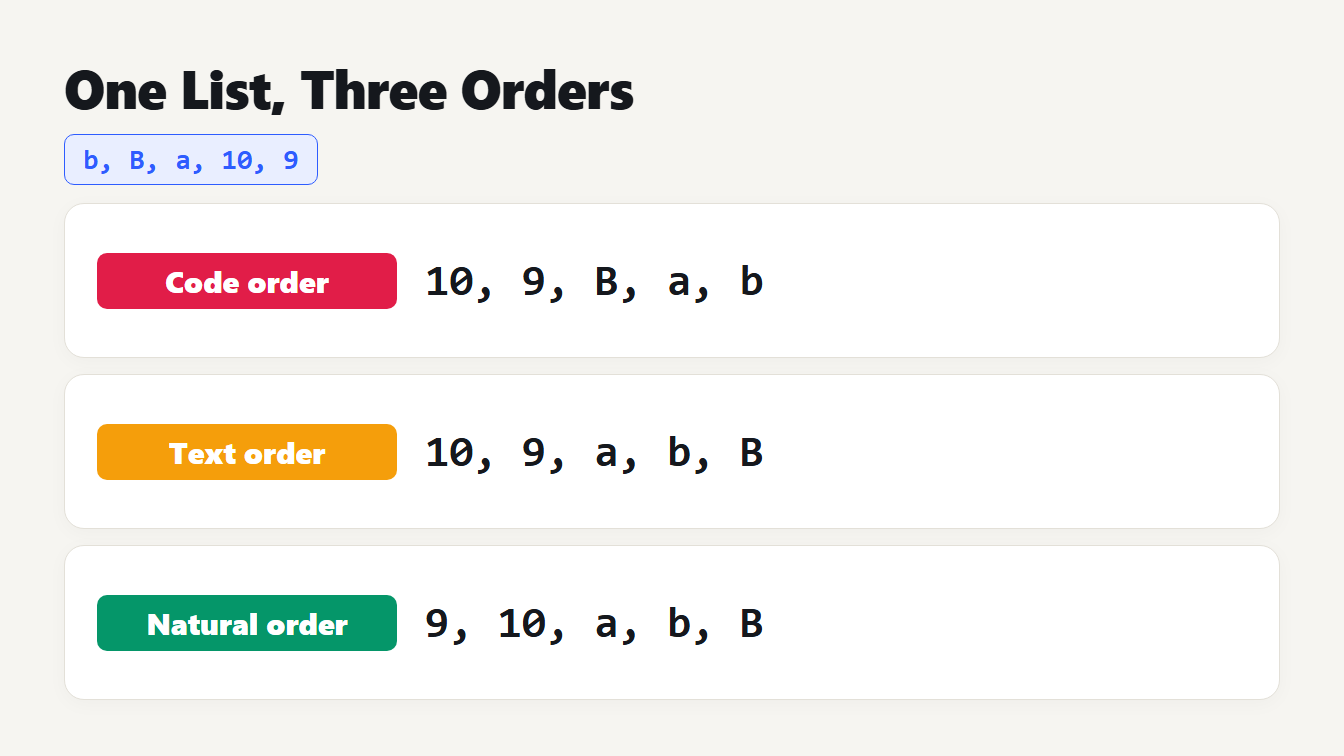
Three cards show the list b, B, a, 10, 9 sorted three ways. Code order gives 10, 9, B, a, b. Text order gives 10, 9, a, b, B. Natural order gives 9, 10, a, b, B.
To sort lines alphabetically, paste them into a line sorter, pick A to Z and copy the result. That works until the list has numbers, capital letters or accents, and then the answer depends on the tool. The same five lines can come back in three different orders, and each order is correct by its own rules. This guide shows what decides the order, how Python, JavaScript, PowerShell and our Sort Lines tool differ on the same list, and the mistakes we found and fixed in our own sorter.
How to sort lines alphabetically in four steps
- Paste your list into the Sort Lines tool, one item per line.
- Choose Alphabetical (A to Z), or Z to A for the reverse.
- Check the options. Sort numbers by value and Ignore case are on by default. Remove blank lines is off.
- Copy the sorted lines. To drop repeated items afterwards, use Remove Duplicate Lines, and our guide to removing duplicate lines explains how it compares them.
One list, three orders
We sorted the list b, B, a, 10, 9 in the places people usually sort text. Python's sorted() and the default sort() in JavaScript compare code units, so the capital B comes before the lowercase letters and 10 comes before 9. JavaScript's localeCompare and PowerShell 5.1's Sort-Object compare text the way a person would, so a, b and B sit together, but they still put 10 before 9.
| Method | Result |
|---|---|
Python sorted() | 10, 9, B, a, b |
JavaScript default sort() | 10, 9, B, a, b |
JavaScript localeCompare | 10, 9, a, b, B |
PowerShell Sort-Object | 10, 9, a, b, B |
JavaScript Intl.Collator with numeric: true | 9, 10, a, b, B |
| Sort Lines tool, default settings | 9, 10, a, b, B |
The first four are not bugs. They compare text, and for text 10 really is before 9. Microsoft's Sort-Object page shows the same thing: sorting a list of product numbers as strings puts 1500 before 2, and it fixes it by casting the values to integers. The MDN page on Array.sort makes the same point, with "80" sorting before "9".
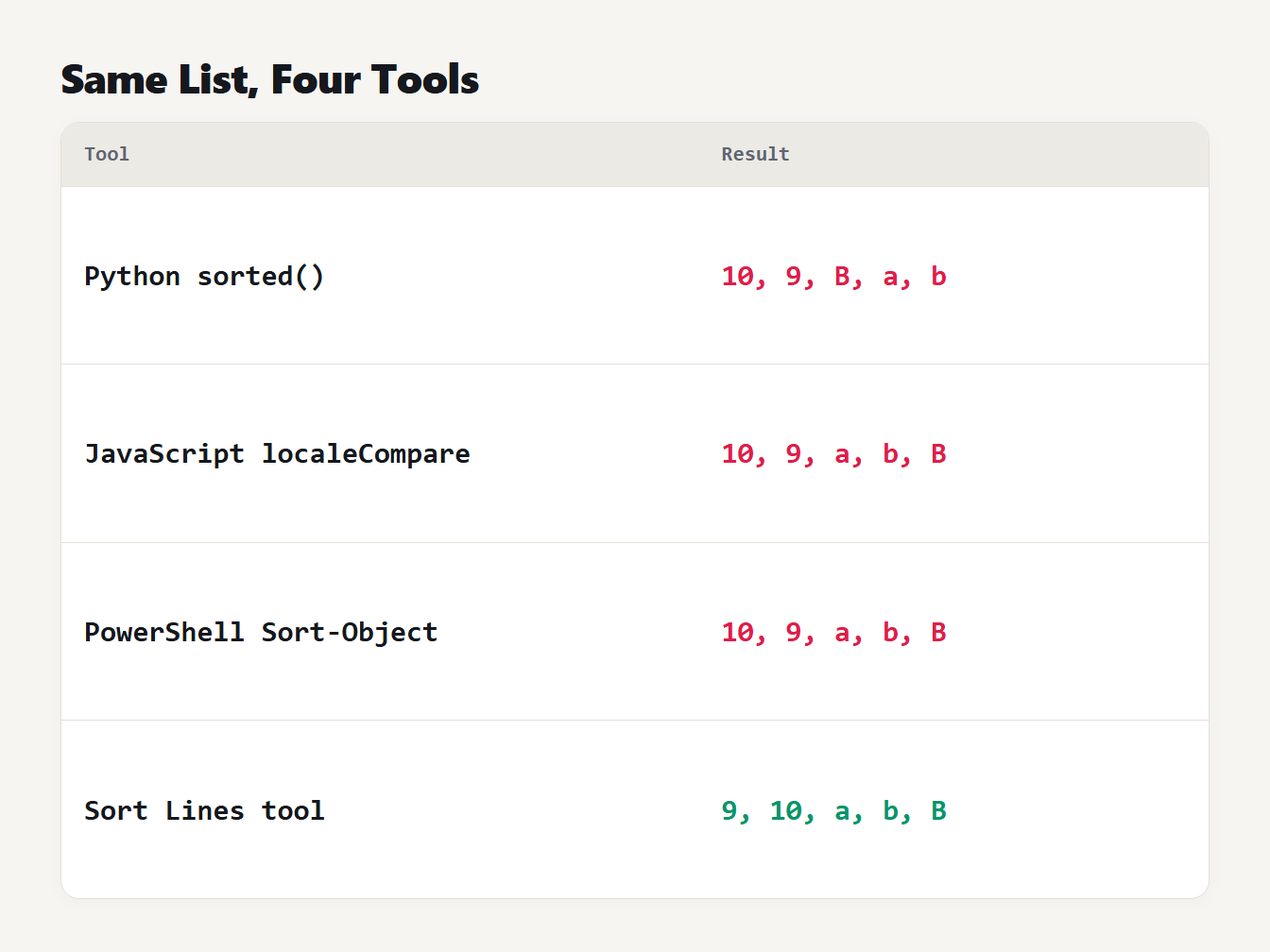
A table of four tools and the order each gives for the list b, B, a, 10, 9. Python gives 10, 9, B, a, b. JavaScript localeCompare gives 10, 9, a, b, B. PowerShell gives 10, 9, a, b, B. The Sort Lines tool gives 9, 10, a, b, B.
Three things decide the order
Case. Code order puts every capital letter before every lowercase one, so Zebra comes before apple. Text order treats a and A as the same letter. Our tool ignores case by default and keeps lines that differ only in case in their original order. Turn Ignore case off to get code order. The GNU sort manual lists -f for folding lowercase to uppercase when comparing.
Numbers. In a natural sort, a run of digits compares by value, so item2 comes before item10 and v1.9 before v1.10. Intl.Collator calls this the numeric option, and MDN gives "1" < "2" < "10" as the example. GNU sort has -V for version numbers in natural order and -n for numeric values.
Language. Order follows the alphabet of the reader. MDN's example sorts the letters Z, a, z and a with two dots: in German the dotted letter lands next to a, and in Swedish after z. We got the same from our sorter with the language set to de and sv.
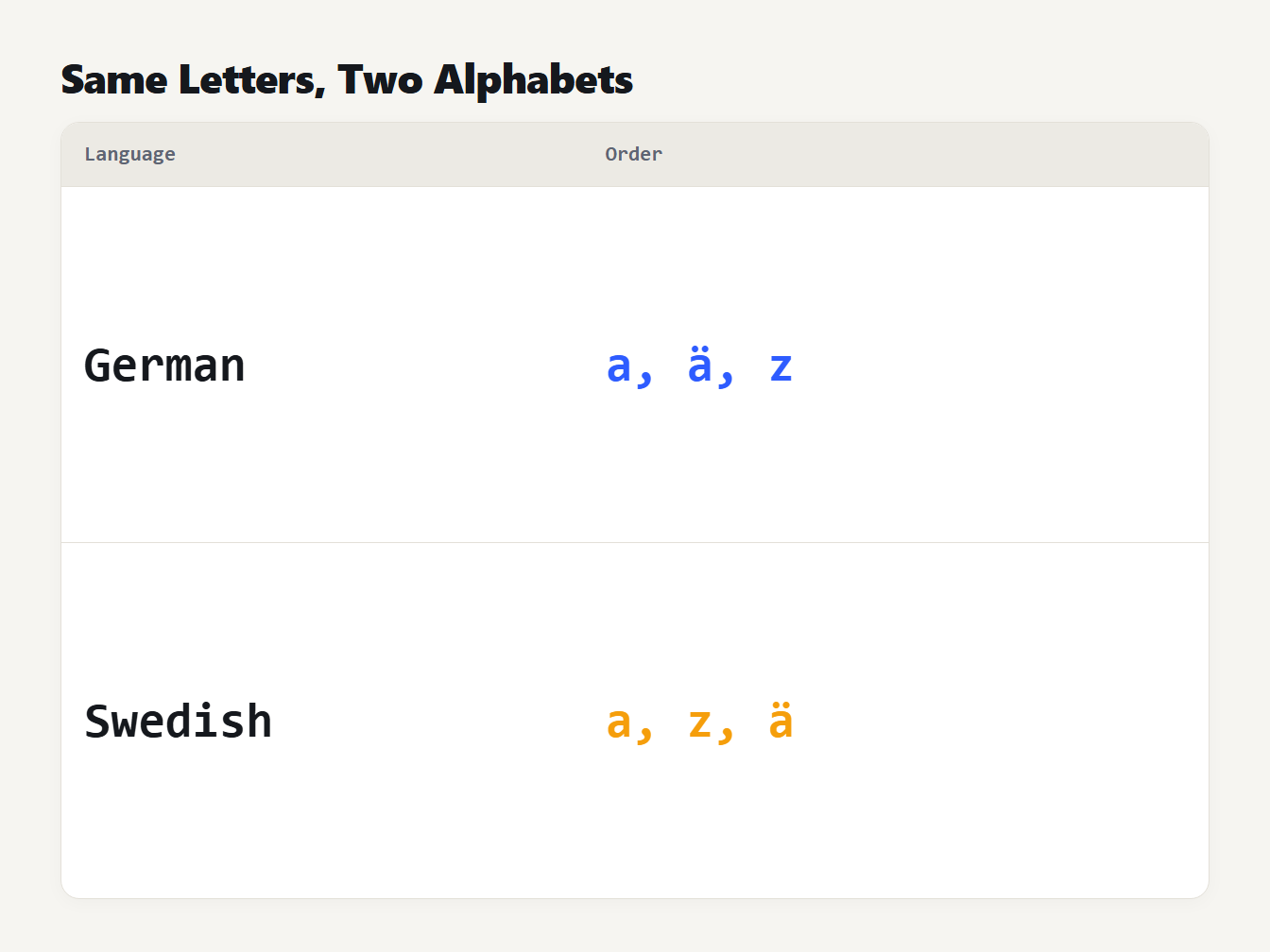
A table of two languages and the order each gives for the letters z, a with two dots, and a. German gives a, then a with two dots, then z. Swedish gives a, then z, then a with two dots.
The environment matters in the shell as well. The sort manual page warns that the locale affects the sort order and says to set LC_ALL=C for the traditional order that uses native byte values. If a script gives a different order on a server than on your laptop, check the locale first.
How to sort numbers inside lines
If you need natural order outside our tool, these are the shortest ways. In JavaScript, pass a collator with the numeric option:
const collator = new Intl.Collator(undefined, { numeric: true, sensitivity: "accent" });
lines.sort(collator.compare);
In Python, split each line into text and number parts, which turns the numbers into integers:
import re

def natural_key(line):
    return [int(part) if part.isdecimal() else part.casefold() for part in re.split(r"(\d+)", line)]

lines.sort(key=natural_key)
On Linux and macOS, GNU sort -V does the same for version-like text. In PowerShell, sort by a cast value as in Microsoft's example, such as Sort-Object {[int]$_}, if every line is a number.
Worked example: file names and version numbers
Natural order matters most for file names and versions. We sorted six file names with the tool, in A to Z order:
| Setting | Result |
|---|---|
| Default | IMG1.png, img2.png, Img3.png, img10.png, img12.png, notes.txt |
| Sort numbers by value off | IMG1.png, img10.png, img12.png, img2.png, Img3.png, notes.txt |
| Ignore case off | IMG1.png, Img3.png, img2.png, img10.png, img12.png, notes.txt |
The input was img12.png, img2.png, IMG1.png, img10.png, notes.txt and Img3.png. With the default settings the pictures come out in the order of their numbers, whatever the case. Switch the number option off and img10.png jumps ahead of img2.png. Switch case off and the capital letters move to the front.
Version numbers behave the same way. v1.10, v1.9, v1.2, v1.9.1 and v1.10.2 sort as v1.2, v1.9, v1.9.1, v1.10, v1.10.2 with numbers by value, and as v1.10, v1.10.2, v1.2, v1.9, v1.9.1 without it. This is the order you want if you need to sort lines alphabetically and the lines are releases.
What we found wrong in our own sorter
Our tool used a plain localeCompare, and it had four problems. We tested it on short inputs and fixed each one:
| Input | Old tool | Now |
|---|---|---|
item10, item2, item1 | item1, item10, item2 | item1, item2, item10 |
b, a and a final line break | A blank first line, no final line break | a, b and the final line break kept |
| Three lines with Windows line endings, Z to A | Mixed line endings | Windows line endings kept |
Two emoji against abc | abc first, because the emoji counted 4 | The emoji line first, because it is 2 characters |
The first row is the one most people notice. The second is easy to miss: a text that ends with a line break has an empty last line, and a sort moves that empty line to the top. The last two come from counting UTF-16 units and splitting only on \n. Our tool now counts characters, so an emoji is one, and it keeps the line ending of your text.
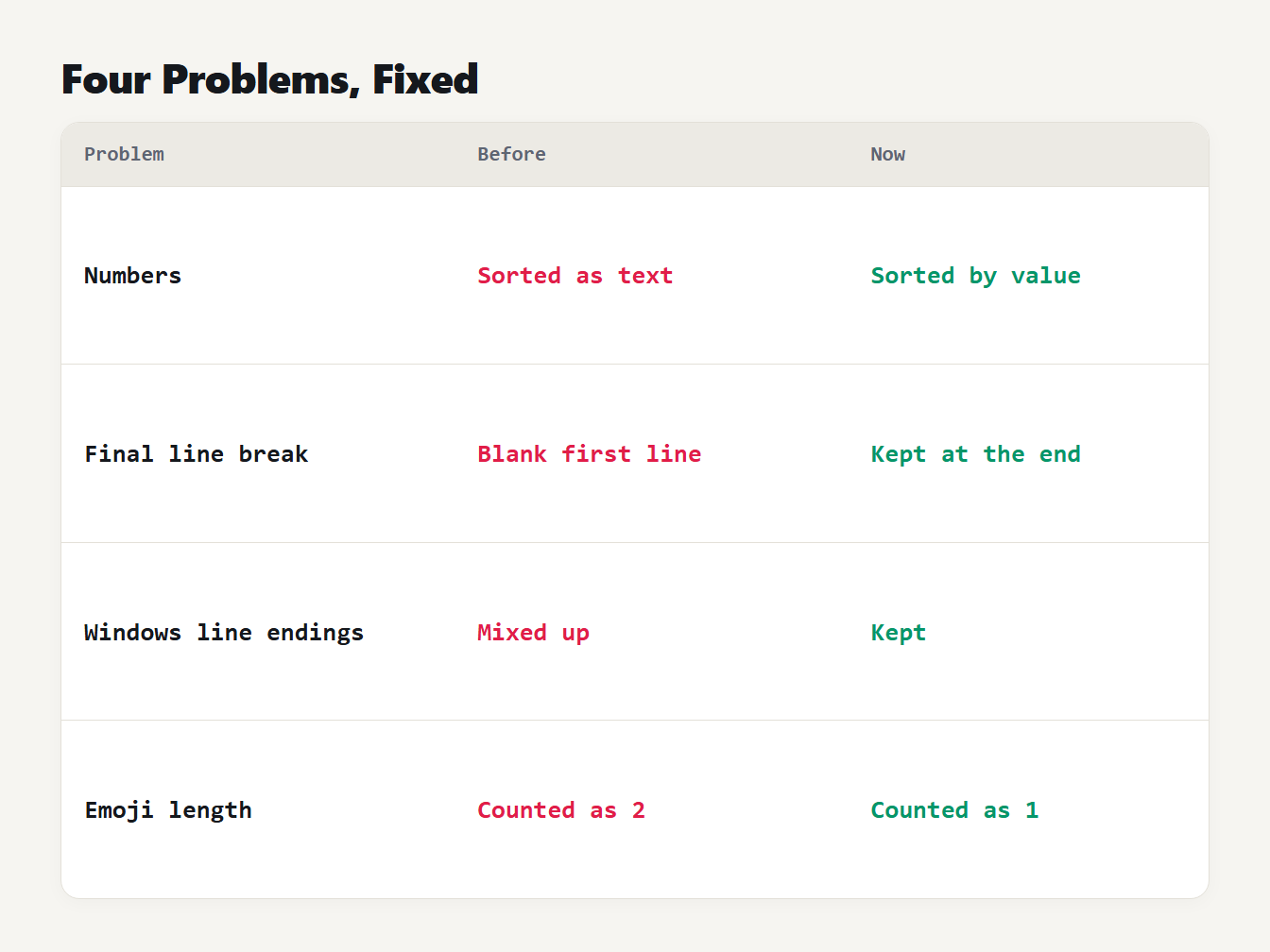
A table of four problems. Numbers sorted as text, now sorted by value. A final line break became a blank first line, now kept at the end. Windows line endings were mixed, now kept. Emoji were counted as two characters, now counted as one.
Sorting by length and removing blank lines
Length sorting counts the characters in each line and breaks ties alphabetically, so the output is the same every time. Blank lines have length zero. They come first in A to Z order and in shortest-first order, so tick Remove blank lines if you do not want them. A line that holds only spaces counts as blank.
How we tested it
We compared the sorter with Python on 3,000 random lists of 2 to 15 short lines made of the letters a, b and c in both cases and the digits 0, 1 and 9. Python's sorted() gave code order. The natural-order key above, with and without casefold(), gave the other orders. We checked six settings on every list, 18,000 sorts in all, in A to Z and Z to A. Our tool gave the same order every time. We also checked that sorting twice changes nothing and that the output always has the same lines as the input.
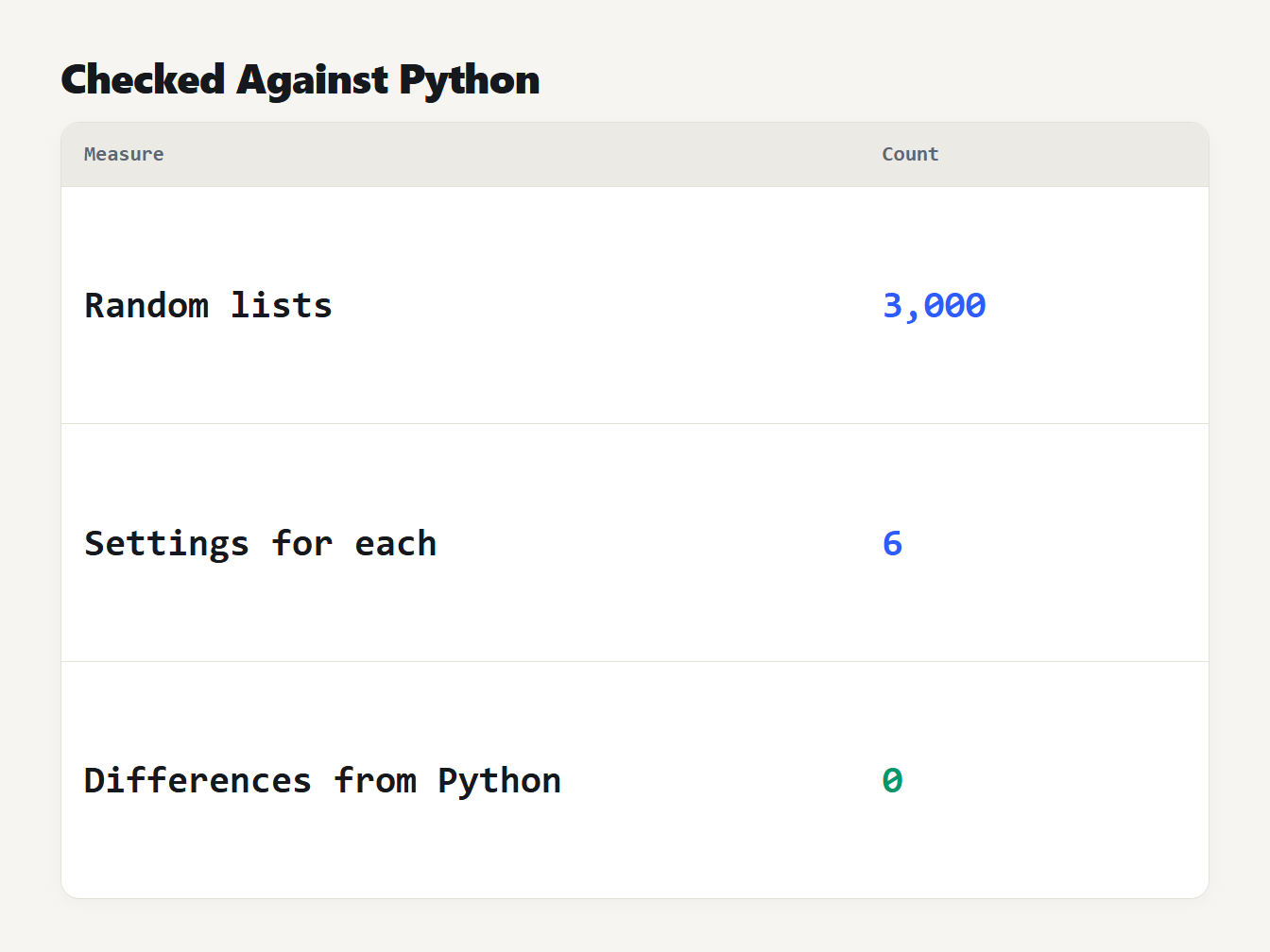
A table with three rows. 3,000 random lists were sorted. Each list was sorted with 6 settings. The number of differences from Python was 0.
The test uses letters and digits only. Accents and other languages depend on the collation rules of your browser, which we cannot compare with Python's, so for those we rely on the browser's own Intl.Collator.
Frequently asked questions
How do I sort lines alphabetically?
Paste the lines into a line sorter, choose A to Z and copy the result. In code, sort the lines with a locale-aware comparison such as Intl.Collator in JavaScript. A plain default sort puts every capital letter before every lowercase letter, which is rarely what you want.
Why does 10 come before 9 when I sort?
Because the sort compares text, one character at a time, and 1 comes before 9. To sort numbers by value, use a natural sort, such as the numeric option of Intl.Collator, sort -V in GNU sort, or the Sort numbers by value option in our tool.
Is alphabetical sorting case sensitive?
It depends on the tool. Code order puts every capital letter before every lowercase letter. Text order, used by most people, puts a and A together. Our sorter ignores case by default and keeps the original order of lines that differ only in case.
Why does the same list sort differently on another computer?
Alphabetical order depends on the language. A German sort places a with two dots next to a, while a Swedish sort places it after z. GNU sort follows the locale of the environment, and its manual says to set LC_ALL=C for the traditional byte order.
How do I sort lines by length?
Count the characters in each line and sort by that number, then by the text to break ties. Our sorter does this in both directions and counts an emoji as one character, which a plain length count in JavaScript does not.
Sort your lines now
Paste your list into the Sort Lines tool, pick A to Z, Z to A or length, and set the options for numbers and case. It keeps your line endings and a final line break, and nothing leaves your browser. To number the result, use the Line Numbering Tool.