MD5 vs SHA256: Which Hash Should You Use, and When?
MD5 vs SHA256: which hash should you use? Get the short answer, the research behind it, a job-by-job guide and the commands to check a file hash.
By TheTextKit TeamPublished
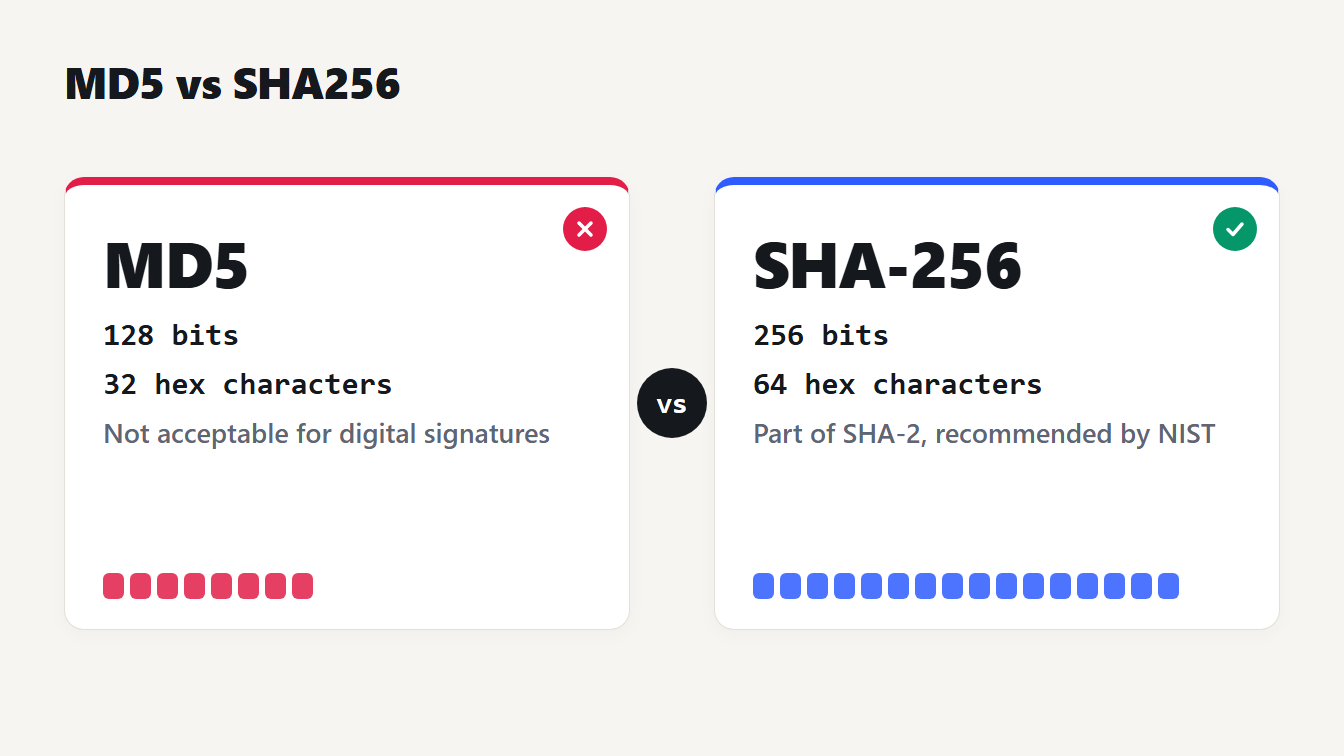
Two cards compare MD5 (128 bits, 32 hex characters, not acceptable for digital signatures) with SHA-256 (256 bits, 64 hex characters, part of the SHA-2 family NIST recommends).
MD5 vs SHA256: for anything new, use SHA-256 (often written SHA256). MD5 still has one honest job, catching accidental file corruption, because it is broken wherever an attacker could be involved. And neither one should store passwords. This guide covers what separates the two, the research behind that advice, which hash fits which job and how to check a file's hash on Windows, macOS and Linux.
MD5 vs SHA256 at a glance
A hash function turns any input into a fixed-size fingerprint. The same input always gives the same fingerprint, and you can't run it backwards. MD5 and SHA-256 differ in size, age and trust.
| MD5 | SHA-1 | SHA-256 | |
|---|---|---|---|
| Output size | 128 bits | 160 bits | 256 bits |
| Hex characters | 32 | 40 | 64 |
| Status | Not acceptable for digital signatures | Retired by NIST on December 31, 2030 | Part of SHA-2, recommended by NIST |
MD5 was published in April 1992 as RFC 1321, written by Ronald Rivest. It was a fine design for its time. The problem is what researchers have done to it since.
What a hash does, and why a tiny change matters
Change one character of the input and the whole output changes. Here is the same word with a capital letter, and then with a trailing newline, using the first 16 hex characters of each hash:
| Input | MD5 | SHA-256 |
|---|---|---|
| hello | 5d41402abc4b2a76 | 2cf24dba5fb0a30e |
| Hello | 8b1a9953c4611296 | 185f8db32271fe25 |
| hello and a newline | b1946ac92492d234 | 5891b5b522d5df08 |
You can reproduce every row in the Hash Generator: type the text and read the hash. That sensitivity is the point. It also explains the most common support question about hashes, which is why yours doesn't match. An invisible newline is enough.
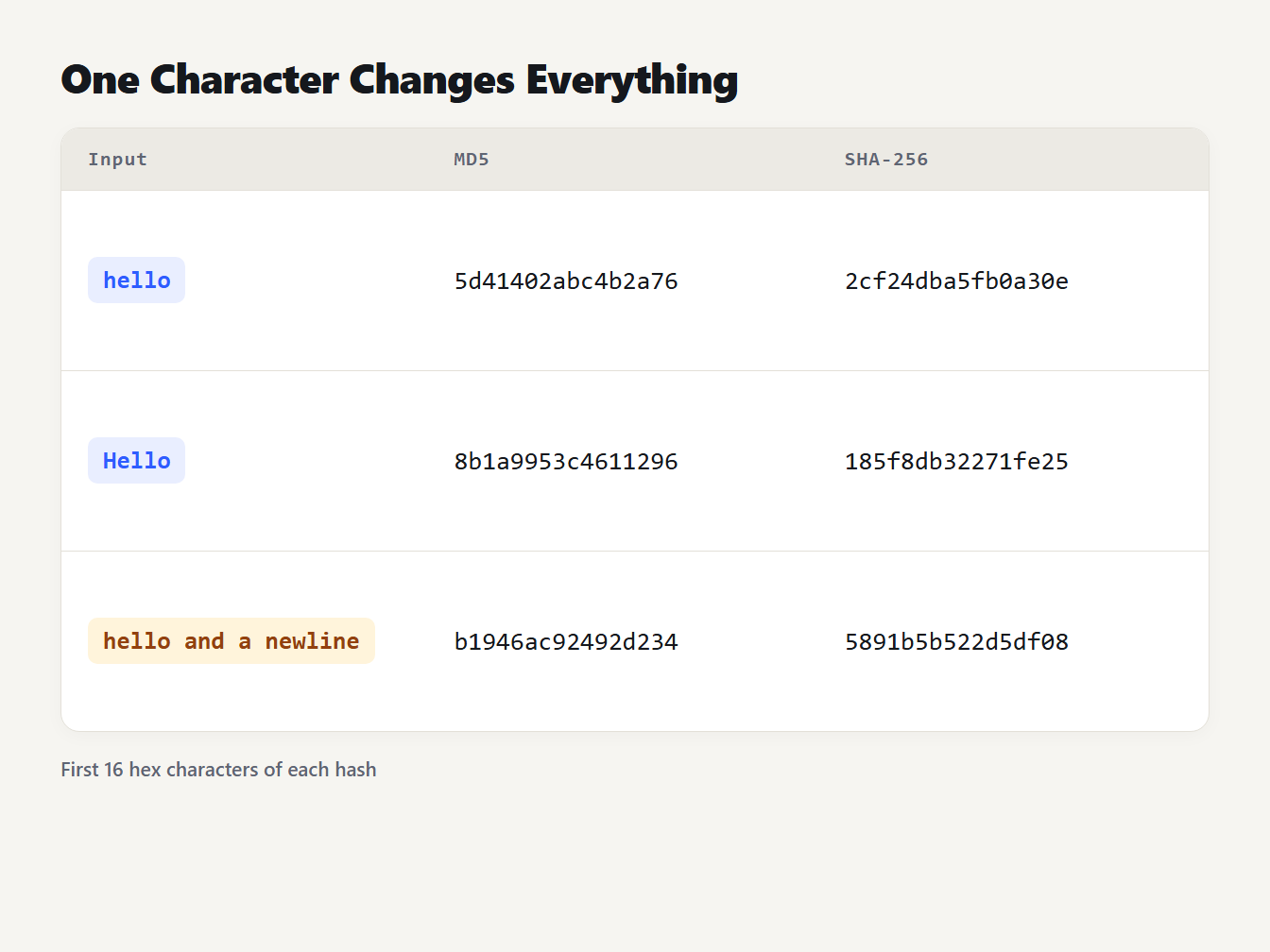
The inputs hello, Hello and hello followed by a newline give MD5 hashes starting 5d41402abc4b2a76, 8b1a9953c4611296 and b1946ac92492d234, and SHA-256 hashes starting 2cf24dba5fb0a30e, 185f8db32271fe25 and 5891b5b522d5df08.
Why MD5 is considered broken
"Broken" has a precise meaning here. A collision is two different inputs with the same hash. A preimage is an input that produces a hash you were given. MD5 has fallen to collisions, not to preimages.
RFC 6151, published in March 2011, states that MD5 is no longer acceptable where collision resistance is required, such as digital signatures. It notes that collisions can be found in about a minute on a standard notebook PC. On the preimage side, it reports that the best known attack takes about 2^123.4 operations, which it calls "pretty high".
So what does that mean in practice? If someone could prepare a file in advance, MD5 can't prove that a different file wasn't swapped in later. That rules MD5 out for signatures, certificates and any check meant to stop tampering. It doesn't make MD5 useless against accidents, because a flipped bit in a download won't happen to collide with the original's hash.
Where SHA-1 fits
SHA-1 sits in between, and it is on its way out. On February 23, 2017, researchers at CWI Amsterdam and Google produced the first real SHA-1 collision. It took roughly nine quintillion SHA-1 computations, about 6,500 CPU-years and 110 GPU-years, which was still thousands of times faster than brute force (SHAttered).
In December 2022 NIST announced it would retire SHA-1 on December 31, 2030, and recommended that anyone relying on it for security move to SHA-2 or SHA-3 as soon as possible (NIST's announcement). SHA-256 belongs to the SHA-2 family. That is the whole reason the answer to "MD5 vs SHA256" is so lopsided.
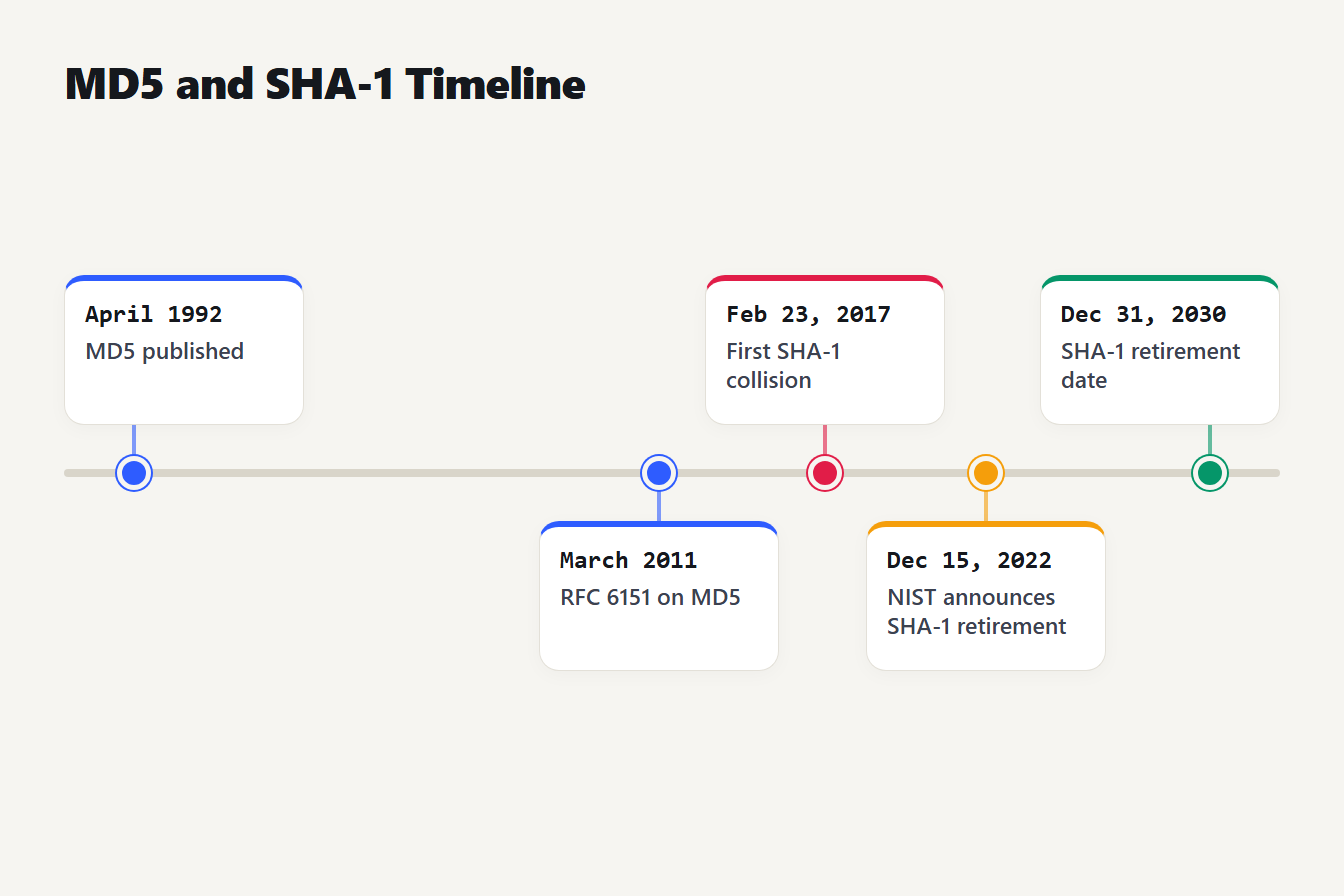
A timeline of five dates: MD5 published in April 1992, RFC 6151 on MD5 in March 2011, the first SHA-1 collision on February 23, 2017, NIST's retirement announcement on December 15, 2022, and the SHA-1 retirement date of December 31, 2030.
Which hash for which job
MD5 vs SHA256 mostly comes down to the threat. If nobody is trying to fool you, the choice is about convenience. If someone might, it is about safety.
| Job | Use | Why |
|---|---|---|
| Check a download against a published checksum | The hash the publisher posts, ideally SHA-256 | You must compare like with like |
| Catch accidental corruption or find duplicate files | MD5 is acceptable, SHA-256 is as easy | No attacker is involved |
| Cache keys and content-addressed names | SHA-256 if outsiders can submit input | Crafted collisions could overwrite entries |
| Digital signatures and certificates | SHA-256 or stronger | RFC 6151 rules out MD5, and SHA-1 is retired |
| Message authentication (HMAC) | HMAC-SHA256 | RFC 6151 suggests it over HMAC-MD5 for new designs |
| Storing passwords | None of them: use Argon2id | Fast hashes allow fast guessing |
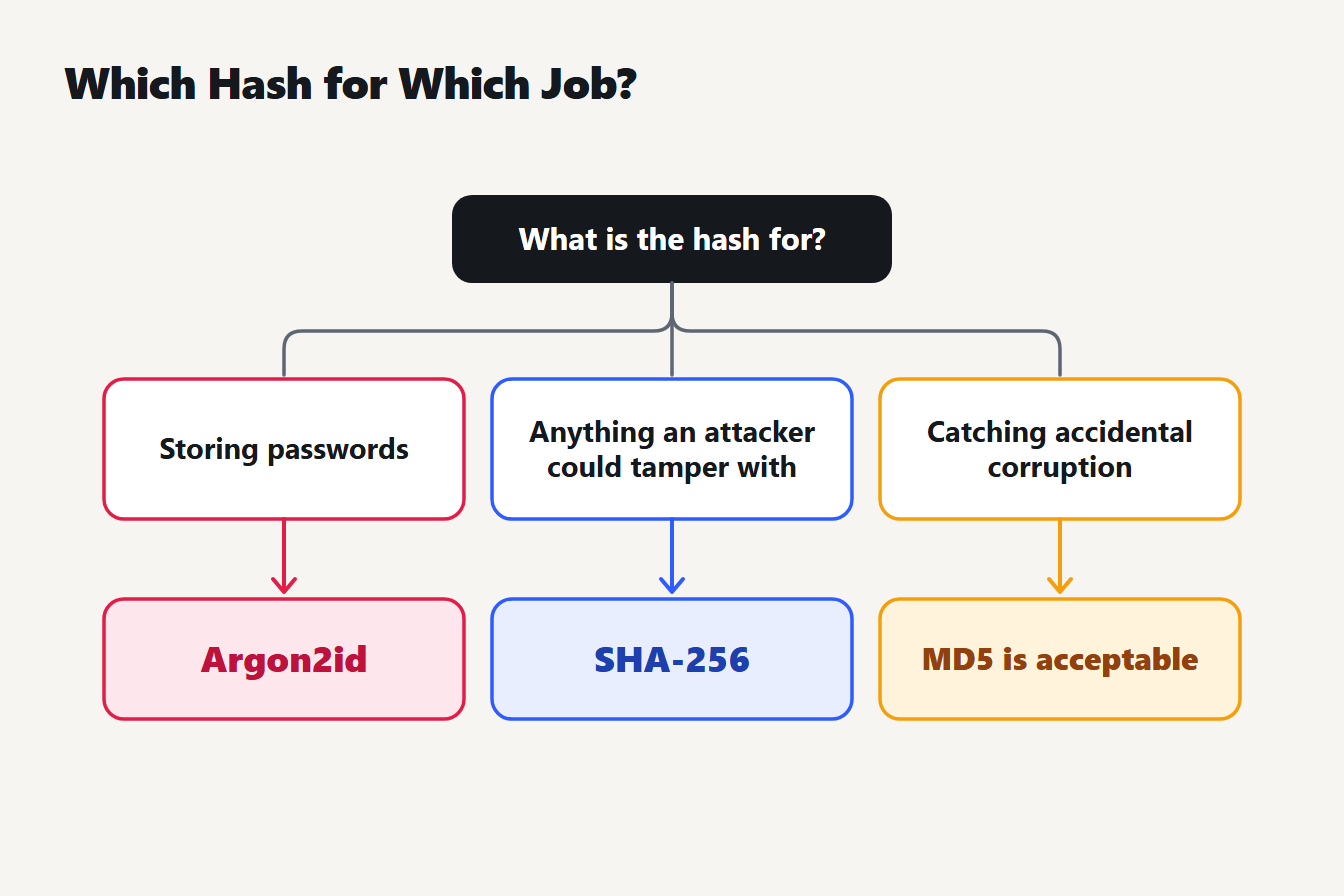
A three-branch chart. Storing passwords: use Argon2id, not a plain hash. Anything an attacker could tamper with, such as signatures and downloads: use SHA-256. Catching accidental corruption: MD5 is acceptable.
One detail in the HMAC row deserves care. RFC 6151 also says the known attacks on HMAC-MD5 do not look like a practical weakness, but it still recommends moving new designs to HMAC-SHA256. Old systems that use HMAC-MD5 are not an emergency. New ones shouldn't start there.
How to check a file's hash
The Hash Generator hashes text you type or paste, not files. To check a download, use the tool your system already has. These commands all print the hash to compare with the publisher's:
| System | Command |
|---|---|
| Windows Command Prompt | certutil -hashfile file.iso SHA256 |
| Windows PowerShell | Get-FileHash file.iso |
| macOS | shasum -a 256 file.iso |
| Linux | sha256sum file.iso |
We ran both Windows commands on a file containing the five letters hello and no newline. Both printed 2cf24dba5fb0a30e26e83b2ac5b9e29e1b161e5c1fa7425e73043362938b9824, the same SHA-256 the Hash Generator gives for that text. PowerShell's Get-FileHash uses SHA-256 unless you ask for another algorithm. For MD5, add -Algorithm MD5 in PowerShell or use MD5 in place of SHA256 with certutil.
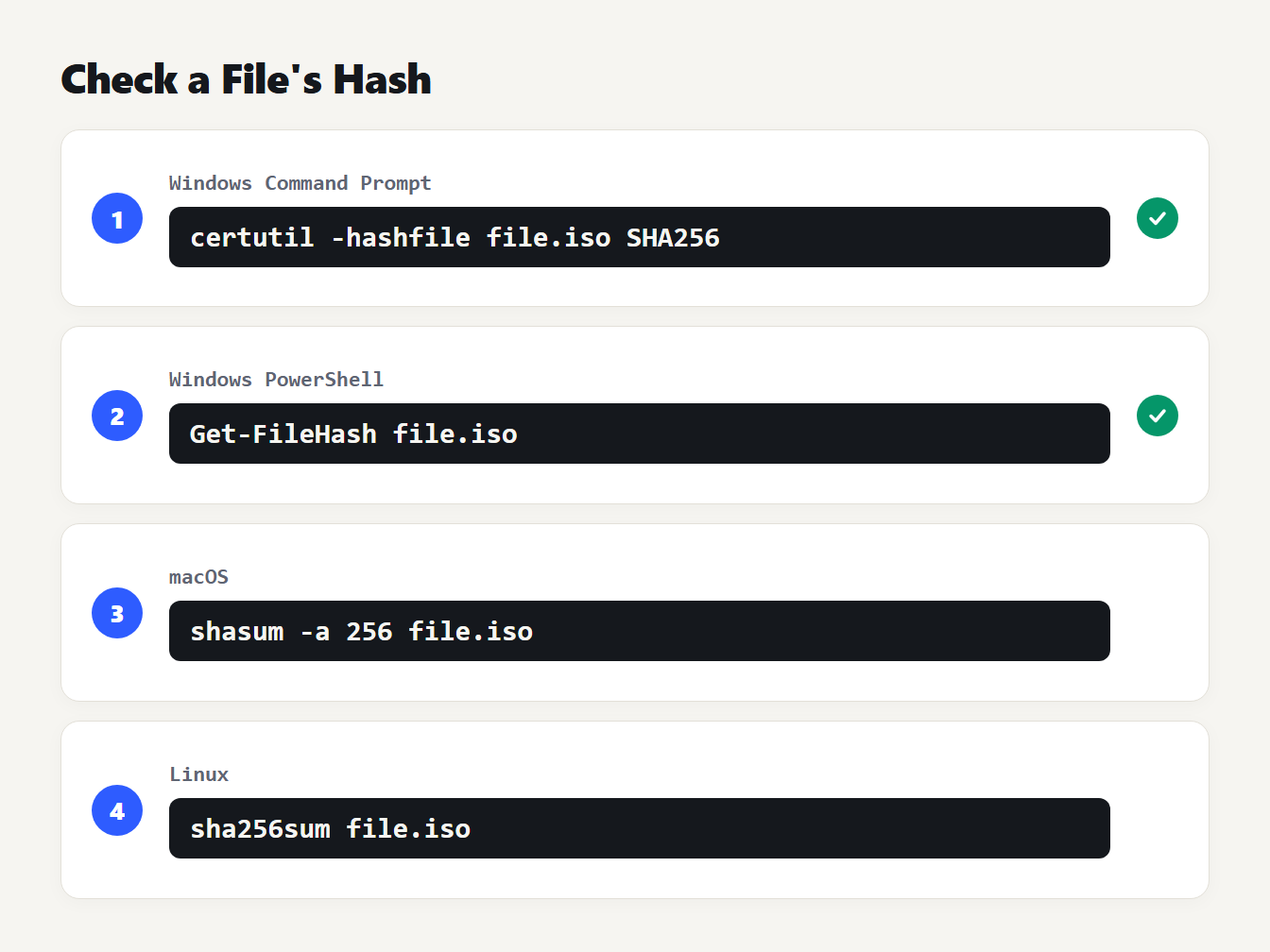
Four commands: certutil -hashfile file.iso SHA256 on Windows Command Prompt, Get-FileHash file.iso in PowerShell, shasum -a 256 file.iso on macOS and sha256sum file.iso on Linux.
Compare hashes as text, and ignore upper or lower case: the hex digits 2CF2 and 2cf2 mean the same thing.
Here is the whole check in three steps:
- Find the published hash. Look for it on the download page, and note which algorithm it names.
- Compute yours with the matching command from the table. If the page lists SHA-256, run SHA-256, not MD5.
- Compare all of it. Match every character, not just the first and last few. A single wrong character means a different file.
One limit is worth knowing. A checksum printed on the same page as the file protects you from a corrupted download, not from a hacked server, because an attacker who can change the file can change the number beside it. If the publisher also offers a digital signature, that is the stronger check.
Is MD5 faster than SHA-256?
Usually, yes, and people cite it as a reason to keep MD5. We timed it. Using Node 24 with OpenSSL 3.5.7 on one Windows PC, each algorithm hashed a 256 MB buffer three times, and we kept the best run:
| Algorithm | Speed |
|---|---|
| MD5 | 622 MB/s |
| SHA-1 | 724 MB/s |
| SHA-256 | 332 MB/s |
| SHA-512 | 473 MB/s |
Your numbers will differ with the processor and the software, so treat these as one data point. They show MD5 about twice as fast as SHA-256 here, and also SHA-1 and SHA-512 both beating SHA-256. Even so, 332 MB/s means a 1 GB file hashes in about three seconds. Unless you hash enormous volumes, speed is a weak reason to choose a broken algorithm.
Why SHA-256 is the wrong tool for passwords
Speed is a feature for file checks and a flaw for passwords. OWASP's Password Storage Cheat Sheet says fast hashes such as SHA-256 are not suitable for storing passwords because they let attackers try a huge number of guesses quickly (OWASP guidance).
It recommends a slow, purpose-built password hash. Argon2id comes first, with at least 19 MiB of memory, two iterations and one degree of parallelism. Next are scrypt, then bcrypt for older systems, and PBKDF2 with HMAC-SHA-256 and a work factor of at least 600,000 if you need FIPS-140 compliance. Notice that SHA-256 appears only inside PBKDF2, never alone. And if you simply need a strong password for yourself, the Password Generator makes random ones in your browser.
Mistakes that make a hash check fail
Most "the hash is wrong" problems and a few security mistakes come from the same short list:
- Treating a hash as encryption. A hash has no key and can't be reversed. If you need to get the data back, you want encryption, not hashing.
- Hashing the wrong bytes. The text, its newline and its encoding all count. Text copied from a terminal often carries a trailing newline that the original didn't have.
- Comparing different algorithms. An MD5 string will never match a SHA-256 string. Check the length first: 32 hex characters is MD5, 64 is SHA-256.
- Using a plain hash for passwords. It feels like protection and isn't. The slow hashes in the OWASP list exist because plain ones are too fast.
- Picking MD5 where an attacker is involved. If a person could gain by making two inputs collide, use SHA-256.
The length check in point 3 is the quickest sanity test there is. Type anything into the Hash Generator and it shows all four sizes at once: MD5 (32 characters), SHA-1 (40), SHA-256 (64) and SHA-512 (128). It labels the first two as legacy, and it runs entirely in your browser.
Frequently asked questions
Is MD5 still safe to use?
Not wherever an attacker could be involved. RFC 6151 says MD5 is no longer acceptable where collision resistance is required, such as digital signatures. It is still fine for catching accidental corruption or finding duplicate files, where nobody is trying to fool you.
Is SHA-256 safe for storing passwords?
No. OWASP says fast hashes such as SHA-256 are not suitable for password storage because they let attackers make a huge number of guesses quickly. Use a slow password hash instead, with Argon2id as the first choice.
Is SHA-1 better than MD5?
Its output is longer, but it is broken for collisions too. The first SHA-1 collision was shown in February 2017, and NIST retires SHA-1 on December 31, 2030 and recommends SHA-2 or SHA-3 instead. For new work, skip both.
Can a hash be decrypted?
No, because a hash is not encryption: there is no key and no way to run it backwards. What attackers do is guess inputs, hash each guess and compare. That works on short or common inputs, which is why weak passwords fall even when hashed.
Why doesn't my hash match the one I expected?
Usually the input differs by an invisible character. The text hello and the text hello followed by a newline have completely different SHA-256 hashes. Check for a trailing newline, a different text encoding or different line endings.
Pick the hash, then check it
The MD5 vs SHA256 question has a short answer: for anything that matters, use SHA-256. Keep MD5 for the old systems that need it and for spotting accidental damage. To see the difference yourself, paste a word into the Hash Generator, add a space at the end and watch both hashes change completely.