QR Code Error Correction Levels: How Much Damage Can Each Survive?
QR code error correction levels L, M, Q and H compared, with measured tests of how much of a code a logo or damage can cover.
By TheTextKit TeamPublished
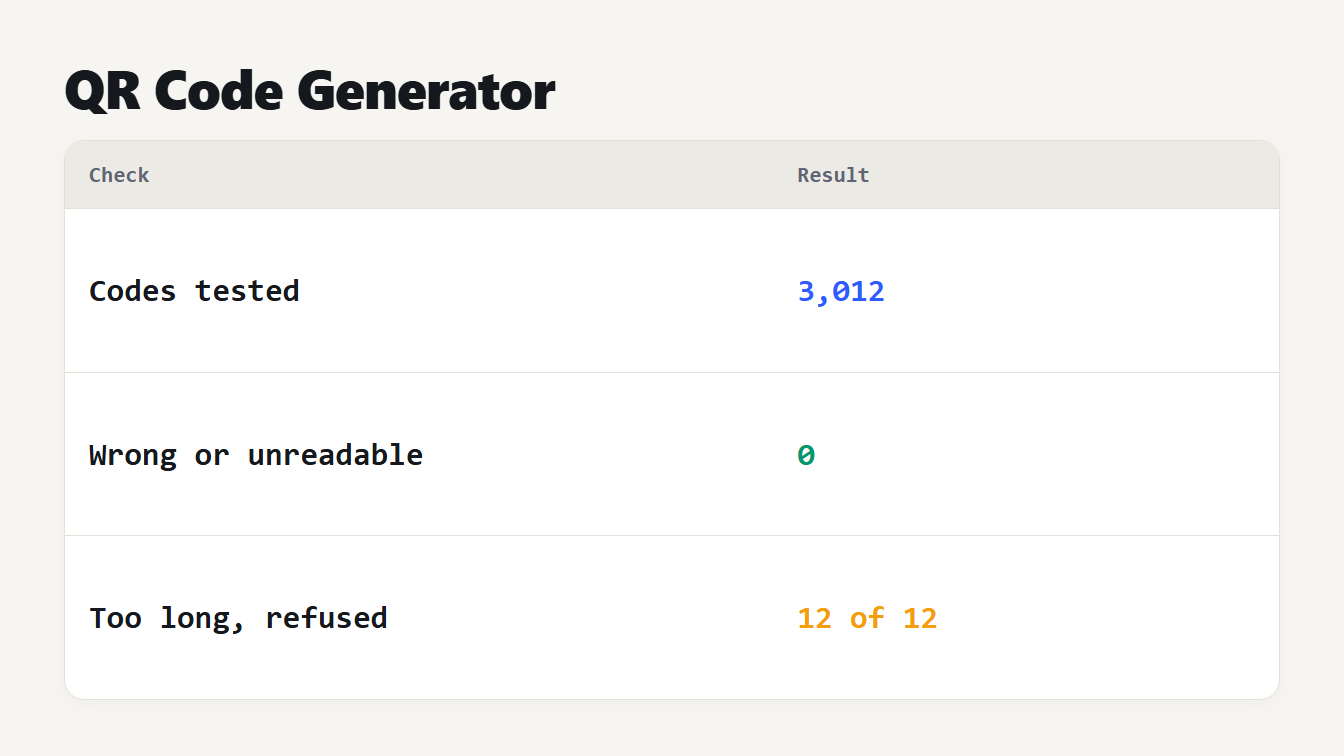
A table of three results for the QR code generator. 3,012 generated codes were decoded with a ZXing-C++ reader and every one came back exactly. 12 texts that were over the size limit were all refused.
QR code error correction is extra data stored in the code so that a scanner can rebuild your text even when part of the code is dirty, scratched or covered. There are four levels, L, M, Q and H, that can restore about 7%, 15%, 25% and 30% of the data bytes. A higher level protects more but makes the code denser, so choose the lowest level that covers your case. Level M is a good default, and level H is the one to pick for a logo.
We measured what each level survives with a real decoder, and the numbers are mostly lower than the nominal ones, which matters if you plan to put a logo in the middle.
What QR code error correction does
A QR code stores your text as bytes and adds recovery bytes calculated from them. The Wikipedia article on QR codes says the code uses Reed-Solomon error correction over a finite field of 256 elements, and that the four levels restore 7%, 15%, 25% and 30% of the data bytes. It adds that the higher the level, the less the code can store.
The page also explains why logos work at all. The embellishments are treated as errors, and the code still scans correctly as long as there are not too many of them. That makes error correction both a safety net and the reason designers can paint on a code.
Denso Wave, the company that created the code, describes the levels on its error correction page. It calls level M the most frequently chosen, says levels Q and H suit factory floors where codes get dirty, and level L suits clean places with a lot of data.
The four levels compared
| Level | Restores | Largest text (bytes) | Where it fits |
|---|---|---|---|
| L | About 7% | 2,953 | Clean screens, lots of text |
| M | About 15% | 2,331 | The usual default |
| Q | About 25% | 1,663 | Prints that may get dirty |
| H | About 30% | 1,273 | Logos, rough surfaces |
The capacities are for the largest code, version 40, which is 177 by 177 squares. Wikipedia gives the side of a code as 4 times the version number plus 17, so version 1 is 21 by 21. The capacity of level L is 2,953 bytes, 4,296 letters and capital letters, or 7,089 digits.
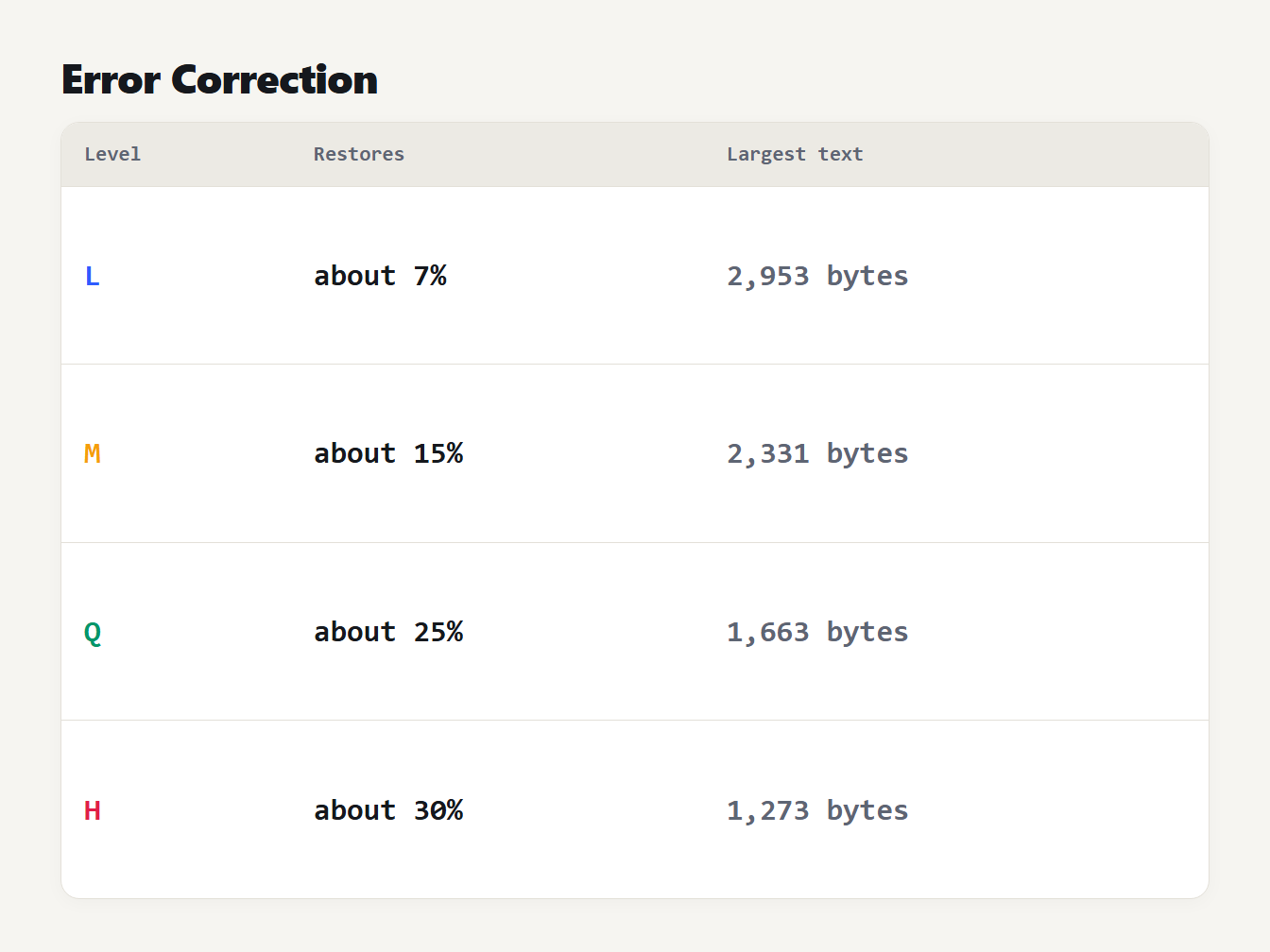
A table of the four QR code error correction levels. L restores about 7% and holds up to 2,953 bytes. M restores about 15% and holds 2,331. Q restores about 25% and holds 1,663. H restores about 30% and holds 1,273.
What a real scanner survives
The nominal percentages count bytes, not area on the page. To see what they mean for a printed code, we made 320 codes. They held link-style text of 20, 60, 120 and 250 characters, with 20 random codes for each length, at every level, from version 3 to version 17. We drew each one on a clean white background and read it with ZXing-C++, an open source library that reads QR codes and other barcodes. Then we damaged them in two ways and found the limit by repeated halving.
First, a white square in the centre, like a logo that hides part of the code. The table shows the median share of the code's area that could be covered before the reader failed.
| Level | 20 characters | 60 characters | 120 characters | 250 characters |
|---|---|---|---|---|
| L | 4.4% | 5.8% | 6.0% | 7.8% |
| M | 7.8% | 10.4% | 10.8% | 11.5% |
| Q | 13.4% | 15.4% | 20.9% | 21.8% |
| H | 17.8% | 20.3% | 24.3% | 22.0% |
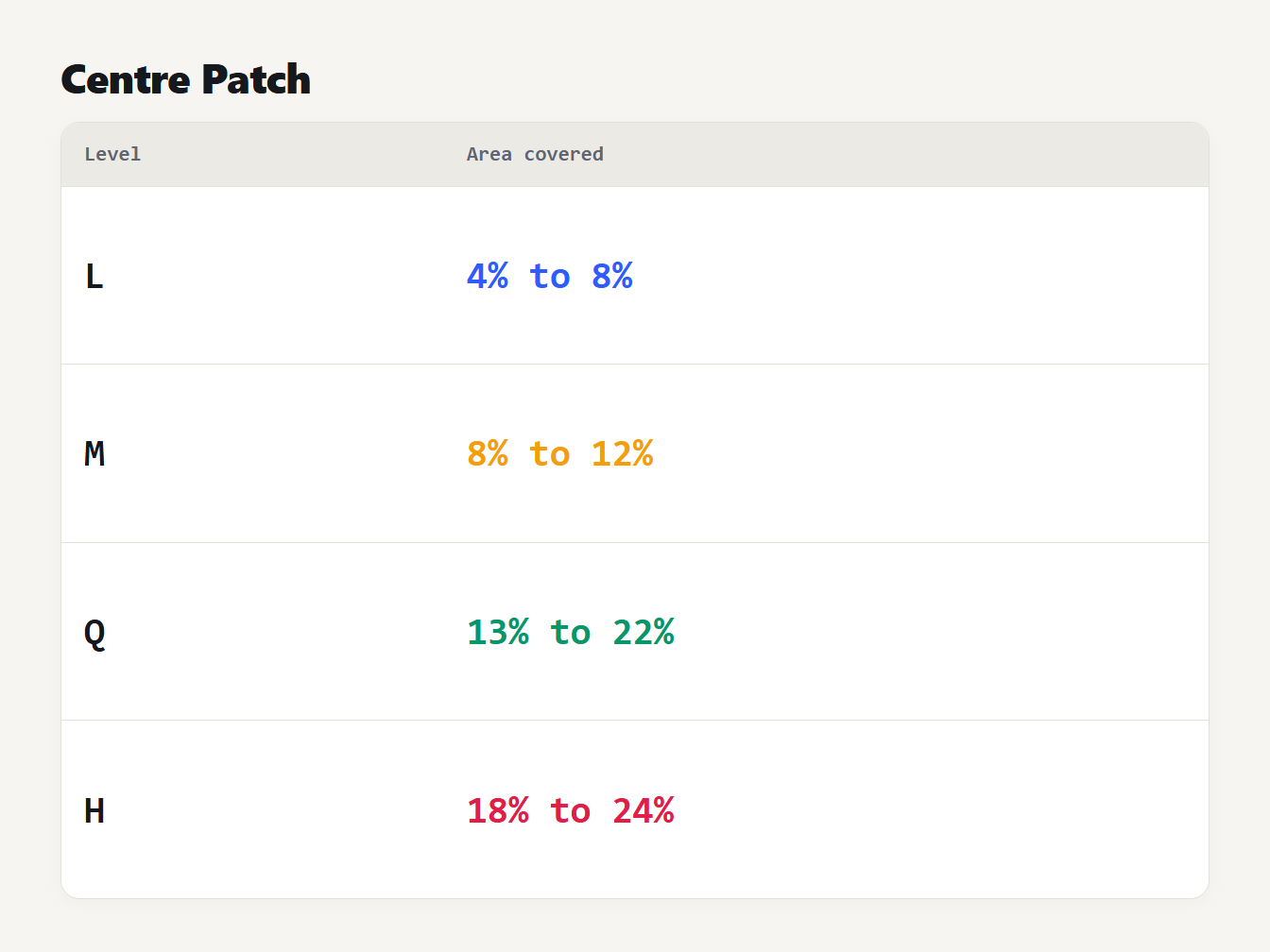
A table of how much of a QR code's area a white patch in the centre could cover before a ZXing reader failed. Level L survived 4% to 8%. Level M survived 8% to 12%. Level Q survived 13% to 22%. Level H survived 18% to 24%.
Level H survived about a fifth to a quarter of the area, level L under a tenth. Longer text survived a little more in our runs, probably because a bigger code spreads the same share of recovery data over more squares. Most of the percentages sit below the nominal ones: H covered 18% to 24% against a nominal 30%, and M covered 8% to 12% against 15%.
The second test flipped random squares from dark to light or the other way. For the 60 character codes, this is the median share of squares that could flip, with the share of bytes that this spoils:
| Level | Squares flipped | Bytes spoiled |
|---|---|---|
| L | 1.4% | About 10% |
| M | 2.3% | About 17% |
| Q | 3.0% | About 22% |
| H | 3.6% | About 26% |
A byte of the code is eight squares. One flipped square spoils its whole byte, so scattered specks do far more harm than their size suggests. If each square flips with probability 3.63%, the chance that a byte of eight squares stays clean is 0.9637 to the eighth power, about 74%, so around 26% of the bytes are spoiled. That is close to the 30% that level H is meant to restore, which suggests the nominal figure describes bytes and not area. The L row gives about 10% spoiled bytes against the nominal 7%, so level L tolerated more than its label in this test.
Adding a logo
For a logo, use level H for the QR code error correction and keep the logo small. Our measurements say a centred patch of about 18% to 24% of the area is the point where a ZXing reader fails at level H on a clean, flat image. A phone camera in poor light, a glossy print and a slight angle all use up part of that margin. A logo covering 10% of the area, which is about a third of the width, leaves a reasonable reserve. Test the finished code on several phones before you print it.
Keep the logo in the middle. The three large squares in the corners are what a scanner looks for first, and they must stay clear. So must the blank border.
The cost of a higher level
Higher QR code error correction means more recovery data, and that means a bigger code. Take a link of 133 characters:
| Level | Version | Squares per side |
|---|---|---|
| L | 6 | 41 |
| M | 8 | 49 |
| Q | 10 | 57 |
| H | 11 | 61 |
At level H the code has 61 by 61 squares, which is 3,721, against 1,681 at level L. That is 2.2 times as many squares. Print both at the same size and the squares of the H code are about two thirds as wide, which a camera has to resolve from farther away. So don't choose H by habit. Choose it when you need the protection.
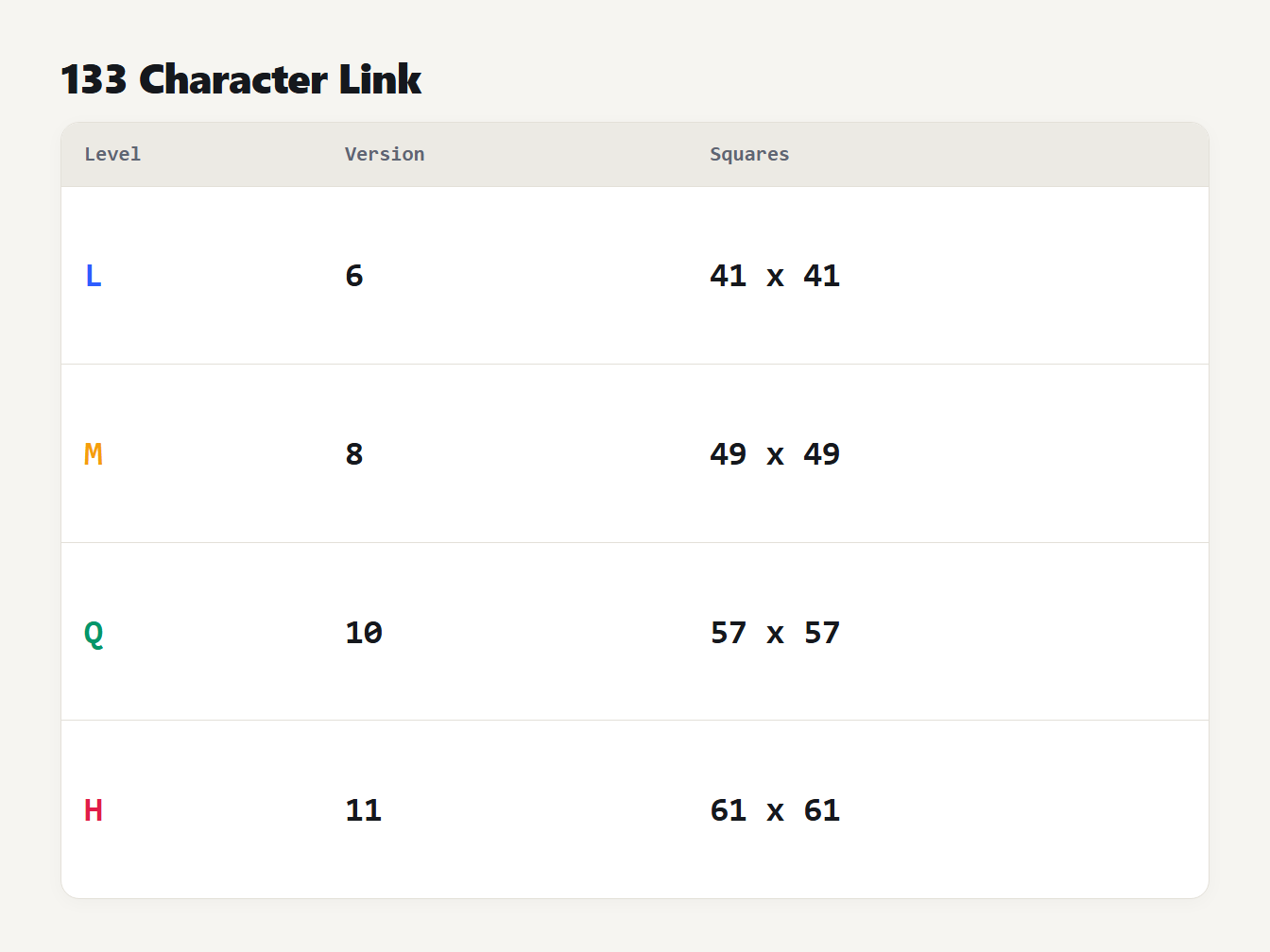
A table of the size of one QR code for a link of 133 characters at each error correction level. L is version 6 with 41 by 41 squares. M is version 8 with 49. Q is version 10 with 57. H is version 11 with 61 by 61.
Quiet zone and contrast
Error correction cannot repair a code that has no clear border. A QRStuff guide to GS1 QR codes says the quiet zone must be at least four modules wide on every side. It must be free of any print, so that the scanner can find the edge of the code. Four modules is also the default in our generator. Keep the code dark on a light background too. In our tests the same reader decoded all 100 dark on light codes and none of the 100 light on dark ones when it was not allowed to invert the image.
How we tested the generator
The codes in this article come from the QR Code Generator. We checked it in four ways.
| Test | Codes | Result |
|---|---|---|
| Random texts decoded with ZXing-C++ | 3,012 | All exactly right |
| Texts over the size limit | 12 | All refused |
| Dark on light drawings in Chromium | 1,300 | All decoded |
| Light on dark drawings in Chromium | 100 | 0 decoded without inversion |
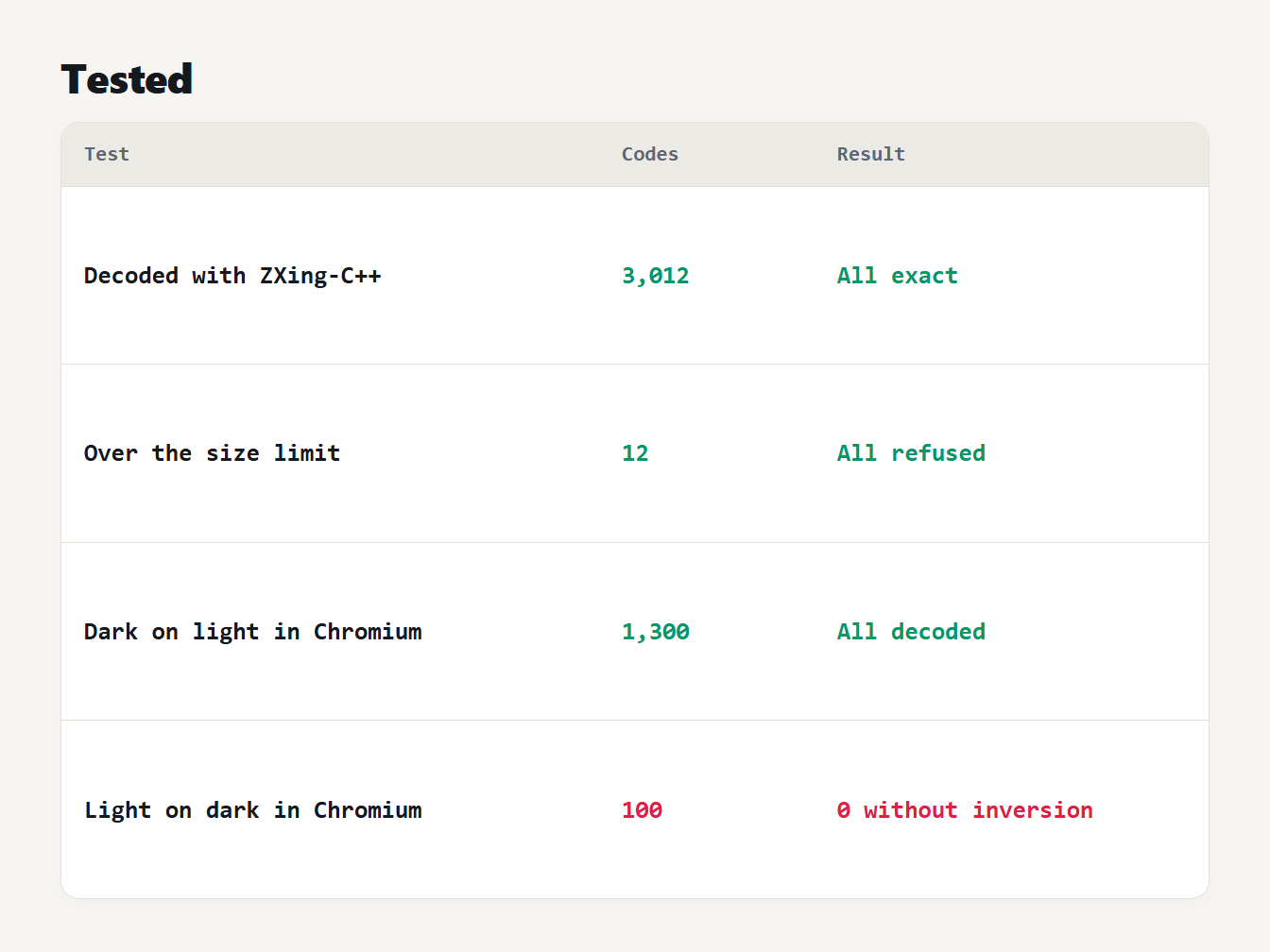
A table of four tests of the QR code generator. 3,012 random texts were decoded exactly. 12 texts over the size limit were refused. 1,300 dark on light drawings made in Chromium were decoded. 100 light on dark drawings were not decoded without inversion.
The random texts included plain text, digits, capital letters, links, accents, Chinese, Japanese, Cyrillic and emoji, in all four levels, at lengths from 1 to 1,000 characters. The size limits matched too: each of the twelve combinations of mode and level accepted the largest text and refused one character more.
One finding changed the code. The encoding library we use turns text into bytes by keeping the low 8 bits of each character, so the € sign, Chinese and emoji came out wrong, while accents such as é happened to survive. We replaced that step with UTF-8, and the texts now decode exactly.
Limits
Everything above comes from one reader, ZXing-C++, on clean, flat images with a white patch. Phone cameras differ, and glare, curved surfaces, blur and print quality will lower the margin. Treat the numbers as a ranking of the levels and a rough size for a logo, not as a promise. And our generator writes text as UTF-8, so a scanner that expects another encoding may show accents wrongly.
Frequently asked questions
What are the QR code error correction levels?
There are four: L, M, Q and H. They can restore about 7%, 15%, 25% and 30% of the data bytes. A higher level adds more recovery data, so the code gets denser and holds less. Level M is the usual default.
Which error correction level should I use for a logo?
Use H, and keep the logo small. In our tests with a ZXing reader, a code at level H still read when a centred patch covered 18% to 24% of its area. Keep the logo well under that, around 10% of the area, and test it on several phones.
Does a higher error correction level make a QR code harder to scan?
It makes the code denser, with smaller squares for the same print size, and small squares are harder for a camera to resolve. A 133 character link is 41 by 41 squares at level L and 61 by 61 at level H. Use the lowest level that gives you the protection you need.
How much of a QR code can be damaged?
The nominal figures are 7%, 15%, 25% and 30% of the data bytes. Scattered damage does worse than that, because each speck spoils a whole byte. In our tests, flipping 1% to 4% of the squares at random was the limit.
What is the quiet zone of a QR code?
It is the blank border around the code. It should be at least four modules wide on every side, and free of any print, so a scanner can find the edge of the code. Do not put the logo or a frame in it.
Make your QR code now
Type a link or text into the QR Code Generator, pick the error correction level and download an SVG or a PNG. To tag a link for campaigns first, use the UTM Builder. Everything runs in your browser, so what you encode is never uploaded.