What Does chmod 755 Mean? Permissions, Octal and Symbolic Modes
What does chmod 755 mean? The owner gets full access, others read and run. See octal digits, 755 vs 644, symbolic modes, setuid, sticky bits and umask.
By TheTextKit TeamPublished
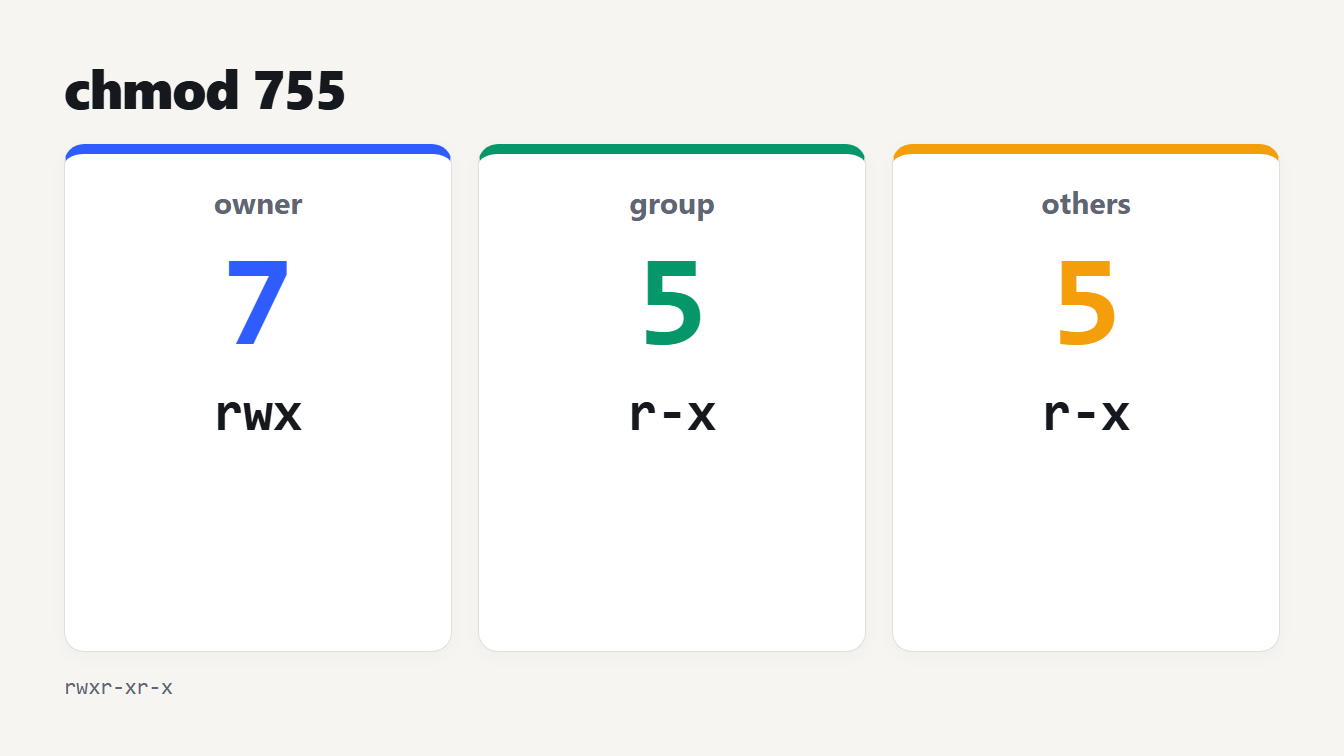
Three cards for the digits of 755. The owner digit 7 is rwx, the group digit 5 is r-x and the others digit 5 is r-x.
chmod 755 means the owner of a file can read, write and execute it, while the group and everyone else can read and execute it but not change it. In ls -l it appears as rwxr-xr-x. Each digit is the sum of 4 for read, 2 for write and 1 for execute, so 7 is 4 + 2 + 1 and 5 is 4 + 1. This guide explains what chmod 755 means digit by digit, compares it with 644 and 777, covers symbolic modes and the special bits, and shows how umask decides what new files get.
What does chmod 755 mean?
The three digits are the owner, the group and everyone else, in that order.
| Digit | Who | Bits | Permissions |
|---|---|---|---|
| 7 | Owner (user) | 4 + 2 + 1 | rwx: read, write, execute |
| 5 | Group | 4 + 1 | r-x: read and execute |
| 5 | Others | 4 + 1 | r-x: read and execute |
Put together you get rwxr-xr-x. This is the usual mode for programs and for directories you want others to browse but not change. The command is chmod 755 filename.
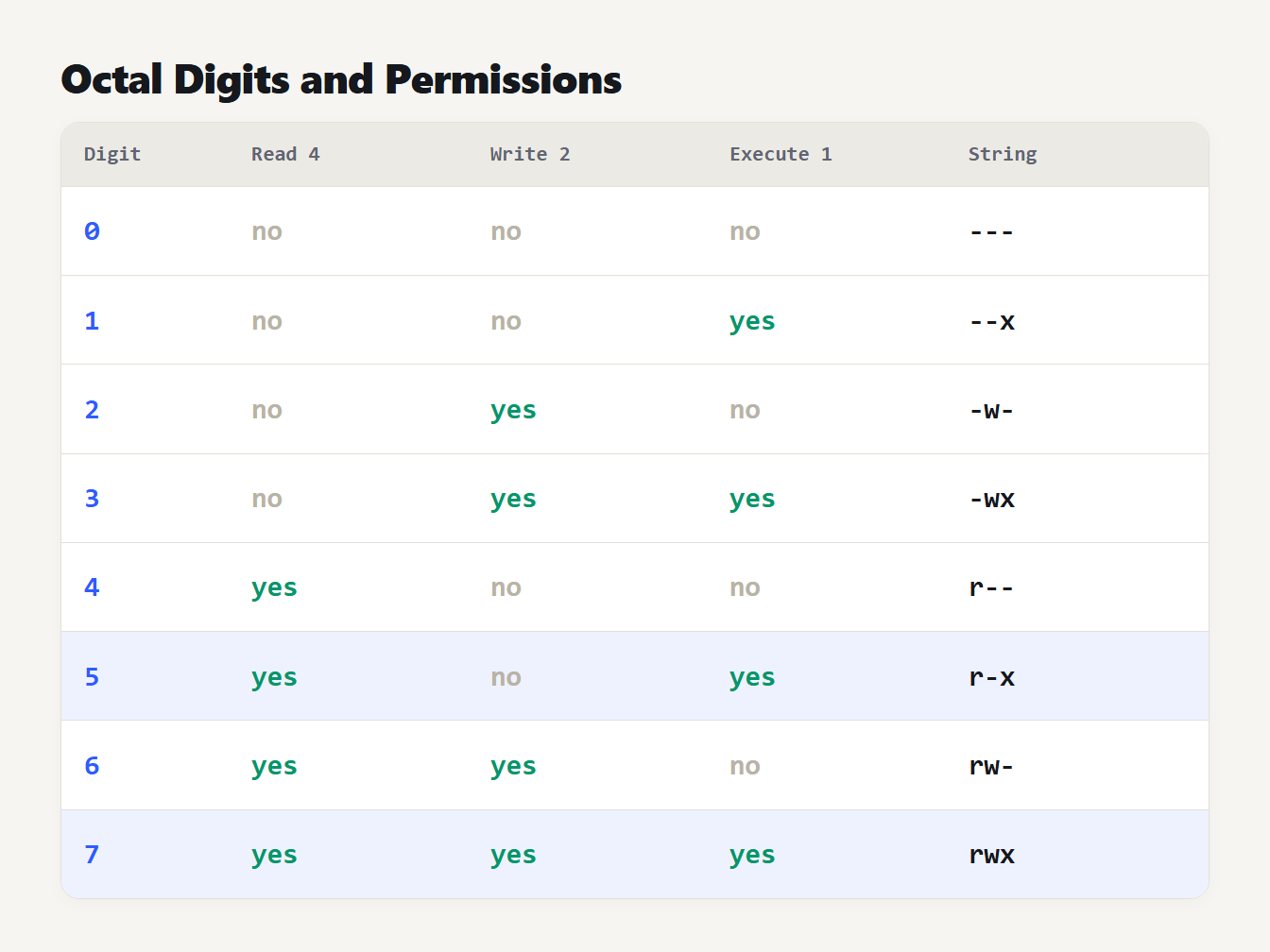
A table of the digits 0 to 7. Each row shows the digit, its read, write and execute bits and the permission string: 0 is ---, 1 is --x, 2 is -w-, 3 is -wx, 4 is r--, 5 is r-x, 6 is rw- and 7 is rwx.
How the octal numbers work
Each permission is one bit, and the chmod manual gives them the values 4, 2 and 1. A digit is the sum of the bits you want. We listed all eight digits with the string each one produces. Zero is ---, 1 is --x, 2 is -w-, 3 is -wx, 4 is r--, 5 is r-x, 6 is rw- and 7 is rwx.
The manual also says omitted digits are treated as leading zeros, so chmod 5 file is the same as chmod 005 file, which gives the owner and group nothing. Always write all three digits, so a short number does not lock you out. When you wonder what does chmod 755 mean, or any other number, read it as owner, group and others, one digit each.
chmod 755 vs 644, 600 and 777
Most of the time you need one of a handful of modes:
| Mode | String | Typical use |
|---|---|---|
| 644 | rw-r--r-- | Normal files: the owner edits, everyone reads |
| 755 | rwxr-xr-x | Programs and directories |
| 600 | rw------- | Private files such as SSH keys |
| 700 | rwx------ | Private directories and scripts |
| 664 | rw-rw-r-- | Files a group edits together |
| 775 | rwxrwxr-x | Directories a group works in |
| 444 | r--r--r-- | Read-only for everyone |
| 777 | rwxrwxrwx | Everyone can do everything |
The difference between chmod 755 and 644 is the execute bit. A text file does not need it, and a program does. 777 is rarely the right fix: it lets every user on the machine change the file.
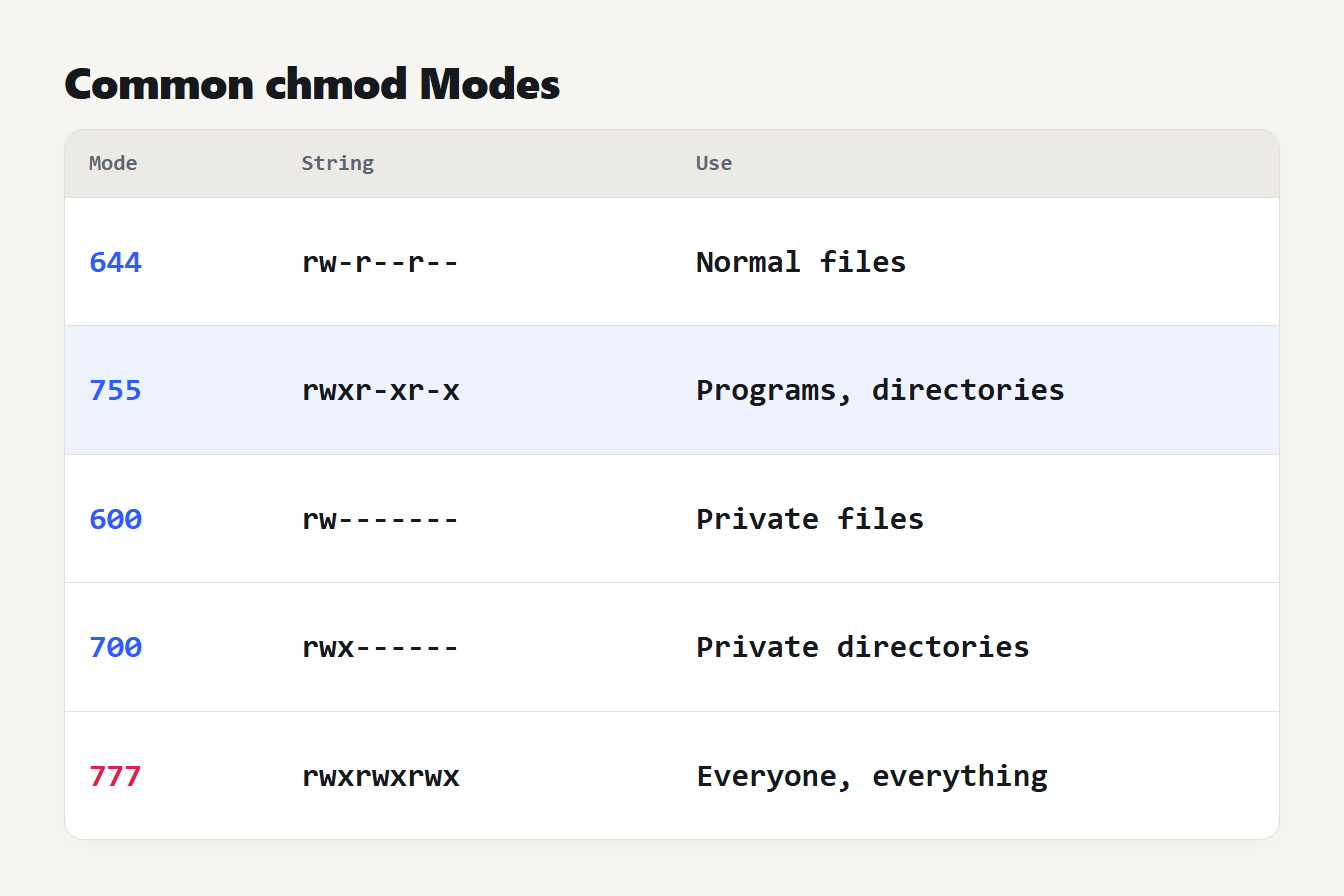
Five rows for the modes 644, 755, 600, 700 and 777. Each row shows the permission string and its typical use, such as normal files for 644 and private directories for 700.
What the permissions mean on a directory
For a directory the same three bits mean something different. According to the path resolution manual page, execute is search permission, which lets you pass through the directory to reach files by name. Read lets you list what is inside. Write lets you create, rename and delete entries.
That is why directories need execute. A directory at rw-r--r-- shows its names to people who can read it, but nobody can open anything inside it by name. It is also why deleting a file depends on the directory's write bit and not on the file's own mode.
Symbolic mode: u+x, go-w and the rest
Octal sets a whole mode at once. Symbolic mode changes part of it. A clause has three pieces: who (u, g, o or a for all), an operator (+ to add, - to remove, = to set exactly) and the permissions (r, w, x, s, t or X). We ran each of these on the starting mode shown:
| Command | From | To |
|---|---|---|
chmod u+x | 644 | 744 |
chmod go-w | 666 | 644 |
chmod g=u | 700 | 770 |
chmod o= | 755 | 750 |
chmod a-rwx,u+rw | 755 | 600 |
chmod u=rwx,g=rx,o= | any | 750 |
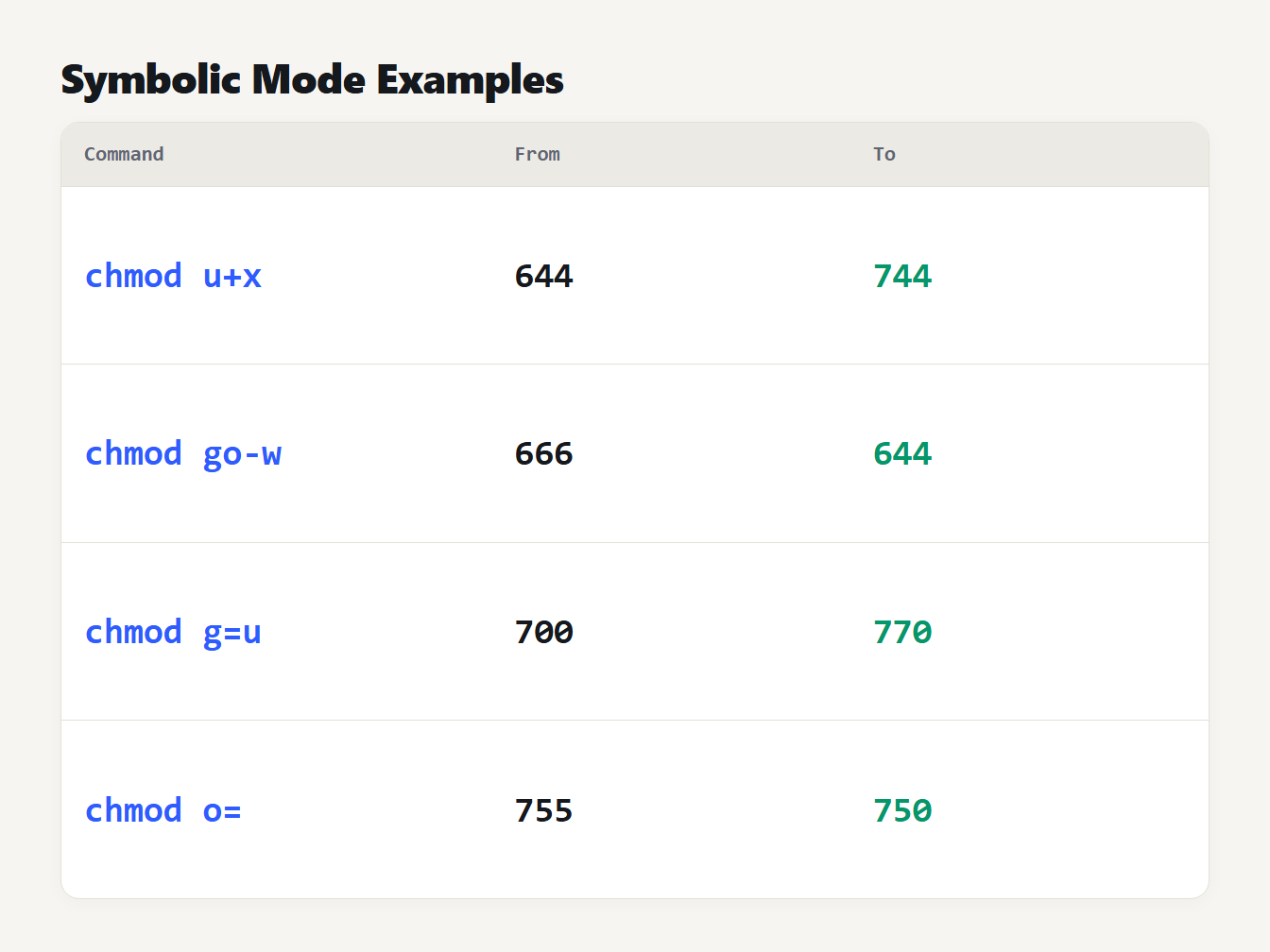
Four rows, each with a starting mode, a symbolic command and the resulting mode: u+x takes 644 to 744, go-w takes 666 to 644, g=u takes 700 to 770 and o= takes 755 to 750.
Two details save trouble. The equals sign clears whatever it mentions, so o= removes every permission from others. And a clause with no who letters acts like a, except that bits in your umask are left alone, which the manual spells out. With a umask of 022, chmod +x on a 644 file gives 755. With 077 it gives 744.
The capital X is for recursive changes. It adds execute only to directories and to files that already have an execute bit. Running chmod -R u=rwX,go=rX dir gave 644 for a 644 file, 755 for a 700 file and 755 for any directory, so plain files do not become executable by accident.
Common chmod mistakes
- Running chmod -R 777. It opens every file under the directory to every user. Fix the owner or group instead.
- Running chmod -R 755 on a tree of files. Every document becomes executable. Use u=rwX,go=rX, or set files and directories separately.
- Removing execute from a directory. You can still list it if read is set, but you can no longer open anything inside.
- Typing a short number. Omitted digits are leading zeros, so chmod 5 file gives the owner no access at all.
The special bits: setuid, setgid and sticky
A fourth digit in front of the three holds three special bits. The inode manual page describes them:
- Setuid (4): the program runs with its owner's user ID.
4755shows asrwsr-xr-x. - Setgid (2): on a program it uses the file's group. On a directory, files created there inherit the directory's group.
2775shows asrwxrwsr-x. - Sticky (1): on a directory, a file can be renamed or deleted only by its owner, the directory's owner or a privileged process.
1777shows asrwxrwxrwt, as on/tmp.
In ls -l, a lowercase s or t means the special bit and the execute bit are both set. A capital S or T means the special bit is set without execute, which is usually a mistake. The manual adds that for directories chmod keeps the setuid and setgid bits unless you say otherwise.
Umask: why new files get 644
New files do not start at 755. The umask manual page says permissions in the umask are turned off from the mode a program asks for, and gives the example 0666 & ~022 = 0644. Files start from 666 and directories from 777:
| Umask | New file | New directory |
|---|---|---|
| 002 | 664 | 775 |
| 022 | 644 | 755 |
| 027 | 640 | 750 |
| 077 | 600 | 700 |
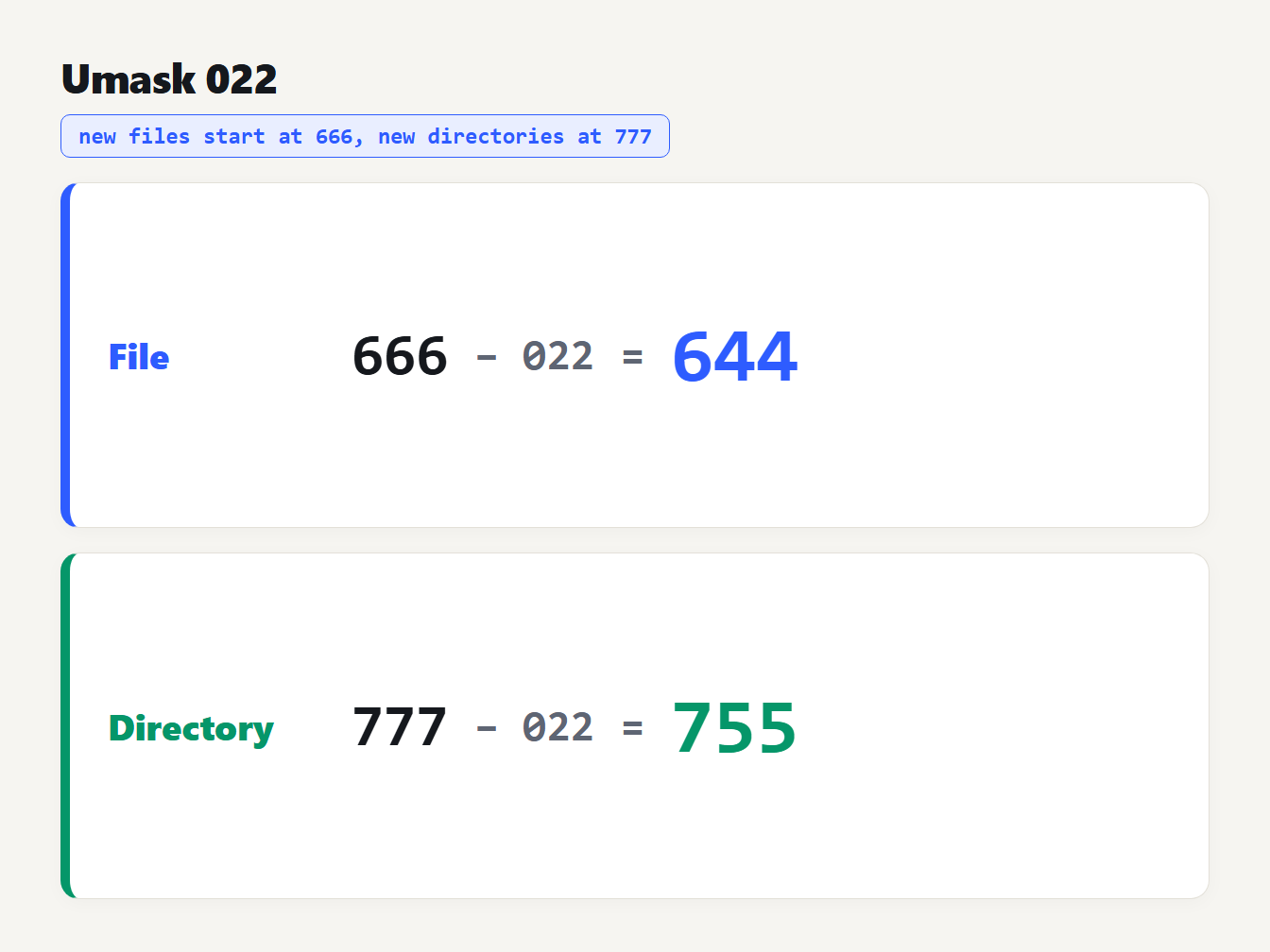
Two rows. For a file, the starting mode 666 with the 022 bits removed gives 644. For a directory, the starting mode 777 with the 022 bits removed gives 755.
The manual calls 022 the typical default, which is why most new files are 644 and most new directories are 755.
Work it out with a calculator
The Chmod Calculator lets you tick the permissions, or type an octal mode, an ls -l string or a symbolic change. The other forms update at once. It prints the chmod commands, warns about world-writable and setuid modes, and has a umask section that gives the file and directory modes. We checked that all 4,096 modes from 0000 to 7777 convert to an ls -l string and back unchanged, and that it applies X, = and the umask rule as described above.
If you work with other bases, the Number Base Converter shows why the digits are octal: each one is exactly three bits. If you are making a script executable so a scheduled job can run it, the Cron Expression Generator and Explainer shows when the job will fire.
Frequently asked questions
What is the difference between chmod 755 and 644?
644 gives the owner read and write and everyone else read only, which suits normal files. 755 adds execute for all three, so programs can be run and directories can be entered. A directory without execute cannot be opened, so directories nearly always need 755 or similar.
Is chmod 777 safe?
Rarely. It lets every user on the system read, write and run the file. Most permission errors are better fixed by changing the owner or group, or by adding the missing bit to one class, than by opening a file to everyone.
How do I make a file executable?
Run chmod u+x filename to add execute for the owner, or chmod +x filename to add it for everyone your umask allows. If the file is a script, it also needs read permission and a valid interpreter line.
What does the first digit in chmod 4755 mean?
A fourth, leading digit holds the special bits: 4 is setuid, 2 is setgid and 1 is the sticky bit. So 4755 is a normal 755 with setuid set, and the program runs with its owner's rights.
What is chmod 755 in symbolic form?
chmod u=rwx,g=rx,o=rx sets exactly the same permissions. The ls -l string for it is rwxr-xr-x. You can also reach it from 644 by running chmod a+x, which adds execute for owner, group and others.
What does chmod 755 mean for your next file?
Ask the question each time you set a mode: what does chmod 755 mean here, and does anyone besides the owner need to run this? If not, use 700 or 644. If yes, write the mode as u=, g= and o= so the result is exact. Preview it in the Chmod Calculator, paste the command, and run ls -l afterwards to confirm the string matches what you meant.