How to Add Line Numbers to Text: Start, Step, Padding and Blank Lines
Learn how to add line numbers to text: where to start, what to do with blank lines, how to line numbers up, and when to use letters. Checked against GNU cat.
By TheTextKit TeamPublished
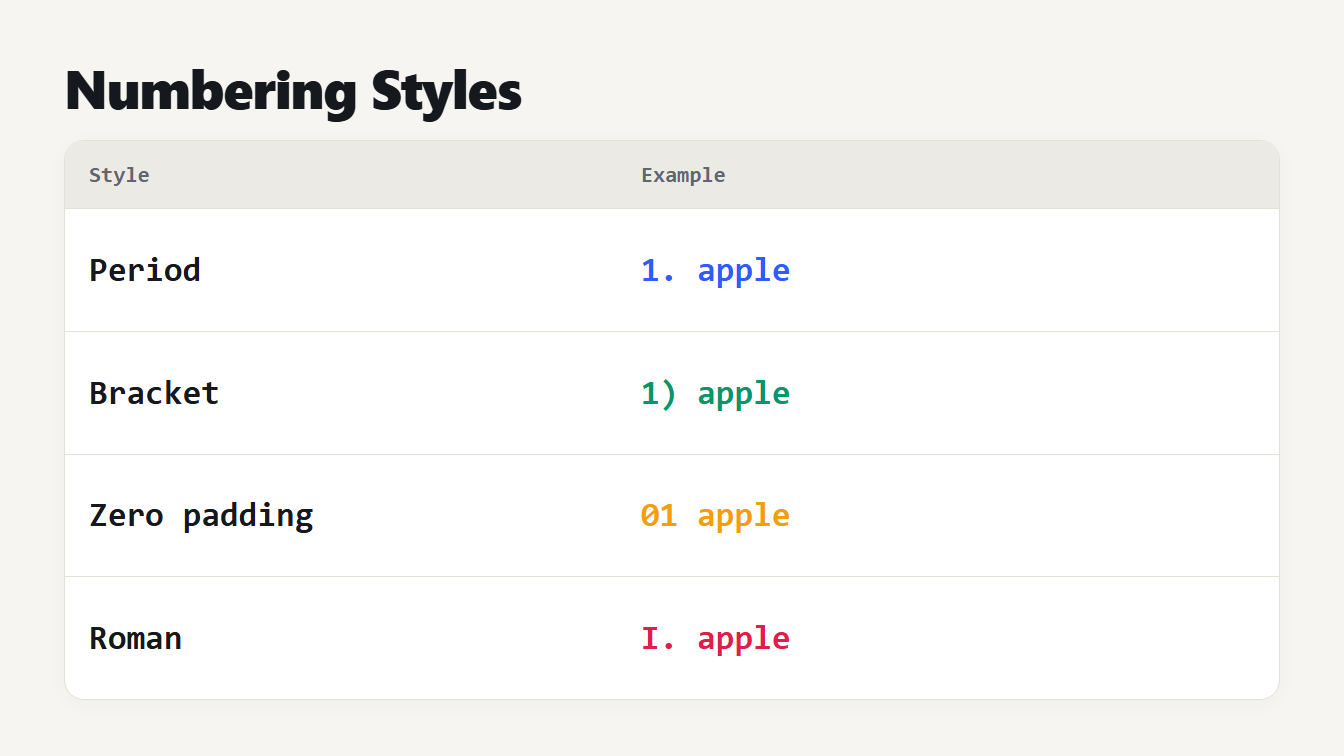
A table of four numbering styles with an example of each on the word apple. A period gives 1. apple. A bracket gives 1) apple. Zero padding gives 01 apple. Roman numerals give I. apple.
To add line numbers to text, paste it into a line numbering tool, choose a separator such as a period or a bracket, and copy the result. The method is simple. The choices are not: whether blank lines get a number, where the count starts, and whether 9 and 10 line up. Those choices decide whether the numbers match an editor, a printed list or a legal clause. This guide shows how to make each choice, and how our line numbering tool compares with the Unix command cat on 1,500 test texts.
How to add line numbers to text
- Open the Line Numbering tool and paste your lines.
- Set Start at and Step. Leave them at 1 for a normal list.
- Pick a separator:
1.,1),1 -,1:,1 |or a tab. - Choose how the numbers are written and lined up, and tick the blank-line options if you need them.
- Copy the numbered text.
If the lines are in a different order than you want, sort them first with the Sort Lines tool, and remove repeats with the Remove Duplicate Lines tool. Numbers added before sorting will be out of order afterwards.
Number every line, or only some
The first decision is what to do with blank lines. There are three common answers, and the Unix tools split on them. The GNU cat -n option, which its own help describes as "number all output lines", numbers every line, blank or not. The cat -b option, "number nonempty output lines", numbers only the non-empty ones. And the POSIX nl command does the same by default. Its specification says body lines are numbered only if they are non-empty, starting at 1 and counting by 1, in a six-character field with a tab after the number.
Our tool's default is the cat -n behavior, because it keeps the numbers equal to the line numbers of the text. A box switches to the other behavior. Here is the same four lines, one of them blank, in each mode:
| Mode | Line a | Blank line | Line b | Line c |
|---|---|---|---|---|
| Every line | 1 | 2 | 3 | 4 |
| Skip blank lines | 1 | none | 2 | 3 |
| Restart after blank | 1 | none | 1 | 2 |
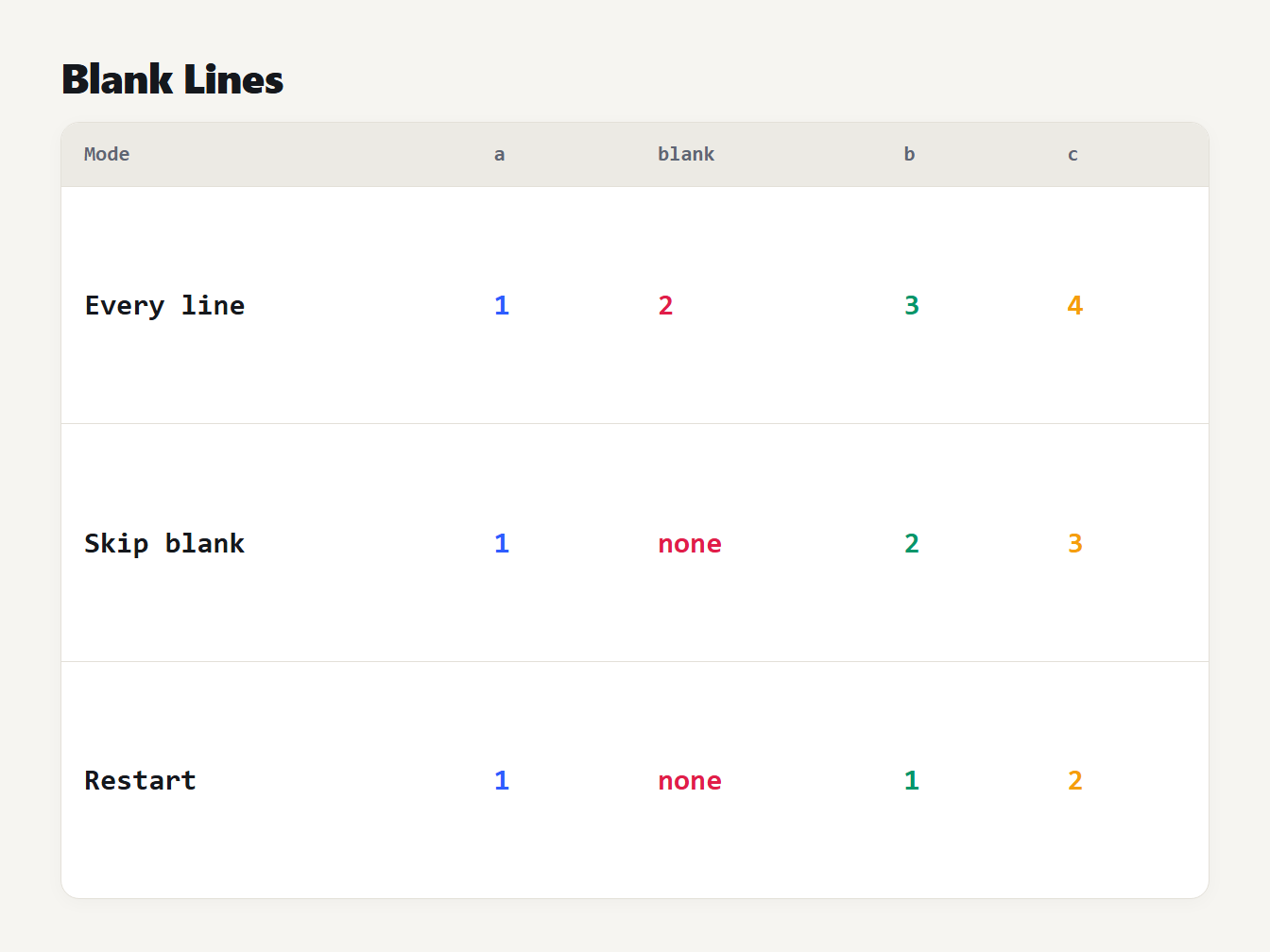
A table of three modes and the numbers given to four lines, the second of which is blank. Every line gets 1, 2, 3 and 4. Skipping blank lines gives 1, none, 2 and 3. Restarting after a blank line gives 1, none, 1 and 2.
A line that holds only spaces counts as blank in our tool. In cat, it counts as a non-empty line and gets a number, so the two differ there.
Start, step and counting down
Most lists start at 1, but not all. Continue a list that ended at 24 by starting at 25. Number code from line 0, as some languages do, by starting at 0. Count down with a start of 10 and a step of -1. Leave room for insertions by numbering in tens: start at 10 with a step of 10, so you can add line 15 later. Our old tool took a start of 0 and turned it into 1, because it treated 0 as an empty box. The new one reads it as 0.
Lining the numbers up
When a list runs past 9, the text after the number shifts: 9. apple and 10. pear don't line up. Padding fixes it. With spaces, the numbers are right-aligned to the width of the largest one, so the text starts in the same column. With zeros, you get 09 and 10, which also sorts correctly as text. The width is that of the largest number, so a list of 120 lines is padded to three digits. The POSIX nl command pads to six characters by default, which is wider than most lists need.
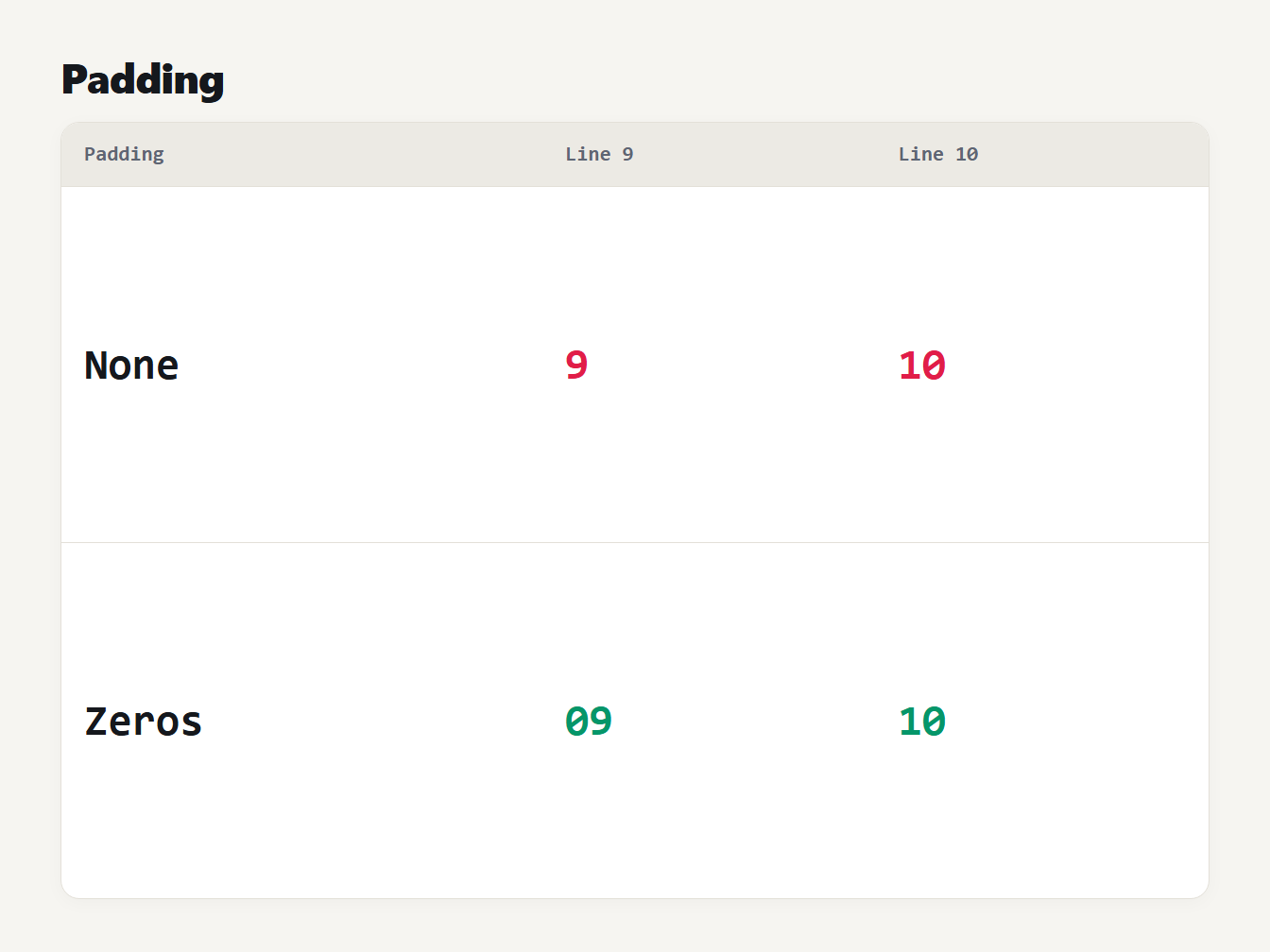
A table of two padding choices and how line 9 and line 10 are numbered. With no padding, they are 9 and 10. With zero padding, they are 09 and 10.
Letters and Roman numerals
Numbers can be written as letters, as in a list that runs a, b, c. After z the letters continue as aa, ab, the way a spreadsheet names its columns. Roman numerals run from I to MMMCMXCIX, which is 3999, because the standard symbols can't write a larger number. A number that a style can't write, such as 0 or a negative number, is shown in digits instead of being left out.
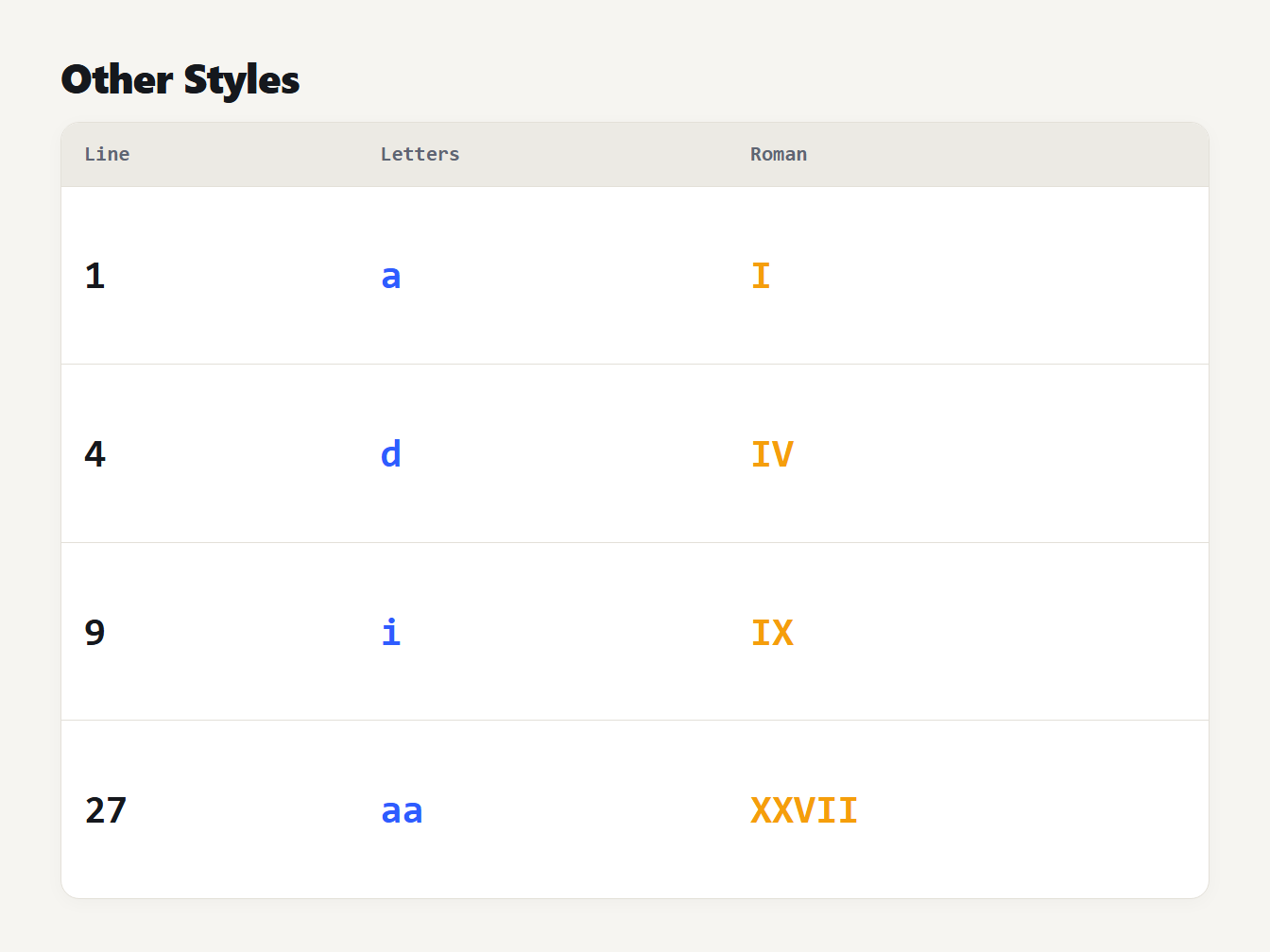
A table of four line numbers and how each is written as letters and as Roman numerals. Line 1 is a and I. Line 4 is d and IV. Line 9 is i and IX. Line 27 is aa and XXVII.
Restarting numbers, and settings for common jobs
For text in blocks, such as clauses or steps with a blank line between groups, you may want each block to start again at 1. Tick the box to start again after each blank line, together with the box that leaves blank lines unnumbered. Each group is then numbered 1, 2, 3 and the blank lines stay empty. This is the setting for a document with sections, where every section has its own steps 1, 2, 3.
Here are settings for other common jobs:
- A numbered agenda. Start at 1, use
1.as the separator, and leave blank lines unnumbered so the spaces between items stay empty. - Line references for a code review. Start at 1, use a tab as the separator, and line numbers up with spaces so the code stays in one column.
- A countdown. Start at 10 with a step of -1.
- Steps grouped by section. Leave blank lines unnumbered and start again after each blank line, so every section runs from 1.
- Outline letters. Choose letters with a bracket, to get
a),b),c).
When numbers get in the way
Line numbers pasted into a program break it, so keep them out of code you will run. For a printed or shared listing, numbers help people refer to a line in a review. For a list in a document, a numbered list in your editor or in Markdown is better, because it renumbers itself when you add an item. In Markdown, an ordered list starts at the first number you type, as the CommonMark specification describes, and the rest follow on. Our guide to Markdown to HTML shows an example.
How we tested it
The easiest tool to check against is the one Unix has had for decades. We used GNU cat from coreutils 8.32 as the reference. We built 1,500 texts of one to twelve lines each. They mixed words, accents, Chinese, quotes, tabs and indented lines. About a quarter of the lines were blank, and about half the texts ended in a line break. We numbered each text with cat -n and cat -b, and with our tool set to the same behavior, then compared the numbers and the text line by line.
| Mode | Texts that matched cat |
|---|---|
Number every line (cat -n) | 1,500 of 1,500 |
Skip blank lines (cat -b) | 1,500 of 1,500 |
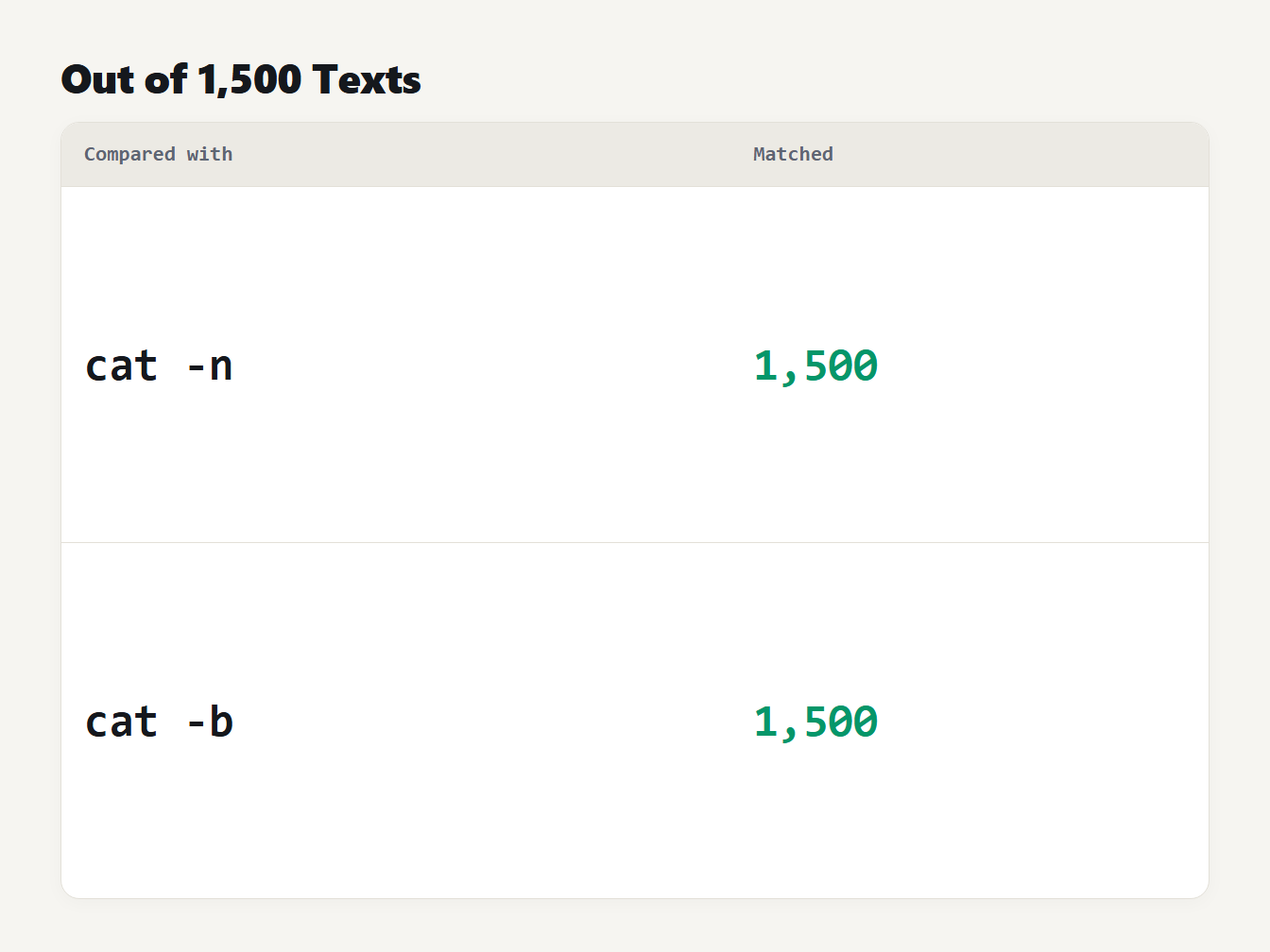
A table of how many of 1,500 test texts our line numbering matched GNU cat on. Numbering every line matched cat -n on 1,500. Skipping blank lines matched cat -b on 1,500.
A separate test numbers 300,000 lines and must finish in under two seconds, so a long file is not a problem. Two limits apply to the comparison with cat. We wrote the texts, and none of them had a line of only spaces, because cat and our tool treat those lines differently, as described above. And the test covers the numbers and the order, not the look of the output, since cat pads to six characters and ours pads to the width of the largest number.
Frequently asked questions
How do I add line numbers to text online?
Paste the text into a line numbering tool, pick the separator, and copy the result. Every line gets a number, starting from 1 unless you choose another start. You can leave blank lines unnumbered and line the numbers up with spaces or zeros.
Should blank lines be numbered?
It depends on the use. Numbering every line matches the line numbers of an editor. Skipping blank lines gives a clean list of items. The Unix command cat -n numbers every line, and cat -b and the default of nl skip empty ones.
Can I start numbering at 0?
Yes. The start can be 0 or a negative number, and the step can be negative to count down. A start left empty falls back to 1.
How do I get 01, 02, 03 instead of 1, 2, 3?
Choose zero padding. The numbers are padded with zeros to the width of the largest one, so a list of 120 lines gets 001 to 120. Space padding right-aligns the numbers instead.
Is my text uploaded?
No. The numbers are added in your browser, and the text is not sent anywhere or stored. The tool needs no account and keeps nothing after you close the page, so it is safe for drafts, contracts and private notes.
Number your lines now
Paste your text into the Line Numbering tool, pick a start, a separator and a style, and copy the numbered lines. Everything runs in your browser, so your text is never uploaded.