How to Find and Replace Text: Whole Words, Regex and Line Breaks
Learn how to find and replace text in bulk: plain, whole word and regex modes, capture groups, line breaks and tabs. Checked against Python on 9,000 cases.
By TheTextKit TeamPublished
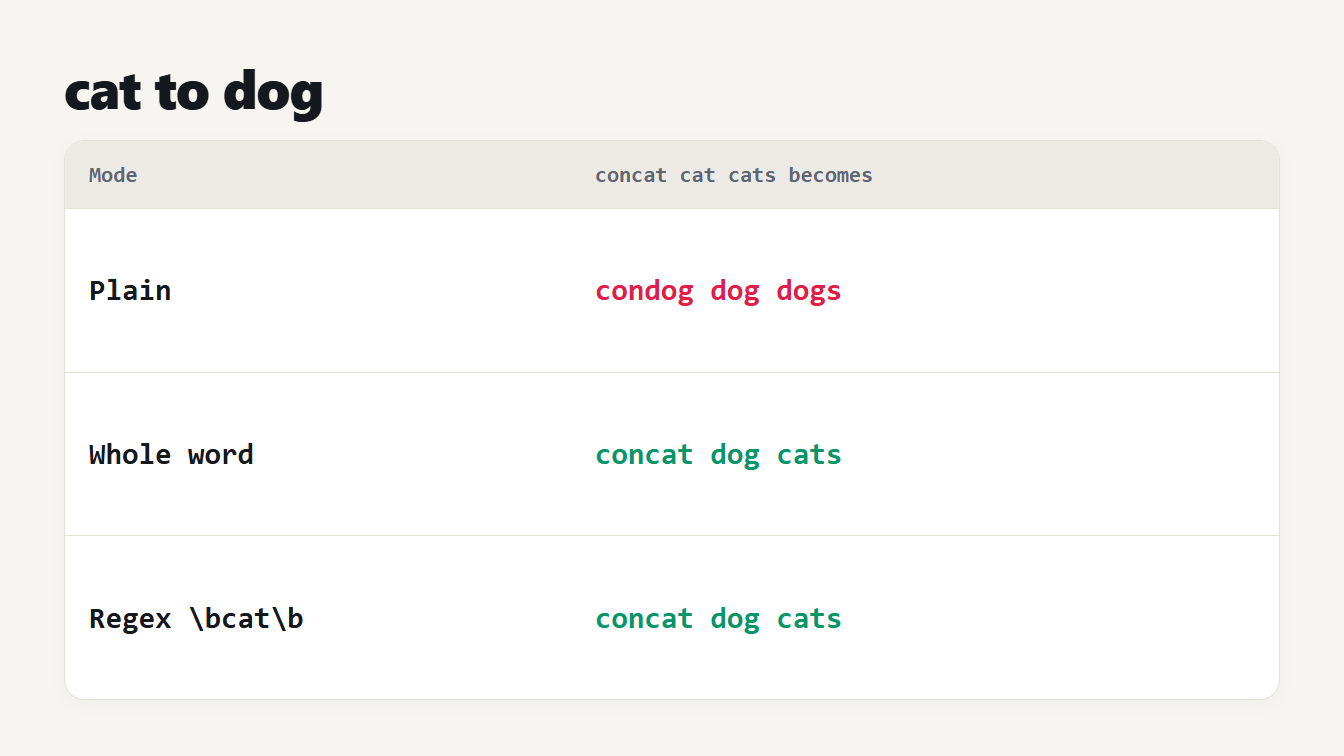
A table of what replacing cat with dog does to the text concat cat cats in three modes. Plain mode changes all three words. Whole word mode changes only the word cat. A regex with a word boundary changes only the word cat.
To find and replace text in bulk, paste it into a find and replace tool, type what to look for and what should take its place, and check the result. The part that takes care is choosing how the search matches, because a search for cat can also change concat, and a search for $1.50 can match nothing at all. This guide explains the three modes, how capture groups and line breaks work, and what we found when we checked our own tool against Python on 9,000 test cases.
How to find and replace text
- Open the Find and Replace tool and paste your text.
- Type the text to find, and the text to put in its place. Leave the second box empty to delete every match.
- Choose Match case or Whole word if you need them. Turn on Use regular expression for patterns.
- Read the count of replacements. If it is not the number you expected, change the options before you copy.
- Copy the result.
The count is the quickest check there is. A search you expect to find twice that reports 40 matches has matched something you did not mean.
Plain, whole word or regex: pick the mode first
The three modes answer the same question in three ways. This is what each does to the text concat cat cats when you replace cat with dog:
| Mode | Result | Why |
|---|---|---|
| Plain | condog dog dogs | The letters cat are found anywhere |
| Whole word | concat dog cats | Only the word cat, with no letter or digit touching it |
Regex with \bcat\b | concat dog cats | The boundary does the same job, but you write it |
Plain mode is literal. A dollar sign, a plus or a dot in the find box means itself, so $1.50 finds $1.50 and C++ finds C++. Tools that quietly run every search as a regular expression will fail on both, because $ and + have special meanings there. In our tool the plain replacement is also literal: typing $& inserts those two characters.
In whole word mode, a word character is any letter in any script, any digit, or an underscore. So café does not match inside cafés, cat does not match inside cat_x, and C++ is found in C++ and C++. because the plus signs are not word characters.
Match case when you find and replace text
With match case off, Cat, cat and CAT are the same. For letters beyond English, the rule that matters is the one in the Unicode case folding table. Our tool uses the simple folding in it. That means the long s (ſ) matches s, the Kelvin sign matches k, and a final sigma (ς) matches σ. It also means two things do not happen. The German ß is not the same as ss, because that is a full folding, which maps one character to two. And the dotted capital İ does not match i, because the table lists that match only as a special case for Turkish.
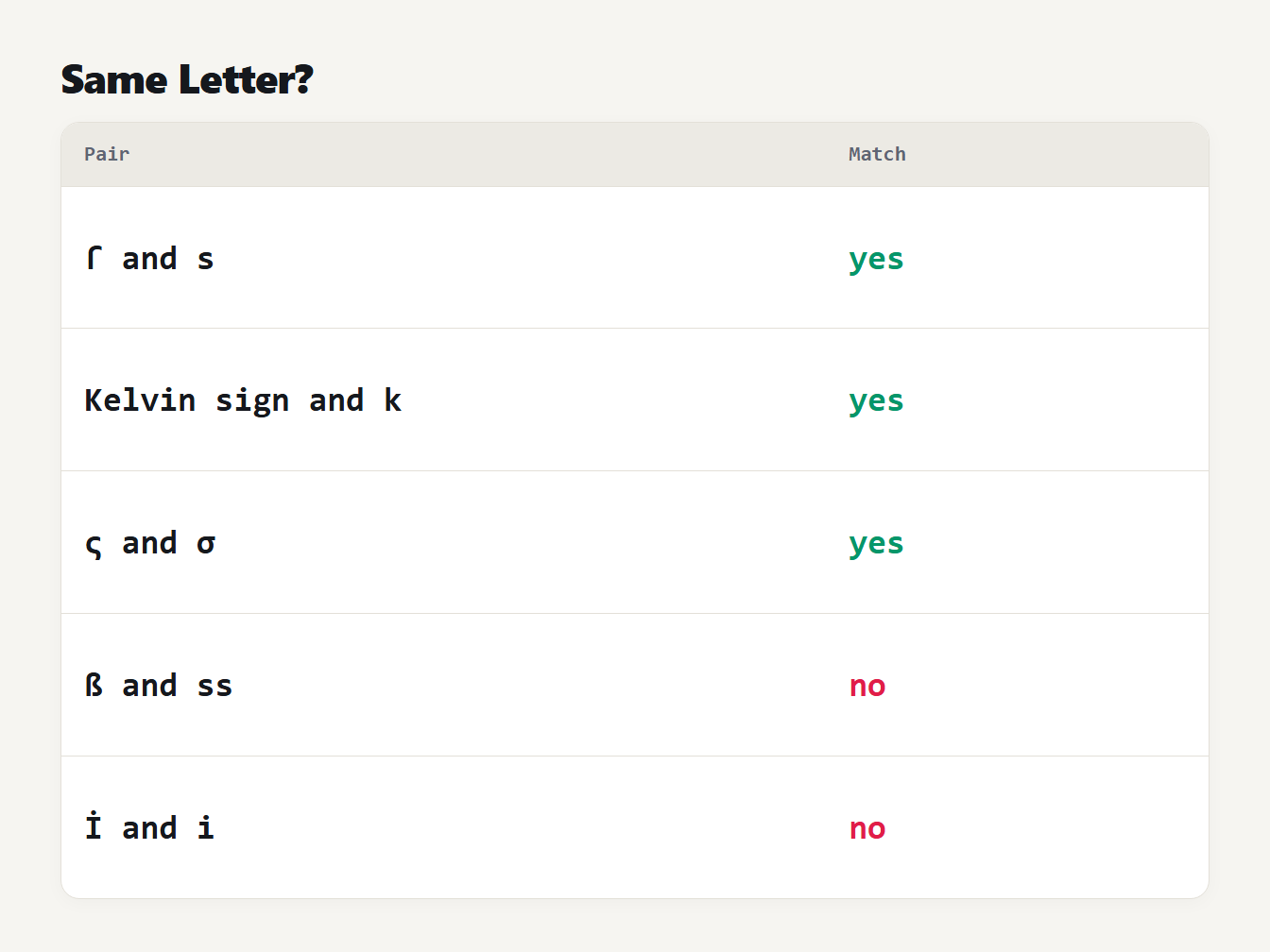
A table of five letter pairs and whether the tool treats them as the same when case is ignored. Long s and s: yes. Kelvin sign and k: yes. Final sigma and sigma: yes. Sharp s and ss: no. Dotted capital I and i: no.
Capture groups: reuse part of what you matched
In regex mode, parentheses in the find box remember the text they match, and the replace box can put it back in any order. The MDN reference for String.replace lists the replacement patterns, and these are the ones the tool supports:
| In the replace box | Inserts |
|---|---|
$1, $2 | The text of the first, second pair of parentheses |
$<name> | The group written as (?<name>...) in the find box |
$& | The whole match |
$` and $' | The text before and after the match |
$$ | A dollar sign |
Here are three jobs we ran in the tool, each with the exact find and replace boxes:
- Swap names. Find
(\w+), (\w+)and replace with$2 $1. The textLovelace, AdabecomesAda Lovelace. - Change a date format. Find
(\d{4})-(\d{2})-(\d{2})and replace with$3/$2/$1. The text2026-10-09becomes09/10/2026. Named groups make it easier to read: find(?<y>\d{4})-(?<m>\d{2})-(?<d>\d{2})and replace with$<d>/$<m>/$<y>for the same result. - Add a currency sign. Find
(\d+) USDand replace with$$$1. The first$$is a dollar sign and$1is the number, so3 USDbecomes$3.
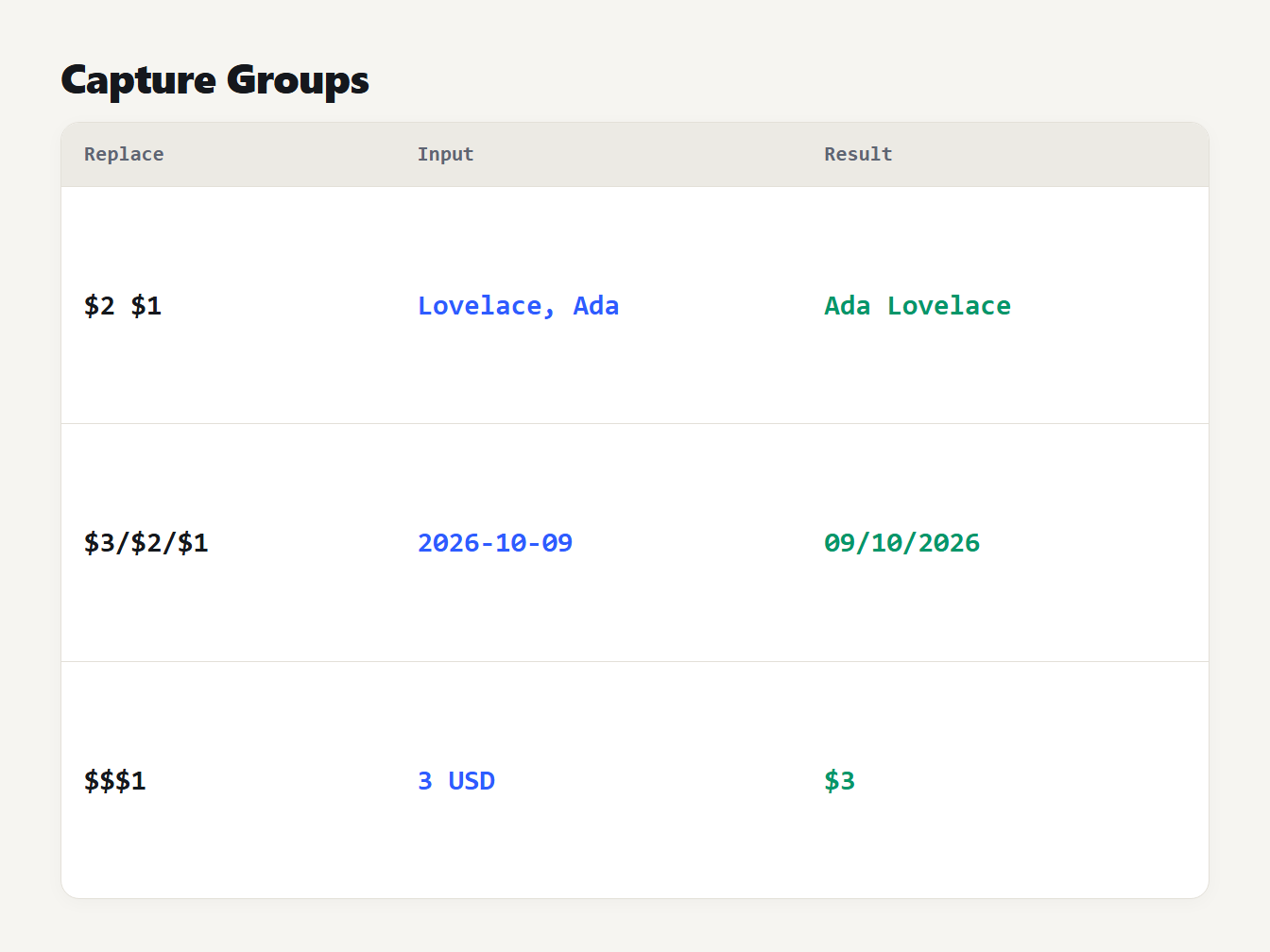
A table of three regex find and replace jobs. Swapping Lovelace, Ada with $2 $1 gives Ada Lovelace. Reordering 2026-10-09 with $3/$2/$1 gives 09/10/2026. Replacing 3 USD with $$$1 gives $3.
Line breaks, tabs and each line
When you find and replace text, a line break often needs changing, and a one-line box cannot hold one. That is why regex mode reads two escapes. In the find box, \n matches a line break and \t a tab, as in any regular expression. In the replace box our tool also reads \n as a line break, \t as a tab and \\ as a backslash. Any other backslash stays as typed.
With the m flag on, which the tool always uses, ^ and $ match at the start and end of every line, not just of the whole text. These jobs follow:
- Join lines. Find
\nand replace with a space.one,two,threeon three lines becomeone two three. - Split a list. Find
,and replace with\nto put each item on its own line. - Bullet every line. Find
^(?=.)and replace with-. The lookahead skips empty lines. With plain^, a text that ends in a line break gets a stray bullet on its empty last line, which we saw in testing. - Trim trailing spaces. Find
[ \t]+$and replace with nothing. - Collapse blank lines. Find
\n{2,}and replace with\n\n, so any run of blank lines becomes one.
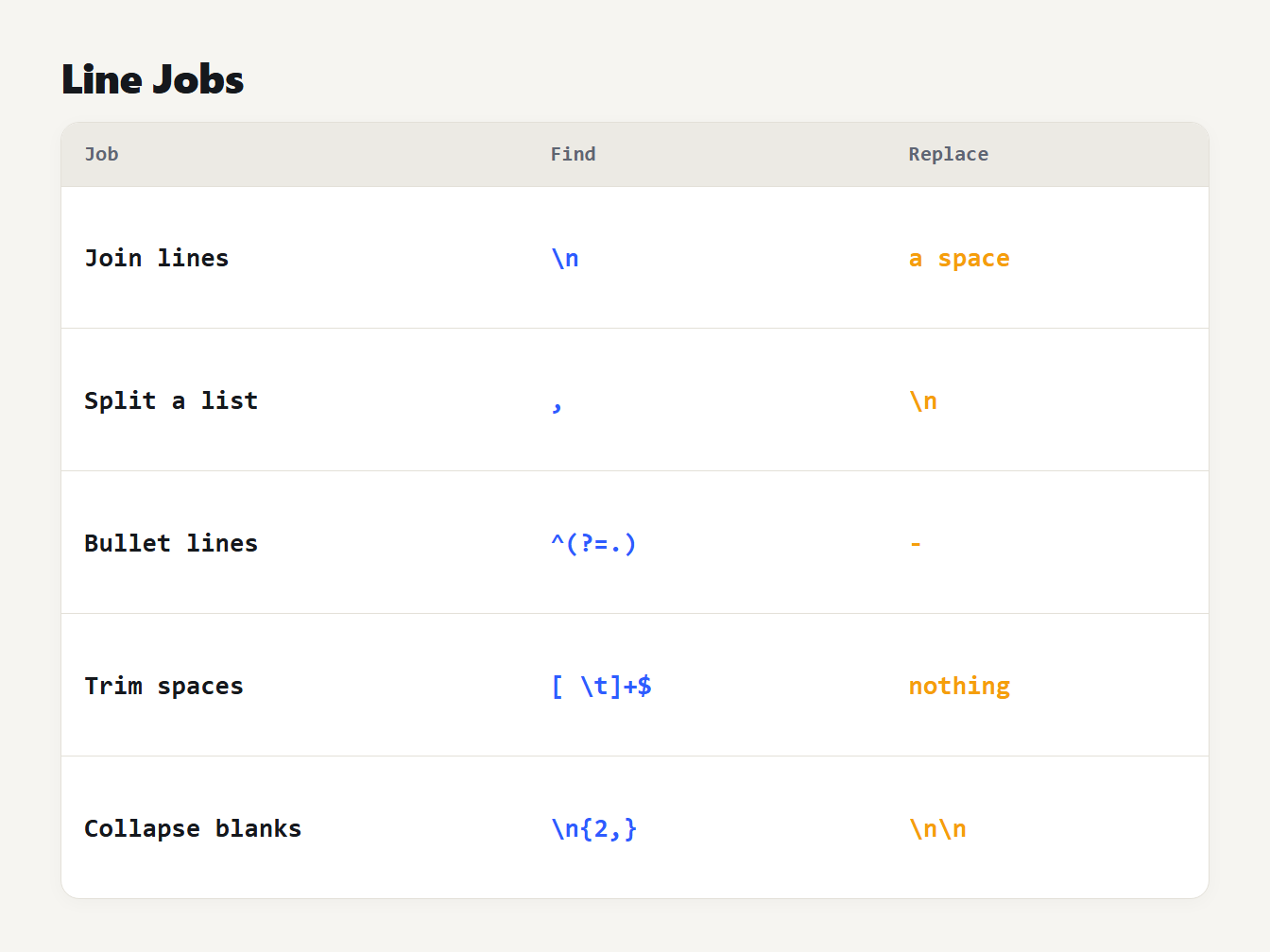
A table of five jobs on lines of text and what to type in the find and replace boxes. They are joining lines, splitting a list, bulleting lines, trimming trailing spaces and collapsing blank lines.
For plain jobs of this kind, the Remove Line Breaks tool and the Whitespace Remover need no patterns. To write and test a pattern before you run it, use the Regex Tester, and our regex cheat sheet lists the syntax.
When a pattern runs forever
Some patterns take an enormous time on some text. A repeat inside a repeat, such as (a+)+b, tries every way to split a run of letters before it gives up when the b is missing. On our machine, that pattern took about 0.1 seconds on 20 letters and 8.6 seconds on 28, and the time kept multiplying with every letter. Run on the page itself, a pattern like that would freeze your browser tab.
The tool therefore runs each search in a background worker with a two-second limit. If a pattern is still running, the worker is stopped, a message explains why, and the page stays usable. We tried it in a real browser with (a+)+b on 40 letters, and the page still answered after half a second. Simplify the pattern, for example by removing the inner repeat, and the result appears as normal.
How we tested it
We compared the tool with Python, whose str.replace and re module are the usual reference. A script built 9,000 cases and recorded what Python gave for each. There were 6,000 plain-text cases: words in many scripts, accents, a decomposed é, a sharp s, long s, Kelvin and dotted capital I, emoji, punctuation and different separators. Each ran with match case on or off and whole word on or off. Another 3,000 used 17 regular expressions, with groups, anchors, lookarounds, empty matches and named groups, on plain ASCII text. We compared the output and the count of replacements.
| Kind of case | Matched Python |
|---|---|
| Plain, match case | 3,030 of 3,030 |
| Plain, case ignored | 2,941 of 2,970 |
| Regex | 3,000 of 3,000 |
| All cases | 8,971 of 9,000 |
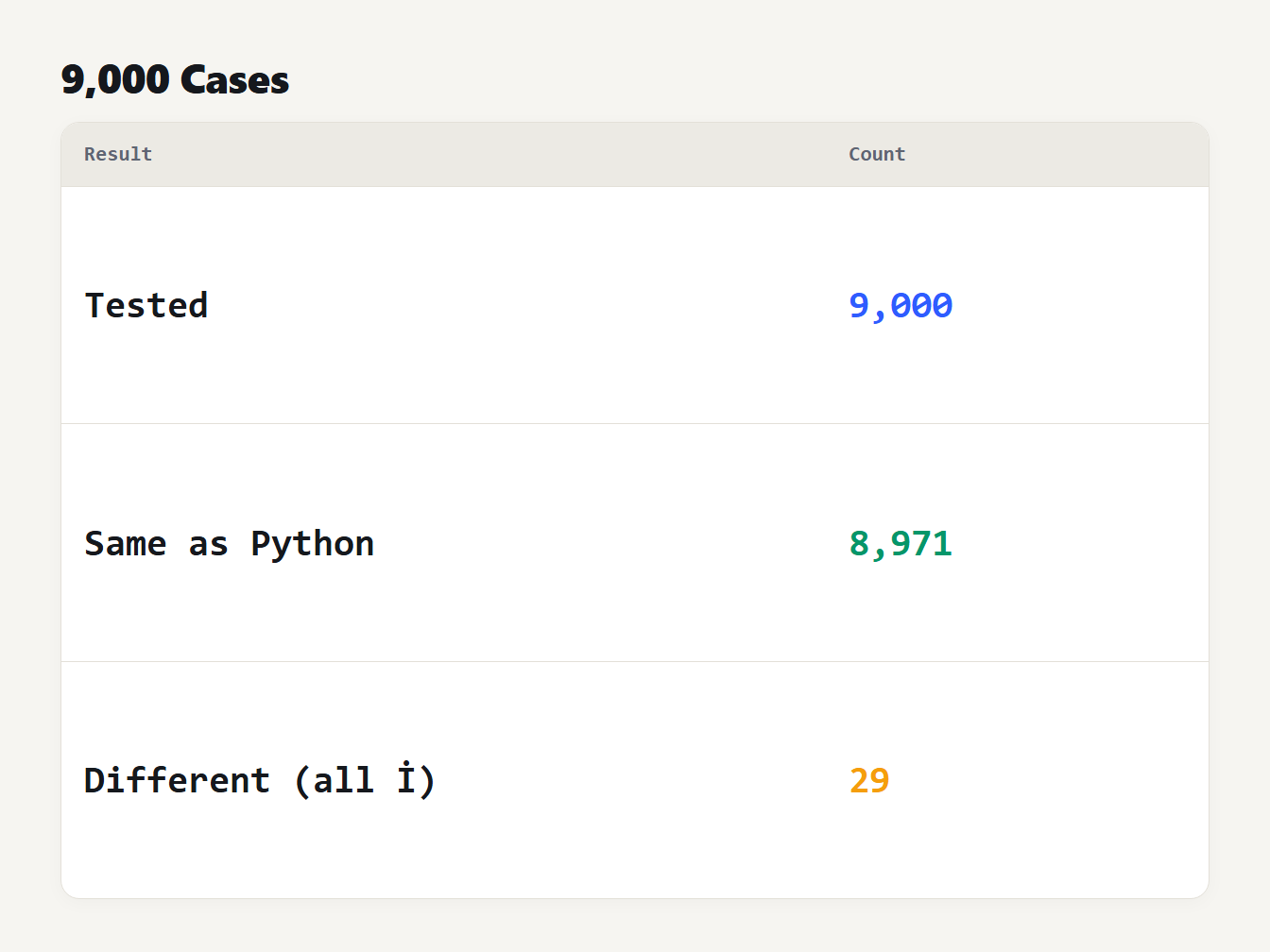
A table of results for 9,000 test cases compared with Python. 8,971 gave the same output and count. 29 differed, and every one of them involved the dotted capital letter I with the case ignored.
All 29 differences involved İ, the capital I with a dot, with case ignored. Python's re.IGNORECASE treats it as the same letter as i. The Unicode simple case folding table does not, and our tool follows the table, so İ is not found when you search for i. Neither answer is a bug, but if you work with Turkish text, check that case.
The test has two limits. The regular expression cases used ASCII text, because \w and \d mean different things in JavaScript and Python for other scripts. And JavaScript counts carriage returns and the Unicode line separators as line ends for ^ and $, which Python does not, so the cases used only line feeds.
Frequently asked questions
How do I find and replace text in bulk?
Paste the text into a find and replace tool, type what to find and what to put in its place, and every match is replaced at once. Turn on match case or whole word to be precise, and check the count of replacements before you copy the result.
How do I replace a line break?
Switch on regular expressions. In the find box \n matches a line break, and in the replace box \n inserts one. To join lines, find \n and replace it with a space. To turn a comma list into lines, find a comma and replace it with \n.
What does $1 mean in the replace box?
In regular expression mode $1 stands for the text matched by the first pair of parentheses in the find box, $2 for the second, and so on. $& is the whole match and $$ is a dollar sign. In plain mode $1 is just the characters $1.
Why did replacing a word also change longer words?
Because a plain search matches letters anywhere, so cat also matches inside concat and cats. Turn on whole word, which only matches cat when letters, digits and underscores do not touch it on either side.
Is my text uploaded?
No. The search and replace run in your browser, and the text is not sent anywhere or stored. The tool needs no account and keeps nothing after you close the page, so it is safe for drafts, contracts and private notes.
Find and replace your text now
Paste your text into the Find and Replace tool to find and replace text, choose a mode, read the count, and copy the result. Everything runs in your browser, so your text is never uploaded.