How to Add Quotes and Commas to a List (for SQL, JSON and Arrays)
Learn how to add quotes and commas to a list for a SQL IN clause or a JSON array, without a trailing comma, with quotes escaped. Tested on 3,000 lists.
By TheTextKit TeamPublished
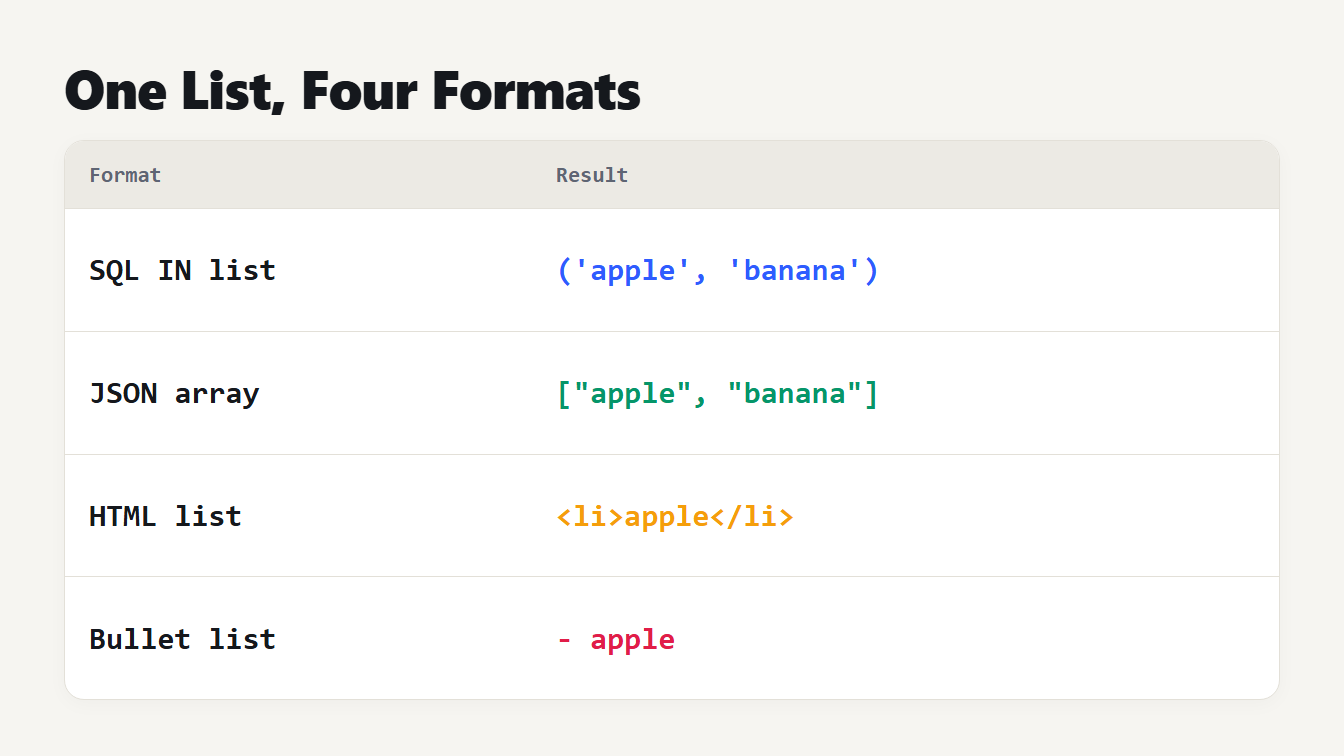
A table with two columns shows the same list in four formats. A SQL IN list is ('apple', 'banana'). A JSON array is ["apple", "banana"]. An HTML list wraps each item in li tags. A bullet list starts each line with a dash and a space.
To add quotes and commas to a list, put a quote mark in the prefix and the suffix and a comma in the separator. A tool then adds them to every line, except that the last line gets no comma. That last comma is the one people forget, and the quotes inside the values are the ones that break the result.
This guide shows how to turn a pasted column into a SQL IN list or a JSON array. It explains why a value such as O'Brien needs care. And it reports how an escaped list held up when we ran 3,000 of them through SQLite and a JSON parser.
How to add quotes and commas to a list
- Copy your list, one item per line, from a spreadsheet, a query result or a document.
- Open the Prefix and Suffix tool and paste it in.
- For a quick result, pick a preset: SQL IN list, JSON array, Quoted, comma at line end, HTML list or Bullet list.
- To build your own, type the quote mark in Prefix and Suffix, a comma in Separator after each item, and tick Put all items on one line if you want one line.
- Copy the result.
Duplicates and order matter in a list, so clean them first with the Remove Duplicate Lines tool or the Sort Lines tool. If the list is wrapped across lines, join it first with our guide to removing line breaks from copied text.
The last comma problem
If you put a comma in the suffix, every line gets it, including the last. 'apple', and 'banana', is not a valid list when it is the end of the list, and many tools reject a trailing comma. JSON does not allow one at all. The fix is to treat the comma as a separator, not as part of each line. The tool puts the separator after every item except the last. The closing quote stays where it is:
'apple',
'banana',
'cherry'
With everything on one line, the separator goes between the items instead. It can end with a space, as in 'apple', 'banana', 'cherry'. The brackets you ask for go around the whole list, so a SQL IN clause comes out as ('apple', 'banana', 'cherry').
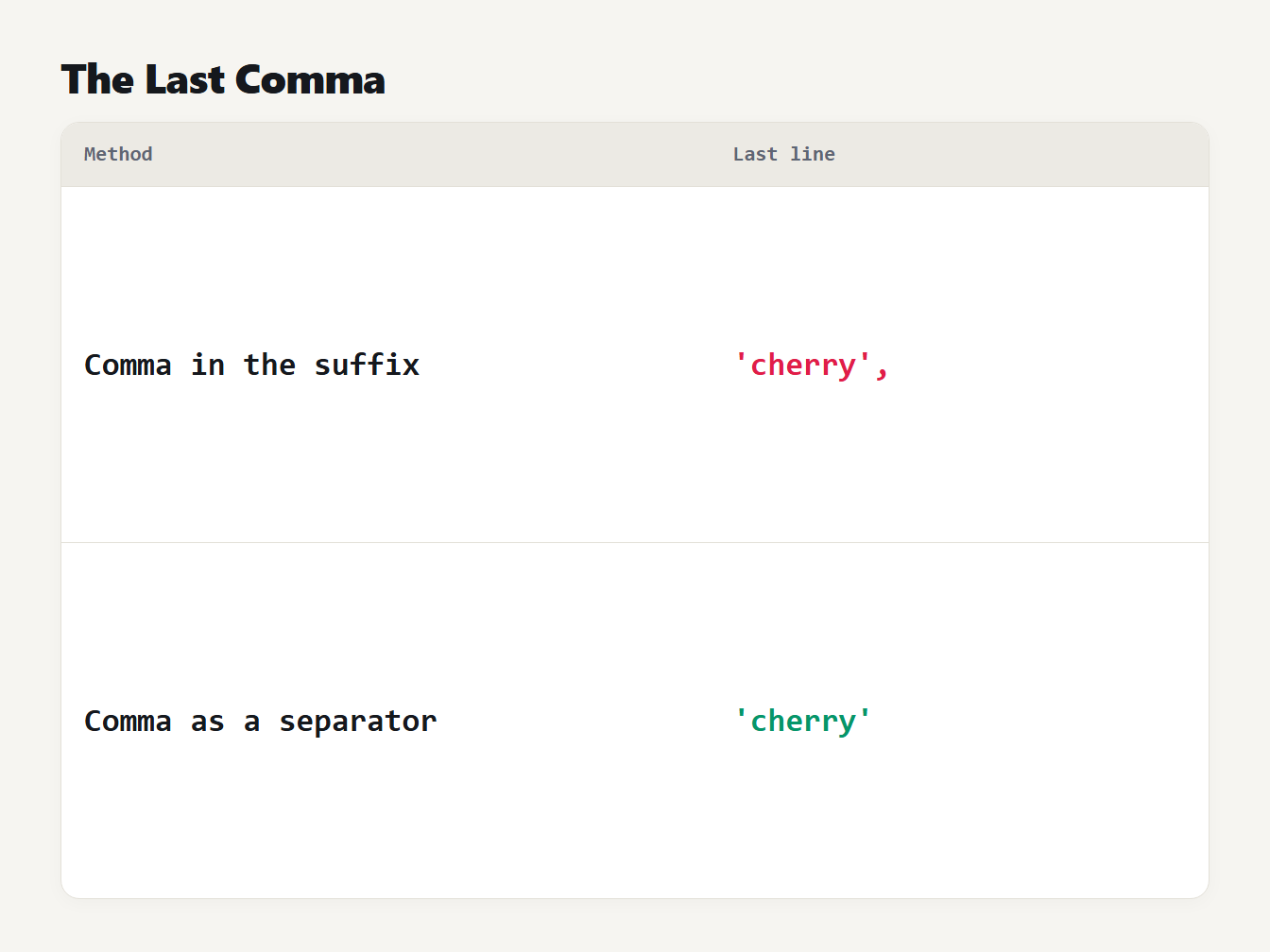
A table of two ways to add commas and what the last line looks like. With the comma in the suffix, the last line ends with a comma, which is a trailing comma. With the comma as a separator, the last line ends with the closing quote only.
Make a SQL IN list
A SQL IN clause takes a list of values in brackets. Strings go in single quotes, and a single quote inside a string is written twice. SQLite's documentation says so directly: "A single quote within the string can be encoded by putting two single quotes in a row". So O'Brien becomes 'O''Brien'. With Quotes inside a line set to Double a single quote (SQL), the tool does this for you:
| Pasted line | Becomes |
|---|---|
apple | 'apple' |
O'Brien | 'O''Brien' |
x'); DROP TABLE t;-- | 'x''); DROP TABLE t;--' |
Two cautions apply. MySQL also treats a backslash inside a string as an escape unless a certain mode is on, as its manual explains, so a value with a backslash can behave differently there. And escaping is not how an application should build queries. The OWASP cheat sheet makes parameterized queries its first defense and calls escaping input strongly discouraged. Use this for the one-off query you run yourself, such as looking up 200 ids that a colleague sent you.
Make a JSON array
A JSON array is the same idea with double quotes and square brackets. The rules for strings are in RFC 8259: the double quote, the backslash and the control characters U+0000 to U+001F must be escaped. The Escape for JSON and JavaScript option does that, so say "hi" becomes "say \"hi\"" and C:\temp becomes "C:\\temp". The same text also works in a JavaScript array, because JSON strings are valid JavaScript.
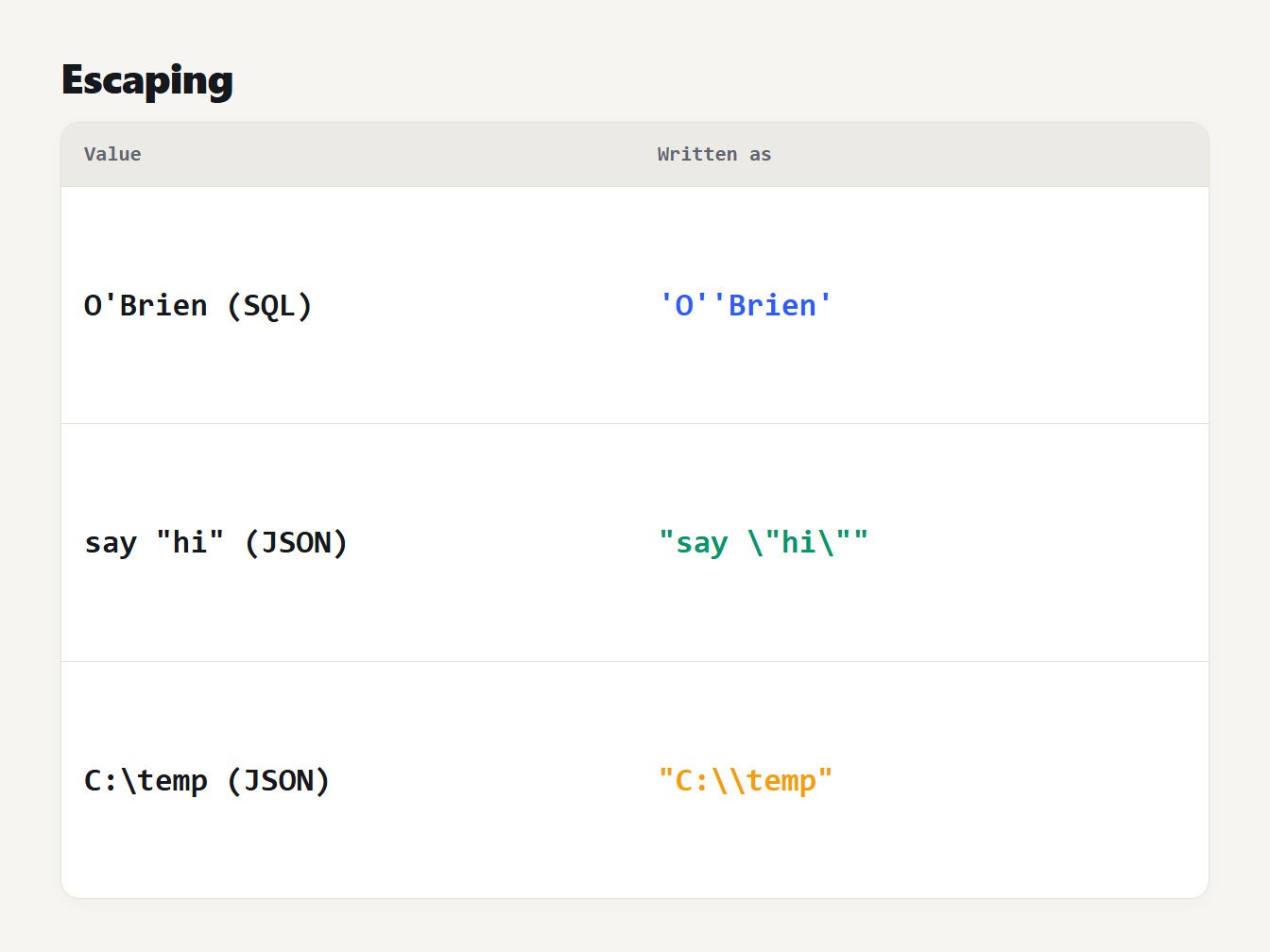
A table of three values and how each is escaped. In SQL, O'Brien becomes 'O''Brien'. In JSON, say hi with double quotes inside gets a backslash before each inner quote. In JSON, a Windows path C:\temp has each backslash written twice.
Other wrappers
These fields cover more than quotes. For an HTML list, put <li> and </li> in the prefix and suffix, with <ul> and </ul> before and after. For a Markdown list, put - in the prefix. To turn a list of paths into full addresses, put a domain in the prefix.
For numbers, leave the prefix and suffix empty, use only a comma and a space as the separator, and tick one line. A column of numbers becomes 1, 2, 3, which is the right form because numbers take no quotes in SQL or JSON. A column of dates is different: SQL wants them quoted, and JSON has no date type, so use quotes for both and check the format your system expects.
How we tested it
An escaped list is only useful if the database or parser reads it back as the same list, so we checked that. We generated 3,000 lists of one to six values, 6,387 different values in all. The values were built from pieces that cause trouble. They included single and double quotes, backslashes, % and _, semicolons, -- and /*, brackets and tabs. They also included accented letters, Chinese, an emoji, and two injection-style strings, x); DROP TABLE t;-- and ' OR '1'='1.
For SQL, we loaded all the values into a SQLite table and ran SELECT name FROM t WHERE name IN (...) for each list, then compared the rows with the list. We ran each list twice: once with quotes doubled, and once with no escaping.
| SQLite 3.50.4 | Correct | Syntax error | Wrong rows |
|---|---|---|---|
| Quotes doubled | 3,000 | 0 | 0 |
| No escaping | 1,120 | 1,464 | 416 |
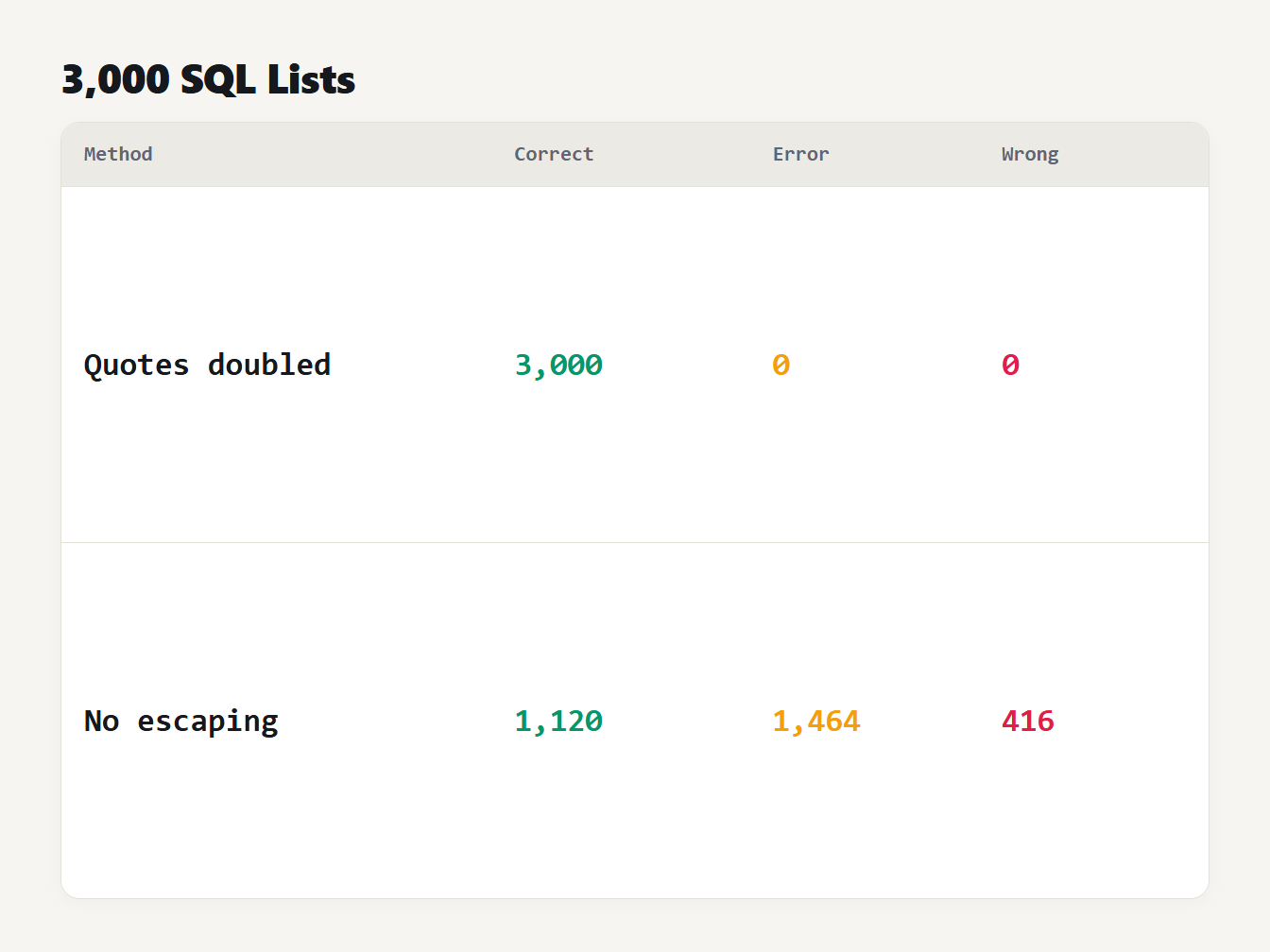
A table of the results of 3,000 SQL IN lists run in SQLite. With single quotes doubled, 3,000 were correct. With no escaping, 1,120 were correct, 1,464 gave a syntax error and 416 returned the wrong rows.
The 416 wrong-row cases are the dangerous ones: the query ran, but returned rows that were not in the list, because a quote ended a value early and the rest was read as SQL.
For JSON, we built a double-quoted array from the same lists and parsed it with Python's json module.
| Python json module | Parsed back to the same list |
|---|---|
| JSON escaping | 3,000 of 3,000 |
| No escaping | 980 of 3,000 |
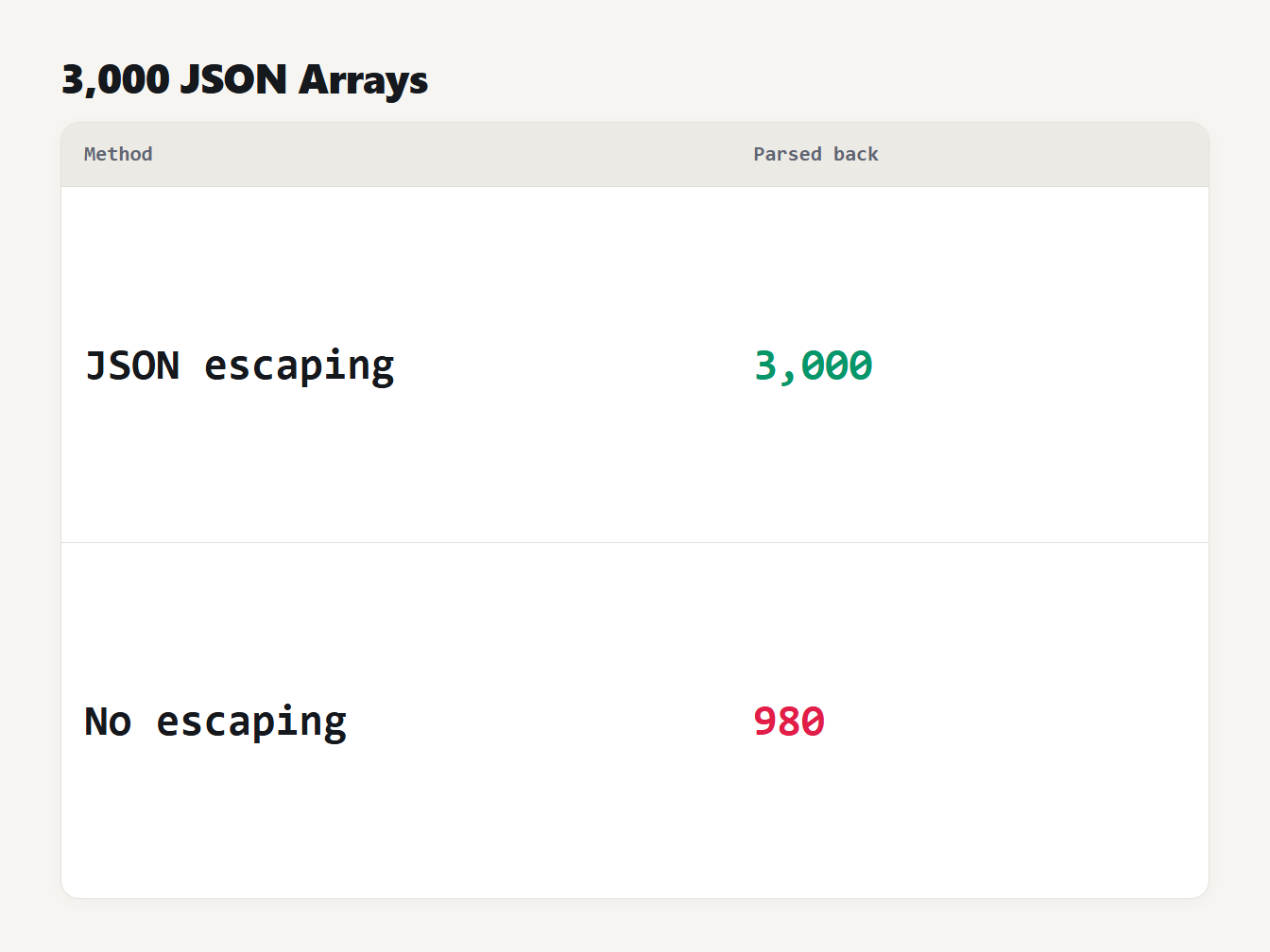
A table of how many of 3,000 JSON arrays parsed back to the same list with Python. With JSON escaping, 3,000 did. With no escaping, 980 did.
We built these lists ourselves, and the values are meant to be awkward, so the failure counts show how often these characters break a list, not how often a typical list fails. A list of plain words never fails.
Using the result
Paste an SQL list after the word IN, as in SELECT * FROM fruit WHERE name IN ('apple', 'banana'), and a JSON list into a file or a script, as in const fruit = ["apple", "banana"]. The tool shows how many items it found, so you can compare that number with the rows you expect. If the query returns fewer rows, some values may not exist in the table, or may differ in capital letters or spacing. If you add quotes and commas to a list often, keep the preset you use most and save the query as a template.
What it can't do
The tool escapes quotes for SQL that follows the standard (doubling) and for JSON. It doesn't know your database, so it can't cover MySQL's backslash rule or the limit that some databases put on the number of values in an IN list. It doesn't quote numbers or dates for you, and it doesn't turn blank values into NULL. Check a long list with a small query before you run it on a large table.
Frequently asked questions
How do I add quotes and commas to each line?
Put a quote mark in the prefix and in the suffix, and a comma in the separator. Every line gets the quotes, and every line except the last gets the comma. The result has no trailing comma, so it can go straight into code.
How do I turn a column into a SQL IN list?
Copy the column, choose the SQL IN list preset, and paste the result between the brackets of IN. It wraps each value in single quotes, doubles any quote inside a value, joins them with commas and adds the brackets.
Why must a quote inside a value be escaped?
Because the quote would end the value early. In SQL, a value such as O'Brien breaks the list unless it is written 'O''Brien'. In JSON, a double quote inside a value must be written with a backslash.
Should numbers be quoted too?
Usually not. A SQL list of numbers is written 1, 2, 3 with no quotes, and so is a JSON array of numbers. Leave the prefix and suffix empty and use only the separator.
Is it safe to put user input in a query this way?
For a one-off query that you run yourself, an escaped list works. In an application, never build queries from text. Use parameters, which handle every case for you.
Format your list now
Paste your list into the Prefix and Suffix tool, pick a preset, and copy the result. Everything runs in your browser, so your list is never uploaded.