How to Count Characters in Text: Emoji, Accents, Spaces and Bytes
Learn how to count characters in text with and without spaces, why an emoji can count as 2 or 8, and which count to use. Tested on 5,000 strings.
By TheTextKit TeamPublished
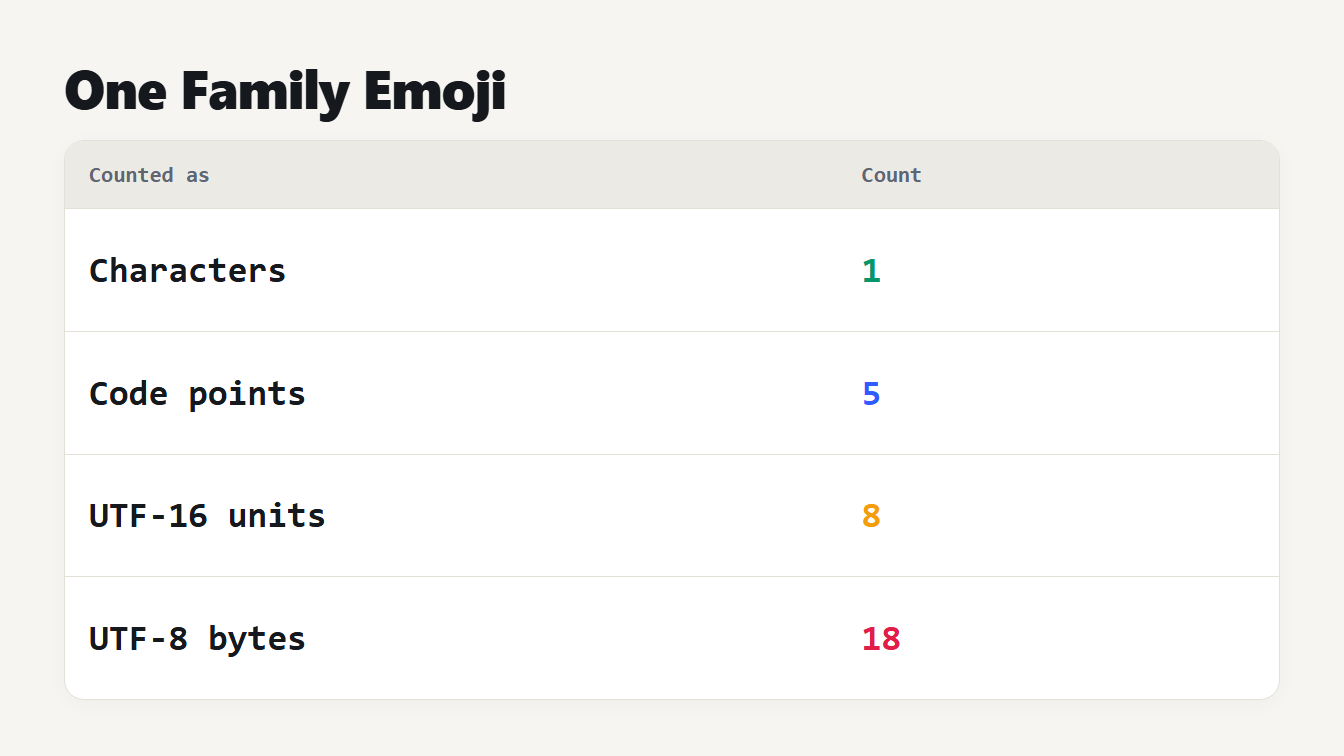
A table with two columns shows four ways of counting one family emoji. As characters a reader sees, it is 1. As Unicode code points, it is 5. As UTF-16 units, the count JavaScript reports, it is 8. As UTF-8 bytes, it is 18.
To count characters in text, paste it into a character counter and read the first number: it counts what a reader sees as characters, with spaces. A second number leaves the spaces out. The trouble starts when the text has emoji, accents or letters outside English, because "how many characters" has four honest answers, and a program can give you any of them. Our old counter used the JavaScript length, which reported 8 for one family emoji. This guide explains the four counts, shows which to use when, and describes how we tested the new counter on 5,000 strings.
How to count characters in text
- Open the Character Counter and paste or type your text.
- Read characters for the count including spaces, and without spaces for the count that leaves out every space, tab and line break.
- Look at the details below the cards if a limit is measured differently: code points, UTF-16 units, UTF-8 bytes, letters and digits.
- If the limit is for X or Google Ads, use the Character Limit Checker, which applies their own rules, and read our guide to the Twitter character limit.
With and without spaces
The with-spaces count includes every character in the text: letters, digits, punctuation, spaces, tabs and line breaks. A line break is one character, and a Windows line break, which is a carriage return plus a line feed, is also one. The without-spaces count removes everything that is blank on the page: spaces, tabs, line breaks, no-break spaces and zero-width spaces. So Hello, world! is 13 characters and 12 without spaces.
Which to use depends on who set the limit. Forms and social posts usually count spaces. Some assignments and translation jobs count without them. If the instructions don't say, ask, or give both numbers.
Why one character can be several
Unicode, the standard behind all modern text, gives each character a number called a code point. But what you see as one character isn't always one code point. Unicode's text segmentation report (UAX #29) calls the unit you perceive a grapheme cluster, and says a letter with a combining accent is one user-perceived character even though it takes two code points.
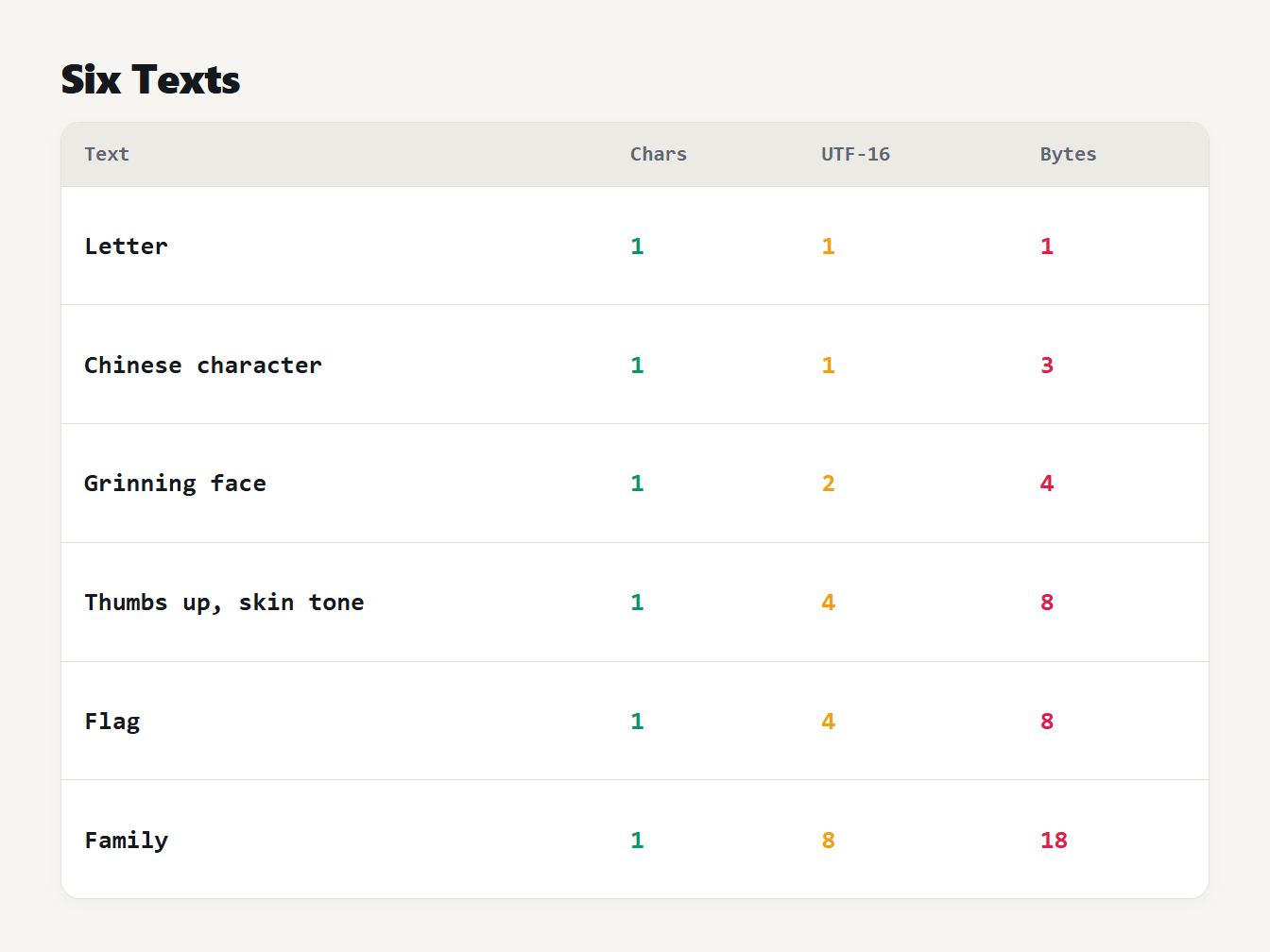
A table of six texts and how each is counted. A letter is 1 character, 1 UTF-16 unit and 1 byte. A Chinese character is 1, 1 and 3. A grinning face emoji is 1, 2 and 4. A thumbs-up with a skin tone is 1, 4 and 8. A flag is 1, 4 and 8. A family emoji is 1, 8 and 18.
Here is what the tool reports for a few texts:
| Text | Characters | Code points | UTF-16 units | UTF-8 bytes |
|---|---|---|---|---|
Letter a | 1 | 1 | 1 | 1 |
e with a combining accent | 1 | 2 | 2 | 3 |
| Chinese character | 1 | 1 | 1 | 3 |
| Grinning face emoji | 1 | 1 | 2 | 4 |
| Thumbs up, medium skin tone | 1 | 2 | 4 | 8 |
| Flag of Ukraine | 1 | 2 | 4 | 8 |
| Family emoji | 1 | 5 | 8 | 18 |
| Windows line break | 1 | 2 | 2 | 2 |
An emoji with a skin tone is two code points: the thumb and a modifier. A flag is two regional indicator letters. A family is three people joined by two invisible joiners.
Four ways to count, and when each matters
- Characters. What a reader sees. Use it for writing limits that a person will check.
- Code points. What Unicode numbers. Use it when a rule is written in Unicode characters.
- UTF-16 units. What JavaScript counts. MDN says a string's
lengthis "the length of the string in UTF-16 code units". The HTML standard measures themaxlengthof a form field the same way, through the Infra standard, which defines a string's length as the number of code units it contains. - UTF-8 bytes. What a file or a web page takes up. Use it when a limit is in bytes, or to estimate size. The POSIX
wccommand also has separate options for counting characters and bytes.
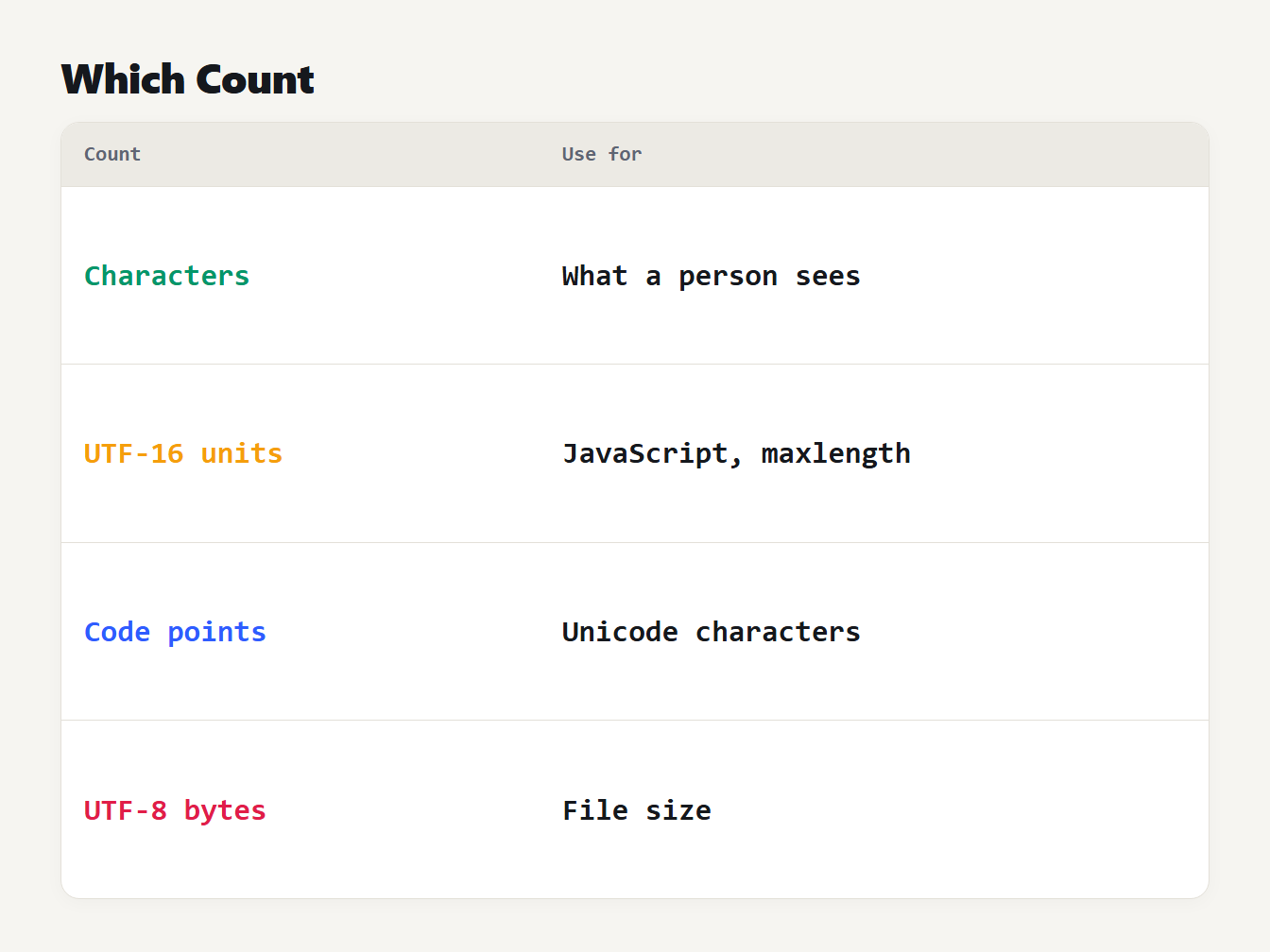
A table of four counts and when to use each. Characters, for what a person sees. UTF-16 units, for JavaScript length and form maxlength. Code points, for Unicode characters. UTF-8 bytes, for file or database size.
The differences are not theoretical. We tested a plain form field in Chromium with a maxlength of 4 and pasted three grinning-face emoji. It kept two, because each uses two units. When we pasted a family emoji, which is 8 units, it kept the first 3, a man and an invisible joiner, and dropped the rest. We tested only Chromium, and other browsers may cut differently.
Counting each way in code
If you count in your own code, pick the call that matches the count you need. For the family emoji from the table, these are the results we got:
const s = "\u{1F468}\u{200D}\u{1F469}\u{200D}\u{1F467}"
s.length                                   // 8, UTF-16 units
[...s].length                              // 5, code points
[...new Intl.Segmenter("en", { granularity: "grapheme" }).segment(s)].length  // 1, characters
new TextEncoder().encode(s).length         // 18, UTF-8 bytes
In Python, len(s) is 5 because a Python string is a sequence of code points. The standard library has no call for grapheme clusters, but the third-party regex module does: len(regex.findall(r"\X", s)) is 1. len(s.encode("utf-8")) is 18. A common mistake is to use the first call in each language and assume it counts characters. It counts units, and the unit differs between languages.
How we tested the new counter
The old counter returned the JavaScript length. The new one uses the browser's own grapheme segmenter, Intl.Segmenter, so it follows the same Unicode rules as the report above.
To check it against something independent, we built 5,000 random strings. Each used one to 14 of 43 building blocks. The blocks were plain letters, digits, tabs, Windows line breaks and accents written both ways. They also included Chinese, Japanese, Korean syllables written as one character and as three parts, Devanagari and Thai. The rest were emoji with skin tones, family and profession emoji, flags, keycaps, Arabic and Hebrew. Python's regex module counts what Unicode calls extended grapheme clusters, using the pattern \X. Our count matched it on all 5,000 strings.
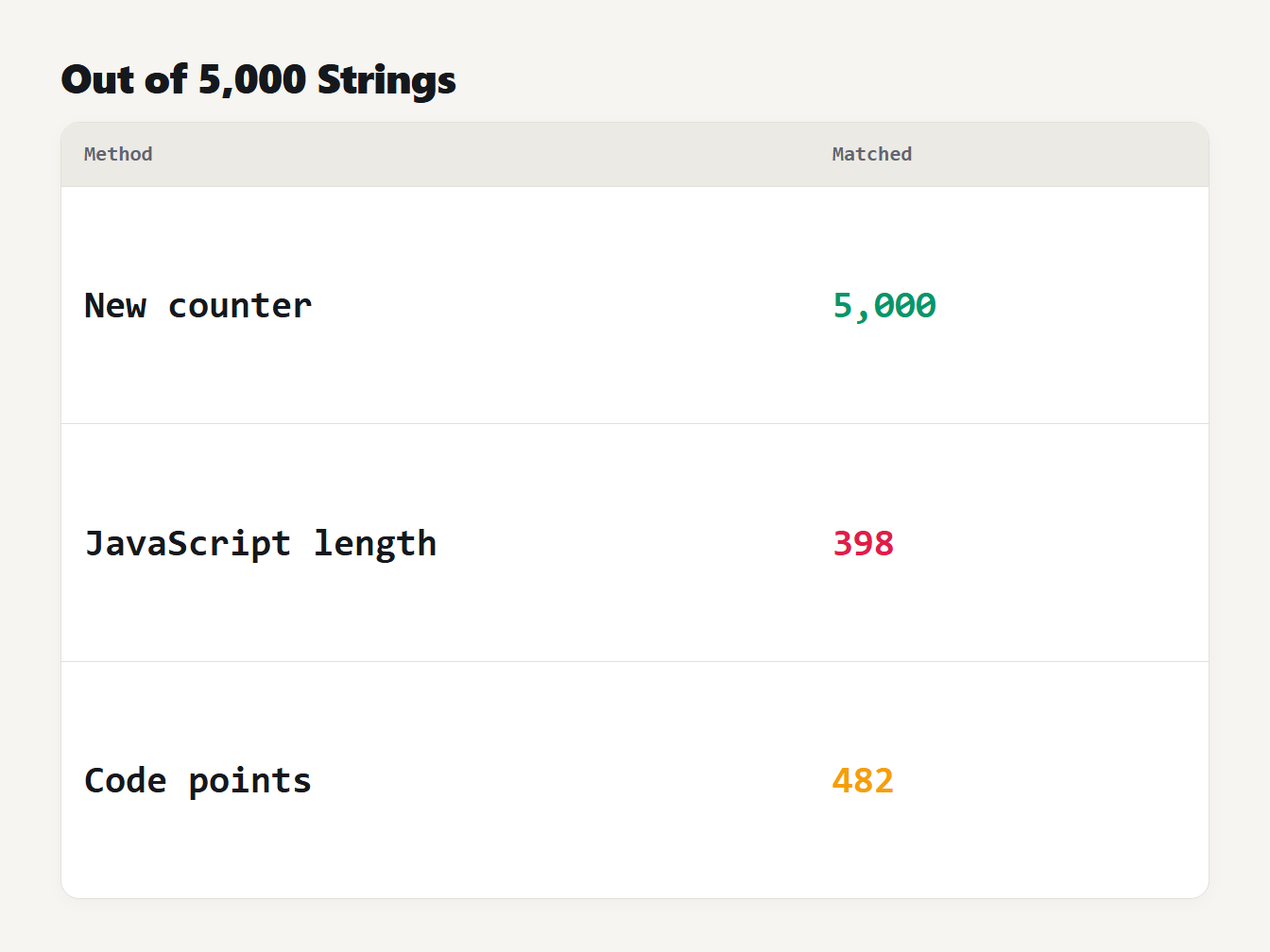
A table of how often each count equals the reference grapheme count on 5,000 mixed strings. The new counter matched in 5,000. The JavaScript length matched in 398. The code point count matched in 482.
The same strings show how often the old count would have been wrong. The JavaScript length equaled the reference in only 398 of them, and a plain code point count in 482. Those figures are high in mismatches because we built the strings to include emoji and combining marks, so plain English will agree far more often. We wrote the strings, so they show how the counts behave on tricky text, not on typical text.
Mistakes that give the wrong count
- Calling the JavaScript length a character count. It counts units, so an emoji can add 2 or more.
- Mixing bytes and characters. A limit of 100 bytes holds 100 English letters but only 33 Chinese characters, because each takes 3 bytes in UTF-8.
- Forgetting hidden characters. Text pasted from a web page can carry zero-width spaces and no-break spaces. They take no room on screen, but some tools count them. This counter leaves them out of the without-spaces figure.
- Ignoring spaces at the ends. Leading and trailing spaces and blank lines count as characters, so trim them first if the limit applies to the visible text.
Counting a longer text
To count characters in text of any length, the details matter less than the choice of count. If you are writing an essay with a limit in characters, the first two numbers are the ones to use. If you are filling a field in a form, check how it measures length. If you are storing text in a file or database, bytes and code points are the numbers that matter. The Word Counter gives words for the same text, and the Text to Binary converter shows how the bytes of a text look in binary, which is a good way to see UTF-8 at work.
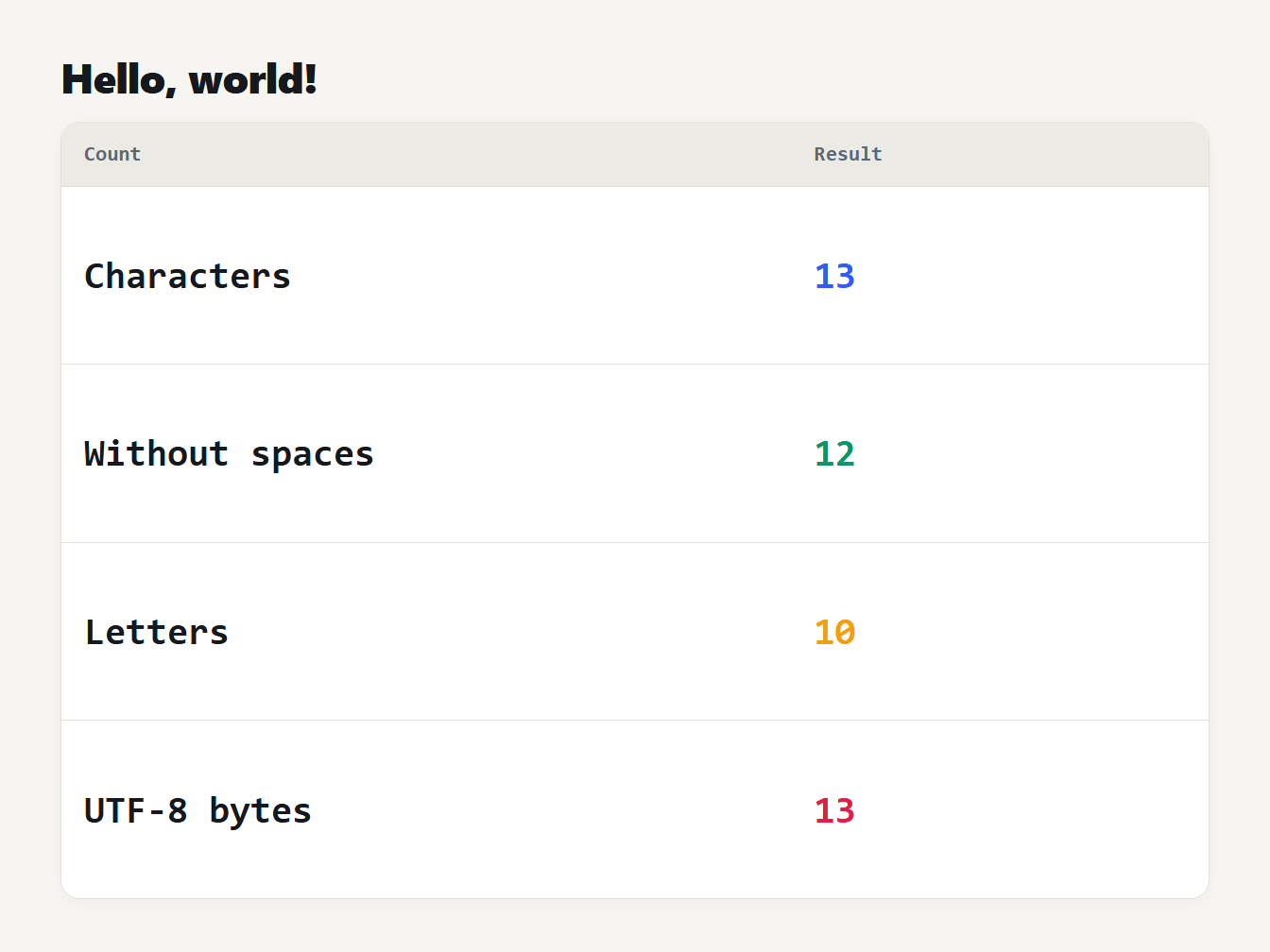
A table of the counts for the text Hello, world! Characters, 13. Without spaces, 12. Letters, 10. UTF-8 bytes, 13.
Frequently asked questions
Does a character counter count spaces?
The main figure counts every character, including spaces, tabs and line breaks. A second figure leaves out all spaces, tabs, line breaks, no-break spaces and zero-width spaces. Which one you need depends on the limit you are checking.
How many characters is an emoji?
One to a reader. To a computer it varies: a grinning face is 1 code point and 2 UTF-16 units, while a family emoji is 5 code points and 8 units. Platforms count in different ways, so check the rule for the one you post on.
Why does my form say my text is too long when it looks short?
Many form fields measure length in UTF-16 units, as JavaScript does, so an emoji uses 2 or more of the allowed characters. A field with a limit of 4 took two emoji in our test, not four.
What is the difference between characters and bytes?
A character is what you see. A byte is a unit of storage. In UTF-8, an English letter takes 1 byte, an accented letter 2, a Chinese character 3 and an emoji 4 or more, so a text can be much larger in bytes than in characters.
Is my text uploaded when I count it?
No. The counting happens in your browser, and the text never leaves your device. The tool needs no account and keeps nothing after you close the page, so it is safe for drafts, contracts and other private text.
Count your text now
Paste your text into the Character Counter, and read the figure that matches your limit. Everything runs in your browser, so your text is never uploaded.