How to Count Word Frequency in Text: Top Words, Common Words and Percentages
Learn how to count word frequency in any text: what counts as a word, how to hide common words, how percentages work, and how it holds up in Chinese or Thai.
By TheTextKit TeamPublished
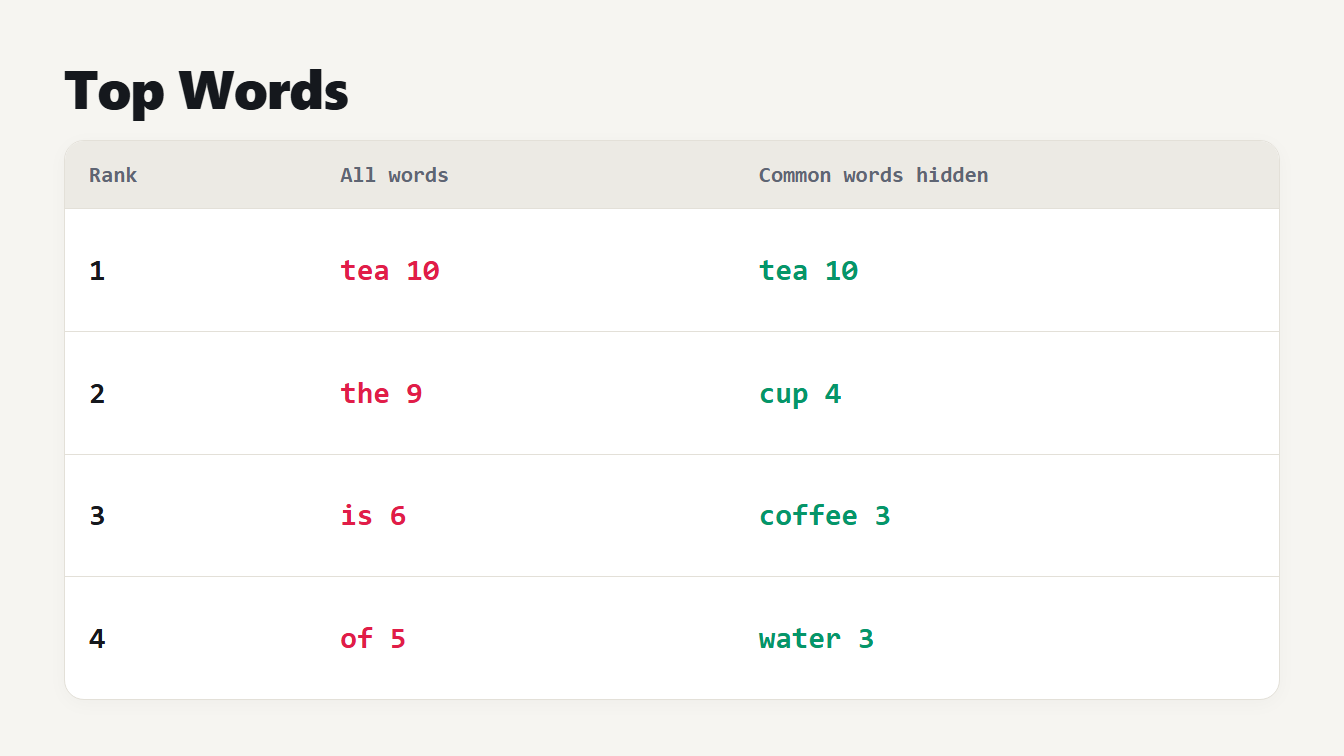
A table of the four most frequent words in a sample text. With all words: tea 10, the 9, is 6, of 5. With common words hidden: tea 10, cup 4, coffee 3, water 3.
To count word frequency, split a text into words, lowercase them, count each different word, and sort the counts from highest to lowest. A word frequency counter does it in one step, and it also gives each word's share of the text. Done well, the list shows which words you lean on, which topic words carry a page, and where a draft repeats itself. The details decide whether the list is useful: what counts as a word, whether the crowds out everything else, and what the percentage is a percentage of. This guide covers each, with a worked example and a test of our own tool against Python.
How to count word frequency
- Open the Word Frequency Counter and paste your text.
- Read the list from the top. Each row has the word, how many times it appears, and its share of the text.
- Tick Ignore common words to hide words such as
the,andandof. - Choose how many rows to show: 10, 20, 50 or 100.
- Look for words that are repeated more than you meant, and for topic words that are missing from the top.
For a count of all words, rather than each word's frequency, use the Word Counter. Our guide to counting words explains what counts as a word in English, Chinese and other languages.
What counts as a word when you count word frequency
Any counter has to decide where one word ends. Our tool uses a simple, fixed set of rules:
| Text | How it is counted |
|---|---|
Don't and don’t | One word, don't, with a curly apostrophe treated as a straight one |
well-known | One word, because a hyphen inside a word joins it |
1,000 and 3.14 | One word each, because the comma or point sits between digits |
THE, The and the | The same word, the |
a or I | Left out, because single-character words are not counted |
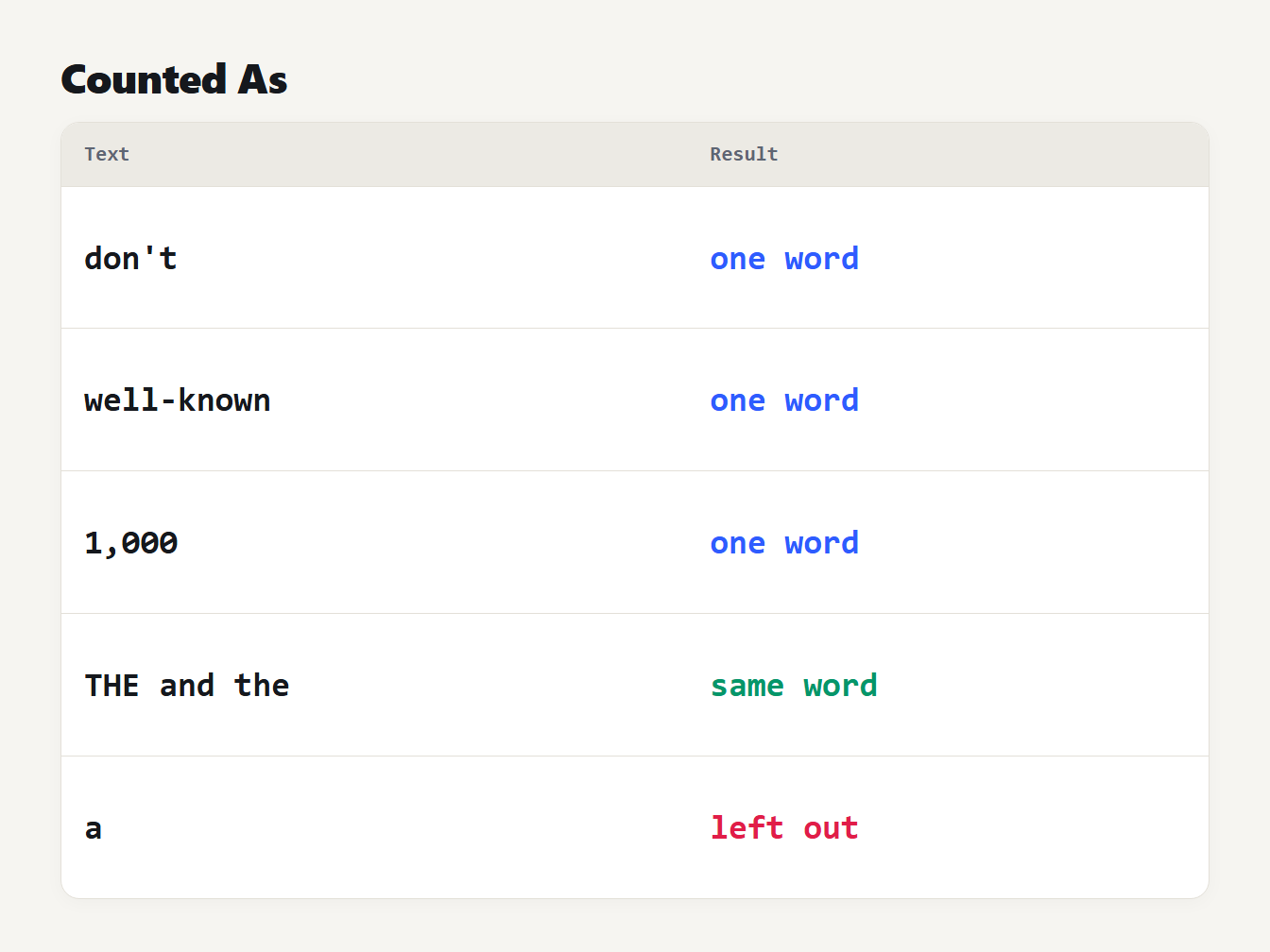
A table of five pieces of text and how a frequency count treats them. Don't is one word. Well-known is one word. 1,000 is one word. THE and the are the same word. A single letter is left out.
Punctuation and underscores split words, so snake_case counts as snake and case. A word is any run of letters, accent marks and digits from any alphabet, and an accent written as a separate mark is joined to its letter, so café typed two ways is one word.
Why the is always at the top
Run any English text through a counter and the top rows are the same: the, of, and, to. Those are common words, sometimes called stop words, and they say little about a text's topic. Here is a 115-word paragraph about tea that we ran through the tool with and without them:
| Rank | All words | Common words hidden |
|---|---|---|
| 1 | tea (10) | tea (10) |
| 2 | the (9) | cup (4) |
| 3 | is (6) | coffee (3) |
| 4 | of (5) | water (3) |
With all words on, four of the top eight are common words. The tool's list holds 115 of them, such as the, and, of, to, is and it. Two groups account for the top eight in the tea text. The common words the, is, of and and were used 24 times, which is 21.8 percent of the counted words. The topic words tea, cup, coffee and water were used 20 times, or 18.2 percent. Hiding the first group puts cup, coffee and water where you can see them.
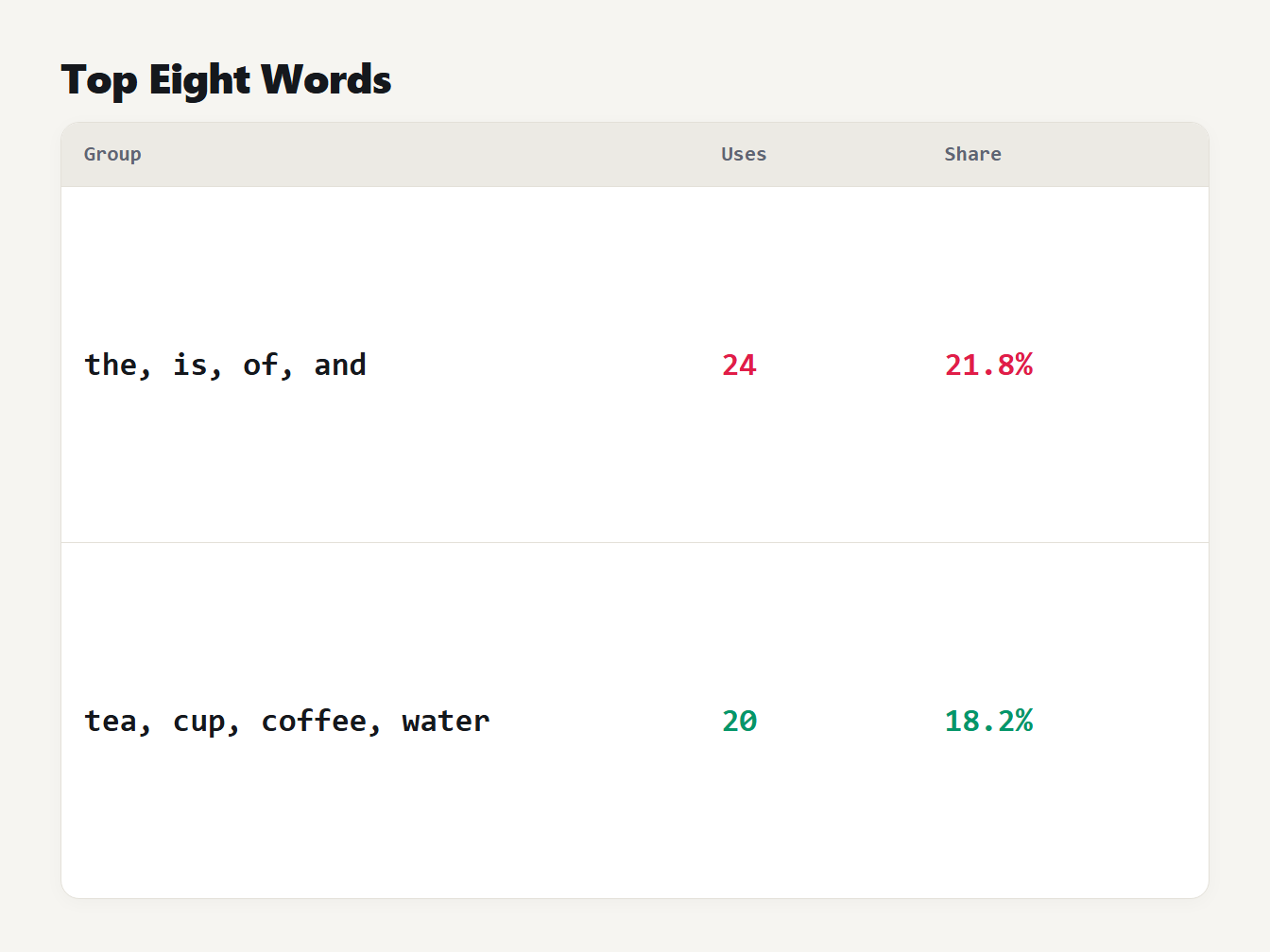
A table of the top eight words of a sample tea text in two groups. Common words the, is, of and and were used 24 times, 21.8 percent. Topic words tea, cup, coffee and water were used 20 times, 18.2 percent.
Whether to hide them depends on the job. To study style, keep them: the balance of function words is part of how someone writes. To find a topic or check keywords, hide them. Tools differ here, because every one ships its own list, so the same text can give a slightly different top ten elsewhere.
What the percentage means
The percentage is the word's count divided by the number of all counted words. In the tea text there are 115 words. Five of them are the single letter a, which is not counted, which leaves 110. The word tea appears 10 times, so its share is 10 divided by 110, or 9.1 percent.
| Step | Value |
|---|---|
| Words in the text | 115 |
| Single letters left out | 5 |
| Words counted | 110 |
tea, 10 uses | 9.1 percent |
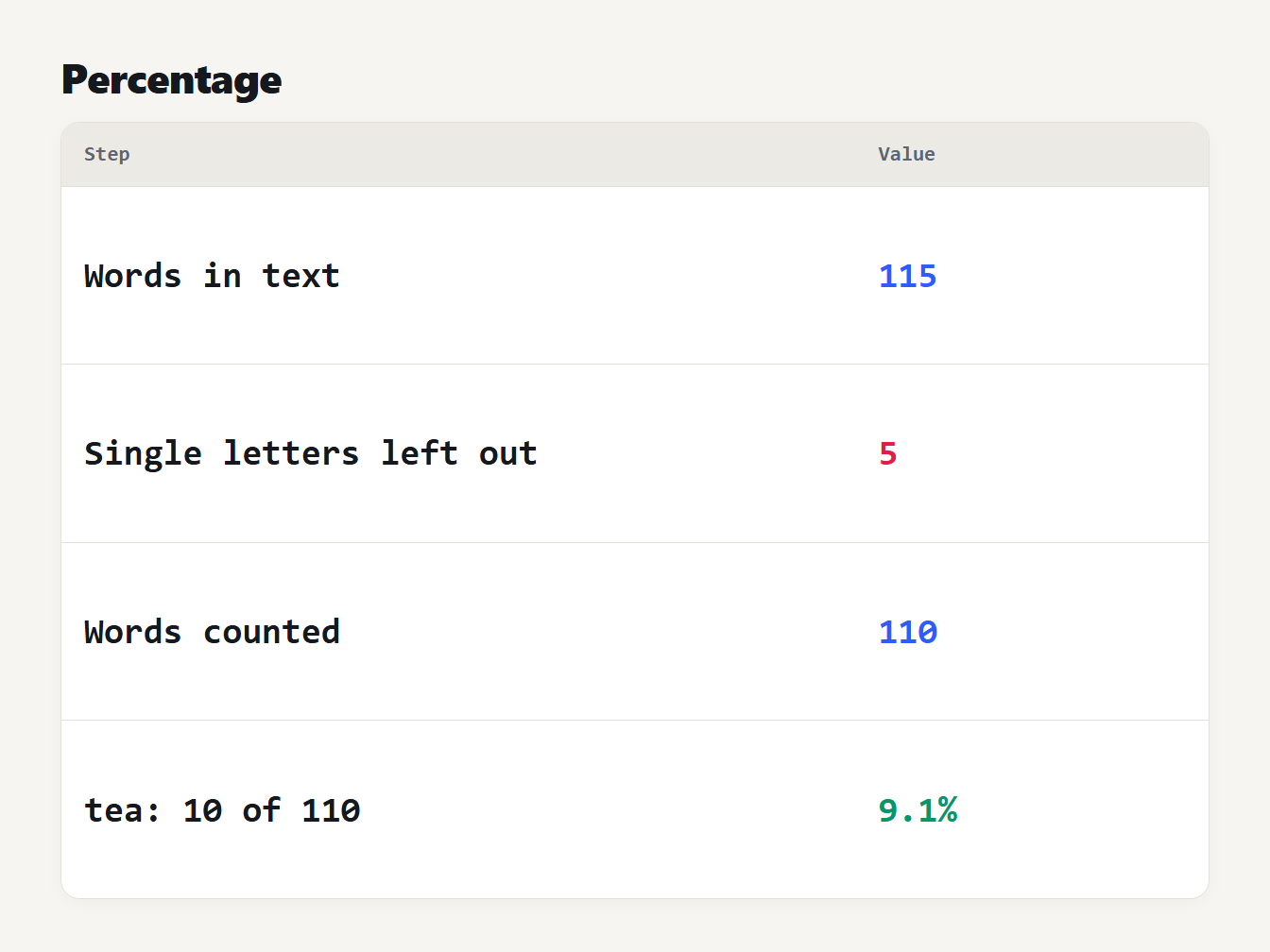
A table of four steps. A sample text has 115 words. Five single letters are left out. That leaves 110 counted words. The word tea, used 10 times, is 9.1 percent of them.
The percentages stay the same when common words are hidden. A word that is 3.6 percent of the text is still 3.6 percent, so you can compare lists with and without them. Our earlier version rounded to a whole number, which showed 9 percent for tea and 0 percent for any word under half a percent, hiding most of the list's detail. One decimal shows the difference between a word at 0.9 and one at 0.5.
A high share is not a goal. If you came here to check keywords, our guide to keyword density explains why there is no ideal percentage, and the Keyword Density Checker applies the same arithmetic to one phrase.
Count word frequency yourself in Python
To see exactly what a counter does, the same job takes four lines. This code uses the Counter class from the Python documentation:
import re
from collections import Counter

words = re.findall(r"[a-z0-9]+(?:'[a-z]+)*", text.lower())
print(Counter(words).most_common(10))
Two things differ from our tool. Python's most_common orders words with equal counts by the order they first appear, and ours orders them alphabetically, so equal counts can be listed in a different order. And this pattern is English-only, so it drops café into caf. Add letters from other alphabets to the pattern if your text needs them.
Chinese, Japanese and Thai
Counting words by splitting at spaces fails for languages that do not use them. A whole Chinese sentence would be one long word. For those scripts the tool uses Intl.Segmenter, the browser's own word splitter, which MDN lists as available across current browsers since April 2024. We tried the Chinese sentence 今天天气很好,今天我们去公园。 ("The weather is good today, and today we go to the park"). It came out as 今天 twice, then 天气, 很好, 我们 and 公园 once each.
The one-character word 去 ("go") is missing, because words of a single character are left out in every script. That is a real limit for Japanese and Chinese, where many common words are one character: 猫 ("cat") would not be counted even if it appeared ten times.
How we tested it
We wanted a check that did not depend on our own code, so we compared the tool with Python. A script made 4,000 random texts of up to 40 pieces each, joined with different separators. The pieces included words in English, French, Russian, Greek, Arabic and Hindi, and capital letters. They also had accents written two ways, curly and straight apostrophes, hyphenated words, numbers such as 1,000 and 3.14, symbols, emoji and a no-break space. Python's regex module counted the words, and Python worked out the percentages. We compared every word, count and percentage, with common words shown and hidden.
| Check | Result |
|---|---|
| Texts compared | 4,000 |
| Same counts and percentages | 4,000 of 4,000 |
| Different | 0 |
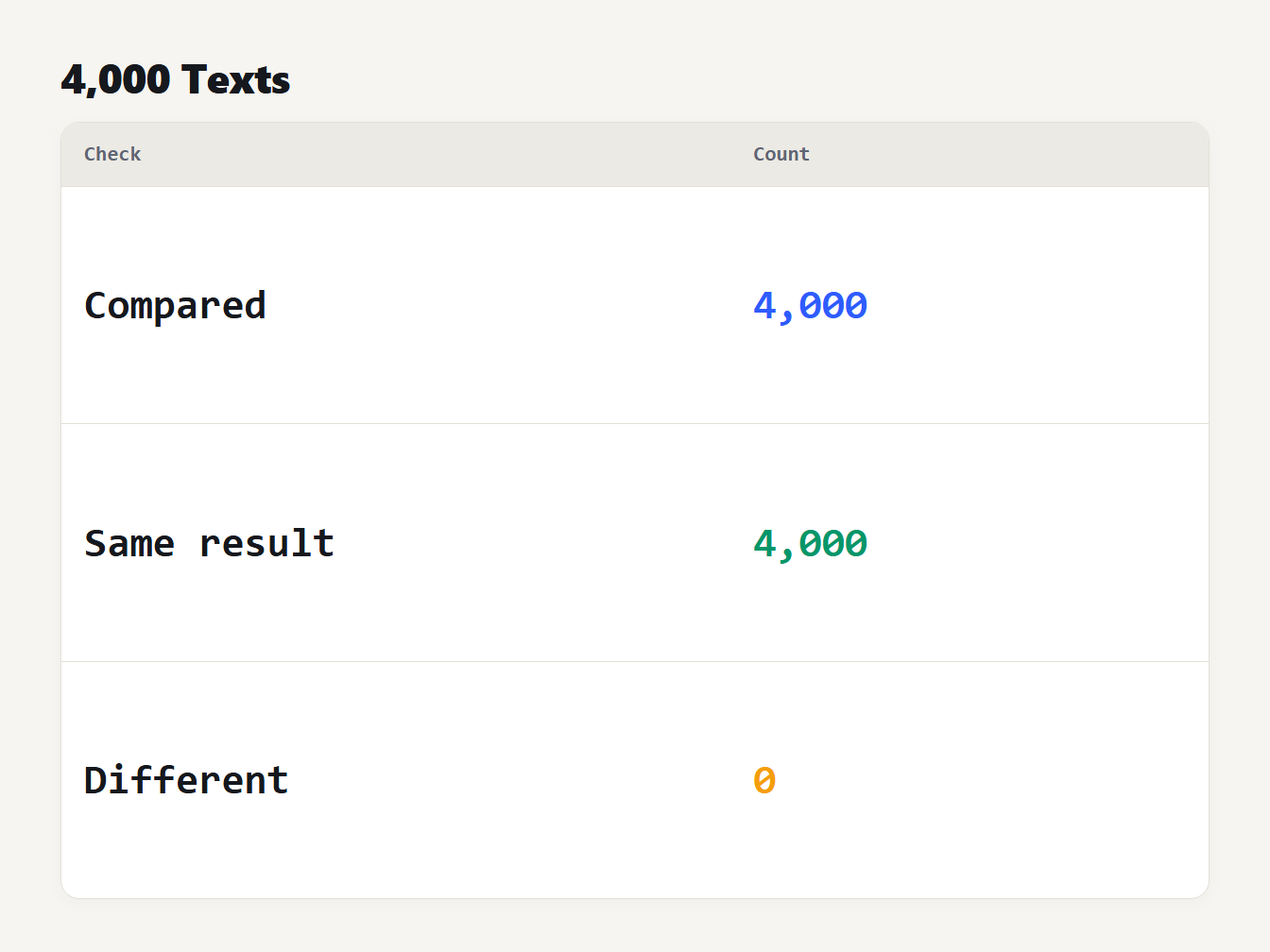
A table of results for 4,000 random texts counted by the tool and by Python. All 4,000 gave the same words, counts and percentages. None differed.
The test has a limit. Both sides used the same definition of a word, so it shows that our tool follows its rules exactly, not that the rules suit every text. It was a useful check for the details. Holding the old version to these rules showed that it split 1,000 and counted 000 as a word, and that it kept each Chinese clause as one long word. Both are fixed.
Frequently asked questions
How do I count word frequency in a text?
Paste the text into a word frequency counter. It lowercases the words, counts each one and lists them from most to least frequent, with a count and a percentage. Hide common words such as the and of if you want the topic words to come first.
What are common words, or stop words?
They are very frequent function words, such as the, and, of, to and is, that tell you little about a text's subject. Tools leave them out of a list so that topic words show. Every tool uses its own list, so the same text can give slightly different results.
How is the percentage calculated?
It is the word's count divided by the number of all counted words, shown with one decimal. If a text has 110 counted words and tea appears 10 times, tea is 9.1 percent. Hiding common words does not change the percentages.
Why are one-letter words left out?
Words such as a and I are among the most frequent in English and say little about a text, so single-character words are not counted. This also removes stray digits and symbols from the list. They are left out of the percentages too.
Is my text uploaded?
No. The counting runs in your browser, and the text is not sent anywhere or stored. The tool needs no account and keeps nothing after you close the page, so it is safe for drafts, essays and private notes.
Count your words now
Paste your text into the Word Frequency Counter, tick the box to hide common words if you want the topic words, and read the list from the top. Everything runs in your browser, so your text is never uploaded.