How to Extract Numbers From Text, Including 1,234.56 and 1.234,56
Learn how to extract numbers from text without splitting 1,234.56, losing 10km or adding up dates. Reads US, European, Indian and Swiss number formats.
By TheTextKit TeamPublished
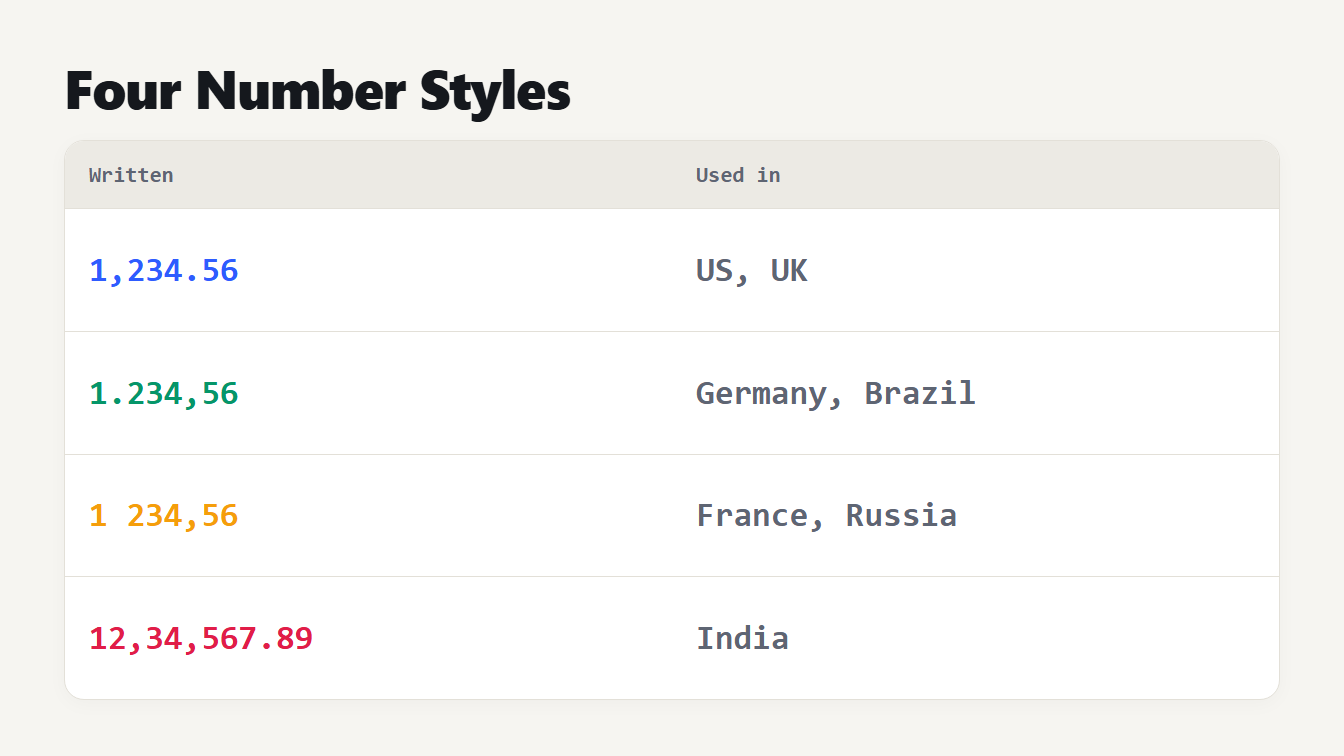
A table with two columns shows four ways of writing a number and the countries that use each. 1,234.56 is used in the US and UK. 1.234,56 is used in Germany and Brazil. 1 234,56 is used in France and Russia. 12,34,567.89 is used in India.
To extract numbers from text, scan for runs of digits, keep the sign only when it is a sign, and join digit groups that belong together. The last part is the one that goes wrong. The common pattern -?\d+(\.\d+)? reads 1,234,567.89 as three numbers, because it doesn't know that a comma can be a thousands separator. Worse, a comma means something different in Germany than in the US. This guide shows how to get a clean list from any text, how numbers are written around the world, and where a number extractor can still be fooled.
How to extract numbers from text
- Open the Extract Numbers tool and paste your text.
- Choose How numbers are written. Leave it on
1,234.56for US and UK text, and pick1.234,56for German, Italian, Spanish or Brazilian text. - Tick Skip dates and times if the text has dates such as
2026-10-09, whose parts you don't want in the list. - Read the count, sum, average, smallest and largest, then choose Copy All.
- Tick List numbers as written if you want
1,234instead of1234in the list.
If the numbers are phone numbers rather than quantities, use the Extract Phone Numbers tool instead, and read how to extract phone numbers from text.
Why a simple pattern fails
Our old tool used one regular expression, and the popular -?\d+(\.\d+)? pattern is close to it. Here is what each one gives for text that looks ordinary:
| Text | Old tool | Simple pattern | New tool |
|---|---|---|---|
$1,234,567.89 | 1, 234, 567.89 | 1, 234, 567.89 | 1234567.89 |
1.234,56 (German style) | 1.234, 56 | 1.234, 56 | 1234.56 |
10km and 5kg | nothing | 10, 5 | 10, 5 |
007 | 7 | 007 | 007 |
1.2.3 (a version) | 1.2 | 1.2, 3 | nothing |
5-3 | 5, 3 | 5, -3 | 5, 3 |
12345678901234567890 | 12345678901234567000 | 12345678901234567890 | 12345678901234567890 |
The old tool also dropped any number followed by a letter, so 10km, 8h and 3rd vanished. And it returned numbers as JavaScript values, which is why 007 became 7 and the long ID lost its last digits. The new tool returns each number as written and, when you ask, with the separators removed.
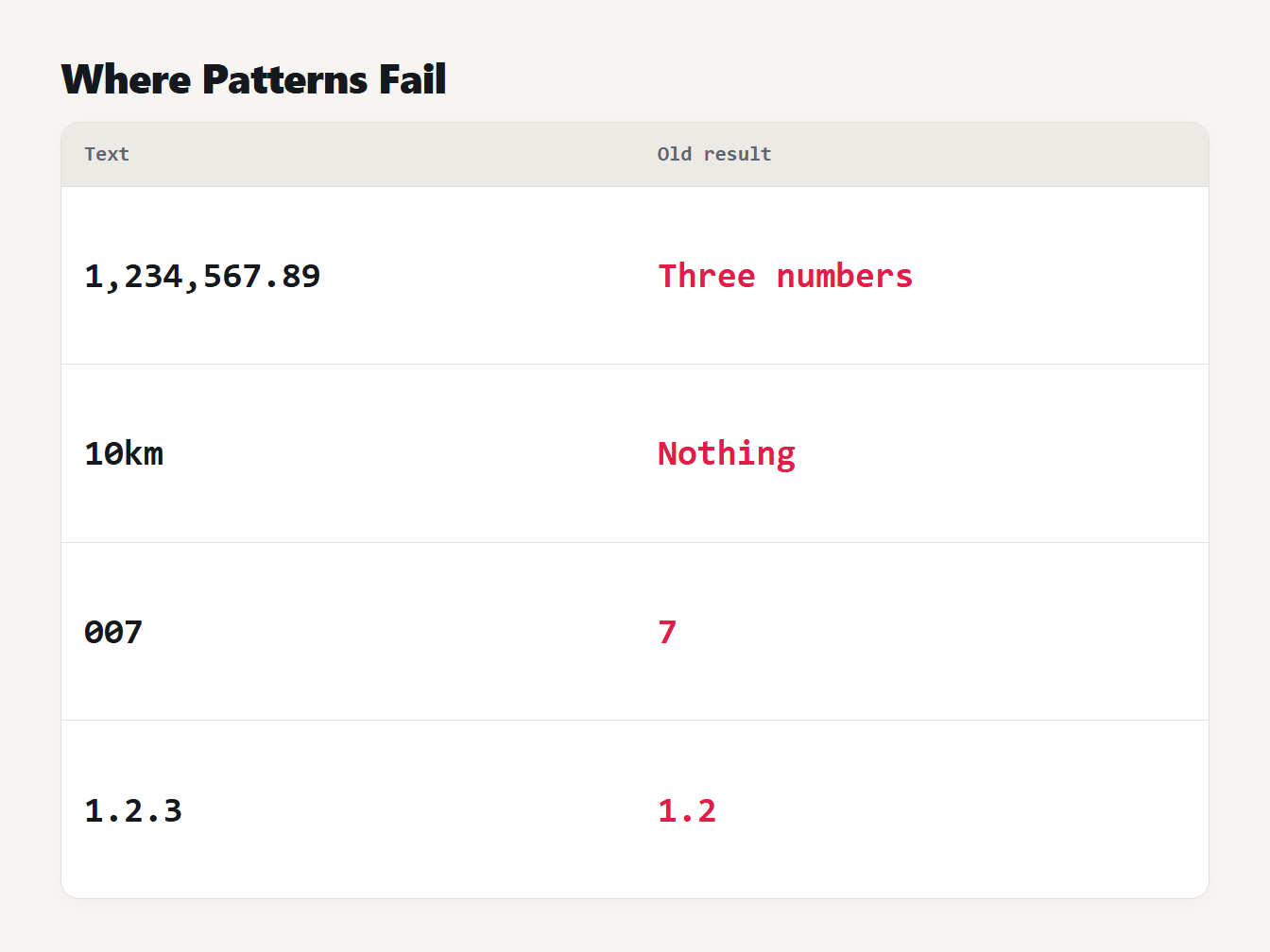
A table of four pieces of text and what the old extractor did with each. 1,234,567.89 was split into three numbers. 10km gave nothing. 007 became 7. 1.2.3 became 1.2.
How numbers are written around the world
There is no single way, and the standards bodies know it. The SI Brochure, published by the International Bureau of Weights and Measures, says in section 5.4.4 that the decimal marker "shall be either the point on the line or the comma on the line". It should be the one customary in the language. The brochure also says digits may be grouped in threes by a space, and that dots and commas are never inserted between groups. Its example is 43 279.168 29, with groups after the decimal mark too.
Real text rarely follows that advice. MDN's page on Intl.NumberFormat shows the same number, 123456.789, written 123.456,789 in German, 1,23,456.789 in the English of India, and with Arabic digits and an Arabic decimal mark in Egypt. We group the cases into five styles:
| Style | Example | Used in |
|---|---|---|
| Comma groups, dot decimal | 1,234.56 | US, UK, Japan, China, Mexico |
| Dot groups, comma decimal | 1.234,56 | Germany, Italy, Spain, Brazil, Turkey |
| Space groups | 1 234,56 | France, Russia, Poland, Sweden, Czechia |
| Groups of two | 12,34,567.89 | India, Nepal, Bangladesh |
| Apostrophe groups | 1'234.56 | Switzerland |
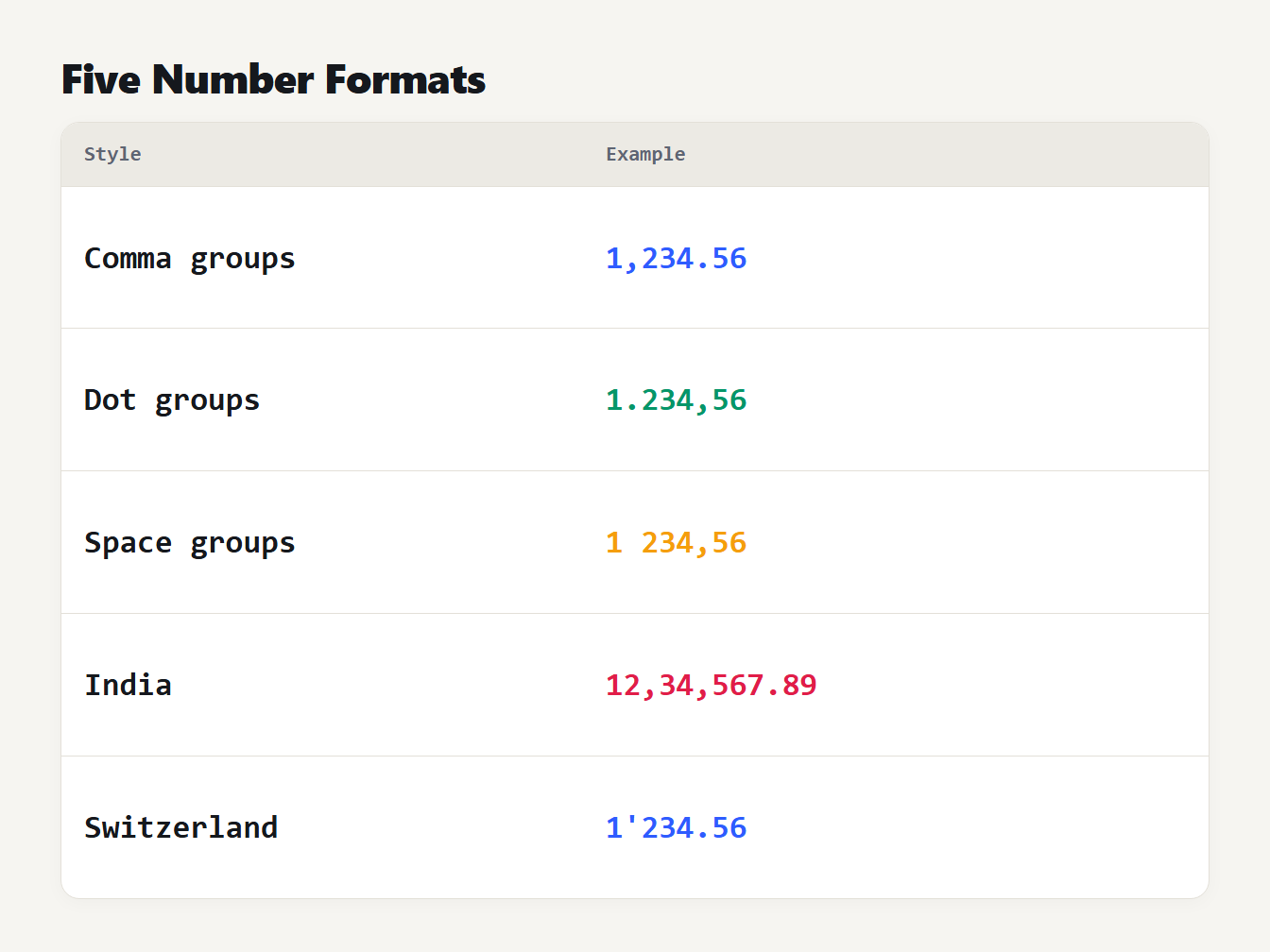
A table of five styles of writing numbers with an example of each. Comma groups with a dot decimal, 1,234.56. Dot groups with a comma decimal, 1.234,56. Space groups, 1 234,56. Groups of two for India, 12,34,567.89. Apostrophe groups for Switzerland, 1'234.56.
The space in the third style isn't always a plain space. It can be a no-break space, a narrow no-break space or a thin space, and the tool accepts all of them. Only the format you choose decides how a comma is read, because 1,234 is one number in the first style and two in a list of numbers.
Signs, units and codes
Four rules decide the rest:
- A sign must be a sign. A minus or plus counts only when it doesn't follow a word, a digit or a closing bracket. In
a -5and(-5)it is negative. In5-3andx-5the dash is just a dash, so you get 5 and 3, not 5 and -3. Right-to-left languages put an invisible direction mark between the sign and the digits, and the tool skips it. - Units don't hide numbers.
10km,50%and3rdgive 10, 50 and 3. - Codes aren't quantities. A number right after a letter, as in
A4,H2O,mp3oritem_5, is part of a name and is skipped. - Versions aren't numbers.
1.2.3and192.168.1.1are skipped whole.
Dates and times are a judgment call. The date 2026-10-09 gives 2026, 10 and 09 unless you tick Skip dates and times. For help turning a timestamp into a date, see our guide to converting a Unix timestamp.
Adding the numbers up
The sum is where small errors hide. In JavaScript, 0.1 + 0.2 + 0.3 is 0.6000000000000001. MDN's reference for Number explains why: a number keeps about 15 to 17 significant decimal digits, and integers are exact only up to 9007199254740991. The tool adds the digits as decimals, so 0.1 0.2 0.3 sums to exactly 0.6.
It marks the sum approximate only when a number has more than 15 digits or an exponent such as 1.5e3. The list still shows every digit as written, so an account number of 20 digits comes out whole, where a plain JavaScript number would round it. Leading zeros stay too: 00510 isn't turned into 510, which matters for zip codes and part numbers. Our guide to converting CSV to JSON explains the same trap in spreadsheets.
If you're working with percentages, the Percentage Calculator and the guide to percentage increase take it from there.
How we tested it
We wrote two tests.
The first is ours: 18 numbers in the comma style, including 1,234.56, .5, -1,234.5, 007, 1e3, a 20-digit ID, Arabic digits and fullwidth digits, and 6 in the dot style, such as 1.234,56. Each is placed in 20 sentences (after a dollar sign, before km, in brackets, at the end of a line). That is 360 cases for the first group and 120 for the second, and a case passes only when exactly the right value comes out. The old tool passed 144 of the 360 and none of the 120. The simple pattern passed 160 and none.
The new tool passed all 480. We wrote those cases ourselves, alongside the fix, so they show that these situations work, not that every text will.
The second test isn't ours. Intl.NumberFormat is the browser's own number writer. We asked Node.js 24 to write 16 values (0, 7, 1234, 12345678.9, -1234.56, 1234567890 and others) in every locale it knows among the language codes and regional variants we tried. That is 176 locales and 2,816 numbers, from Arabic to Zulu. The tool read every one back as a single number with the right value, using the style that fits each locale.
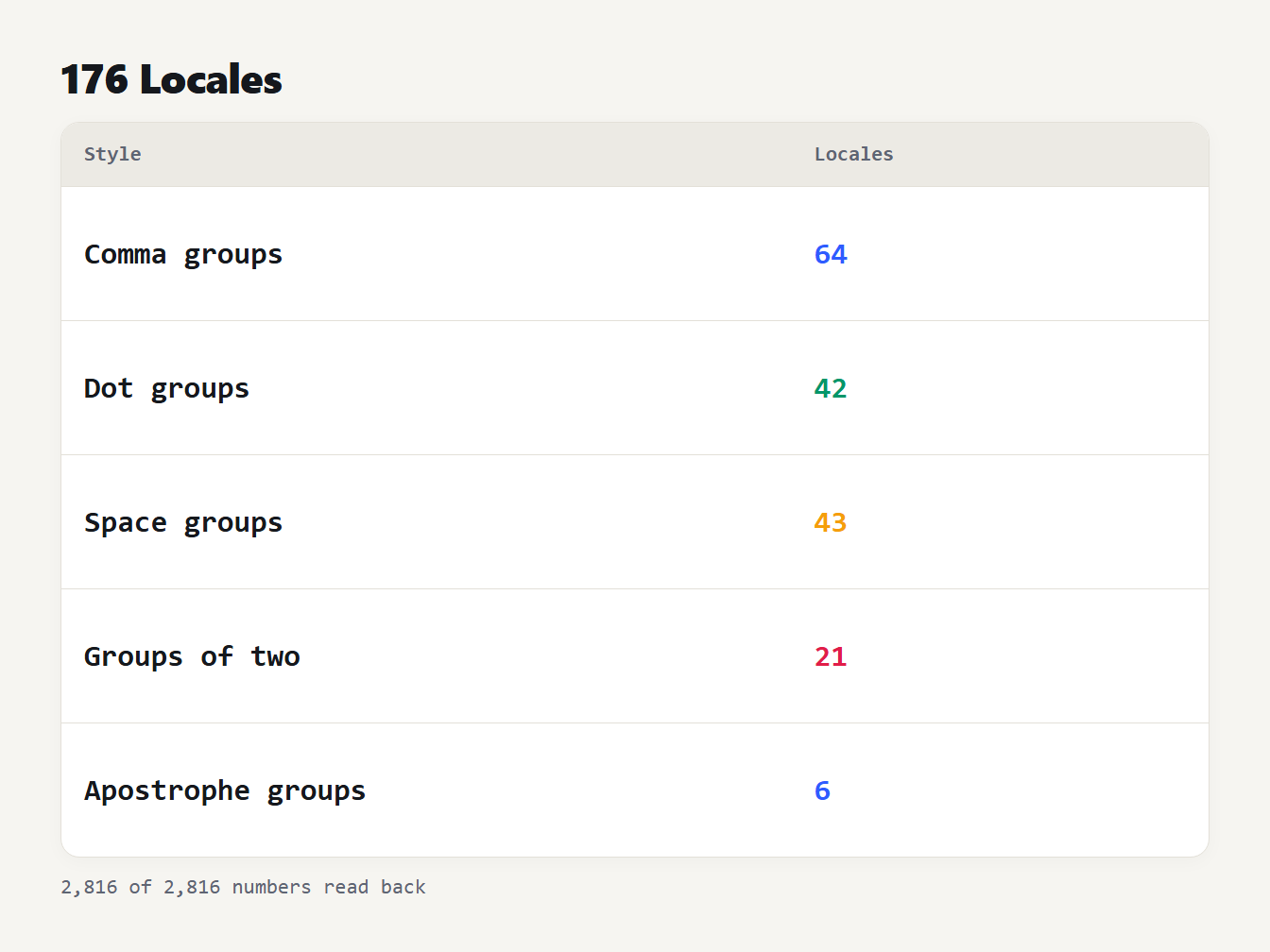
A table of the five number styles and how many locales use each in the test. Comma groups, 64 locales. Dot groups, 42. Space groups, 43. Groups of two, 21. Apostrophe groups, 6. In all, 2,816 of 2,816 numbers were read back correctly.
Two limits apply. The locale test used the style that fits each locale, which is what you do when you choose the format in the tool. And it can't say how your own text is written: a list such as 100,200,300 is read as one number in the comma style, so choose No grouping for lists.
What an extractor can't know
Two things stay ambiguous in any tool. A number such as 1.234 is one point two three four in the US and one thousand two hundred thirty-four in Germany. And a column of figures with no separators, like 100200300, can't be split into three. The format you pick settles the first, and your own text settles the second.
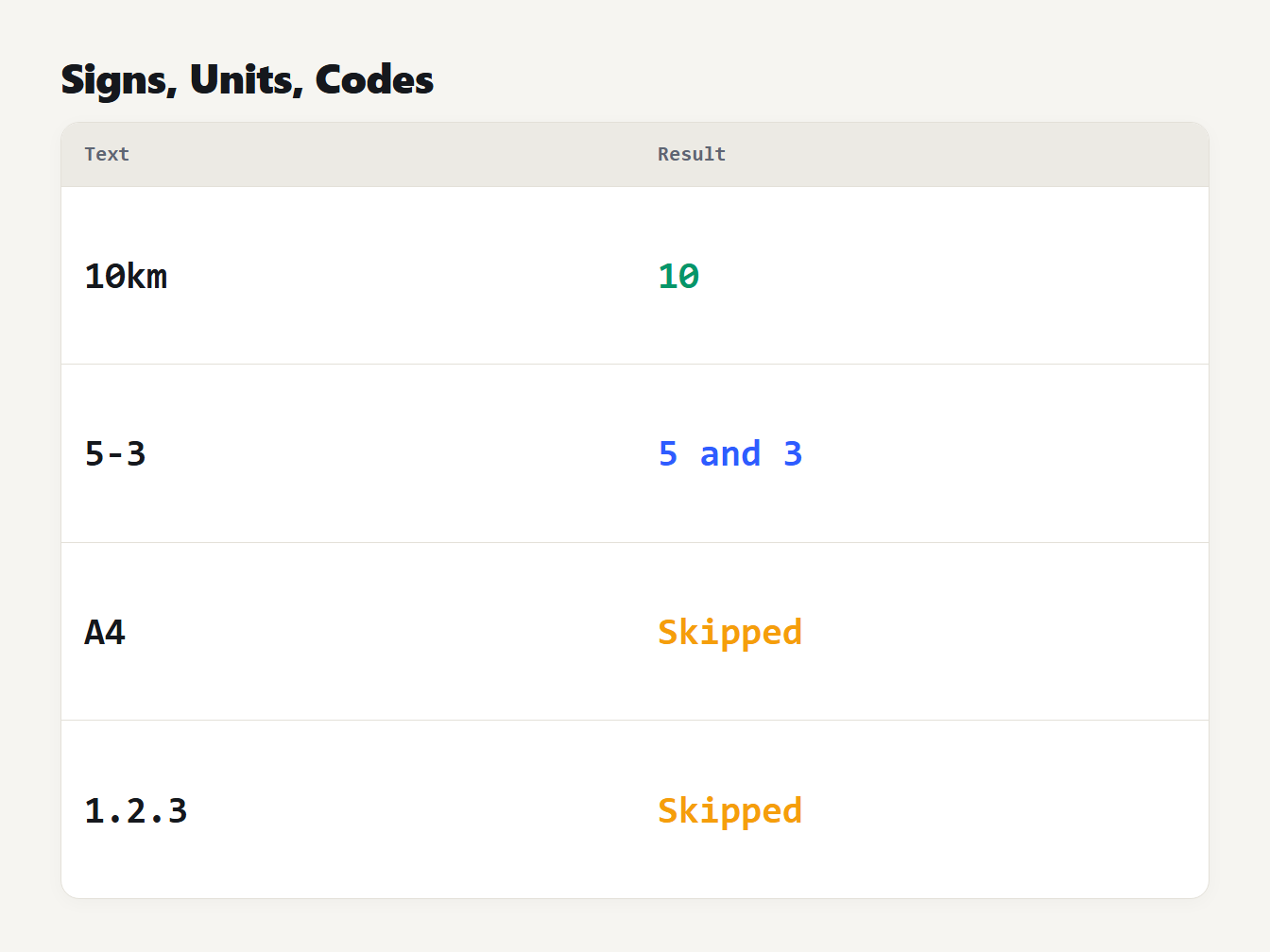
A table of four pieces of text and what the extractor returns. 10km gives 10. 5-3 gives 5 and 3, with no minus sign. A4 is skipped as a code. 1.2.3 is skipped as a version.
Frequently asked questions
What is the easiest way to extract numbers from text?
Paste the text into a number extractor, choose how your numbers are written, and copy the list. In code, the pattern -?\d+(\.\d+)? finds plain numbers, but it splits 1,234 into two and treats the dash in 5-3 as a minus sign.
Why does 1,234 come out as 1 and 234 in some tools?
Because the tool doesn't know the comma is a thousands separator. In the US it is, and 1,234 means one thousand two hundred thirty-four. In Germany and France the comma is the decimal mark. Pick the format your text uses.
Can I add up the numbers I extract?
Yes. The tool shows the sum, the average, the smallest and the largest. The sum is exact decimal arithmetic, so 0.1 plus 0.2 plus 0.3 is 0.6. It is marked approximate only when a number has more than 15 digits or an exponent.
Does it find numbers inside words like abc123 or H2O?
No. A number that comes right after a letter is treated as part of a code or a word and skipped. A number followed by letters, such as 10km or 3rd, is found.
Are my numbers sent to a server?
No. The numbers are found and added up in your browser, and the text is not uploaded. The tool needs no account and keeps nothing after you close the page, so it is safe for invoices, logs and other text you would not want to share.
Extract your numbers now
Paste your text into the Extract Numbers tool, pick the way your numbers are written, and copy the list. Everything runs in your browser.