How to Extract URLs From Text Without the Extra Punctuation
Learn how to extract URLs from text and keep full stops, brackets and quotes out of the result. Tested on 588 cases, with a free extractor and a short regex.
By TheTextKit TeamPublished
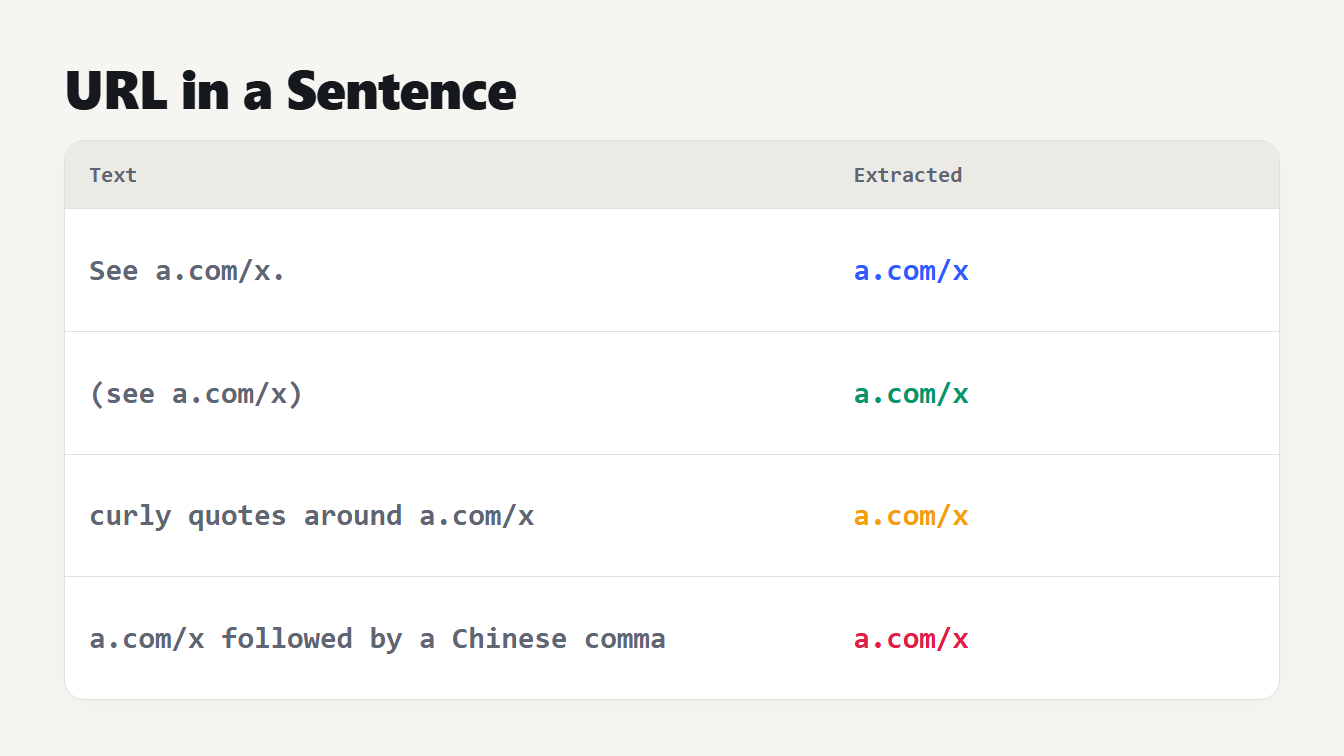
A table with two columns shows four pieces of text and the address taken from each. A full stop, brackets, curly quotes and a Chinese comma around the address are all left out of the result.
To extract URLs from text, find every address that starts with http:// or https://, read on until a space, a quote or an angle bracket, and then cut the sentence punctuation off the end. The first two steps are easy. The third is where most extractors go wrong, because a full stop, a bracket or a curly quote right after a link isn't part of it, yet a bracket inside a Wikipedia address is. This guide shows how to get a clean list, how the rules work, and how our own extractor did on 588 test cases before and after we fixed it.
How to extract URLs from text
- Open the Extract URLs tool and paste your text. An article draft, an email thread, a log file and a page of HTML source all work.
- Read the count. It shows how many addresses were found and how many repeats were removed.
- Leave Also find addresses that start with www. ticked if your text has links written without
http://. - Choose Copy All to get one address per line.
- To check the addresses one at a time, paste a single one into the URL Parser, which splits it into scheme, host, path and query.
If you want the list sorted or de-duplicated further, the Remove Duplicate Lines tool does that, and our guide to removing duplicate lines explains the options.
Where a URL ends
RFC 3986, the standard for URL syntax, is why this is hard. It allows the full stop in an address, and it lists the comma, semicolon, exclamation mark, apostrophe, asterisk and both round brackets as characters that may appear in one. All of them can sit inside an address, and all of them also end sentences. Nothing in the text itself tells you which is which.
The RFC's advice for text is to mark a link clearly. Its appendix on delimiting a URI in context recommends angle brackets or double quotes, and says the wrapper isn't part of the address. People rarely do that, so an extractor has to guess from the characters around the end. Three groups cause nearly all the errors.
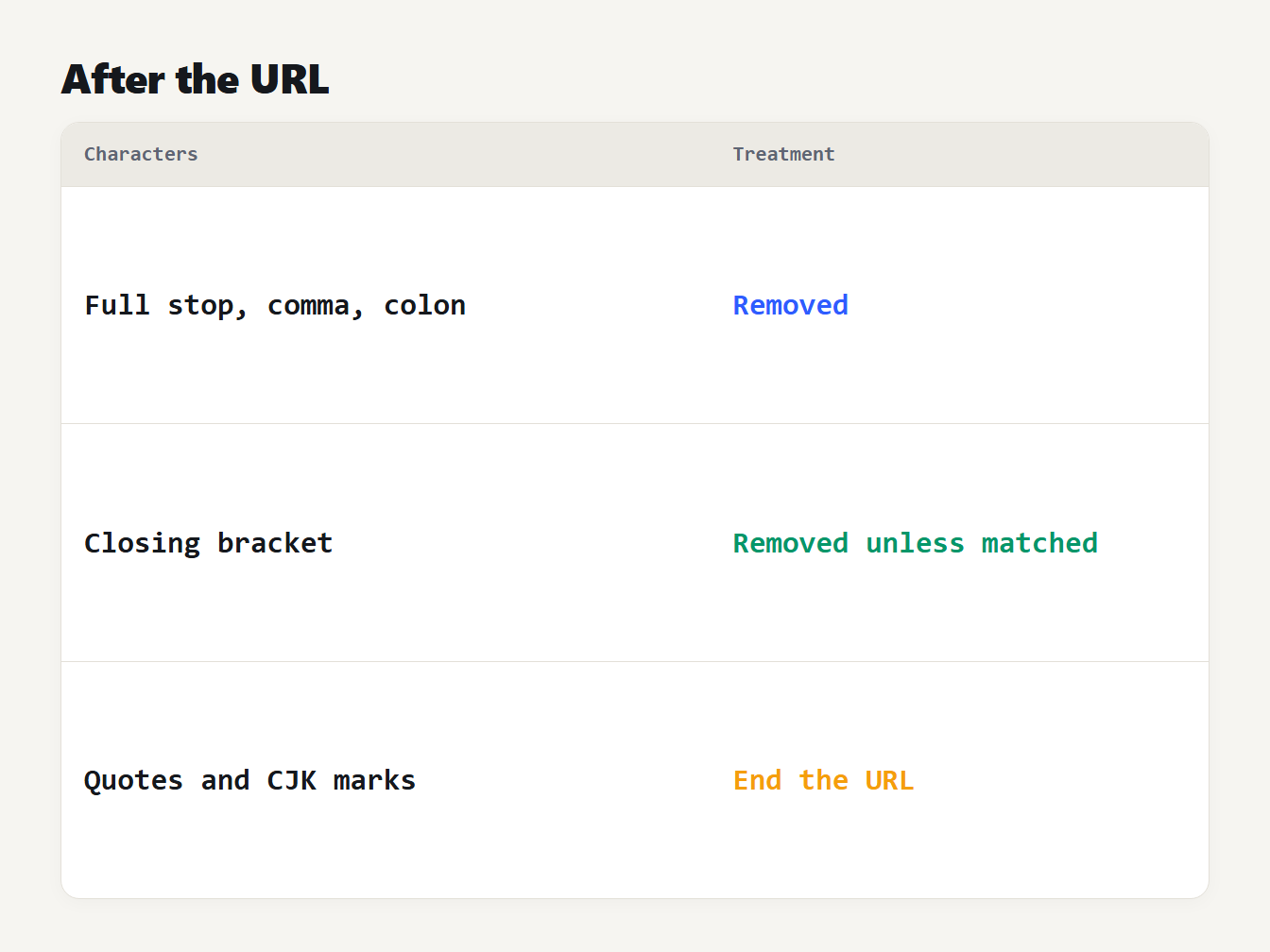
A table of three groups of characters that can follow a URL and how the extractor treats each. Sentence punctuation such as a full stop is removed. A closing bracket is removed unless the address has an opening one. Quotes, angle quotes and Chinese punctuation end the address.
Sentence punctuation. In See https://example.com/a. the full stop belongs to the sentence. An extractor that stops only at spaces returns https://example.com/a., which points to a different page. The same goes for a comma, a semicolon, a colon, an exclamation mark and a question mark.
Brackets. In (see https://example.com/page) the closing bracket belongs to the sentence. In https://en.wikipedia.org/wiki/Foo_(bar) it belongs to the address. The rule that works: keep a closing bracket only if the address has a matching opening one. The nested case, (see https://en.wikipedia.org/wiki/Foo_(bar)), comes out right, because the last bracket has nothing to match.
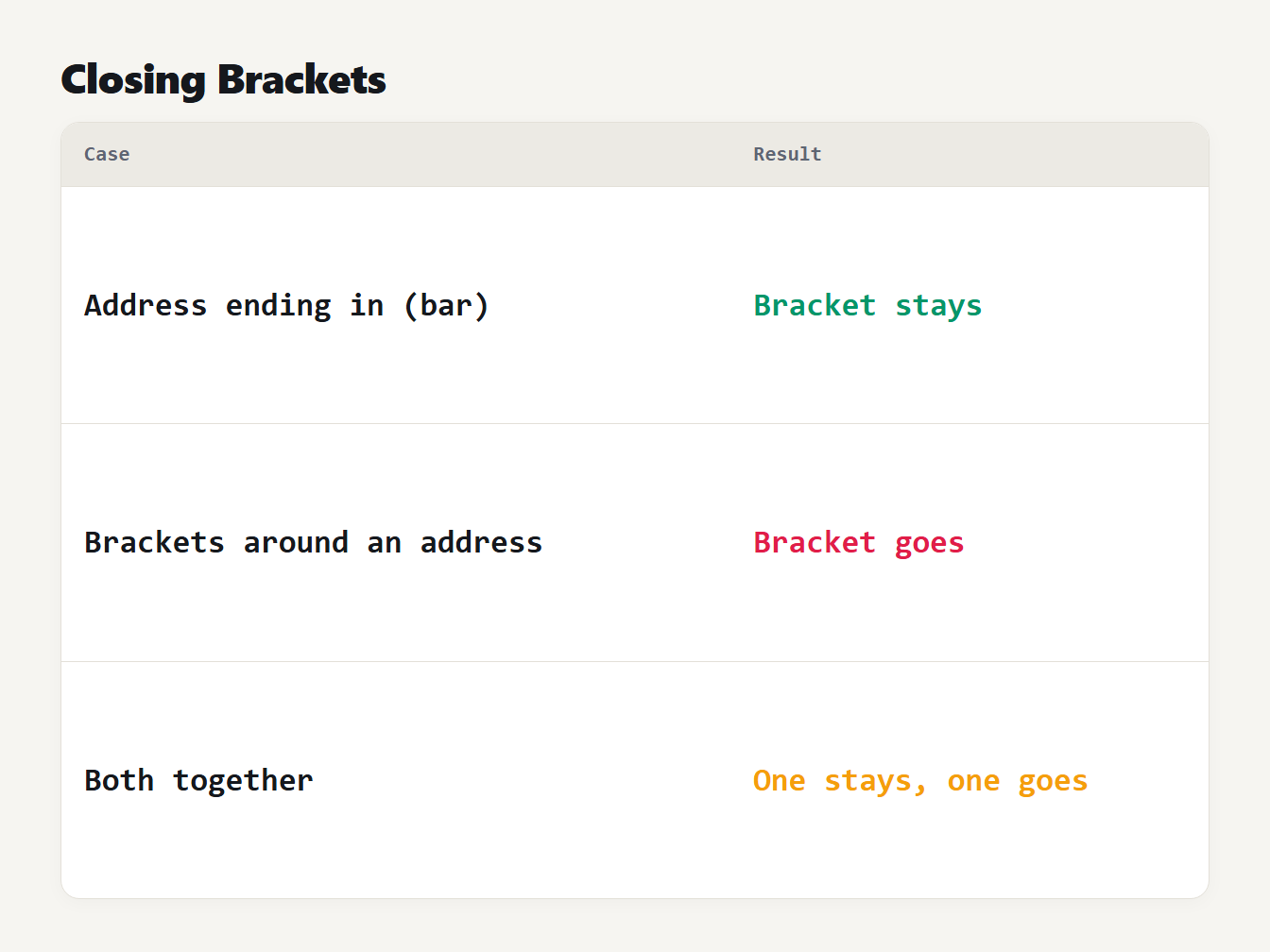
A table of three cases. An address ending in a bracketed word keeps its closing bracket. Brackets around an address are removed. With both together, one closing bracket stays and one goes.
Quotes and other scripts. A straight quote ends an address, and so does an angle bracket. Word processors and chat apps use curly quotes instead, and text from Chinese, Japanese or Korean writers puts a full stop, comma or bracket straight after a link with no space. Those characters can't appear in an unencoded URL, so they should end the match. We also drop a trailing Markdown asterisk, so **https://example.com/b** returns the address without the bold marks.
How we tested it
Our old extractor stopped only at spaces and a few ASCII characters. To measure it, we took 21 addresses and placed each in 28 surroundings. The addresses had ports, queries, fragments, brackets, accented and Chinese letters, a user name, an IPv6 host, an FTP link and two www. forms. The surroundings were sentence punctuation, every kind of bracket and quote, Chinese punctuation, Markdown, an HTML attribute, new lines and tabs. That makes 588 cases, and a case passes only when the result is the address alone.
| Extractor | Cases passed |
|---|---|
| Old Extract URLs | 323 of 588 |
| New Extract URLs | 588 of 588 |
| linkify-it, a widely used link finder | 452 of 588 |
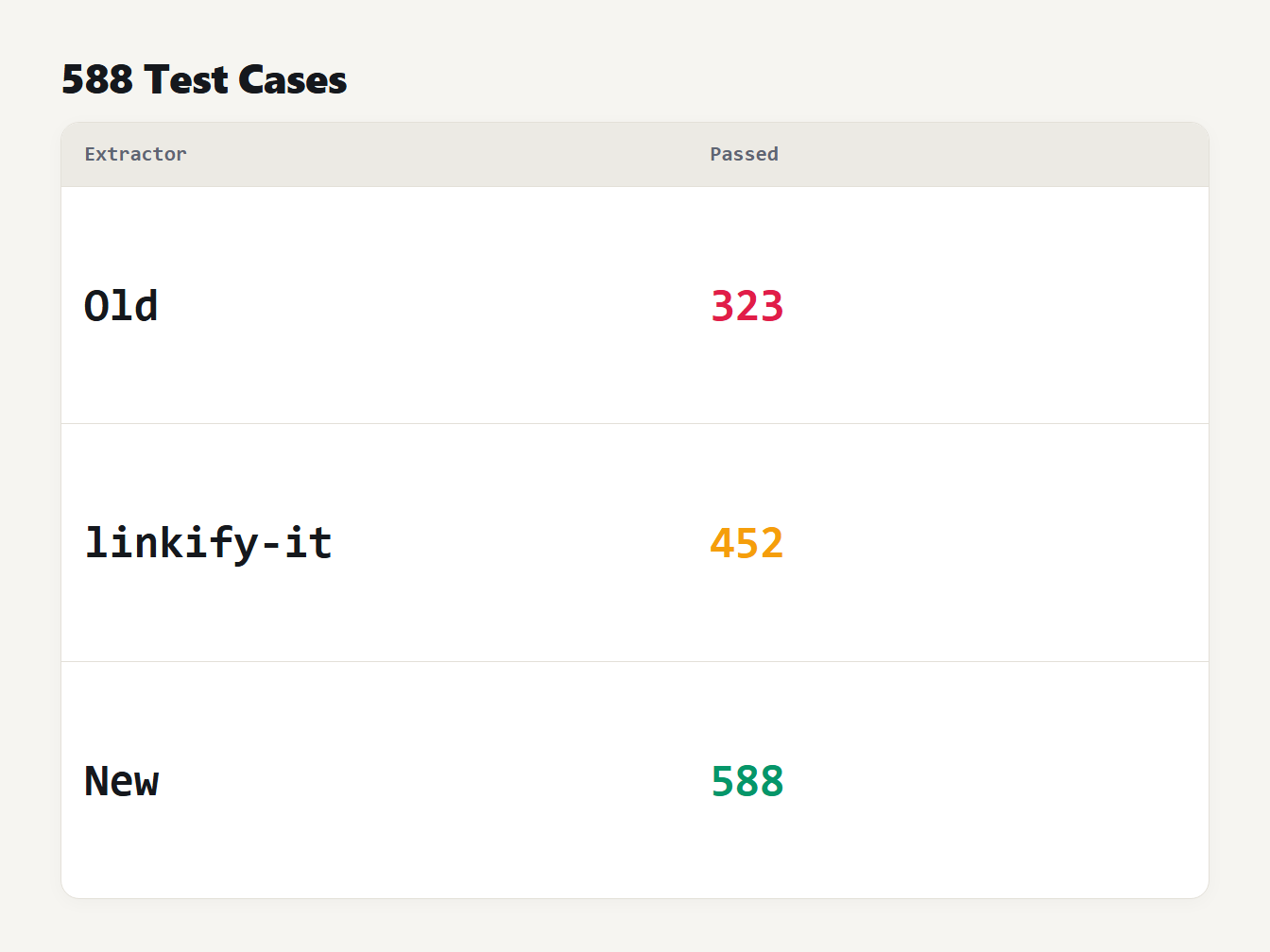
A table with three rows. The old extractor returned exactly the address in 323 of 588 cases. The linkify-it library returned it in 452. The new extractor returned it in 588.
The old extractor failed every curly quote, angle quote, ellipsis, Chinese punctuation, corner bracket, fullwidth bracket and Markdown case, and it missed IPv6 hosts and www. links. We added linkify-it as an independent check. It is built to turn text into clickable links, so its aims differ from ours. It keeps a trailing colon and Markdown asterisks, cuts an address at a user name and password, and finds no link in the Chinese-comma cases. For fairness, we counted its repeated matches once.
We wrote the 588 cases ourselves alongside the fix, so they show that these situations are handled, not that every real text will be.
Plain prose is easier. We ran both versions over the 57 articles on this site and compared the result with every web link that the Markdown actually renders. Both found 199 of the 201. The other two are www.example.com written in a table, which Markdown turns into a link on its own. The difference shows up in punctuation-heavy and non-English text, not in clean prose.
Links inside HTML and Markdown source
The same tool works on page source, because an href or src value starts with http:// or https:// and ends at the closing quote. Two details matter. First, relative links such as /about or ../index.html have no scheme, so they are not found. If you need those, use a parser that reads the HTML.
Second, a query string in HTML source is written with & in place of &, and the extractor returns the text as written. A link such as https://example.com/?a=1&b=2 comes out with & in it. Run the list through the HTML Entity Encoder and Decoder to turn it back into &, and see our guide to HTML entities for why this happens.
In Markdown, [docs](https://example.com/docs) gives the address alone, since the closing bracket has no opening one inside the link. An angle-bracket link such as <https://example.com> works too, because the bracket ends the match.
A short regex you can use
If you'd rather write it yourself, this JavaScript does the ASCII part of the job. It finds candidates first, then trims each one:
function trimUrl(url) {
  let end = url.length
  while (end > 0) {
    const text = url.slice(0, end)
    const open = (text.match(/\(/g) || []).length
    const close = (text.match(/\)/g) || []).length
    const last = text[text.length - 1]
    if (/[.,;:!?'*]/.test(last) || (last === ')' && close > open)) end--
    else break
  }
  return url.slice(0, end)
}

const urls = (text.match(/https?:\/\/[^\s<>"]+/g) || []).map(trimUrl)
It returns https://example.com/a for See https://example.com/a. and keeps https://en.wikipedia.org/wiki/Foo_(bar) whole. It doesn't know about curly quotes or Chinese punctuation, so add those characters to the class after [^\s<>". A pattern that tries to do everything in one expression is slower and harder to read. One pass to find candidates and one to trim them is easier to fix.
What the extractor leaves out
- Email addresses and
mailto:links. Use the Extract Emails tool, and read how to extract email addresses from text. - Bare domains such as
example.com/pagewith nohttp://orwww.. Ordinary text is full of file names and version numbers that look the same. - Relative links such as
/about, which have no host. - Repeats that differ slightly. Two addresses that differ in capitals or by a trailing slash count as two.
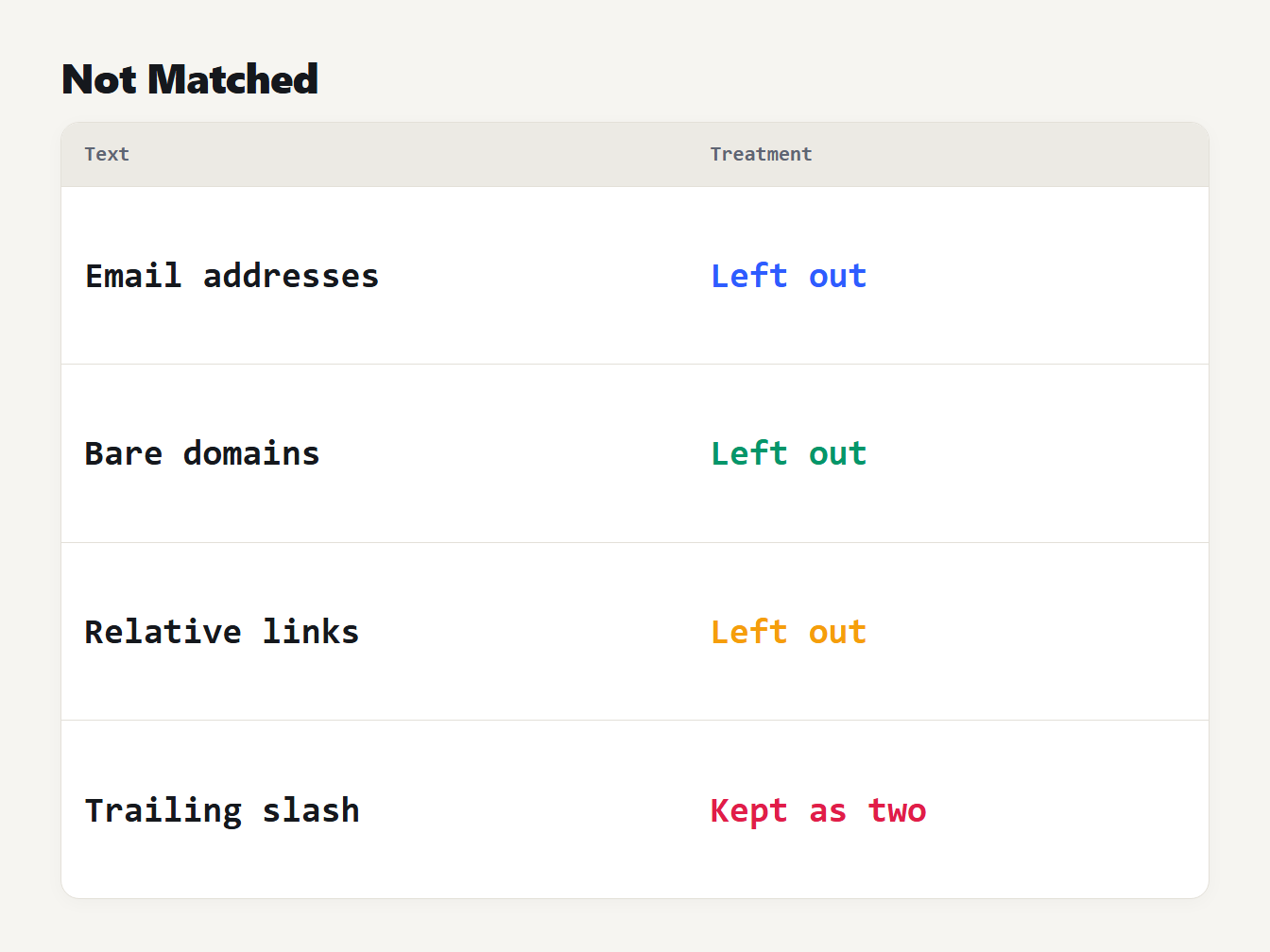
A table of four kinds of text and what the extractor does with each. Email addresses are not matched. Bare domains such as example dot com are not matched. Relative links such as slash about are not matched. Addresses that differ by a trailing slash are kept as two.
If an address has spaces or special characters in it, the guide to URL encoding explains how they are written, and the parts of a URL shows what each piece is called.
Frequently asked questions
What is the simplest way to extract URLs from text?
Paste the text into a URL extractor and copy the list. In code, match https?://, read on until a space, a quote or an angle bracket, then remove the sentence punctuation from the end of each match.
Does it find addresses that start with www?
Yes, when the www option is ticked, which it is by default. They are listed as written, without a scheme added. Bare domains such as example.com are not matched, because file names and version numbers would give false results.
Why does a closing bracket sometimes stay on the URL?
Because some addresses contain brackets, such as Wikipedia pages that end in a bracketed word. The tool keeps a closing bracket when the link has an opening one, and removes it when it only wraps the link.
Can I get the links from an HTML page?
You can paste the page source, and the tool will find the addresses written in href and src attributes, because they start with http or https. Relative links such as /about have no scheme, so they aren't matched.
Are the results checked to see if they work?
No. The tool finds text that is shaped like a URL. It doesn't visit the address, so a mistyped or dead link is listed like any other.
Extract your URLs now
Paste your text into the Extract URLs tool, keep the www option on if you need it, and copy a clean list. Everything runs in your browser, so your text is never uploaded.